

Key Takeaways
- A skill is a folder in
~/.claude/skills/holding aSKILL.mdand whatever else the procedure needs. Drop it in, restart, and Claude finds it. - My rough rule for writing one: I've done the task more than twice and been annoyed by the same part each time. Below that, a prompt is fine.
- My research skill stops at findings and won't write a draft. That single restriction does more work than anything else in the file.
- The brief is where I spend the most care now, because a section missing there goes missing from the draft too, and I find out two stages later.
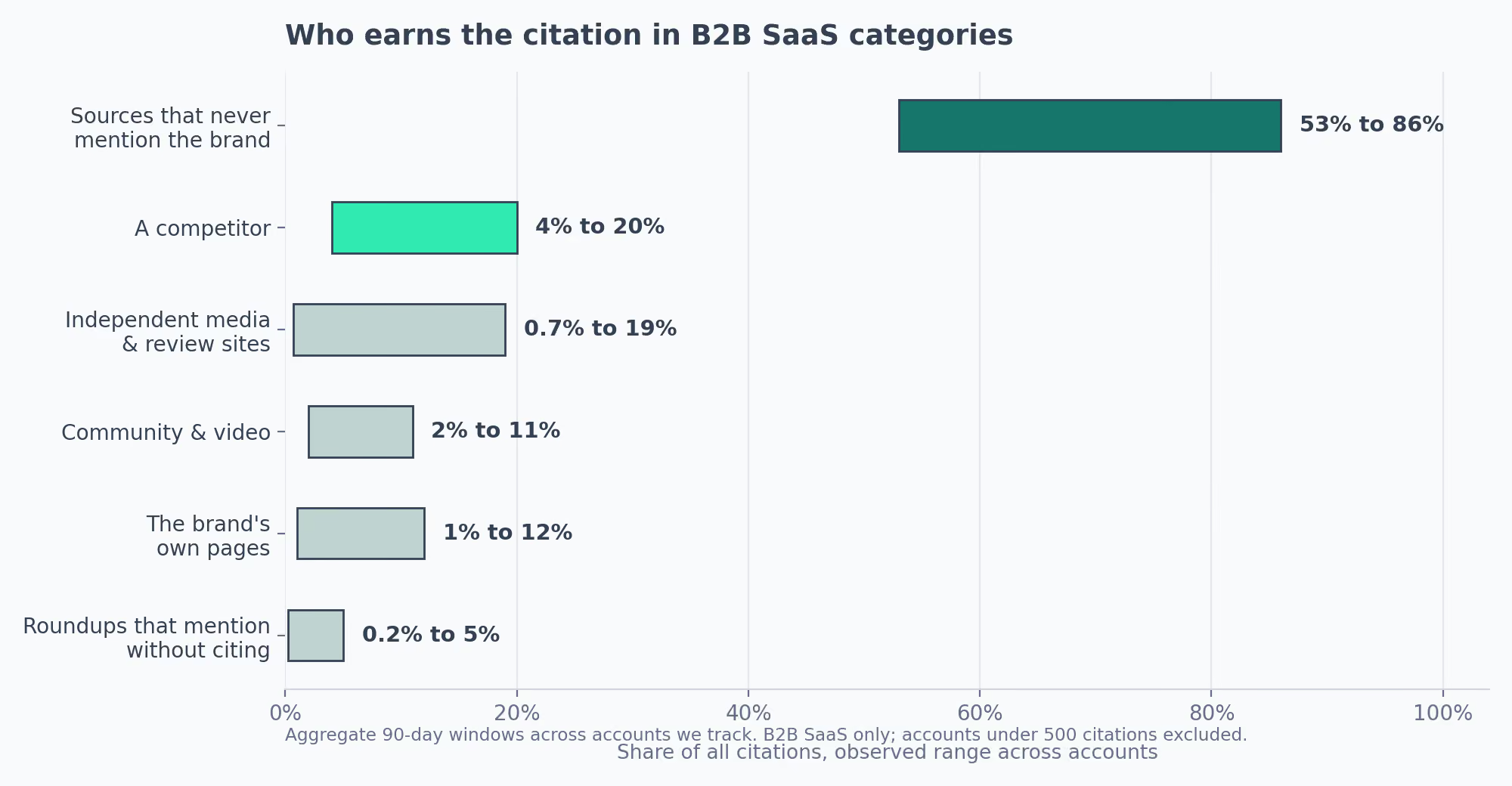
- Across the B2B SaaS accounts our team tracks, 53% to 86% of AI citations go to sources with no mention of the brand anywhere. That range is what I plan topics off.
- I keep most of the information the draft skill gives me and rewrite most of the sentences. My time budget was upside down for a while.
- The distribution one needed a state file, or the same opener came back every week.
- Six published skills survived my install-and-drop pass. They're listed near the end, with why each one stayed.
- All five of my files are at the bottom of this page, with install commands. Free, no email.
Claude marketing skills are folders of written instructions that Claude loads automatically when a task matches. Each holds a procedure, the reference material it needs, and optional scripts that check the output. Unlike a saved prompt, a skill carries its own rules and gates, so the same work produces the same standard every run.
On a normal week, the writing itself took less of my time than everything wrapped around it. Pulling citation data, building the brief, checking every figure against the source it was credited to, cutting the lines that read like a model wrote them.
None of it was hard. All of it was work I'd done before, and redoing it from memory every week is what got old.
Every one of those stages began from a blank window and whatever I could remember about what went wrong the last time.
A saved prompt doesn't remember any of that. It hands you the same starting point on run 40 that it handed you on run one, so the same mistakes came back on a schedule. I'd catch them or I wouldn't, depending on how tired I was.
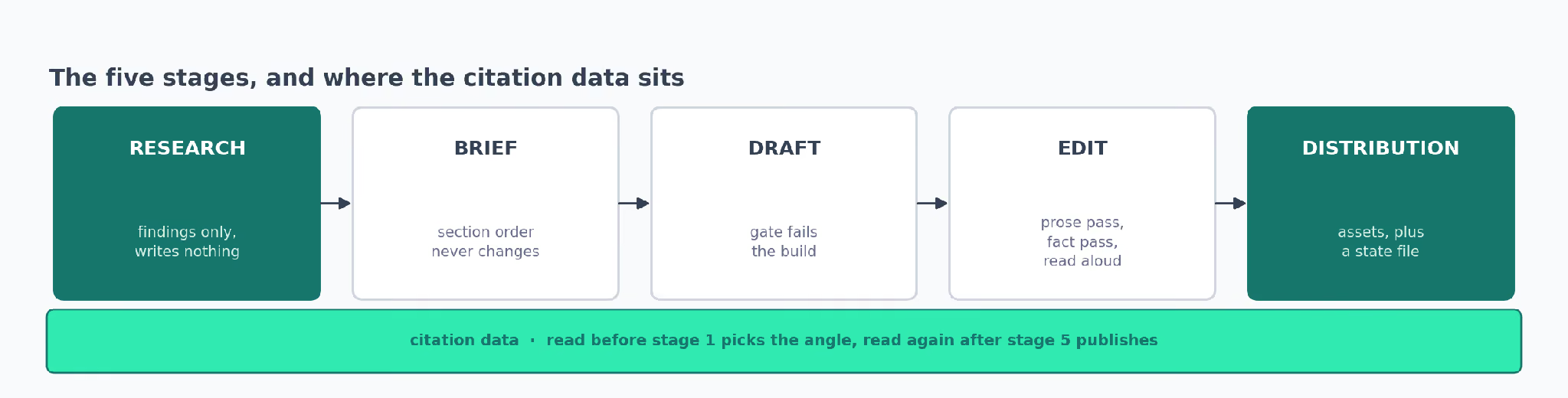
So I went looking for published Claude marketing skills first. I installed a lot of them across the five stages of my week, kept six, and wrote my own for the rest.
Those five are below, one per stage, with the install command, a before-and-after from an actual run, and the point where each one still falls over:
- Research pulls the SERP and the citation data, returns findings, and writes nothing.
- Brief turns those findings into a brief whose sections can't be skipped.
- Draft writes to the brief, then fails the build if the prose carries a banned pattern.
- Edit runs one mechanical pass on the prose, one on the facts, then a read-aloud I do myself.
- Distribution turns the piece into channel assets, and remembers what it already published.
They're all at the end of the section they belong to, or bundled at the bottom if you'd rather take the lot.
What Turns a Prompt Into a Claude Marketing Skill
A skill is a folder, and that's most of what there is to know about building one. The longer answer to what is a Claude skill is in our explainer.
My threshold for writing one stays low: more than twice, and annoying in the same place each time.
When something annoys me somewhere different every time, it isn't a procedure yet, and writing it down just locks in the wrong one. That's cost me a couple of files I later deleted.
briefing-content/
├── SKILL.md          # the procedure + frontmatter
├── references/       # what the procedure reads
│   ├── section-template.md
│   └── domain-filter.txt
└── scripts/          # what passes or fails
    └── quality_gate.py
Three parts, and only one of them is required:
SKILL.mdholds the procedure plus frontmatter with a name and a description.references/holds anything the procedure reads. Mine keeps a section template and a domain filter.scripts/holds anything that passes or fails. Plenty of skills work fine without it.
I spend more time on that description than on anything else in the file, because Claude reads it to decide whether the skill applies to what I just asked for. Written vaguely, mine never loaded. Written as a list of the phrases I'd reach for, it loads every time.
Installing one is a copy and a restart:
cp -r briefing-content ~/.claude/skills/Personal skills live in ~/.claude/skills/, one folder each, and Claude picks up anything new on the next start.If you'd rather look at a few hundred before writing your own, our library of the best Claude skills is a decent place to browse. The Claude skill creator skill got my scaffolding right on a first attempt.
What sold me on folders over prompts is that the instructions and the evidence travel together.
| A prompt can | A folder can |
|---|---|
| Say "check your stats against primary sources" | Carry the list of primary sources, the four-step process, and the failure patterns that produce most bad figures |
| Be pasted, when you remember | Arrive every run, whether you remember or not |
Stage 1: The Research Skill That Refuses to Write a Draft
My research skill stops at findings. It hands back a list in chat and writes nothing to disk unless I ask for a file by name.
I learned that one the annoying way. Give a skill permission to research and write, and it writes, and then the piece rests on whatever surfaced first instead of on a call I made deliberately.
Two articles went out that way before I put the restriction in.
Before it stops, it pulls the top ten organic results and drops the ones that rank for everything and teach me nothing about page structure. Then it reads the top four properly:
- Word count and format
- Full heading outline
- Which structural elements each one carries
- Whether there's a named author
- The last-updated date
- What the page says it will cover and doesn't
That last field gives me most of my angles. Pages promise a walkthrough and hand you a summary far more often than they leave a topic out entirely. Put the promise next to what the page delivers and the hole is obvious.
What 90 Days of Citation Data Changed About My Topic List
We run an AI-visibility connector across client accounts, so before I settle on an angle I pull 90 days of citation data for the category and look at who gets cited on the questions a brand should own.
Across the B2B SaaS accounts we track, between 53% and 86% of those citations go to pages that don't mention the brand anywhere. So the usual problem is plain absence. No competitor had to beat us for it to happen, and the brand's own pages take 1% to 12%, so writing more of them is rarely the whole answer.
| Who earns the citation | Share of all citations |
|---|---|
| Sources that never mention the brand | 53% to 86% |
| A competitor | 4% to 20% |
| Independent media, analysts, vertical review sites | 0.7% to 19% |
| Community and video sources | 2% to 11% |
| The brand's own pages | 1% to 12% |
| Roundups that mention without citing | 0.2% to 5% |
Two caveats before anyone carries those bands anywhere:
- B2B SaaS only. I wouldn't trust them in another category.
- Accounts under 500 citations in a 90-day window come out before averaging, because small samples swing far enough to widen every band without adding much.
Two other patterns have held steadily enough that I plan against them.
Community and video sources cluster in the same order almost everywhere:
- YouTube
- Medium
- Quora
And the same five owned formats earn the citations across categories:
- Category listicles
- Alternatives and comparison pages
- Explainers that define a category
- Integration pages
- Product announcements
So when a category comes back with the brand missing from most answers, my next job is finding the five questions it's absent from and covering those, in the formats above. That's the whole handoff from this stage to the brief.
Two notes made it into my file because both failure modes mislead you instead of announcing themselves.
- Workspace identifiers are typed. I passed a string where the schema wanted an integer and spent twenty minutes checking credentials, because the failure reads exactly like a permissions error.
- Anything holding a current workspace keeps session state. Those calls have to run in sequence. Fired in parallel, I got data from whichever one landed last, labeled with the account I'd asked for first.
If you want to compare approaches, ai citations report and keyword research, and there's a keyword research workflow for anyone who'd rather follow steps than install anything.
Install It
cp -r researching-content ~/.claude/skills/ # then restart Claude CodeBefore and After, on This Article's Keyword
Asked cold, Claude gave me a summary of what Claude skills are plus three generic gap suggestions. With the skill loaded, the same request came back as ten ranked results with vendor pages separated from community ones, four gaps ordered by how hard they would be to copy, and the one line I ended up building this whole piece on: every page ranking here describes skills without publishing one.
Where It Fails
It has no opinion on whether a gap is worth your week. It ranked "publish a working file" first on defensibility, and it would have ranked it first even if I had nothing to publish. On a keyword with fewer than four serious competitors it thins out badly, because the procedure assumes four pages worth reading.
researching-content
Pulls the SERP and the citation data, returns findings, writes nothing.
Stage 2: The Brief Skill That Won't Let Me Skip a Section
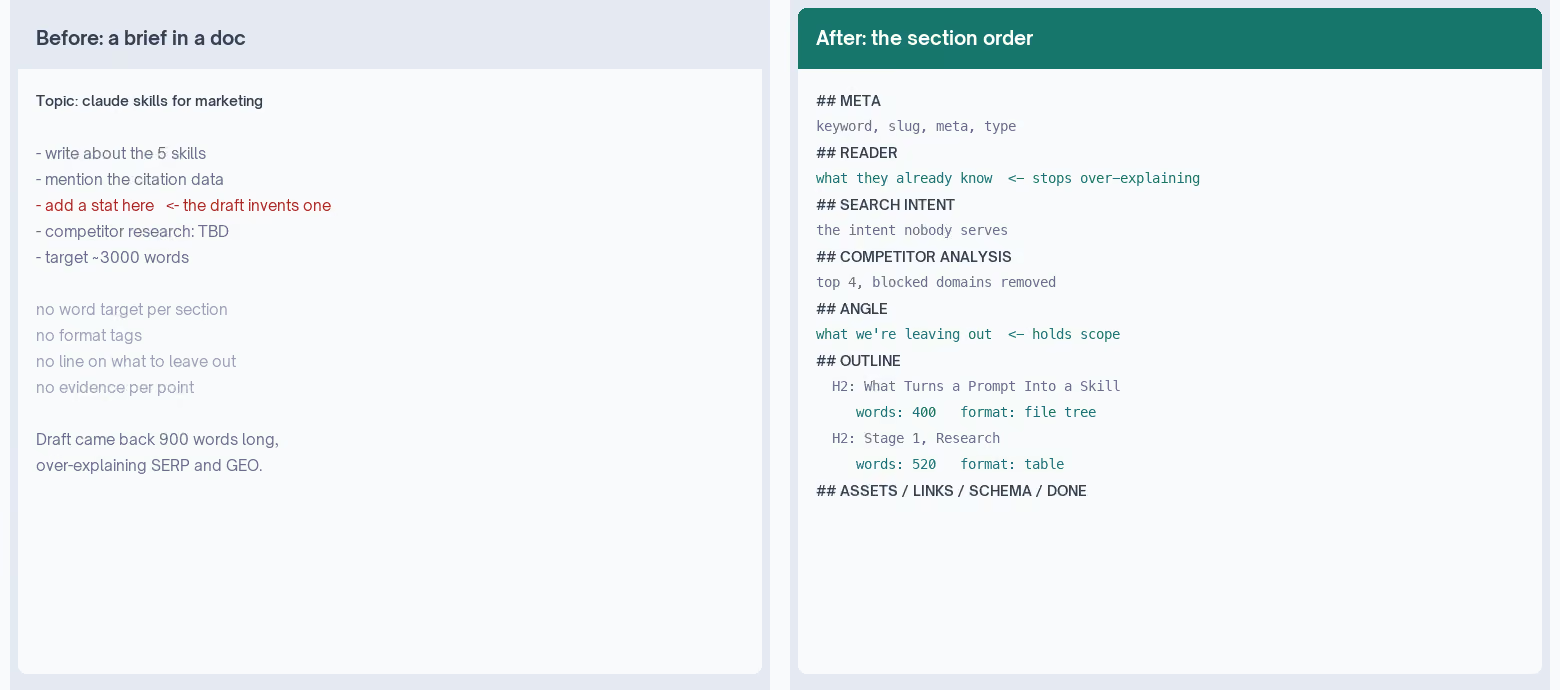
The section order in mine never changes. Nothing gets moved, skipped, or added.
I wrote it that rigidly because of what a missing section costs me two stages later.
- No word target for section four, and the draft gives section four whatever length it feels like.
- "Add a stat here" sitting in the outline, and it invents one.
When a field genuinely doesn't apply I write "not applicable" and the reason, which costs a line. Deleting the field has cost me a rewrite more than once.
The order runs:
## META              (keyword, slug, meta title and description, word count, type)
## READER            (who, their problem, what they already know, what they do next)
## SEARCH INTENT     (primary intent, competing intents, the one nobody serves)
## COMPETITOR ANALYSIS
## ANGLE             (the gap, why it's defensible, what we're leaving out)
## SECONDARY KEYWORDS (each mapped to a section)
## TITLE OPTIONS
## OUTLINE           (per section: words, format tag, points, evidence, note)
## ASSETS
## LINKS
## SCHEMA
## DEFINITION OF DONE
Two of those fields carry more weight than the rest, and I only know that because I left both blank for a while.
| Field | Filled in | Left blank |
|---|---|---|
| What they already know | The draft stops explaining SERP and GEO to people who use both words daily | It over-explains every time. A model with no reader in mind defaults to the most cautious one |
| What we're leaving out | Scope holds | My drafts widened by a section and a half, and the word count went with them |
There's also a domain filter. These come out of the structural competitor set before anything gets averaged:
- Community sites and forums
- Video
- Professional networks
- Free-publish platforms
- Marketplaces and review aggregators
I read competitors to learn what page structure the SERP rewards. A discussion thread at position two isn't a structure I can copy into a layout, so leaving it in drags every average.
It goes back in as a finding, though. A SERP where community results sit above the vendors is telling me something about tone.
The page I write for that keyword probably needs to answer the way a person would, and that call belongs in the outline before anyone starts drafting.
Briefs used to take me most of an hour. They now run under ten minutes at around $0.10 each, or a few dollars for a batch of 50.
Honestly the cost mattered more to me than the time. At that price I brief topics I'm only half sure about, which is a different planning rhythm from picking winners upfront.
Our content brief template has the field list if you want to look without installing anything, and the seo content brief skill and content brief workflow both handle this stage differently to mine.
Install It
cp -r briefing-content ~/.claude/skills/ # then restart Claude CodeBefore and After, Same Topic
My old brief was the eight bullets in the left panel above. The templated one came back with a word target and a format tag on every section, both scope fields filled in, and a source sitting next to every figure it wanted me to use. The draft that came out of it landed within 200 words of target instead of 900 over.
Where It Fails
It fills the template faithfully and it cannot tell me the angle is boring. I have written a well-formed brief for a topic that did not deserve one, and nothing in the file flagged it. It also can't sanity-check a keyword, so a brief for a term with no search volume looks exactly like a brief for a good one.
briefing-content
Turns findings into a brief whose sections cannot be skipped.
Stage 3: The Drafting Skill Is Mostly Constraints
Every rule in my draft skill started as a sentence that came back in a draft. That's why the file reads more like a banlist than a set of instructions.
The check sits inside the build path, and that placement was deliberate. It exits nonzero on a rule break, so a draft carrying a banned word can't reach the publish step even when I'm in a hurry.
Anywhere I could walk past it, I did.
Five rules ended up in mine, and each one arrived after a draft came back carrying the thing it now blocks.
- A banned-word list. Nothing more than the words I kept typing. It grows every time I catch a new one. Yours would look different, so keep your own instead of copying anybody else's, including this one.
- Blocked openers. The gate refuses a draft starting with Imagine, Picture this, It's 2am, or In today's. Every one of those is in there because my drafts kept opening that way, and a scene I invented for a reader always read worse than the situation they were already sitting in.
- Blocked internal vocabulary. Words like "pillar article" and "this cluster" are how my team talks, and they don't belong on a published page. I never caught them by proofreading, because they read as normal to me.
- A cap on proof points. Our client count, our spend under management, whichever figure I'm proudest of: once per article, twice at the outside. A hard number lands the first time and reads as padding by the third, and the draft reaches for it in every section if I let it.
- A count of example variety, because my company examples kept collapsing onto one profile.
grep -cE "Series [ABC]" draft.md # more than 2, diversifyThe skill gets the content right and the sentences wrong, and that ratio hasn't moved no matter how many rules go into the file. About 70% of what it says survives my edit, and about 10% of how it says it does.
The gate catches words on a list. It has never caught a paragraph written from my side of the desk instead of the reader's.
My time budget was upside down for a while because of that. Drafting takes less than I expected, and the pass after it takes considerably more.
If you want the same problem approached from the voice side, the copywriting skill and brand voice guidelines are both worth a look. Automated content checks covers the gate idea as a workflow.
Install It
cp -r drafting-content ~/.claude/skills/        # then restart Claude Code
python3 ~/.claude/skills/drafting-content/scripts/quality_gate.py draft.md
Before and After, One Paragraph
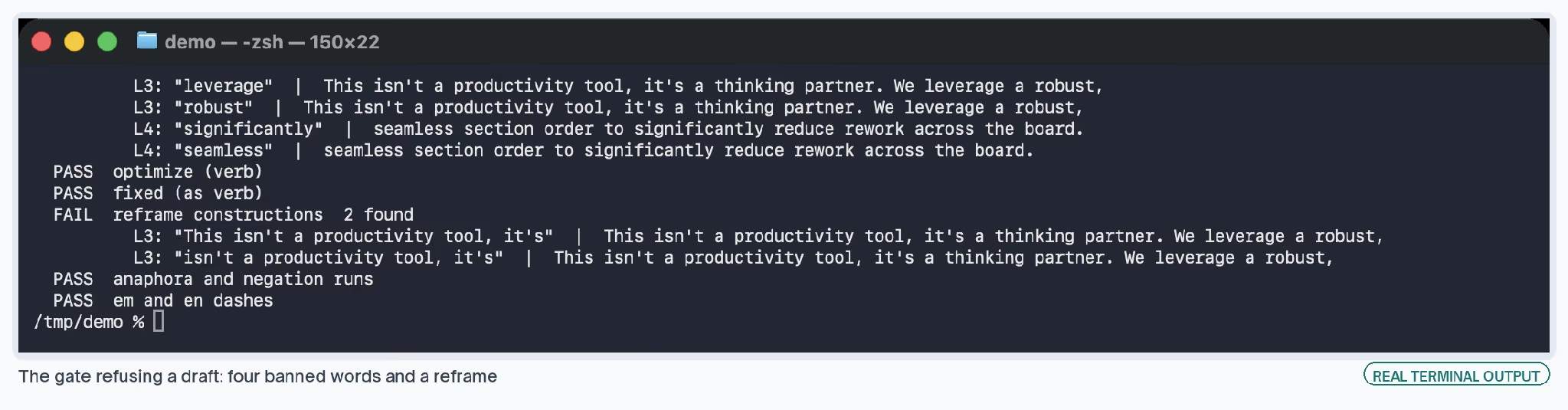
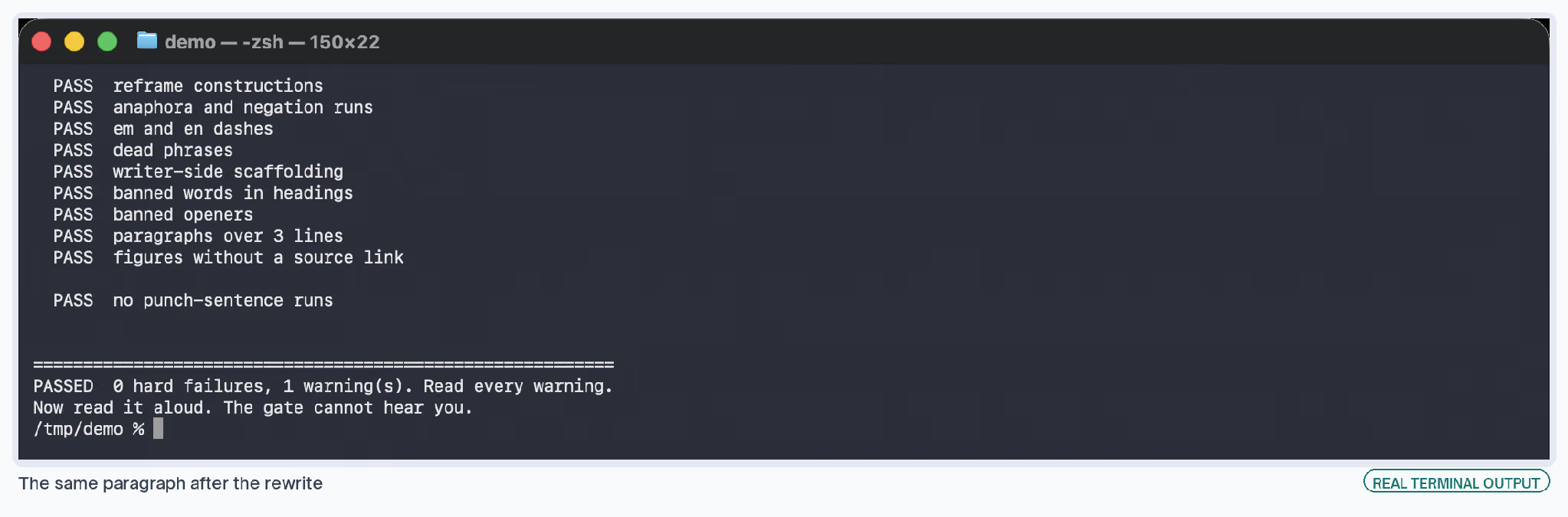
The two screenshots below are the honest version. The draft went in carrying four banned words and a reframe, came back red, and passed on the rewrite. That loop runs on any markdown file, whether a skill wrote it or you did.
Where It Fails
The gate reads words and not paragraphs, so a passage can be clean and still be written for me instead of for the reader. It can't hear rhythm either. That's what the read-aloud pass is for.
drafting-content
Writes to the brief, then fails the build on a banned pattern.
Stage 4: Two Editing Passes, Prose Then Facts
The Mechanical Pass
I run prose first, then facts. A fabricated figure inside a badly written paragraph is easy to miss and obvious once the paragraph reads clean, so the order saves me a second sweep.
The prose pass works down a list of documented patterns, ordered so a partial pass still removes the worst.
Wikipedia's Signs of AI Writing catalogues most of them and cites the research, which is worth reading in full if this is new to you.
Top of my list is the reframe: any sentence that negates a framing, then asserts the corrected one.
- ✗This isn't a productivity tool. It's a thinking partner.
The negated half carries no information. Nobody needs to be told what something isn't before learning what it is, and the repair is always the same, which is deleting everything before the positive claim.
The hard ones hide inside a relative clause or wear a concession, so no grep finds them. "Sure, dashboards work, but the interesting part is..." Same skeleton, reads generated in the same way.
These are genuinely hard to catch in your own writing. My gate missed six of them in this article, all in shapes its patterns didn't cover, and I found the last one on a third read after the check had already come back clean twice.
Those patterns went into the file afterward. That's how every rule in this stack got there.
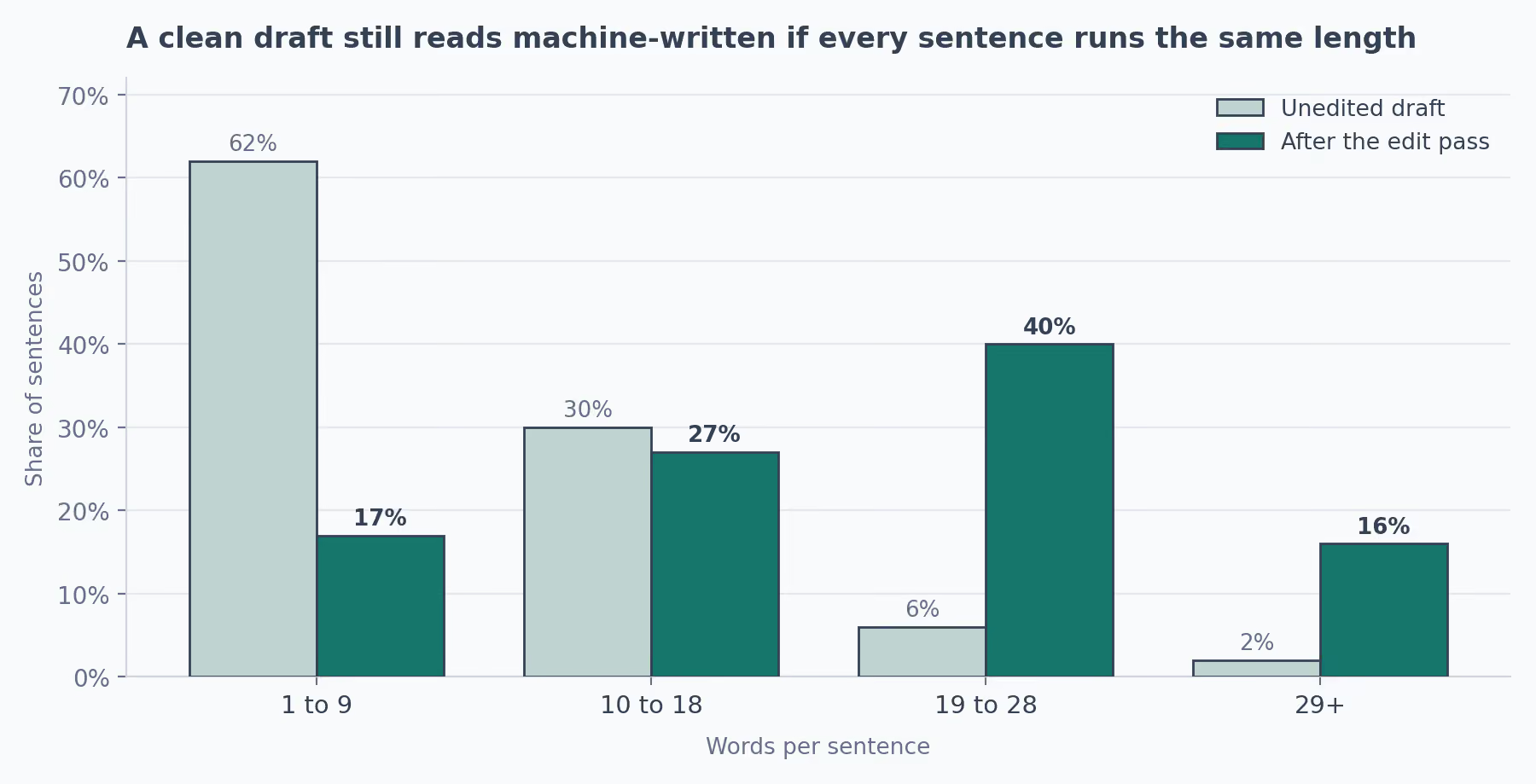
Second on my list, and the one that took me longest to see: a run of short performed declaratives.
- ✗The goal was simple. Nobody wanted complexity. That was the idea.
Every word in the first version is clean and every sentence is short, and it still reads machine-written because a person talking doesn't pace like that. Connective tissue repairs it: so, and, because, which, where.
For facts, every number, percentage, date, and named claim goes back to the organization it's credited to, at that organization's own publication. An aggregator repeating a figure isn't a source, and neither is the roundup citing the aggregator.
Four patterns account for most of the bad ones I find:
- The orphan percentage: a clean round number with no organization attached. "Studies show 60% of marketers..." There's no study.
- The citation chain, where A cites B cites C and C cites nothing. I follow it to the end before accepting the number.
- The plausible drift. A source said 34%, it travels as "over a third", then as 40%, then as "nearly half."
- The wrong-year survival: genuine, three years old, still circulating as current.
One caution I'd pass on, because it cost me a good figure once. A failed fetch reads exactly like a fabricated claim, so it's worth confirming the page arrived before deleting anything.
Redirects, timeouts, and bot filters each return an empty result that looks identical to proof of absence.
Fact checker and copy editing come at this stage from different angles, and the humanizer skill is the closest published thing to my prose pass.
The Read-Aloud Pass
I read the whole thing aloud and rewrite every sentence I wouldn't say to a colleague. It's the step I skip when I'm behind, and it's the one that catches what nothing else does, because cadence has no regex.
A paragraph clears every check on the list and still reads as written by something that has never had to hold anyone's attention in conversation.
My distribution skill carries a banlist that scrubs every first-person pronoun, because our company handle writes as a company. It would fail this article on the first word.
Install It
cp -r editing-content ~/.claude/skills/ # then restart Claude CodeBefore and After, One Figure
A draft came to me citing a percentage to a well-known vendor's blog. The fact pass traced it to an aggregator, the aggregator to a roundup, and the roundup to nothing. The figure came out, and a sourced one from the same organization went in.
Where It Fails
It can only check what carries an attribution. A number with no organization attached gets flagged as unverifiable, which is correct and unhelpful when that number is the reason the section exists. And the prose pass will happily clean seventeen patterns out of a paragraph that should have been deleted.
editing-content
One mechanical pass on the prose, one on the facts.
Stage 5: The Distribution Skill That Remembers What It Already Said
Every other stage can be stateless, because each article arrives as a fresh problem. Distribution works differently, since the model has no memory of the post that went out last Tuesday.
Without something to check against, the same opener and the same handful of framings came back every week, and my feed started looking automated to everyone except me. So my skill reads a file before writing anything, then updates it after.
{
  "date": "2026-08-11",
  "channel": "linkedin",
  "format": "text",
  "opener": "the first eight words, verbatim",
  "angle": "one line describing the take",
  "asset_used": "admission"
}
The opener gets stored word for word. I tried paraphrasing it first, which defeats the purpose when the thing I'm catching is the phrasing coming back.
The skill then pulls five things out of the source article: the most surprising figure, the most concrete artifact, the strongest opinion, whatever the piece admits doesn't work, and any table or screenshot worth reproducing.
That fourth one usually makes the best post in the set, and it's the one I overlooked for the longest. Admissions get more engagement than claims. My guess is a claim asks people to take your word for it, and an admission doesn't.
The channel gets set before the voice scrub, because the rules invert.
| Channel | Pronoun rule |
|---|---|
| Company handle | Every first-person singular rewritten to "we" |
| Personal byline | The opposite. A vague "we" here is the tell that a brand post got repurposed without editing |
Two habits from this stage I'd keep even if I dropped the rest of the skill.
- Every link gets fetched before publishing. A dead link in a live post can't be corrected after the fact, and one pointing at the wrong company's domain is worse than dead.
- A rejections log, one line per thing that got sent back and why. The same three things got sent back twice before I started writing them down, and after that they stopped.
Content repurposing handles the fan-out side better than mine does, and the internal linking engine covers what happens to the article after publish.
Install It
cp -r distributing-content ~/.claude/skills/ # then restart Claude CodeBefore and After, Across a Month
Four posts from four different articles opened on a figure in almost the same construction. With the state file reading, the fifth opened on the admission instead, because the skill could see what the previous four had done.
Where It Fails
It builds assets for any article handed to it, including the ones that should have been left to sit and rank. Nothing in the file knows a piece worth pushing from a reference page. That call has stayed mine, and it's the one I get wrong most often.
distributing-content
Channel assets, plus a state file that stops openers repeating.
How the Five Claude Skills Ran on This Article
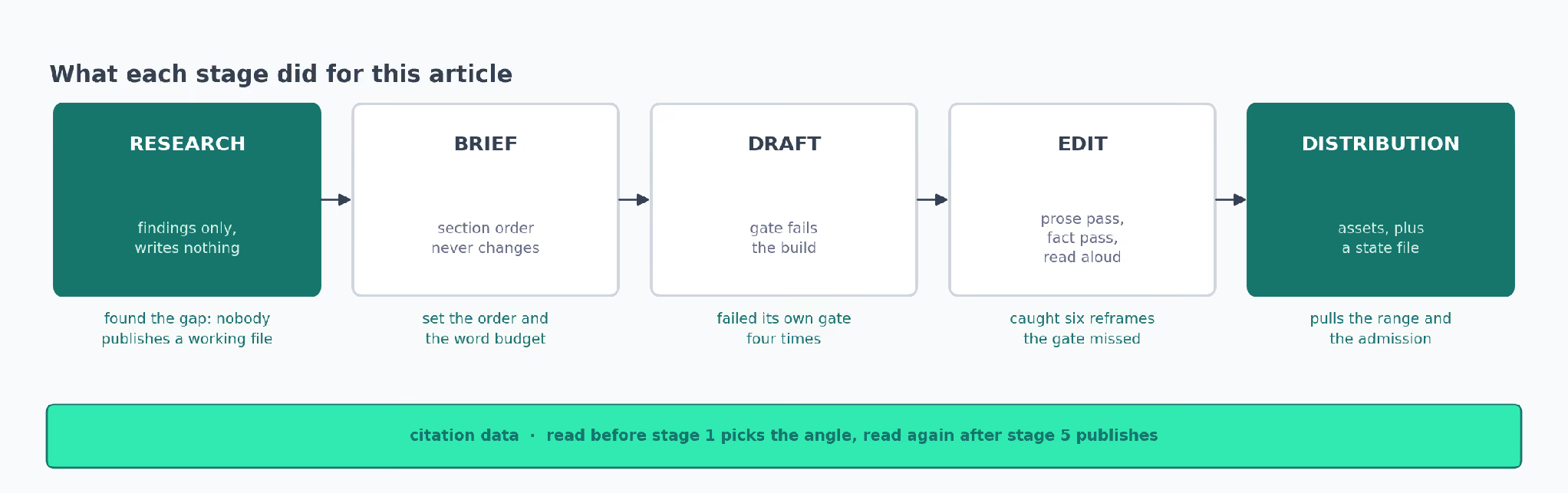
This article went through all five.
- Research pulled the SERP and found that every page ranking for this topic describes skills without publishing one. That gap became the angle.
- Brief set the section order, the word budget per section, and the line saying what to leave out.
- Draft wrote to that brief and failed its own gate four times before it passed.
- Edit caught six reframe constructions the gate had missed, and checked every figure on the page.
- Distribution will pull the citation range and the admission about 10% of sentences, then check both against what went out last week.
All five point at one voice file. Without that they'd be five separate tools, and instead I change a rule once and every stage picks it up, which is why each new skill took less work than the one before.
The citation data that surfaced the gap is what I'll check again in a month, to see whether this page gets pulled into answers about Claude skills.
That tells me whether the angle was right or only interesting.
Which Claude Skill to Build First
I'd start with the brief stage. Most people start with drafting, and I did too, which I now think is the wrong end to begin at, because a weak brief costs you the draft and the edit behind it.
Drafting is also where the output sits furthest from usable, so starting there put me off the whole idea for a while.
Three things went into my day-one file and nothing else:
- The procedure, written as steps, in the order I already did them.
- One reference file holding the material I always went looking for.
- One check that failed loudly. Mine was a grep for the words I overuse.
Everything else came later. Twelve rules on day one would have been a guess about what might go wrong.
Three rules plus a check grew into the right shape instead, because every rule I added afterwards arrived attached to something that had happened.
The read-aloud pass is the one I've left alone. Every other part of my process got more mechanical as the files grew, and that one went the other way. It's the only step where being the person who wrote the draft is a disadvantage, and no file has helped me with it yet.
The Five Best Claude Skills for Marketing, Side by Side
| Stage | Skill | The rule doing most of the work | Where it fails | What still needs me |
|---|---|---|---|---|
| Research | researching-content | Returns findings only, never a draft | No opinion on whether a gap is worth the week | Choosing the gap |
| Brief | briefing-content | Section order never changes | Fills the template even when the angle is weak | The angle, and what to leave out |
| Draft | drafting-content | Build fails on a banned word | Reads words, not paragraphs | Rewriting the sentences |
| Edit | editing-content | An aggregator doesn't count as a source | Only checks figures that carry an attribution | Cadence, and reading it aloud |
| Distribution | distributing-content | A state file remembers last week's openers | Builds assets for articles that should sit | Whether the post is worth making |
claude-content-skills
Five folders, one copy, installed in under a minute.
The Six Published Claude Marketing Skills I Kept
I installed a lot of what the library holds and kept six. These are the ones still in my folder, with the reason each survived.
| Skill | Stage it covers | Why it stayed |
|---|---|---|
| content gap audit | Research | Turns competitor keywords into a gap list, which is the one thing my research skill can't do without a visibility connector |
| keyword research | Research | Pulls positions four to 15, where the quick wins sit, and mine never looked there |
| content brief generator | Brief | Builds from the top results by scraping them. I reach for it when I have no first-party data and no time |
| fact checker | Edit | Runs verification across models, which catches things one model waves through |
| the humanizer skill | Edit | The closest published thing to my prose pass, and a fair test of whether my banlist is missing something |
| content repurposing | Distribution | Handles the pillar-to-short-form fan-out better than mine does |
The ones I dropped mostly went for one of two reasons. Either they covered a stage I already had a file for, or they tried to research and write in one pass. Same problem as stage one.
Nothing here covers paid media, lifecycle, or outbound, so anyone working those stages will need different files. The rest of the Claude skills library is worth a browse, and these are the ones I'd look at first per stage.
| Stage | Also worth a look | Probably for you if |
|---|---|---|
| Research | ai seo, slate ai search analytics | You want the answer-engine baseline before the keyword work |
| Brief | content strategy | You're mapping a cluster rather than planning one page |
| Draft | the copywriting skill, brand voice guidelines | The problem is voice more than structure |
| Draft | docs as marketing, programmatic seo | The page is documentation or a template set, where my prose rules stop applying |
| Edit | copy editing, seo schema | The piece is live and the job is markup or a pass for readability |
| Edit | seo re-optimization | The piece already ranks and needs a refresh instead of a rewrite |
| Distribution | social media strategy, reddit engagement | You need the channel plan before the posts, which mine assumes you have |
| Distribution | internal linking engine | The question is what happens to the article after publish |
If you'd rather copy a process than build one, there's a whole directory of workflow templates, and a content engineering system comes closest to this pipeline written out as steps.
What This Saves, and What I Can't Prove
It saves time, and that's the least useful thing I can tell you about it.
What I have now is a written record of every mistake I've made in a content process, sitting in files that apply it for me whether or not I remember the incident.
Somebody new gets the rules and the reasons in the same afternoon. And when I read something of mine back and it sounds like a model wrote it, a line goes into a banlist and it stops happening in that shape.
The record is the part I'd keep if the time saving went away, and you can't get that from a prompt library.
I can't give you a total, though. Only the brief stage got measured before and after properly, so you get 45 minutes down to ten there and nothing that solid for the other four. Anyone quoting a clean number across five stages is estimating.
Slate's citation data feeds the first and last stage, and it's the only piece of this I didn't build myself.
If you want to see what that data says about your own category before you plan another article, book a walkthrough and someone will show you the questions you're missing from.
Abishek Balaji is a content marketer at Slate. The five skills on this page are generalized versions of the ones he runs daily, with client specifics removed.