

Key Takeaways
- Open a skill and you are reading markdown. The work is deciding what to write down, which is a job marketers already do.
- The description field is the trigger. Get it wrong and the skill sits in your list doing nothing, with no error to tell you why.
- Skills and MCP solve different problems. MCP gets Claude to your data, and a skill tells it what to do when the data lands.
- Installing one takes a zip and a toggle. There is no terminal step.
- Look for a named test with a worked example before you install anybody's skill.
- A skill will not police your output. Somebody still reads it.
- The best rules in these files came out of watching bad output, so they are the ones you cannot plan in advance.
- Working skills sit at the foot of this piece, ungated, with their scripts.
Claude Skills are folders of instructions, scripts, and reference files that Claude loads when your request matches the folder's description. One folder holds one procedure. Until something matches, Claude sees only the folder's name and description, so an unused skill costs you nothing. Marketers use them for briefs, meta descriptions, voice checks, and competitor audits.
I opened my first Claude Skill looking for code. What I found was a markdown file telling Claude to stop writing birthday messages that sound like greeting cards.
I read it twice for the part I was missing. There is no missing part. A folder, a text file, some rules about voice, and Claude picks it up when the moment fits.
What held my attention was the paragraph explaining why the rules existed:
The whole genre is drowning in cliché. "Wishing you a year filled with sunshine, smiles, and success." Everyone's brain has that template loaded, including yours. The job is to fight that gravity and write something that sounds like a real person who actually knows this teammate.
Somebody had sat with a pile of bad birthday posts, worked out what made them bad, and written the diagnosis into a file. That is an editing job, done once, applied every time after.
A task I had filed under engineering turns out to be prose. That is why I keep a directory of them now, and why I think these belong to marketers at least as much as to developers.
A Claude Skill Is a Folder, and the Folder Is Mostly Prose
Here is one of my own, open on my machine so you can see the whole thing.
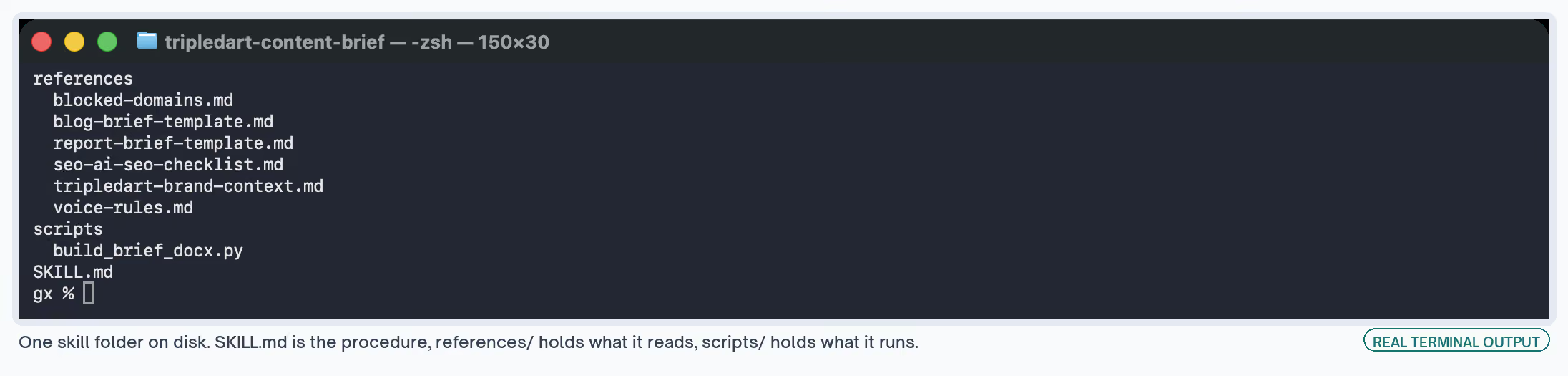
| Part | What it holds | Optional |
|---|---|---|
| SKILL.md | The procedure, and the frontmatter deciding when it loads | No |
| reference/ | What the procedure reads: templates, banlists, brand context | Yes |
| scripts/ | Anything that has to pass or fail, or do arithmetic | Yes |
That folder writes content briefs. I come back to it for one line near the top of the instructions, which says the skill stops at the brief and never writes the article.
The reason for the hard line: a brief is a decision document. Its value is in locking the title, the structure, the angle, and the differentiation before any words get written.
Nobody writes "never produce the article" into a blank file. A line like that arrives after the thing has already done it. The file is where the correction goes, so it holds next time without anybody having to remember it.
Its references directory holds the voice rules, two brief templates, a checklist, brand context, and a list of domains I keep out of citations. The scripts directory holds the Python that builds the Word file.
Some skills need no scripts directory at all. One of the three I am giving away below is pure procedure, because nothing in it has to pass or fail.
The clearest case for a scripts directory is Anthropic's own docx skill, which builds Word files from code. Its procedure spells out the traps: percentage column widths break in Google Docs, and table shading set as solid renders black.
Why an Unused Skill Costs You Nothing
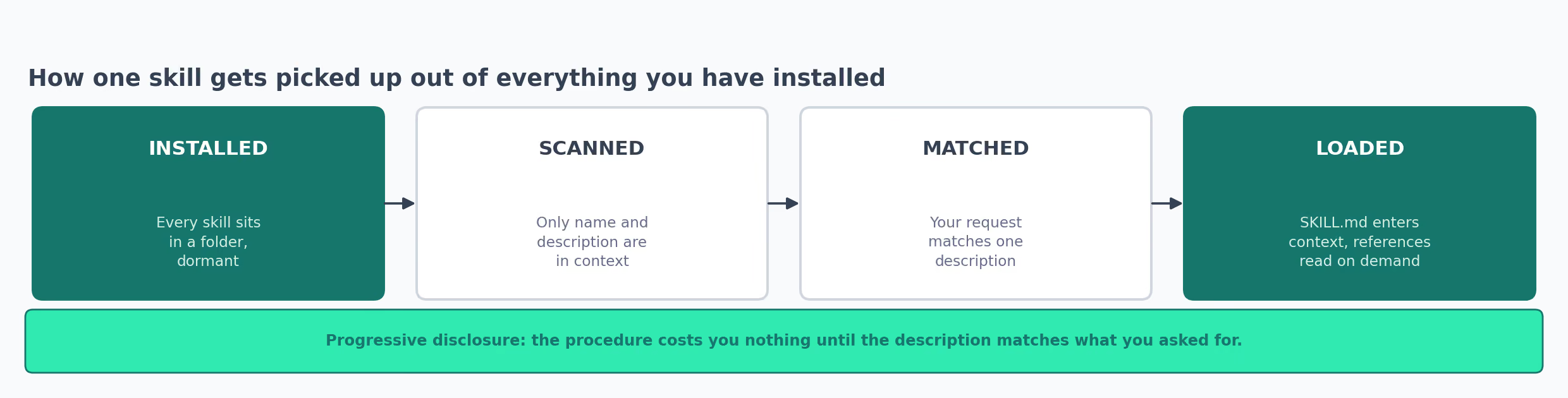
Claude does not read the folder up front. It sees the name and the description, decides whether your request matches, and loads the instructions only then. Reference files come in later, as the procedure reaches them.
Anthropic calls this progressive disclosure. It means I can keep a shelf of skills without any of them eating into the context I need for the actual work.
Simon Willison put the gap at dozens of tokens per capability against tens of thousands for an MCP server. So I add skills without thinking about it, and I add MCP servers deliberately.
Why My First Claude Skill Never Ran
I wrote one, installed it, asked for the thing it did, and got an ordinary Claude answer.
Nothing errored. There was no warning and nothing missing from the folder. The skill sat in my list, toggled on, doing nothing at all.
The description was the problem, and I had written it the way I write a page title.
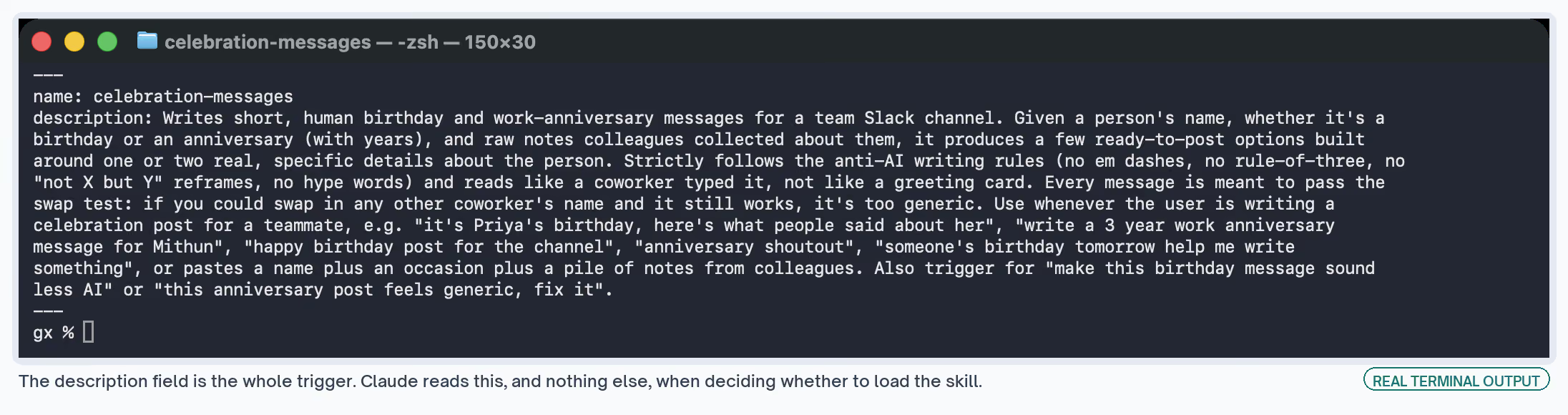
# what I wrote, which never fired
description: Helps write great birthday messages for your team.

# what the working file says
description: Writes short, human birthday and work-anniversary messages for a
  team Slack channel. [...] Use whenever the user is writing a celebration post
  for a teammate, e.g. "it's Priya's birthday, here's what people said about
  her", "write a 3 year work anniversary message for Mithun", "happy birthday
  post for the channel", "anniversary shoutout".
Mine described the skill. The working one lists what a person says out loud when they want it, and Claude matches your request against that list.
I went the long way round before I understood this. I rewrote the instructions, split them into reference files, added examples, and got the same silence every time.
None of that mattered. Claude was never reading past the description, so the instructions underneath it were beside the point. They were fine, and nothing was reaching them.
So a description can summarize the file perfectly well and still catch nothing. Those are separate jobs, and only one of them gets the skill to run.
What Goes In the Description
- What the skill does, written in the third person
- The phrases someone types when they want it, including the clumsy ones
- The deliverable, because people ask for a brief and not for research
- The do-not case, naming whichever skill should take the request instead
- A name in gerund form, lowercase with hyphens
- Under 1,024 characters, which is more room than it sounds
Anthropic's own authoring guidance is stricter about this field than I expected, and I have come round to why. A skill that never triggers looks exactly like a skill you never wrote.
Now, when one of mine goes quiet, I open the description and name the deliverable in it before I touch anything else.
Where I Stopped Confusing Claude Skills With MCP
For a while I used the two words as though they overlapped. What tripped me up is that both arrive as something you install, and both extend what Claude can do for you.
They answer different questions, though, and once I had that straight the rest of the vocabulary settled down with it.
| What it is | Lives where | Good for | |
|---|---|---|---|
| Prompt | One instruction you retype | Your clipboard | A task you do once |
| Project | Standing context for a body of work | A project's instructions | Background that applies across one workstream |
| Skill | A written procedure Claude loads on a match | A folder holding SKILL.md | A task you repeat, where the steps matter |
| MCP server | A live connection to a data source or tool | A running server | Reaching data Claude cannot otherwise see |
| Agent | A loop that plans, acts, and checks its own work | A runtime, with tools attached | Work where the steps get decided as it goes |
Our AI search analytics skill shows the pair working together. The MCP connection brings the citation data across, and the skill decides which cuts of it to report and in what order.
Pull the skill out and I get numbers with nobody's read on them. Pull the connection out and the skill has nothing to read.
Agents sit a level above both of these. I still hear them talked about as though they compete with skills. An agent chooses what to do next, and a skill tells it how to do one of those things well.
How to Install a Claude Skill Without Touching a Terminal
I assumed this part needed a developer, and put off trying it for longer than I should have. It takes about a minute.
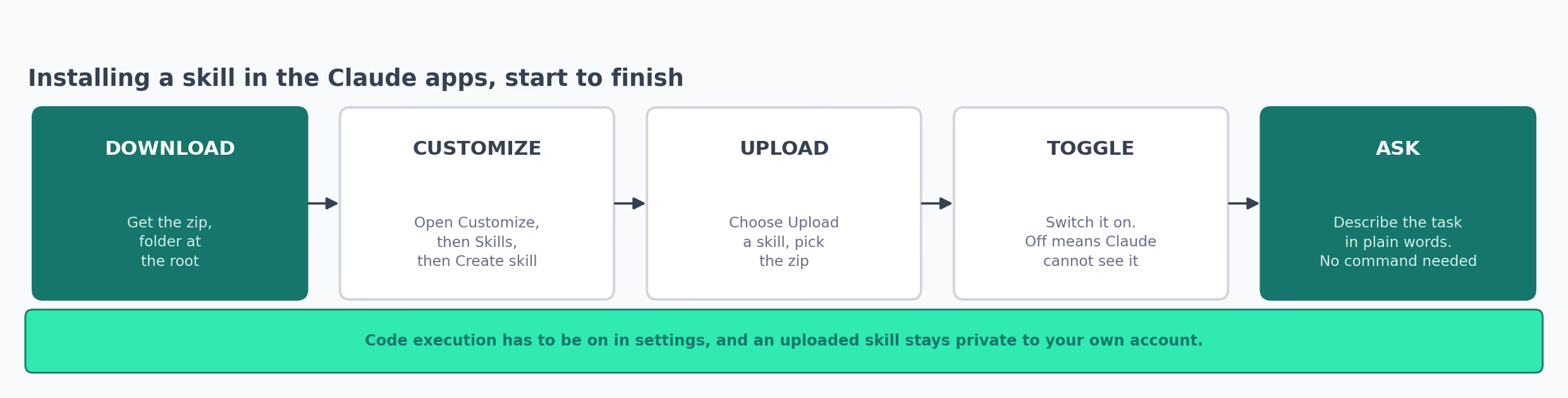
- Get the folder as a zip, with the folder itself at the root of the archive
- Open Customize, then Skills
- Press the plus button, then Create skill, then Upload a skill
- Pick the zip
- Switch the toggle on, because a skill toggled off is invisible to Claude
- Describe your task in ordinary language, since the description in the file does the matching
Code execution has to be on in your settings before a skill with a script will run. Anything you upload stays private to your account.
On a Team or Enterprise plan an owner provisions skills centrally, which is how a whole team ends up with the same one.
The Zip Shape People Get Wrong
My first archive came back rejected, because I had zipped the contents and not the folder around them.
The error said the archive was invalid, which is true and not much help. Listing the zip made it obvious in a second, and I have checked that listing before every upload since.
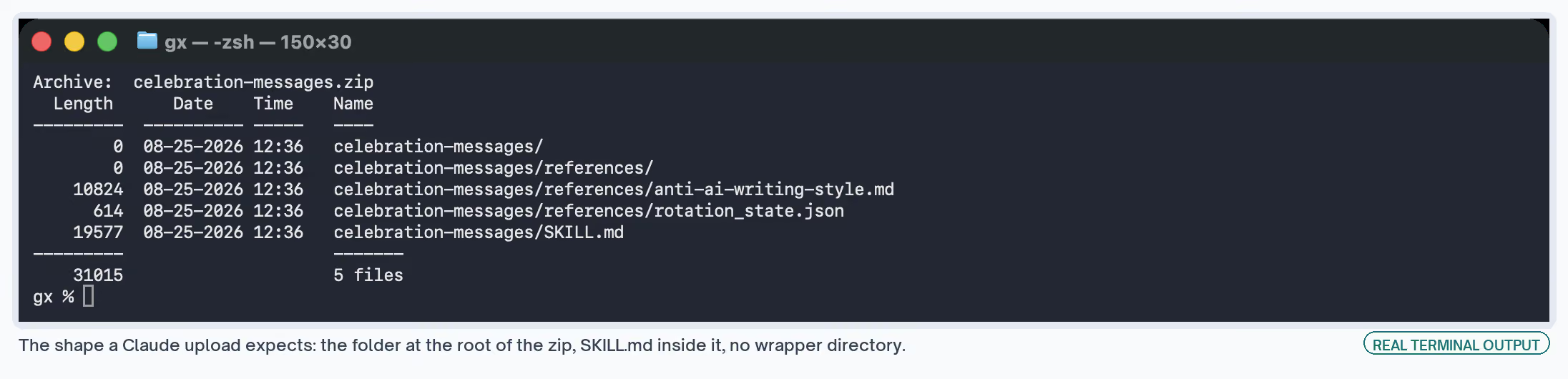
# correct: the folder sits at the root of the archive
zip -r checking-copy-for-ai-tells.zip checking-copy-for-ai-tells

# wrong: the files land at the root, with no folder around them
cd checking-copy-for-ai-tells && zip -r ../skill.zip .
In Claude Code the install is a copy:
cp -R checking-copy-for-ai-tells ~/.claude/skills/Restart, and the folder name becomes the skill name. The same folder works in both places, so a skill you write for the apps needs no editing to work in the terminal.
Every listing on the Exchange gives its install route on the page, including the ones with nothing to download. The keyword research workflow writes the procedure out for anybody who wants to rebuild it by hand.
The Editing Rule I Would Never Have Written Down
Back to the birthday skill, because one rule inside it changed how I write all of them.
Its argument comes down to a test the file names outright:
The swap test. If you could swap in any other coworker's name and the message still makes sense, it's not good enough. Rewrite it.
Then it gives you the pair:
✗ "You're an amazing part of this team, happy birthday!"
✓ "You're the only reason anyone can find anything in Figma, happy birthday."
I can run that test by hand in about two seconds. That is the reason I trust what comes out of the folder.
Further down, the same file warns against writing a line the author is proud of.
It flags "Good fun on a normal day, properly locked in when it counts" as a composed line, with a setup and a payoff. It asks for the plainer "he's a laugh but takes the work seriously" instead.
I would not have thought to write that down. It only surfaces after you read a stack of output that is all quietly pleased with itself, and by then whoever noticed has often moved teams.
That is the job these folders do. They hold what you learned from bad output, somewhere it gets applied every time instead of once.
Before I had that straight, I was writing skills as instructions. Do this, then this, in this order. Useful, and roughly what a good process document already gives you.
The files that earn their keep read more like an editor talking. They name the failure, show it, and say what to write instead, which is a different kind of document from a checklist.
What I Check Before I Install Anybody's Skill
- A named test, with a worked pair showing a pass and a fail
- A description carrying phrases a person would type, and a do-not case
- Rules that say what goes wrong without them
- A closing section on what the skill cannot do
- Reference files split out, so the procedure stays readable
- A license, where the author is not you
That last one catches more than you would expect. Good skills circulate with no license attached, which becomes a problem the moment you want to adapt one for a client.
Four Claude Skills I Learned Something From
All four are on the Exchange, and between them they cover the range of places a skill comes from. Two are ours and closed, one comes from an independent practitioner under an open license, and one Anthropic puts out as an example. For a wider shortlist, see our pick of the best Claude skills for marketing.
Content Brief Generator
Scrapes the top five results for a keyword, filters out the non-content URLs, converts what remains to markdown, and pulls organic keywords in parallel.
Out comes a brief carrying keyword intent, H1 alternatives with a stated angle, the H2 outline, an FAQ, internal link suggestions, and schema notes.
What I took from this one is the scraping step. Reading the live results every time is the difference between a brief about this week's SERP and a brief about the shape I remember it having.
Briefs went from 45 to 60 minutes down to under 10, measured on its page. Every run reads the live results, so the brief reflects the SERP as it stands today.
Where It Fails
- Needs a Semrush subscription, which is a cost on top of everything else
- Built in Slate's visual builder, so there is no public repository to copy
- It is ours, which you should weigh accordingly
- Its own page says to skip it where your brief pipeline already keeps up with your publishing volume, and I would take that at face value
There is a workflow walkthrough if you want the step sequence without the skill behind it.
Fact Checker
Three phases, one model each: pull every checkable claim out of a draft, search the web for each one, then flag what is wrong and rewrite it with the correct figure and a citation attached.
I took the ordering from this one. Extraction hands you a claim list before any searching starts, so you can read the list and catch what it missed before the expensive part starts.
Corrections then arrive with citations, which makes the check auditable instead of a verdict you take on trust.
Where It Fails
- Three phases across three models make it the most token-heavy skill in this set, per word of draft
- Proprietary, so there is nothing here to install
- Returns a reviewable pass, which means a person still reads every correction
The fact-checking workflow covers the same sequence, if the sequence is the part you want.
Brand Voice Guidelines
Rebecca Rae Barton published this one under an MIT license, and it installs as a single folder. It is the one skill here I can hand you without a caveat about who owns it.
It audits 10 to 20 pieces of your existing content, including the ones you consider off-brand, and derives a voice definition and a tone matrix from what it finds.
One line in it reorganized how I think about the distinction:
Voice is who you are and it does not change. Tone is how you adapt to the situation, from a celebration to a crisis.
Deriving the voice from published work instead of a workshop is the other good call on Barton's skill page. Naming a sample size matters too. It makes the exercise repeatable by somebody who was not in the room.
Where It Fails
- Captures your current voice faithfully, patterns you dislike included
- Installation is manual, with no version management to speak of
- Its own page is blunt about the ceiling: it documents and it will not enforce, so applying the voice stays a separate editing job
Skill Creator
Anthropic's, from the example-skills plugin. It turns a process you repeat into a skill through a draft, test, evaluate, rewrite loop, and it will pull the workflow out of a conversation you have already had.
This one changed how I write mine. Testing sits inside the loop, and the skill says when to bother writing tests on its page instead of insisting on them regardless.
It also treats getting the description to trigger as a separate problem with its own tooling. Given how my first attempt went, that matches my experience of what breaks.
Where It Fails
- Each evaluation costs tokens, and a larger test set costs more of them
- On subjective output the scores help less, and the skill says so instead of pretending otherwise
- Anthropic labels the whole thing a demonstration, so treat it accordingly
What Claude Skills Will Not Do for You
I would rather tell you this before you spend a weekend on one.
| Limit | What it means in practice |
|---|---|
| A skill documents, it does not enforce | Output still gets read. A voice skill produces off-voice lines and a brief skill misses sections |
| A description that does not match never runs | The failure is silent. Nothing errors, the skill simply sits there |
| Scripts need code execution switched on | Off by default in some setups, and a script-bearing skill does nothing without it |
| Uploaded skills are private by default | Your team does not get yours until an owner provisions it centrally |
| Tokens get consumed every time | A multi-phase skill on a long draft is not a cheap operation |
| A skill inherits your process | Write down a weak procedure and you get it applied consistently |
The last one is the one I watch hardest, because it is the only one that gets worse with use.
A procedure nobody has questioned, written into a file and run every week, turns out a quarter of output with the same flaw in every piece. Consistency cuts both ways.
The failure is quiet, too, because consistent output looks like working output. Nothing in the folder will tell you the procedure inside it was the wrong procedure.
I also cannot give you a time saving across a set of skills. One figure in this piece is measured and published, the brief stage going from 45 to 60 minutes down to under 10.
For everything else I have no before-and-after I would quote, and anybody handing you a clean number across a whole stack is estimating.
Speed is what people notice first anyway. What keeps paying is that my fifth brief comes out looking like my first.
That took a while to appreciate. I built the first few chasing the hours back, and the hours are pleasant. The part I would not give up now is not having to remember how I did it last time.
Three Claude Skills I Wrote for This Piece
Treat these as starting points and not as files with years behind them. Both scripts work, and I ran each against passing and failing input before packaging.
Every one ends with a section stating what it cannot do. That section is the part I would read first in anybody's skill, mine included.
| Skill | The job it covers | Script | What it will not do |
|---|---|---|---|
| writing-meta-descriptions | A batch of descriptions for a section of a site | Yes | Open the page to confirm the description describes it |
| checking-copy-for-ai-tells | A last pass over a draft before an editor sees it | Yes | Rewrite anything for you |
| auditing-a-competitor-page | A structured record of one competing page | No | Tell you whether the gap is worth writing |
Take both habits below whatever you end up building:
- Every rule says what goes wrong without it, so you can judge whether it applies to you
- Every banlist and template is a separate file, meant to be edited instead of overridden
writing-meta-descriptions
Takes a list of URLs and their target keywords. Returns descriptions of 150 to 160 characters, keyword inside the first four words. The script checks every row and exits non-zero on anything that would truncate.
It borrows the swap test openly from the birthday skill: put a competitor's page behind your description, and where it still reads correctly the description is filler.
Writing the example for that rule, my own first attempt came in at 140 characters and the script caught it. Getting corrected by a file I had written that morning is a good argument for writing the check into the folder.
writing-meta-descriptions
Writes 150 to 160 character descriptions for a batch of URLs, then checks every one.
checking-copy-for-ai-tells
Scans a draft for hype vocabulary, dead connective phrases, the negate-then-correct reframe, three sentences in a row opening on the same word, and sentence length that never varies.
It reports every hit with a line number. Nothing gets rewritten for you, which is deliberate.
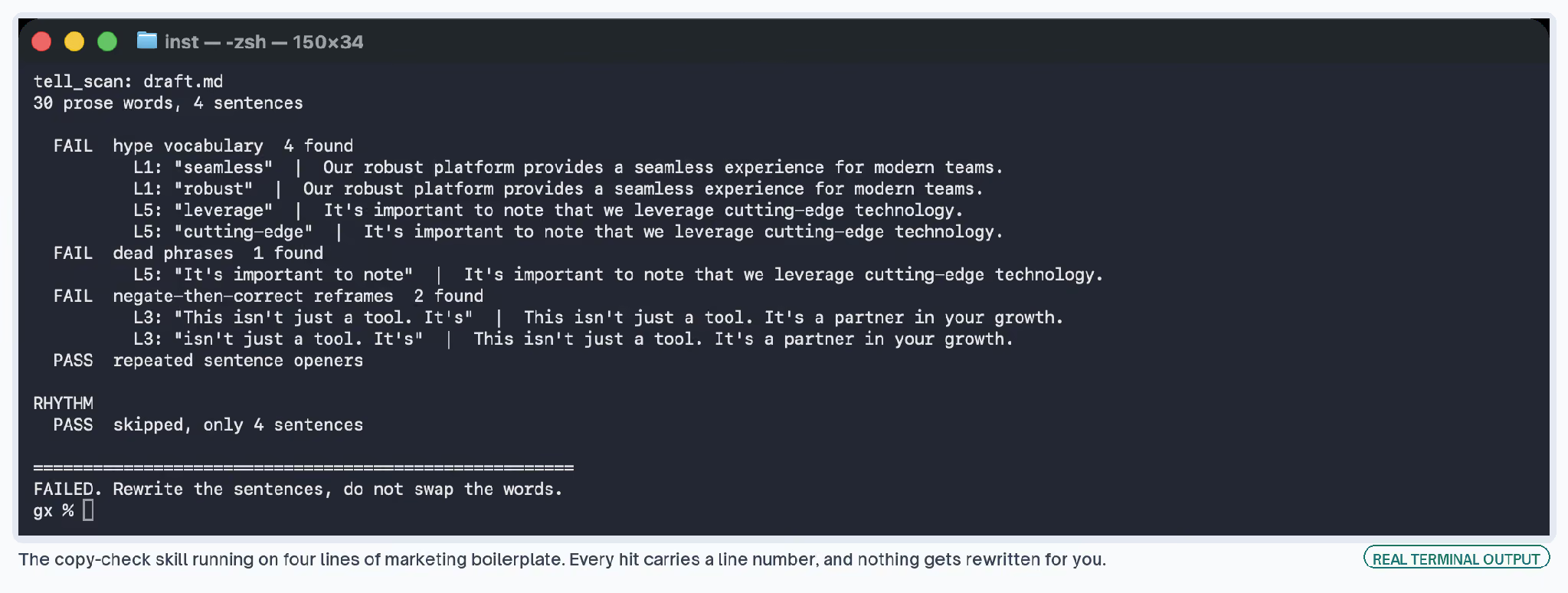
The rule it insists on hardest is to rewrite the sentence and never substitute the word.
A line flagged for seamless and patched to "smooth" carries the same emptiness, because the word was standing in for a fact somebody now has to go and find.
✗  The integration provides a smooth experience across both platforms.
✓  Contacts sync both ways within about a minute, and a failed sync retries
   three times before it alerts the owner of the record.
The rebuilt line is longer, and it is the only one of the two that tells a reader anything. That trade turns up on nearly every hit, which is why the scan reports and declines to rewrite.
The banlist sits in its own file and is meant to be edited. Editing it is how you disagree with a result.
A word that carries genuine technical meaning in your category belongs off the list, and a word your team overuses belongs on it.
checking-copy-for-ai-tells
Scans a draft for hype words, dead phrases, reframes, repeated openers, and flat rhythm.
auditing-a-competitor-page
Reads one page and returns what it claims, the proof behind each claim, the questions a buyer would ask that it never answers, and the one gap that would justify a page of your own.
It grades proof and not plausibility. A claim you happen to know is true still counts as unsupported where the page offers nothing behind it.
It also asks you to log what you could not check, since an audit read as complete when it sampled one section sends somebody off in the wrong direction.
auditing-a-competitor-page
Returns one page's claims, the proof behind each, and the gap worth writing.
All three, plus a README
Three skill folders, two scripts and a README with the install command. Free, no email required.
Which Claude Skill to Build First
Starting again, I would pick the task where I care most about getting the same output every time, and not the task that eats the most hours.
A skill moves a procedure out of one person's head into something a colleague can run without rebuilding it. That pays off more on a small repeated job than on an occasional big one.
My instinct sent me the other way, at the biggest job on the list, and I got a skill I ran twice.
These jobs on the Exchange come up again and again as first builds, and each has its procedure written out:
- Keyword research, where the output format keeps drifting
- Internal linking, where consistency across a whole site is the entire point
- Copy editing, where the rules already live in somebody's head
- Content repurposing, where one source gets cut several different ways
Each is weekly work for most content teams, which matters more than the hours any of them takes.
Things I look for in a first candidate:
- You do it at least weekly
- You can name what good output looks like, specifically enough to write a test for it
- Somebody else on the team does it differently, and the difference bothers you
- The steps are stable, so you are not rewriting the file every other week
- The output gets reviewed by someone, because nothing here removes that step
Where the process already exists, Skill Creator will pull it out of a conversation faster than you will write it from a blank file.
To browse before building, the workflows library has the step sequences written out. The Claude free tier page covers what you get without paying.
One expectation to set before you start. My early ones were too long and too vague, and both faults surfaced the same way, as the skill failing to trigger.
Shorter and more specific has beaten longer and more thorough every time I have tried it, which is the reverse of how I write most other things.
The part I did not expect is how much of this is editing. Deciding what to write down, what to leave out, and how to name a failure so a colleague recognizes it later.
My folder of skills is mostly a folder of those decisions, and the marketers I know are already good at making them.