

Key Takeaways
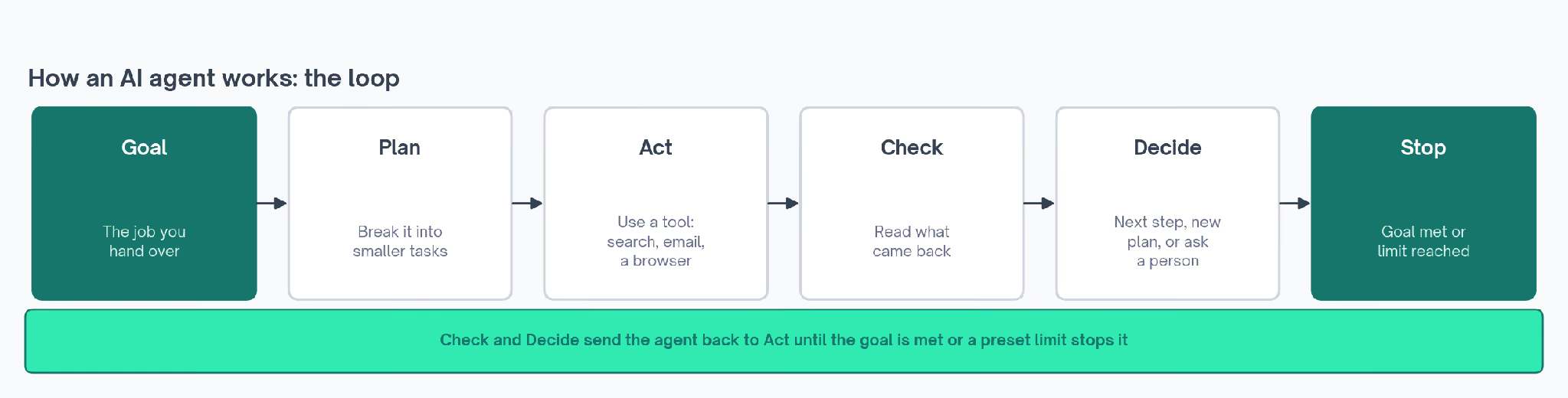
- An AI agent is a large language model working in a loop with tools. It plans a step, acts, checks what happened, and goes again.
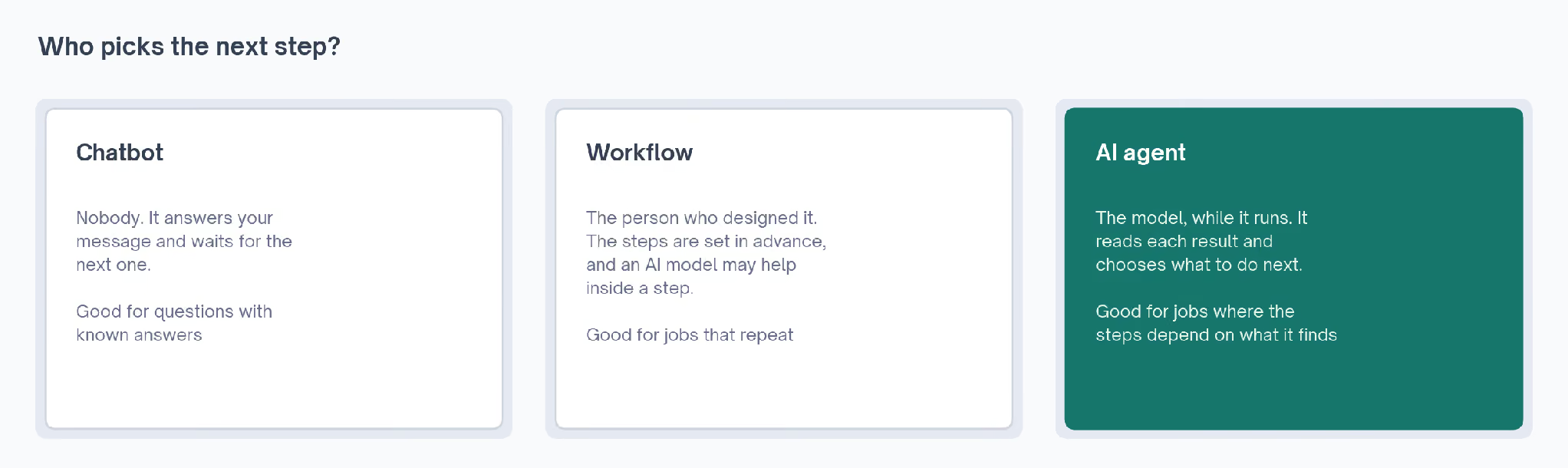
- The quickest test is who picks the next step. When the model decides, it's an agent. When a script written in advance decides, it's a workflow.
- A chatbot can only reply. An agent can also send, book, buy or update things for you, so its permissions deserve as much thought as its answers.
- Customer support and coding have the clearest track record, because success in both is easy to check.
- For a job with the same steps every time, a plain workflow is usually cheaper and more predictable than an agent.
- Anthropic, the company that makes Claude, advises starting with the simplest setup and adding agent behavior only when it improves results.
- Plenty of products carry the agent label without the loop, so the checklist near the end asks what a product does after its first action.
An AI agent is software that takes a goal, decides which steps to take, uses tools such as search, email or a web browser to carry them out, and checks each result before choosing the next move. A chatbot answers you. An agent keeps working in a loop until the job is done or it needs you.
Type a question into ChatGPT or Claude and an answer comes back. Now ask for three Lisbon hotels under $200 a night, a comparison of their cancellation rules, and a booking at the best one.
That second request needs software that can take steps on its own. It has to search, compare, decide, book and confirm, checking its own progress between each move. That's what an AI agent is.
The term turns up in 2026 on customer service tools, email apps, browser extensions, coding tools and sales software. Vendors use it loosely, so someone new to it has no easy way to tell a working agent from a chatbot with a new name.
Underneath the marketing every agent follows the same loop, and it's easy to spot once you know its shape.
AI Agents Explained in Plain English
An AI agent is a piece of software that gets a goal and works toward it by itself, choosing its own steps along the way.
Most agents today are built on a large language model (LLM), the type of artificial intelligence (AI) behind ChatGPT, Claude and Gemini. A language model reads and writes text. When used in an agent, it also decides what to do next.
IBM's agent explainer describes an agent as a system that performs tasks on a user's behalf. It works out its own sequence of steps using whatever tools it has.
Anthropic's engineering team puts it more plainly. Its guide to building effective agents says agents are typically "LLMs using tools based on environmental feedback in a loop."
"Environmental feedback" sounds technical but means something ordinary. After each action, the agent looks at what came back, such as a search result, an error message or a confirmation email, and uses that to decide what to do next. A person working down a to-do list does the same.
An agent needs a goal, tools and a loop. Take away any one of the three and the software stops behaving like an agent:
- With no goal, it sits and waits for the next instruction.
- With no tools, it can describe what should happen and can't make any of it happen.
- With no loop, it does a single thing and stops, whether or not that thing worked.
How AI Agents Work, Step by Step
The agents described by IBM, Anthropic and Google Cloud all follow some version of the same cycle. The names change between vendors, and the order stays put:
- It receives a goal. A person types it, or another piece of software hands it over.
- It makes a plan. It breaks the goal into smaller tasks. IBM calls this task decomposition, and for a simple job the agent may skip it.
- It picks a tool and uses it. That might mean searching the web, reading a spreadsheet, filling in a form or sending a message.
- It checks the result. Did the search return anything? Did the form submit? Did the email bounce?
- It decides what comes next. Another step, a new plan, a question for you, or the finish line.
- It stops. Either the goal is met or it hits a limit set in advance, such as a maximum number of attempts.
Here's a sketch of that loop on an everyday task. It's an illustration of the pattern, written for this guide, and no particular product produced it:
Goal: book the earliest Saturday appointment at a dentist near me
Plan     Find nearby dentists, check Saturday hours, book the earliest slot
Act      Search a map for dentists within 5 km
Check    Several results. Only some list Saturday hours
Act      Open the booking page for each clinic open on Saturday
Check    Two take online bookings. Earliest slot is 10:30
Ask      "Book 10:30 on Saturday at the clinic on Lake Road?"
Act      Confirm the booking once you say yes
Check    Confirmation email received
Stop     Goal met
The interesting lines are the checks. When the search showed only some clinics open on Saturday, the agent changed what it did next.
A script written in advance would have carried on down its list, whatever came back. It might have tried to book a clinic that was closed, or stopped at the first result and reported success. Neither mistake would show up until someone checked by hand.
The "Ask" line matters too. Before the one action that commits you to something, the agent pauses and hands the decision back to a person.
LangChain's agent definition frames all of this as control. LangChain makes software for building agents, and it defines an agent as a system where the language model decides what the application does next.
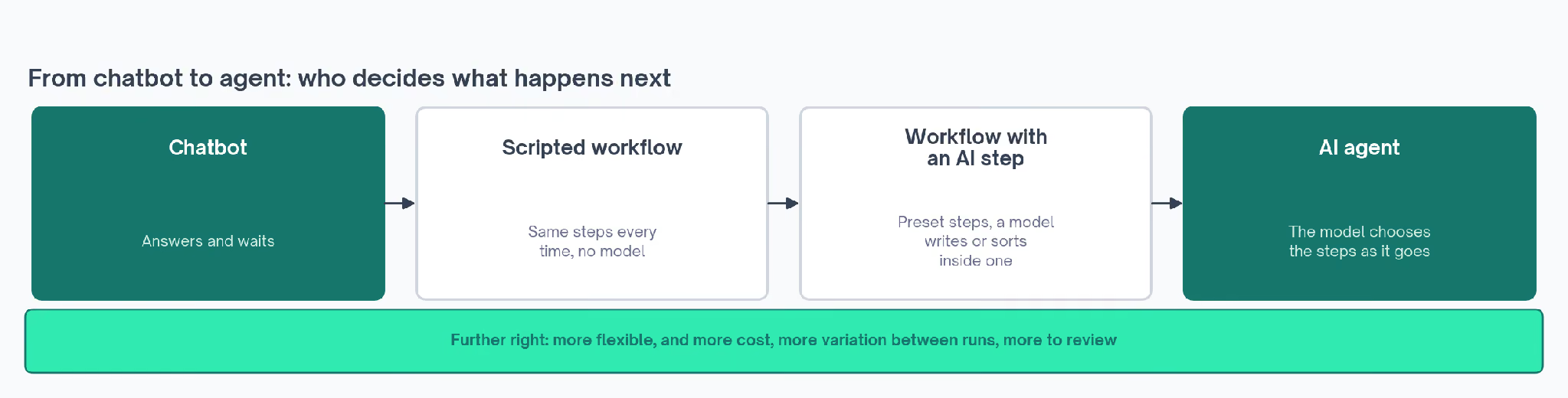
How agentic a system is depends on how much of the deciding the model owns. That turns "is this an agent?" into a question with a range of answers.
At one end of that range a model picks a single branch out of three, and at the other end it runs the whole job from goal to finish.
IBM adds a piece to the loop that's easy to miss. Agents can improve their answers through feedback, either from other AI agents or from a person reviewing the work. IBM calls the second kind human-in-the-loop.
What's Inside an AI Agent
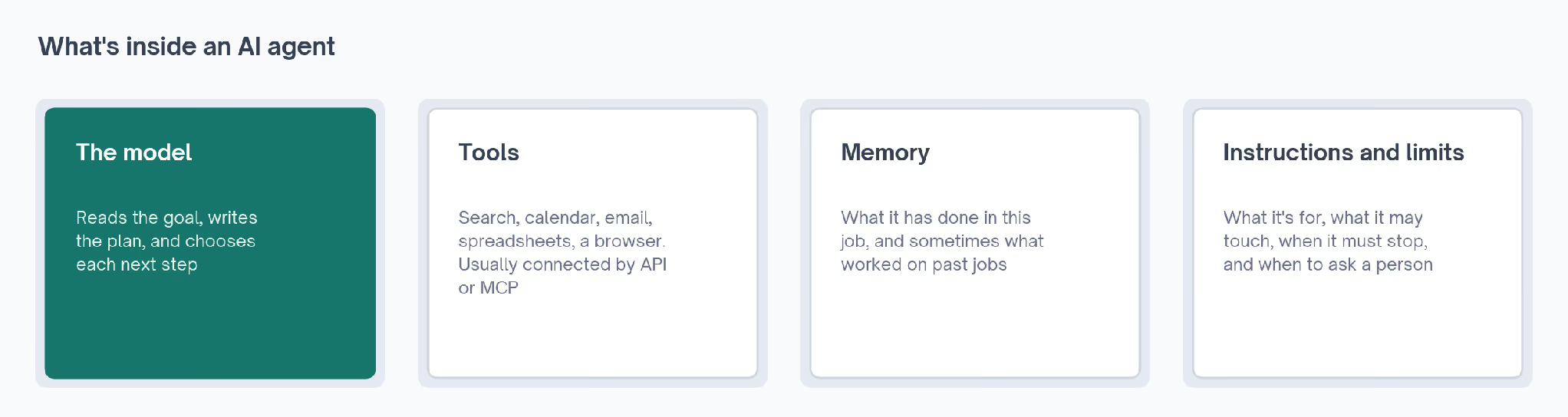
Open up almost any agent and you'll find the same parts, arranged differently depending on the job.
The Model That Does the Reasoning
The language model reads the goal, writes the plan, and chooses each next step. When people call an agent smart or clumsy, they're mostly describing the model.
A more capable model follows longer instructions and recovers from errors more often. It also makes fewer strange choices halfway through a task.
The Tools It Can Use
Tools are how an agent touches the world outside the chat. Most connect through an API, a published way for one piece of software to ask another for data or an action.
An agent might have a search tool, a calendar tool, and a tool that writes rows into a spreadsheet.
It only has the tools someone gave it, so the tool list also sets the edge of what it can do.
A growing number of tools connect through MCP (Model Context Protocol), an open standard Anthropic released so AI models can plug into outside software in a consistent way.
The Claude plus Google Ads setup is an example. Claude reads ad account data through that kind of connection and answers questions about it.
Memory
An agent needs to remember what it has already done in the current job, or it repeats steps. Some also keep longer-term memory, such as your preferences or the outcome of past tasks.
Google Cloud's agent guide lists memory as part of how an agent gets configured. It sits alongside a defined role and a set of tools. Without memory, a long job falls apart halfway, because the agent loses track of what it has finished.
Instructions and Limits
Someone has to tell the agent what it's for, what it may touch, and when to stop. That covers plain-language instructions and the permissions it holds, such as whether it can spend money, delete files, or email customers.
It also covers stopping conditions, the rules that end a run even when the goal isn't met. Anthropic's guide recommends limits such as a maximum number of attempts, plus points where the agent pauses for a person. A spending cap works the same way.
These limits are the part I'd look at hardest before letting any agent near my accounts. The model decides how well the agent works, and the limits decide how much damage a bad decision can do.
AI Agent vs Chatbot: Who Picks the Next Step
A chatbot is a program you talk to. Older ones follow a script of set questions and answers. Ask one something outside that script and it tells you it can't help.
Newer chatbots run on the same language models as agents, which is why the two get confused. The difference sits in what happens after the reply.
McKinsey's agent explainer treats a customer service chatbot as an early, basic version of an agent. Google Cloud draws a similar line between bots that follow rules, assistants that work with you, and agents that act with more independence.
A third category sits in between, and it causes most of the confusion. A workflow is a set of steps someone designed in advance, where a language model may do some of the work inside a step.
Anthropic separates the two cleanly. In a workflow, the steps are laid down in code ahead of time. In an agent, the model directs its own process and chooses which tools to use.
| Question | Chatbot | Workflow | AI agent |
|---|---|---|---|
| What it does | Answers messages | Runs a preset series of steps | Works toward a goal |
| Who picks the next step | Nobody, it waits for you | The person who designed it | The model, while it runs |
| Can it take actions? | Rarely | Yes, the ones it was built for | Yes, with whatever tools it holds |
| When something unexpected happens | Says it can't help | Stops, or follows a backup path | Tries another route or asks you |
| Best for | Questions with known answers | Jobs with the same steps every time | Jobs where the steps depend on what it finds |
Put the hotel request from the top of this guide through a chatbot and an agent, and the gap is plain:
✗  Chatbot: "Here are three hotels in Lisbon under $200 a night."
✓  Agent: checks your dates, compares cancellation rules, books the one
   you approve, and forwards the confirmation to your inbox.
The chatbot's answer might be excellent. It still leaves the rest of the job to you.
Anthropic's description of support agents shows where the line falls in practice. The customer still sees a chat window, and behind it the agent can pull up order history, read help articles, issue a refund and update the ticket.
AI Agent Examples From Companies Using Them
The clearest examples come from places where success is easy to measure, and Anthropic's guide says agents add the most value on tasks that combine conversation with action, have clear success criteria, and keep a person involved.
Customer Support: Klarna's Assistant
Klarna, the buy-now-pay-later company, launched an AI assistant built on OpenAI's models in February 2024. It handles refunds, returns and payment questions inside the Klarna app.
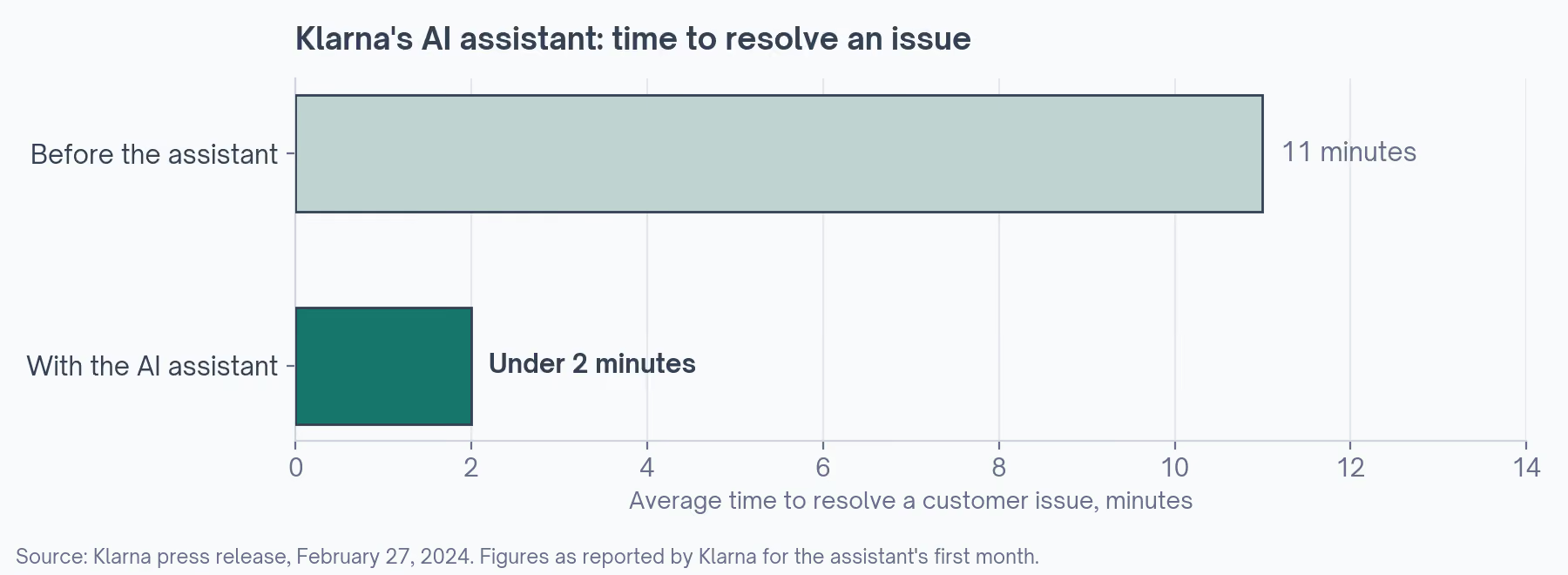
It can look up a customer's orders and act on them, which is what separates it from a help-center chatbot. Klarna's first-month press release reported these figures:
| Measure | Reported by Klarna, February 2024 |
|---|---|
| Conversations in the first month | 2.3 million |
| Share of all customer service chats | Two-thirds |
| Average time to resolve an issue | Under 2 minutes, down from 11 |
| Change in repeat inquiries | 25% fewer |
| Languages | More than 35 |
The story has a second chapter. In 2025, the trade publication CX Dive reported that Klarna was hiring people back into customer service, while the assistant still handled about two-thirds of inquiries.
I read that as the most useful part of the example. The agent took the volume, and customers still wanted a person for the harder cases. Klarna's reported gains were about speed and scale.
CX Dive's report also cited a survey by Verint, a customer experience software company, in which more than two-thirds of customers said they'd had a bad chatbot experience. Their most common complaint was a bot that couldn't answer the question.
Coding Agents
Software is the other area where agents have taken hold. A coding agent reads a task, opens the relevant files, writes changes, and runs the tests. The test results tell it what to change next.
Tests make the checking step unusually reliable, which suits the loop. A failing test is a clear signal, and the agent can keep trying until the tests pass. Without tests, it would have no quick way to know a change had broken something.
Anthropic's guide describes its own coding agent solving issues from SWE-bench, a benchmark built from problems filed on GitHub, the site where developers store and share code. The same guide adds that a person still needs to review the result against the wider system.
Research Agents
A research agent takes a question and keeps searching until it has enough to answer. The number of searches depends on what the first few turn up, so nobody can write the path in advance.
IBM's explainer walks through a version of this. A user asks an agent which week next year will likely have the best weather for a surfing trip in Greece.
The agent gathers weather history, consults another agent that specializes in surfing conditions, and combines the findings into an answer. The handoff to a second agent is common in research tasks, where no single tool holds everything.
Agents That Use a Computer
Some agents operate a computer the way a person does, by looking at the screen, moving the pointer, clicking and typing.
Anthropic's "computer use" reference implementation works this way. Browser agents that fill in forms and click through websites run on the same idea, which helps where a website offers no API for other software to connect to.
MIT Sloan's explainer gives a travel version. An agent with access to booking sites, email and the workplace chat app Slack could plan a trip, and with card permissions it could book and pay without anyone stepping in.
Operations and Monitoring
The same MIT Sloan piece describes an agent watching live video from a warehouse. It could flag something unusual, or, if set up that way, stop a conveyor belt.
That example is a reminder that an agent's actions don't have to happen inside software. Anything it's wired to, it can switch on or off. A door lock, a thermostat or a production line can all sit at the end of an agent's tool list.
Sales and Marketing
Sales and marketing tools use the word "agent" heavily, and many of the popular setups are workflows with AI inside a step.
The AI-powered BDR engine runs the same sequence every time. It finds contacts, adds company data, checks the email address, then loads a written sequence into a sending tool. BDR stands for business development representative, the sales role that books first meetings.
The Reddit brand monitoring template works the same way, with a model scoring each mention inside a preset path. Both are useful. Neither picks its own next step, and knowing that tells you what to expect when something odd comes back.
AI Agent Automation or a Plain Workflow?
I expected guides from companies building agents to push agents for everything. Anthropic's does the opposite, opening with advice on when to hold back.
It recommends the simplest solution that works, which sometimes means building no agent at all. The guide also warns that agents trade speed and cost for better results on hard tasks.
That reasoning holds for anyone automating their own work. Each step an agent takes is a new chance to go wrong, and a mistake early on carries into every step after it.
A workflow with the same steps every time is easier to predict, cheaper to run and simpler to check. Anthropic's own examples of workflows include writing marketing copy and then translating it, and sorting support questions into categories.
| Task | Better fit | Why |
|---|---|---|
| Send a welcome email when someone signs up | Workflow | The steps never change |
| Write marketing copy, then translate it | Workflow | Anthropic's own example of a preset chain |
| Sort support questions into refund, billing and technical | Workflow | The categories are known in advance |
| Settle a support ticket that needs order lookups and a refund | Agent | The steps depend on the customer's account |
| Change code across several files to close a bug report | Agent | Nobody can say in advance which files are involved |
| Research a topic across many sources | Agent | The number of searches depends on what turns up |
When the steps are known, the AI workflow automation tools on this site do the job without the overhead of an agent.
The n8n workflow templates show what preset steps look like in practice. n8n is a tool for connecting apps to each other in set sequences, and each template is a chain someone has already built.
For marketing teams, the marketing automation workflows guide and the sales workflow automation guide cover jobs where a workflow is enough. An agent pays for itself on the rows further down that table, where nobody can write the path in advance.
Anthropic goes a step further for developers. For many applications, it says, a single well-built request to the model, with the right reference material and a few examples, is usually enough.
How to Tell Whether a Product Is an AI Agent
The research firm Gartner has a name for products that claim the label without the loop. It calls it "agent washing", meaning vendors rebranding chatbots, assistants and robotic process automation as agents.
Robotic process automation, or RPA, is older software that repeats clicks and keystrokes in a set order. It's useful, and it has no model deciding anything. Putting a chat window on top of it doesn't change how it works.
In a June 2025 forecast, Gartner estimated that only about 130 of the thousands of vendors selling agentic AI offer products that fit the description.
The same forecast predicted that more than 40% of agentic AI projects will be canceled by the end of 2027, citing rising costs, unclear business value and weak risk controls. Its advice for now is to pursue agentic AI only where it delivers clear value.
Two made-up product descriptions show how the label can mislead:
✗  "Our AI agent sends a follow-up email three days after every demo."
✓  "Our AI agent reads the demo notes, decides whether a follow-up, a
   proposal or a check-in fits, drafts it, and asks you before sending."
The first is a workflow with one trigger and one action, and the second reads, decides and checks with you before it acts, which is the plan, act and check loop at work.
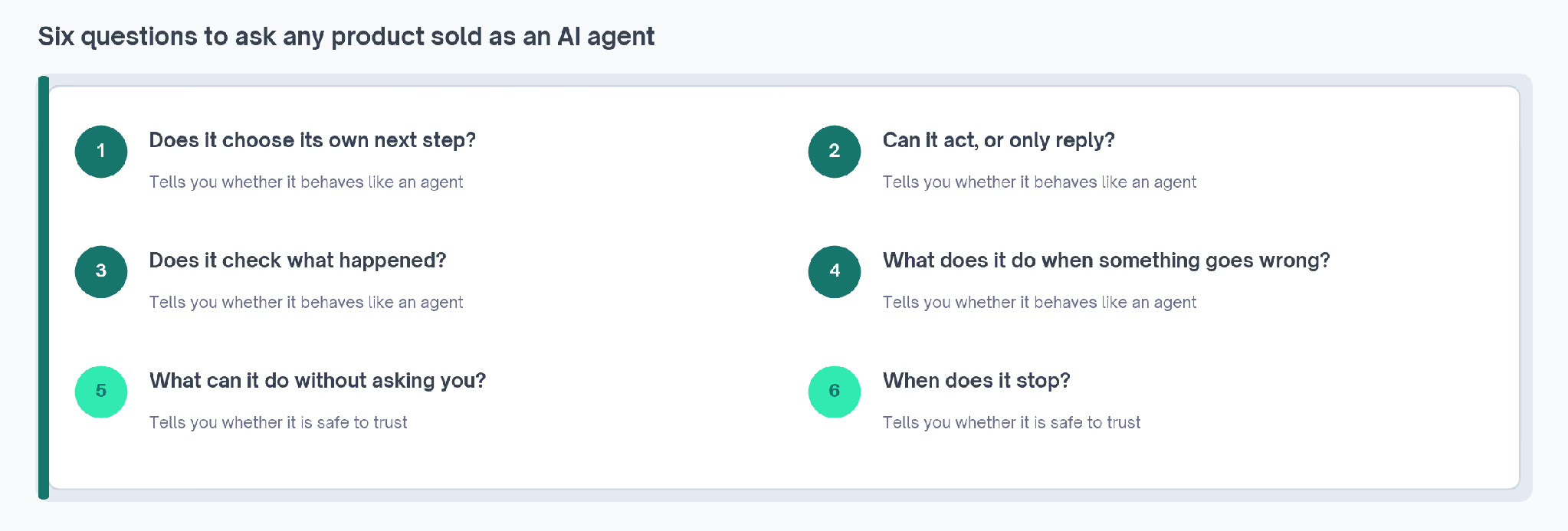
These questions sort a product quickly. I'd ask them of any tool with "agent" on the box:
- Does it choose its own next step? Or does it follow a path somebody drew in advance?
- Can it act, or only reply? Sending, booking, updating and buying all count as acting.
- Does it check what happened? An agent reads the result of each action before moving on.
- What does it do when something goes wrong? Look for a retry, a different route, or a question back to you.
- What can it do without asking? You should be able to see and change those permissions.
- When does it stop? A goal met, a step limit, a budget, or a check-in with a person.
A product that answers yes to the first four is behaving like an agent. The last two tell you whether it's safe to hand it anything important.
A product can fail the first question and still be the right buy. If your job has the same steps every time, a workflow sold as an agent may do exactly what you need at a lower price.
Where AI Agents Still Go Wrong
Agents are new, and the companies building them are open about the weak spots. These come up again and again in the sources above:
- Errors stack up. A wrong turn at step two affects every step after it, and a long task has many chances to go wrong.
- They cost more. An agent may call the model dozens of times for a single job, and each call costs money and time.
- Two runs can differ. Language models don't always give the same answer twice, so the same request can take a different path on a different day.
- Permissions carry risk. An agent that can pay, delete or email customers can also do those things by mistake.
- Review still falls to a person. Anthropic says so for its own coding agent, and Klarna's rehiring points the same way for support.
- Labels mislead. A product called an agent may be a chatbot or a workflow, which is fine as long as you know which you're buying.
None of this makes agents a bad idea. It means the tasks that suit them today are ones where a mistake is easy to spot and cheap to undo.
Support questions with a clear right answer, code backed by tests, and research you'll read before acting on it all fit that description.
Where to Start if You're New to AI Agents
If I were starting from nothing, I'd begin with a task I already do by hand.
I'd want one where I can tell at a glance whether the result is right, such as research summaries, meeting notes or first drafts of routine emails. A wrong answer there costs a few minutes of rereading.
These pages on the site help with that first step:
- The guide to what Claude Skills are explains how to give an assistant a written procedure it follows every time.
- The Claude skills library collects ready-made procedures, such as the cold email skill.
- The best Claude skills for marketing are tested and sorted by job.
- The GTM tools directory lists go-to-market tools with permanent no-cost plans, including Fathom's meeting notes, which records and summarizes calls.
- The workflows library has preset automations for when an agent is more than the job needs.
I'd hold off on giving any agent spending power or access to customers until I'd watched it handle smaller jobs and seen where it stops.