

Key Takeaways
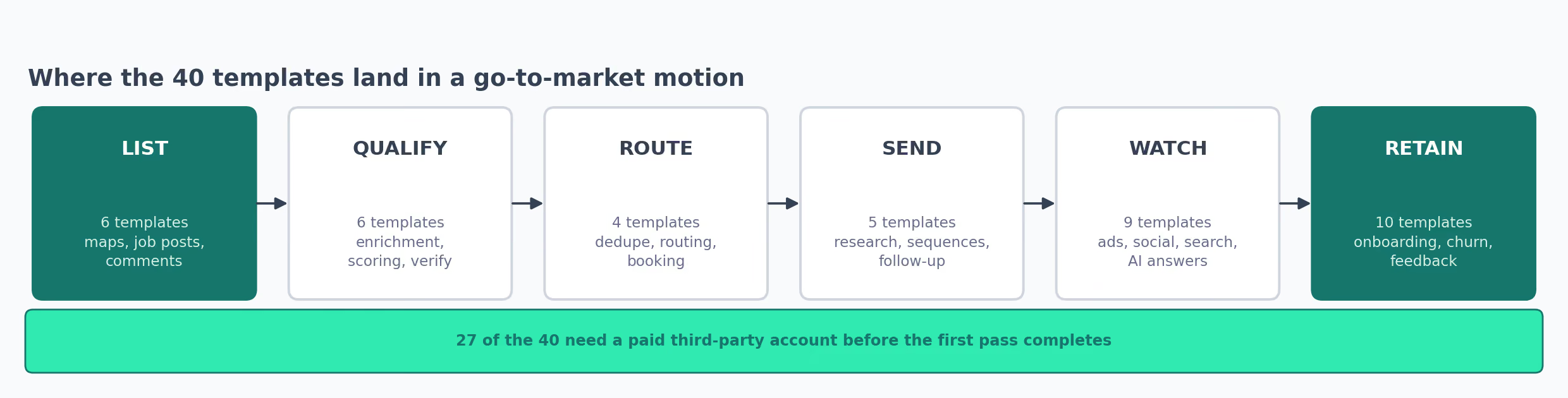
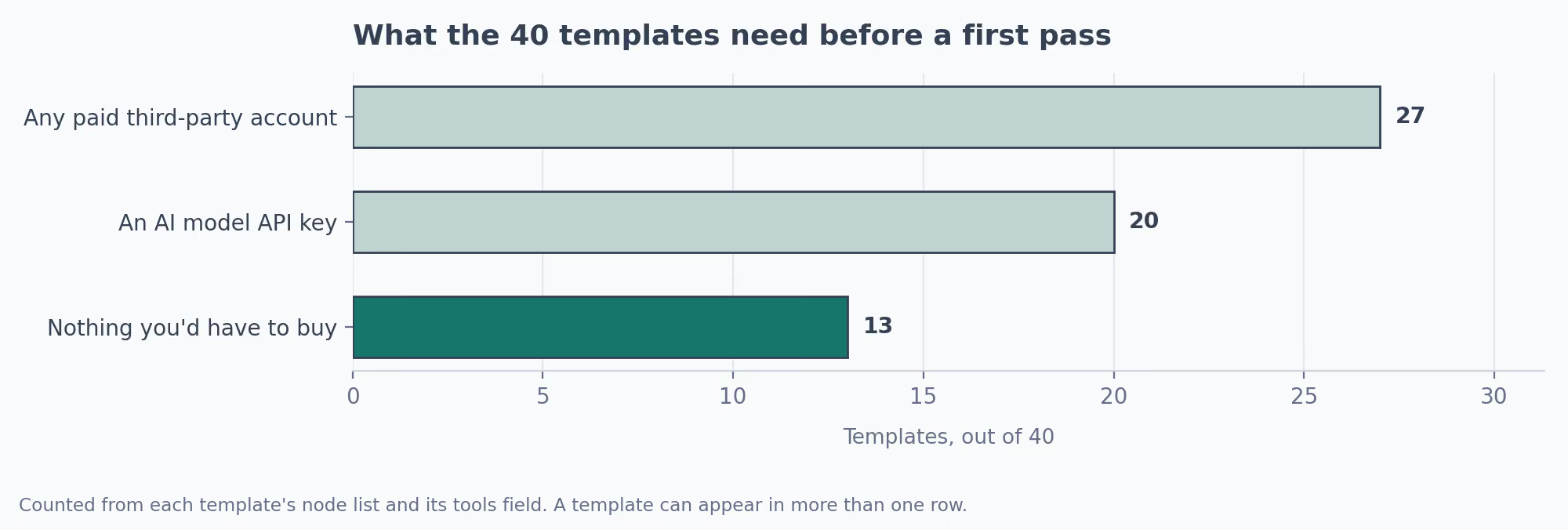
- Read the credential list before the workflow logic. 27 of the 40 here want a paid third-party account before a single record completes.
- Start on one that needs nothing you'd have to buy. The first build is where you learn the tool, and 13 of these qualify.
- Repoint every sheet ID, base and channel before you trigger anything, because that's where the silent failures live.
- Treat every number in a template as a placeholder: scores, batch sizes, day counts, benchmarks.
- Trigger by hand and read each node's output before anything goes on a schedule.
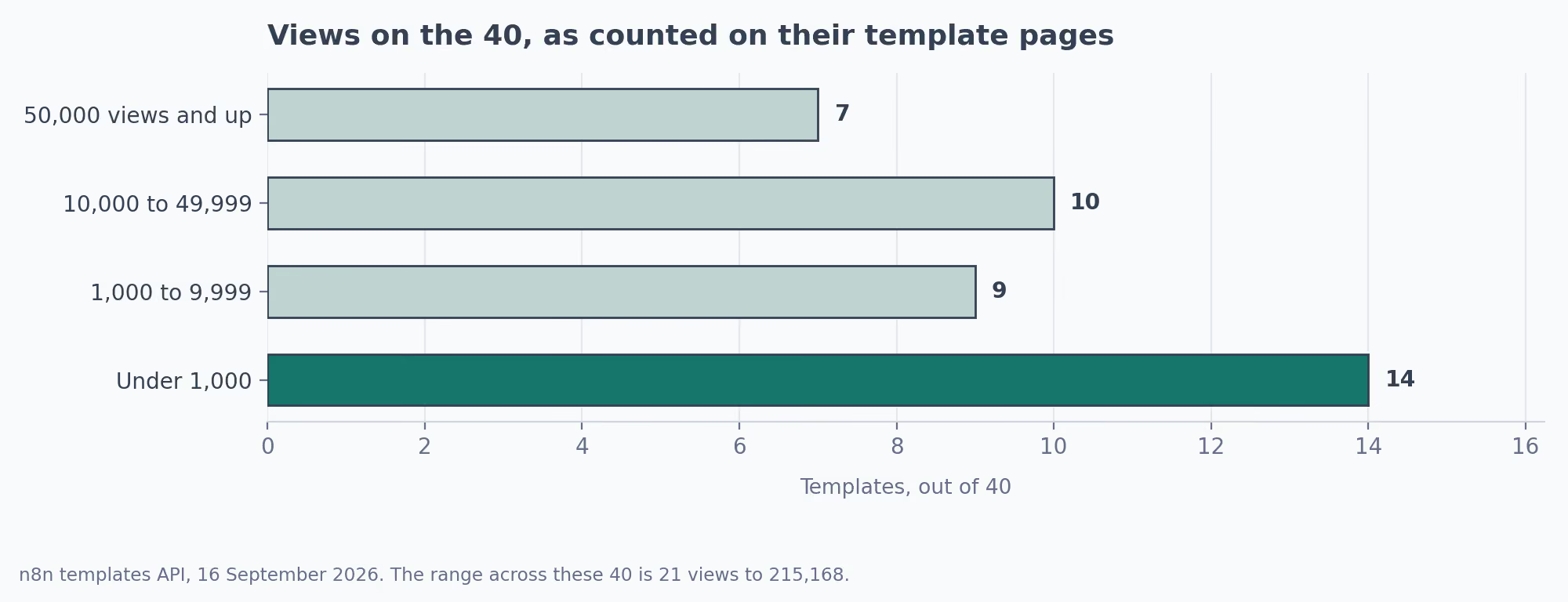
- Popularity is a bad filter. Views across these 40 run from 21 to 215,168, and the count says nothing about fit.
- Check the published date. Node fields move, and two of these go back to 2022 and 2023.
Quick Answer
n8n workflows are automation templates you import as a file into n8n, a tool that wires your apps together. The 40 here cost nothing to import and cover a go-to-market (GTM) motion end to end: sourcing, enrichment, outreach, ad and search reporting, onboarding, churn.
Importing an n8n template takes about a minute. Getting one to do useful work takes longer, and the workflow logic is rarely what's in the way.
Credentials are the first blocker. Every template arrives with empty slots, and a missing key fails that one node while the rest of the pass completes, so what you get is a gap instead of an error.
Configuration is the second, and it never announces itself. Sheet IDs, Airtable bases, score thresholds and prompts all still point at whoever built the thing. A workflow with an unedited sheet ID goes green and writes into somebody else's spreadsheet.
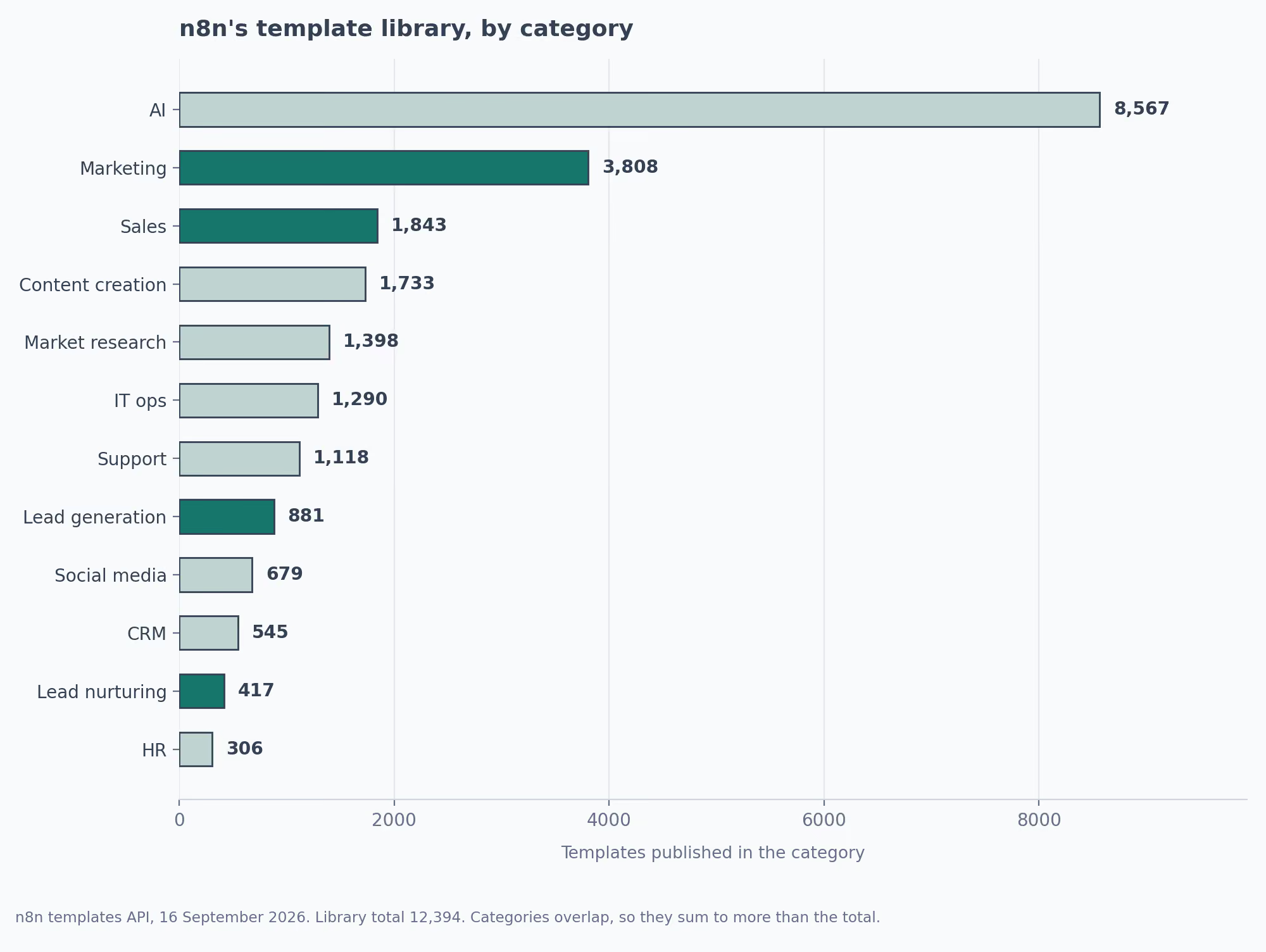
The library's own sort ranks by views, so a chat demo with 780,399 of them sits at the top and AI video generators fill the screen behind it.
The 40 n8n Workflow Templates, by Stage
| Stage | Templates | Need a paid account | Where I'd start |
|---|---|---|---|
| Build the list | 6 | 5 | The Google Maps email scraper |
| Enrich and qualify | 6 | 6 | Qualifying leads in a sheet |
| Catch and route inbound | 4 | 1 | Typeform to HubSpot with dedupe |
| Research and send | 5 | 3 | The Gmail campaign sender |
| Paid, social and brand | 5 | 4 | The ad drop detector |
| Search and AI answers | 4 | 3 | The keyword generator |
| Onboarding and churn | 6 | 3 | The Zendesk rating monitor |
| Customer feedback | 4 | 2 | The star rating form |
The library is searchable by category without opening the site, and the same call works for any category name n8n publishes:
curl -s "https://api.n8n.io/api/templates/search?rows=20&category=Sales&sort=views:desc"Some of these overlap on purpose. Two take a Typeform submission into HubSpot, one enriching before it scores and the other deduping before it creates.
Four watch for churn off different signals: HubSpot deal age, Postgres usage logs, Zendesk satisfaction ratings, and a statistical baseline. Pick on the data you already collect, because one reading a source you don't will complete and flag nothing.
25 of the 40 also have an Exchange listing, which is where their setup steps and known limits are written out.
What You Get When You Import an n8n Workflow Template
n8n is a tool for connecting apps to each other. You draw a workflow on a canvas as a chain of nodes. One node reads a Google Sheet, the next calls an API, the next writes to your CRM.
A trigger at the front decides when the chain fires. A template is that canvas saved as a file, and importing one drops the author's version onto yours, wired up and switched off, with every credential slot empty.
The library is n8n's own, and any n8n user can publish to it, so a template's author is a community member with an account.
One of the 40 here comes from n8n partner Airtop, and the rest are individuals and agencies. A few names turn up more than once, including Jimleuk with three.
Every template page has a button that copies the file to your clipboard, and pasting onto an open canvas imports it. From there the work is the same every time.
| Import step | What it involves | Where it goes wrong |
|---|---|---|
| Paste the file | Copy from the template page, paste onto a blank canvas | Nothing, this part is quick |
| Add credentials | One connection per service the workflow touches | A missing key fails that node while the rest completes, so you get a gap instead of an error |
| Repoint the IDs | Sheet IDs, Airtable bases, Slack channels, CRM properties | The template writes to the author's sheet until you change it |
| Rewrite the prompts | Any model node arrives with the author's instructions | Generic output that reads as generic |
| Move the thresholds | Scores, batch sizes, day counts, benchmarks | The author's numbers are not yours |
| Run one record | Trigger by hand and read every node's output | Skipping this is how a schedule sends 400 wrong emails |
The two silent steps look like this on the canvas. First the destination:
✗  Google Sheets node → Document ID: 1BxYt...aQ9      the author's own sheet
✓  Google Sheets node → Document ID: <your sheet>     tab names matched to what the template writes
Then anywhere a number decides something:
✗  IF  lead score > 50          the value the template arrived with
✓  IF  lead score > <your own>  taken from last quarter's converted leads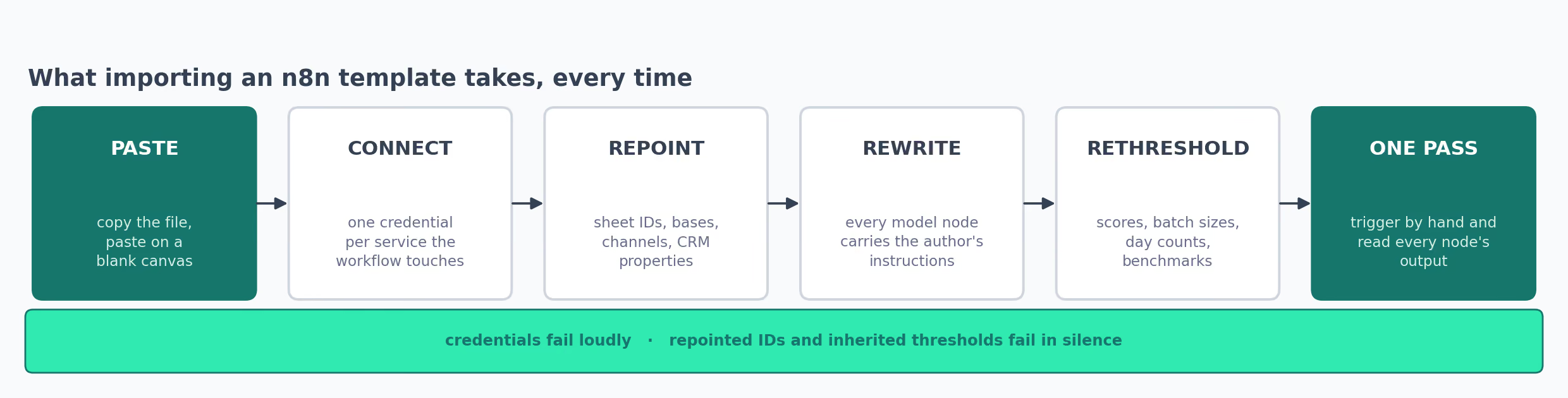
What an n8n Template Costs Once It Starts Running
The file costs nothing. Three other things do, and n8n itself is the first.
Self-hosting the community edition from n8n's repository costs nothing but server time. On n8n's cloud the Starter plan is €20 a month for 2,500 executions. Pro is €50 for 10,000, after a trial of 1,000.
An execution is one complete pass. That arithmetic catches people out on schedules, because an hourly job uses about 720 executions a month on its own. Two of those fill a Starter plan before anything else has started.
The second cost is the third-party services a template calls. Apollo credits, Bright Data requests, Apify actor runs, DataForSEO crawls, an Airtop seat. These are priced per use and sit outside n8n entirely.
The third is model tokens. A workflow that scores 200 leads a day with an AI node is making 200 API calls a day, and the template has no idea what your budget is.
| What the template needs | How many of these 40 | What that means for a first run |
|---|---|---|
| Nothing beyond n8n and accounts you hold | 13 | Import, connect Google or your CRM, go |
| A model API key | 20 | Per-call billing that scales with volume |
| Any paid third-party account | 27 | A signup and a card before the workflow completes |
The 13 with no paid dependency are the ones to start on. They work off Google Sheets, Gmail, Slack, HubSpot, Zendesk, Typeform and n8n's own data tables, which is to say off accounts a go-to-market team tends to have open already.
Across all 40, the same few services keep appearing, which tells you which credentials to set up once and reuse.
| Service | How many of the 40 touch it |
|---|---|
| Google Sheets | 21 |
| An AI model API | 20 |
| Slack | 13 |
| Gmail | 12 |
| HubSpot | 6 |
| Google Calendar | 3 |
n8n Workflows That Build Your List of Target Accounts
Every outbound motion starts with a list, and each of these builds one off a different signal: a map listing, a job posting, a job change, a LinkedIn search, a comment thread, an Apollo lookup.
1. Scrape Business Emails From Google Maps
Akram Kadri's Google Maps scraper works a category and a city through Maps, follows each listing to its website, and reads email addresses off the page. Core n8n nodes do all of it, with no scraping vendor in the chain.
Cost
Nothing beyond n8n. Google Sheets holds the output.
What You Get
- A list of businesses matching a category and a location, with duplicates already removed
- Email addresses read from each business site and written to a sheet
- A sub-workflow structure you can repoint at a different source later
Where It Falls Over
- Google Maps markup changes, and a scraper built on plain HTTP nodes stops working when it does
- Role addresses dominate the yield, so
info@arrives looking like a contact
My Tip
I'd run one narrow category first and read the output column by column. The yield depends entirely on whether the sites you're hitting publish an address at all.
2. Scrape LinkedIn Job Listings for Hiring Signals
A form takes a role, a city and a country. Yaron Been's hiring-signal scraper sends that to Bright Data, cleans the job posts it returns, and stores them in Google Sheets. A posting is a budget line somebody already approved.
Cost
Bright Data credits per request, billed by them. Exchange listing
What You Get
- Recent postings for a role in a named city, refreshed on each form submission
- A cleaned sheet with company, title and posting date, ready to join to your CRM
- A form front end, so somebody who has never opened n8n can trigger a search
Where It Falls Over
- The dataset API answers asynchronously, and the template's Wait node timing is the first thing to break at volume
- A company hiring for a role is not the same as a company buying, so the signal needs a second filter
My Tip
Decide which roles count as a signal before the first search. Hiring a VP of Sales and hiring a support agent mean different things, and one list can't hold both.
3. Monitor LinkedIn Job Changes With Airtop
Airtop published this job-change monitor and it does a narrow job well. It reads the job-change feed for your own LinkedIn connections and returns name, new position, profile URL and a function label like marketing or sales.
Cost
An Airtop account, which is a subscription of its own. Exchange listing
What You Get
- Four clean fields per person, plain enough to drop straight into a CRM update
- A function label, so a change can route to whoever sells to that team
- Batches of five per run, which keeps a manual trigger readable
Where It Falls Over
- Five records a run is a ceiling, and a large network needs scheduling around it
- It watches your connections only, so the coverage is whatever your network already covers
My Tip
Fire the manual trigger once and read all five records before adding a single node downstream. The output shape decides what your CRM update can do.
4. Search LinkedIn Companies and Score Them With AI
Matthieu's company search pulls companies off a LinkedIn search, sends each one to a model for a fit score against criteria you write, and appends the scored row to a Google Sheet acting as a lightweight CRM.
Cost
An OpenAI key, charged per company scored.
What You Get
- A scored prospect list built from a search, without a CRM license involved
- Scoring criteria you write yourself in the prompt, so fit means what you say it means
- A Wait node between batches, which keeps the search from tripping rate limits
Where It Falls Over
- Scoring quality is entirely the prompt, and the default prompt carries the author's idea of fit
- Sheet-as-CRM stops working the moment two people need to edit rows at once
My Tip
I'd score 20 companies I already have an opinion about before trusting the model on one I don't. The disagreements tell you what to put in the prompt.
5. Turn LinkedIn Post Comments Into Enriched Leads
Saverflow AI's comment extractor takes a post URL from a form, runs Apify scrapers across the comment thread, enriches each commenter's profile, and exports to Google Sheets or CSV. No LinkedIn login goes into it.
Cost
Apify actor runs, which are metered. The author notes the first 1,000 comments carry no charge.
What You Get
- Everyone who engaged with a post, which is a warmer starting point than a firmographic filter
- Profile enrichment on top of the bare comment data
- A CSV branch, so the list can go somewhere other than Sheets
Where It Falls Over
- Commenters on a post are self-selected, and a viral post fills the list with people outside your market
- Apify actors are maintained by third parties, so a broken actor breaks the workflow with no warning
My Tip
Point it at a competitor's product announcement instead of a general industry post. The comment thread under a launch is closer to intent than the one under a hot take.
6. Find and Verify Decision-Makers With Apollo
Apollo's people search works off a list of company names in a Google Sheet. Uche Madu's version writes results to a Contacts tab, then parks everything in a separate Contacts (Verified) tab that only a human fills.
Cost
Apollo credits, plus a model key for the title-matching step. Exchange listing
What You Get
- Organization search and people search chained, so a company list becomes a contact list
- A verification tab between the API and anything that sends
- Slack notification when a batch finishes
Where It Falls Over
- Apollo's match rate on titles and addresses varies by company size and region, and the template can't tell you which rows are wrong
- The Sheets nodes arrive carrying the author's sheet IDs, so an unedited import writes nowhere you can see
My Tip
I'd keep the verification tab even when it feels like friction. An unverified Apollo row reaching a sequencer is how a domain gets burned.
Enrich and Qualify Before Anyone Calls
A list of names isn't a pipeline until something adds context to it, and these six take a row you already have and attach a market, a score, a verified address or a research summary before a human spends time on it.
7. Enrich a Company From Its Own Website
Lucas Perret's website enricher reads a column of domains out of Google Sheets, pulls the page content for each, and asks a model to name the market, the industry, the target audience and the value proposition. Answers go back into the same sheet.
Cost
An OpenAI key, charged per company enriched.
What You Get
- Four judgement fields per domain, from the company's own words instead of a firmographic database
- A loop with a Wait node, so a long list doesn't trip a rate limit
- Output written back onto the original row, which keeps the sheet usable as a source
Where It Falls Over
- It was published in January 2023 against GPT-3, and the model node needs updating before it produces anything current
- A homepage built of marketing copy tells the model what the company says about itself and nothing more
My Tip
I'd swap the target audience field for something narrower, like whether they sell to engineers or to marketers. Broad audience labels come back true and tell you nothing.
8. Research an Account With an AI Agent
This researcher takes a company name or a domain and hands it to an agent with two abilities. It searches Google through SerpApi, and it visits pages through a sub-workflow that fetches the content. The agent returns a structured record instead of a paragraph.
Cost
An OpenAI key plus SerpApi credits, both metered per search.
What You Get
- Account research from an unstructured input, which is the state most prospect lists arrive in
- A structured output parser, so results land as fields your CRM can accept
- Google Sheets at both ends, input and output
Where It Falls Over
- Agent loops are open-ended by design, and a stubborn company can burn tokens before the parser gets anything
- SerpApi pricing is per search, so a 500-row list is a bill you should model first
My Tip
Cap the agent's iterations before pointing it at a list of any size. Left alone it'll keep searching for a company that has no web presence at all.
9. Qualify New Leads as They Land in a Sheet
Yulia's lead qualifier fires on a new row in Google Sheets, sends the lead to a model carrying your qualification rules in the system prompt, and writes the verdict back beside the original data.
Cost
An OpenAI key. Everything else is Google Sheets.
What You Get
- Qualification rules written in plain language in one node, editable by whoever owns the definition
- A Google Sheets trigger, so anything that can append a row can feed it
- The verdict merged back onto the lead's own row
Where It Falls Over
- Sheets triggers poll on an interval, so expect minutes between a new row and a verdict
- Rules living in a prompt are invisible to anybody who never opens n8n
My Tip
I'd paste last quarter's closed-won and closed-lost rows through it before writing the rules. What the model gets wrong on known outcomes is the rule you're missing.
10. Validate Every New CRM Contact's Email
Jonathan's HubSpot validator watches for new contacts, checks each address through One Simple API, and posts to Slack when one comes back bad, which keeps a typo from becoming a bounce three weeks later.
Cost
A One Simple API key, charged per check.
What You Get
- A validation step between form fill and first send
- Slack notification naming the contact, so somebody can chase the correction
- A small node count, which makes it a sensible first n8n build
Where It Falls Over
- It was published in February 2022, so the HubSpot node's fields have moved since
- One Simple API is a single point of dependency for the whole workflow
My Tip
I'd point the Slack alert at whoever owns the form instead of a general ops channel. A bad address is usually a form problem.
11. The Whole BDR Loop, Sourcing Through Send
Ruben AI published this pipeline as list building through campaign launch. Apollo supplies contacts, Apify scrapes the company page and the prospect's recent posts, Perplexity and Jina AI pull news, and Emailable checks the address.
Airtable is the front end, so somebody who doesn't write code can approve or kill a lead before anything sends.
Cost
Apollo, Apify, Emailable and Instantly.ai accounts, plus model credits. Exchange listing
What You Get
- Scraped company summaries, recent posts and press attached to every contact before personalization
- A qualification step you configure against your own criteria
- Three drafted emails per prospect, pushed into an Instantly.ai campaign
Where It Falls Over
- Five paid accounts have to be live before the first record completes: Apollo, Apify, Emailable, Instantly.ai and a model API
- The Apollo search goes through a plain HTTP node, so a change at their end breaks it without an obvious error
My Tip
One record end to end, and read all three drafted emails before opening the tap. Personalization built on a scrape is convincing until the scrape returns the wrong company.
12. Enrich a Form Submission Before You Score It
Adem Tasin's enrichment router has Hunter.io and Abstract API fill in what a Typeform didn't ask for, then scores the enriched record. It reaches HubSpot already carrying company size, with Slack and Google Sheets kept in step.
Cost
Hunter.io and Abstract API credits, both metered. Exchange listing
What You Get
- A three-field form that produces a better-qualified record than a nine-field form nobody finishes
- Scoring against enriched attributes instead of self-reported ones
- Enriched fields mapped onto HubSpot properties for later segmentation
Where It Falls Over
- Enrichment misses on small companies and on personal email domains, and a missed enrichment scores as a low-fit lead
- The extraction step depends on exact Typeform field keys, which change when somebody edits the form
My Tip
I'd send one test submission and write down the field keys before touching anything else. Every silent failure I'd expect here starts with a renamed form question.
Catch Inbound and Get It to the Right Rep
Inbound arrives faster than anyone reads it, and the gap between a form fill and a first reply is where most of the loss happens.
13. Capture a Typeform Lead Without Creating a Duplicate
A Typeform trigger starts it. Krishna Sharma's capture workflow then searches HubSpot by email before deciding whether to create a contact or update an existing one. A Function node scores the lead in plain JavaScript and buckets it cold, warm or hot.
Cost
Nothing beyond Typeform, HubSpot and Slack. Exchange listing
What You Get
- A dedupe branch that keeps a form from filling your CRM with the same person twice
- Scoring in readable JavaScript, using signals like a corporate email domain and whether a company name was given
- Slack alerts split by tier, so a hot lead lands somewhere different from a cold one
Where It Falls Over
- Scoring rules in a Function node are invisible to marketing unless somebody documents them elsewhere
- Email is the only dedupe key, so the same person submitting from work and personal addresses creates two records
My Tip
I'd set the two thresholds that split cold from warm and warm from hot against last quarter's actual conversions. The defaults are the author's, and they'll be wrong for your funnel.
14. Chase the Leads Your Scoring Model Buried
Every hour Avkash Kakdiya's low-score router queries HubSpot for contacts under 50, checks a Google Sheet so the same person isn't alerted repeatedly, then notifies the record owner and creates a follow-up task. A Gmail node sends the re-engagement email.
Cost
Nothing beyond HubSpot, Slack, Gmail and Sheets. Exchange listing
What You Get
- Attention on the segment a scoring model sends nowhere
- A dedupe sheet, without which an hourly job alerts the same rep about the same lead all day
- A HubSpot task alongside the Slack ping, so the action survives the notification
Where It Falls Over
- An unowned contact has nobody to notify, and the owner lookup returns empty
- The threshold arrives set at 50, which means something different in every scoring model
My Tip
A week of reading what it surfaces comes before the Gmail step goes live. A re-engagement email to somebody who scored low for a good reason costs more than the silence did.
15. Rotate Leads Across Reps Without Losing Count
Adrian Kendall's round-robin router keeps the last-used route in an n8n Data Table, so the rotation survives a restart instead of starting over at the first rep every time.
Cost
Nothing beyond n8n. Data Tables are built in. Exchange listing
What You Get
- A counter that persists, which is the part a naive round-robin gets wrong
- A Switch node with placeholder routes you swap for sub-workflow calls or CRM requests
- Merge logic that preserves the original payload through the routing step
Where It Falls Over
- Even rotation ignores capacity, so a rep on holiday still collects their share
- The routes arrive as placeholders, so nothing happens until you wire each one yourself
My Tip
I'd trigger it a dozen times by hand and watch the counter before connecting a live lead source. A router that drops the record is a worse outcome than no router.
16. Book the Meeting Over SMS and Chase the Ones Who Don't
Jimleuk's appointment agent takes enquiries over Twilio, checks availability in Cal.com and books the slot. Where nobody books, it sends follow-up messages to re-engage, and after a booking it can reschedule or cancel without a human stepping in.
Cost
A Twilio number, a Cal.com account and an OpenAI key.
What You Get
- Availability checked live, so the agent never offers a slot that's gone
- Follow-up messaging for enquiries that stall before a booking
- Reschedule and cancel handled in the same conversation thread
Where It Falls Over
- An agent with booking authority acting on a misread message is an expensive error, and the template gives it that authority by default
- Twilio messaging is billed per segment, so a chatty agent has a cost per conversation
My Tip
I'd keep a human approval step on cancellations for the first month. Booking wrongly annoys somebody, and cancelling wrongly loses the meeting.
n8n Automation for Account Research and Outreach
Preparation gets cut first when a week gets busy, and sending gets automated worst.
17. Read the News Before the Call
Milorad Filipović's pre-call digest checks your Google Calendar each morning for meetings with companies, searches newsapi.org for coverage of each, and emails you a per-company list of headlines. It's built around the calendar you already keep.
Cost
A newsapi.org key, which has a no-charge developer tier.
What You Get
- A morning email per company you're meeting, with headlines and short descriptions
- Company extraction off calendar invites, so nothing needs maintaining by hand
- A No Operation branch for days with no meetings, which keeps the inbox quiet
Where It Falls Over
- Company names are pulled from invite text, and a meeting titled "intro call" gives it nothing to search
- newsapi.org's no-charge tier restricts how far back you can look and how often you can ask
My Tip
Tighten the search query before trusting the digest. A company with a common name returns coverage of somebody else entirely, which is a bad thing to open a call with.
18. Build a Meeting Brief From Email and LinkedIn
Jimleuk's meeting assistant checks the calendar hourly and works out who else is on the invite. Two sub-workflows then fire per attendee: one searching your last email exchange, one scraping their LinkedIn profile and recent activity. The brief arrives over WhatsApp.
Cost
Apify actor credits plus an OpenAI key.
What You Get
- Email history and social activity in one brief, assembled an hour before the meeting
- Delivery to WhatsApp, which is readable walking into a room
- Sub-workflows you can call from anywhere else you've built
Where It Falls Over
- LinkedIn scraping through a third-party actor is fragile, and a blocked scrape returns an empty brief with no warning
- Hourly calendar polling eats an execution allowance faster than I'd plan for
My Tip
I'd drop the WhatsApp step and send to Slack if your team already lives there. The novelty of a phone message wears off and the channel switch doesn't.
19. Send a Sequence That Stops When Someone Replies
David Roberts' Gmail campaign sender takes a list of addresses in a Google Sheet and a sequence of email templates, sends the first to everyone, and only sends the later ones to threads nobody has replied to.
Cost
Nothing beyond Gmail and Google Sheets.
What You Get
- Reply detection at the thread level, so an answer stops the chase automatically
- Merge fields from any extra column in the sheet, including name and company
- A delay you set per step in the sequence
Where It Falls Over
- Gmail enforces daily sending limits, and a workspace account hitting them fails the rest of the batch
- Sending cold volume from your main domain is a deliverability decision, and this template makes it easy to make badly
My Tip
I'd run this on warm follow-ups before I'd point it at a cold list. Reply detection pays there without putting a sending domain at risk.
20. Draft a Personalized Reply to Every Inbound Enquiry
Intuz published this outreach workflow to handle the replying that piles up. It reads each enquiry out of Google Sheets, asks a model to draft a response against that specific message, and sends through Gmail.
Cost
An OpenAI key, charged per draft.
What You Get
- A reply written against the enquiry text instead of a template with a name slotted in
- Google Sheets as the queue, so anything that can write a row can feed it
- Few enough nodes to follow the whole path on one screen
Where It Falls Over
- It sends without an approval step, so a bad draft reaches a prospect before anybody reads it
- Quality depends entirely on the prompt, and the default is written for Intuz's own enquiries
My Tip
Point the Gmail node at drafts instead of send for the first two weeks. Reading 50 drafts teaches you what the prompt is missing.
21. Chase the Prospects Who Went Quiet After a Meeting
Jimleuk's follow-up agent looks back at sales meetings from a few days ago, works out which ones never got a reply, and suggests the next message or the next call. It waits for your approval in Gmail before booking anything.
Cost
An OpenAI key. Calendar and Gmail are the rest of it.
What You Get
- A human approval step before any booking, so the agent proposes and you decide
- Duplicate removal, so the same prospect isn't chased twice from two meetings
- Suggestions drawn from the meeting record instead of a set cadence
Where It Falls Over
- The lookback window is set in the schedule node, and a long sales cycle needs a different number than a short one
- Approval by email means the agent stalls whenever you're away, and the queue builds
My Tip
I'd approve everything by hand for a month and keep a note of what I declined. That list is the filter to add before this goes anywhere near automatic.
Watch What Paid, Social and Brand Are Doing
Channel reporting is the work most likely to be done by hand on a Monday morning, and brand monitoring is the work most likely to be skipped altogether.
22. Report on Analytics and Both Ad Platforms Together
Friedemann Schuetz's weekly report reads the last seven days from Google Analytics, Google Ads and Meta Ads, plus the same week a year earlier. A model builds the table and writes the summary.
The long version goes out by email, and a shortened one to Telegram for reading on a phone.
Cost
Google Analytics, Google Ads and Meta API access, plus a model key. Exchange listing
What You Get
- One table covering Analytics and both ad platforms over the same window
- A year-over-year comparison in that table, which tells you about growth where a week-on-week number tells you about weather
- Multi-domain Analytics support, for teams with more than one property
Where It Falls Over
- Three separate API credentials have to be live, and the Facebook Graph API is the one most likely to expire on you
- A written summary from a model is only as good as the prompt, and the default answers a generic question
My Tip
I'd edit the summary prompt to answer whatever your team asks on Monday. A paragraph describing the numbers underneath it is wasted space.
23. Catch an Ad Campaign Falling Over Before Month End
Avkash Kakdiya's drop detector pulls yesterday's campaign data from Meta and Google, then lines the metric names up so the two can be compared.
Click-through rate and return on ad spend go against benchmarks held in a Code node. Campaigns falling short reach Slack, WhatsApp and Gmail in the same pass, with a row written to Google Sheets so the history survives.
Cost
Google Ads and Meta API access. No third-party vendor. Exchange listing
What You Get
- Both platforms compared on aligned metric names, which is the step that usually needs a spreadsheet
- Benchmarks you set yourself in a readable Code node
- A Sheets log, so a bad week is visible as a pattern and not just as an alert
Where It Falls Over
- The benchmarks arrive as the author's numbers, and an account with different economics alerts constantly until you change them
- Daily granularity means a weekend dip reads as a drop
My Tip
The benchmark values want replacing with your own trailing averages before any alert channel goes live. An alert nobody believes gets muted in a week.
24. Draft and Schedule a Month of Social Posts From a Sheet
A cron fires daily at 9 AM and reads that day's topics from a Google Sheets calendar. This generator writes a version per platform, short for Twitter and longer for LinkedIn. DALL-E makes an image and everything queues through Buffer.
Cost
An OpenAI key and a Buffer account. Exchange listing
What You Get
- A calendar that lives in a spreadsheet, so planning a month never needs automation access
- Platform-specific variants from one topic line
- Buffer as the queue, which keeps scheduling and approval where your team already does it
Where It Falls Over
- Generated images rarely match a design system, and the image branch is on by default
- Default platform prompts produce generic posts, which is the fastest way to teach a team to distrust the whole thing
My Tip
I'd delete the platform branches you don't publish to before the first pass. An unused Instagram branch still burns tokens every morning.
25. Turn a Trend Sweep Into Calendar Rows
vinci-king-01's trend sweep works six sources daily: LinkedIn, Twitter, Instagram, Google Trends, BuzzSumo and Reddit. The output lands in a Google Sheets content calendar instead of a dashboard.
Cost
ScrapeGraphAI credits, one key for every scraping step. Exchange listing
What You Get
- Viral pattern and engagement signals pulled out before anything reaches you
- Content opportunities written as calendar rows, which is the format a writer can act on
- A Slack digest alongside the sheet
Where It Falls Over
- One key powers every scraping step, so an expired credential empties the whole sweep silently
- Six sources of noise is still noise, and the default source list is nobody's buyer set
My Tip
I'd cut the source list to the two platforms your buyers use and leave it a week before acting on anything. A week is the minimum to tell a trend from a spike.
26. Read Only the Reddit Mentions That Deserve an Answer
Daniel Shashko's Reddit monitor sweeps all subreddits every 24 hours for your brand keywords and takes up to 50 of the newest mentions.
Each one goes to a model that scores sentiment, assigns an engagement score out of 100, judges relevance and drafts a reply. Only mentions above 60 reach a human.
Cost
An OpenAI key, charged per mention scored. Exchange listing
What You Get
- A digest short enough to read, because the threshold does the filtering
- Each mention tagged educational, supportive or promotional
- A Sheets log showing which subreddits keep coming up
Where It Falls Over
- A generic product name pulls in every unrelated thread, and the filter can't recover from a bad keyword list
- 60 is the author's line on engagement quality, and yours will sit somewhere else
My Tip
Leave the promotional response type switched off until the account has standing in those subreddits. Reddit punishes anything reading like marketing, and a drafted reply makes that easy to do at speed.
n8n Workflows for Search and AI Answer Visibility
Search reporting splits into two questions now: whether Google sends you traffic, and whether an assistant names you when somebody asks it a buying question.
27. Audit a Site Against Its Own Search Console Data
This audit calls DataForSEO to crawl up to 1,000 pages, pulls Search Console metrics for the same URLs, and merges them before scoring.
Custom Workflows AI wired the crawl to Search Console, so the branded HTML report at the end names which broken pages are also the ones earning clicks.
Cost
DataForSEO crawl credits, billed per page. Exchange listing
What You Get
- Findings grouped into status problems, content quality, metadata, internal linking and pages nobody links to
- Crawl data joined to click data, which is the join that turns a list of faults into a priority order
- An HTML template node you can put your own logo into
Where It Falls Over
- The 1,000-page ceiling is written into the template, and a bigger site needs the crawl splitting
- Thin-content thresholds are word counts, so a short page that answers a question scores as thin
My Tip
I'd change the thin-content word threshold to match how your pages are written before reading a single finding. Every site I've seen has a different floor.
28. Check Whether Assistants Name You at All
Incrementors' visibility tracker asks the same brand-neutral questions of ChatGPT, Claude, DeepSeek and Perplexity, then reads each answer for whether your site appears, where, and how strongly. It names competitors in the same pass. Output is a 27-field scorecard.
Cost
API keys for all four model providers, each billed separately. Exchange listing
What You Get
- Brand-neutral prompts, which is the only way an answer means anything
- Four platforms compared on identical questions in one pass
- Competitor names pulled out of the same answers
Where It Falls Over
- A missing key removes a platform from the comparison without saying so, which makes a partial pass look like a complete one
- Model answers vary between identical prompts, so a single pass is a sample and not a measurement
My Tip
I'd replace the sample prompts with the questions your buyers ask, keep them brand-neutral, and repeat the pass weekly. One reading tells you nothing about direction.
29. Get an On-Page Audit for Any URL From a Form
Not Another Marketer's audit takes a URL through an n8n form, fetches the page, converts it to markdown, and hands it to an agent that reports on technical setup, content structure and on-page elements. The report arrives by Gmail.
Cost
An OpenAI key, charged per page audited.
What You Get
- A form front end, so anyone on the team can request an audit without opening n8n
- Markdown conversion before the model sees the page, which keeps the token cost sane
- A formatted report by email instead of a JSON blob
Where It Falls Over
- It reads the HTML it's served, so a page rendered in the browser comes back looking empty
- A model's on-page opinion is a checklist, and it never sees how the page performs in search
My Tip
Pair this with the Search Console audit above instead of using it alone. One tells you what a page looks like, the other tells you whether anybody reached it.
30. Generate a Keyword List From Google's Own Suggestions
Zacharia Kimotho's keyword generator is a webhook you call with a seed term as a query parameter, and it returns the autosuggest expansions as an array.
GET https://<your-n8n-host>/webhook/keywords?q=lead+scoringCost
Nothing. It's core nodes against a public endpoint.
What You Get
- Suggestions that come from what people type, without a keyword tool subscription
- A webhook interface, so it plugs into a spreadsheet, a form or another workflow
- An array response, ready to feed a brief generator or a clustering step
Where It Falls Over
- Autosuggest gives you phrasing and no volume, so it can't tell you which term is bigger
- Hitting a public endpoint hard from one address is a rate limit waiting to happen
My Tip
I'd chain it behind a list of seed terms and write the output to a sheet, then take the clustering somewhere else. As a standalone call it answers one question at a time.
Keep the Customer Past the First Invoice
Retention work gets automated last, which is backwards when the revenue is already on the books. The split below is between workflows that watch for a signal and workflows that act on one.
31. Run the First Week After Signup Without Anyone Remembering
David Olusola's onboarding sequence takes the signup on a webhook, checks the email and name arrived, and creates the HubSpot contact before the welcome email goes out.
Wait nodes handle the next three: onboarding documents after two hours, a personal check-in after a day, a week-one guide after three. The CRM status updates at each one.
Cost
Nothing beyond HubSpot and Slack. Exchange listing
What You Get
- Four touches across the first week, timed by Wait nodes instead of a marketing platform
- A CRM status update at each milestone, so the record reflects where somebody has got to
- Team notification at each step, which means a human knows who just signed up
Where It Falls Over
- Wait nodes hold an execution open, and a long sequence at volume is an execution-count problem
- The two-hour gap assumes your product's first value moment lands there, and most don't
My Tip
I'd rewrite all four emails before enabling any of it. What the day-one check-in asks somebody to do decides whether the sequence earns a second read.
32. Send the Trial Emails on the Right Day
Avkash Kakdiya's trial sequence reads trial start dates out of MongoDB each day, works out how far into the trial each user is, and a Switch node sends whichever of four emails matches: day three, day seven, day 13, and a last one on expiry.
Cost
Nothing beyond MongoDB and Gmail. Exchange listing
What You Get
- Trial emails driven off your own user table, without a lifecycle platform in between
- Four messages mapped to trial days you can change in one Code node
- A small enough node count to read end to end before trusting it
Where It Falls Over
- Day thresholds are written into the Code node, so a 30-day trial needs the logic rewritten
- Gmail sends from whichever account you connect, and nobody monitors a noreply inbox
My Tip
Swap MongoDB for whatever holds your users, which is usually Postgres or an HTTP call to your own API. The date arithmetic and the Switch are the parts doing the work.
33. Score Accounts for Churn Risk Before Renewal Season
PollupAI's churn model pulls deals from HubSpot and collects linked support tickets and feature usage from a Google Sheet. It then weighs deal age, ticket sentiment and usage trend against thresholds you set, and emails the account owner when risk crosses the line.
Cost
A model key for the sentiment and scoring steps. Exchange listing
What You Get
- A health score built from three inputs nobody looks at together
- Sentiment analysis over support tickets, not just a count of them
- An email to the named owner, so the alert has somebody attached
Where It Falls Over
- Sentiment scoring is the piece most likely to be wrong, and a mis-scored ticket moves the whole health number
- Usage data has to already be in a sheet, and getting it there is the hard part of this build
My Tip
I'd check the sentiment step against tickets I'd already read before trusting a single score. Where it disagrees with you is where the threshold needs moving.
34. Put an Offer Behind the Churn Alert
This retention workflow goes past the alert. Customer profiles, support history and product usage from PostgreSQL feed a risk score, and above 0.7 it generates a unique Stripe discount code, drafts the email carrying the offer and logs the action to Google Sheets.
Cost
A model key, plus a Stripe account you already have. Exchange listing
What You Get
- A risk score from three sources, with a 0.7 line deciding who gets an intervention
- Per-customer Stripe coupons instead of one shared code anyone can pass on
- A Sheets log of every action, which is how you find out whether the offer worked
Where It Falls Over
- A discount is margin you don't get back, and an over-eager threshold spends it on customers who were never leaving
- Usage logs in PostgreSQL are the strongest of the three signals and the one most likely to be missing
My Tip
I'd read the first batch of scores against accounts I know before letting anything generate a coupon. The 0.7 line is the author's, and it's the setting that costs money when it's wrong.
35. Turn Support Ratings Into a Daily Churn Signal
Rahul Joshi's Zendesk monitor fetches tickets every weekday at 8:00 PM, cleans them into priority, age and urgency, then flags the ones carrying negative satisfaction ratings. Flagged tickets land in a Google Sheet and in Slack with the ID, subject, rating and a suggested action.
Cost
Nothing beyond Zendesk, Sheets and Slack. Exchange listing
What You Get
- A daily read of the satisfaction rating nobody reviews
- Every flag carries its ticket link, so the alert is one click from the context
- A sheet that becomes a pattern after a month, where the Slack message is gone in an hour
Where It Falls Over
- The flag depends entirely on satisfaction ratings being collected, and plenty of Zendesk instances don't
- An 8:00 PM schedule puts the alert in front of nobody until the next morning
My Tip
Check that ratings are being collected at all before importing this. Where they aren't, the whole workflow completes successfully and flags nothing forever.
36. Treat Product Metrics the Way Engineering Treats Uptime
Yassin Zehar's health monitor checks revenue and usage metrics daily, including churn and feature adoption. The comparison goes against a statistical baseline instead of a hand-set threshold. An unusual reading becomes a structured incident with an owner, a Slack message and a root-cause suggestion attached.
Cost
A model key for the root-cause step. Exchange listing
What You Get
- Anomaly detection against a baseline, which survives seasonality better than a fixed number
- An incident record per anomaly, in a database, with an owner field
- A daily health summary for whoever asks for one
Where It Falls Over
- A statistical baseline needs history, so the first weeks of alerts are noise
- Root-cause suggestions from a model read confidently whether or not they're right
My Tip
I'd pick four or five metrics that would change a decision and monitor only those. Watching everything produces a daily alert that gets muted by week three.
Collect What Customers Are Telling You
Feedback arrives in more places than anyone reads, and collection fails more often than analysis does.
37. Trigger a Customer Satisfaction Survey Off a Pipeline Event
A deal moving to Completed in GoHighLevel triggers this survey workflow and the Net Promoter Score email goes out through Gmail. A webhook catches the response and sorts it into promoter, passive or detractor.
Rahul Joshi stores the result in Notion and posts it to Slack, so a detractor gets a reply the same day.
Cost
Nothing beyond GoHighLevel, Gmail, Notion and Slack. Exchange listing
What You Get
- A survey triggered by a pipeline event instead of a calendar date, so it lands while the work is fresh
- Responses captured into structured Notion fields for long-term tracking
- Error handling, so a response never disappears silently
Where It Falls Over
- It's wired to GoHighLevel, and moving it to another CRM means rebuilding the trigger
- A generic request is the main reason survey response rates are low, and the default copy is generic
My Tip
I'd write the survey email myself and deploy the webhook with one full round trip before enabling the trigger. A survey that fires and loses the answer is worse than no survey.
38. Find the Themes in Survey Answers Nobody Has Read
Toshiya Minami's feedback analyzer reads responses from Google Sheets, groups them positive, neutral and negative, then batches each group before analysis so the model reads a set instead of one answer at a time. Themes go to a summary sheet and a Slack channel daily.
Cost
A model key, charged per batch analyzed. Exchange listing
What You Get
- Sentiment grouping before any analysis, so themes don't blur across positive and negative
- Batching, which keeps themes coming from a set of answers instead of drifting answer by answer
- A consolidated report in a sheet and in Slack
Where It Falls Over
- The template arrives with non-English column headers you have to rename before anything reads
- Too small a batch produces themes from noise, and the default size is the author's
My Tip
Hold on to the raw responses alongside the summary. A theme with no examples under it doesn't survive its first challenge in a meeting.
39. Collect Star Ratings Without Another Subscription
Alexander Schnabl's feedback form serves two things on one webhook path: a GET returns a styled HTML form with a required one-to-five rating, and a POST saves the response to an n8n Data Table.
Query-string parameters ride along, so a link carrying a plan name or a campaign source arrives attached to the rating.
Cost
Nothing. Everything lives inside n8n. Exchange listing
What You Get
- A hosted form with configurable text, colors and button labels
- Ratings stored with whatever context you passed in the link
- A branded confirmation page, with no redirect to anywhere else
Where It Falls Over
- Styling happens by editing an HTML node, which is a developer task dressed as a marketing one
- Data Tables are fine for hundreds of rows and were never meant to be your analytics store
My Tip
Submit it once from a phone before sending the link anywhere. The form is what your customer sees, and it's the one part of this list a customer ever looks at.
40. Consolidate Feature Requests From Every Channel Into Jira
Yaron Been's request collector scrapes support systems, user forums, social platforms and review sites through Bright Data, then categorizes and prioritizes what it finds by frequency and user impact. Results go to Google Sheets and into Jira as tickets.
Cost
Bright Data scraping credits, billed per request. Exchange listing
What You Get
- Requests from support, forums, social and review platforms in one view
- Prioritization by how often something recurs, ahead of who asked loudest
- Jira tickets, so feedback becomes work somebody owns
Where It Falls Over
- A miscategorized request disappears into the wrong bucket and nobody ever finds it again
- Without a frequency floor before the Jira step, one vocal customer writes your roadmap
My Tip
Configure only the channels your feedback arrives on. Every extra source is scraping credits spent on a platform your buyers never post to.
Where These n8n Workflows Break
None of these are hard to import. Most of what goes wrong afterwards falls into a handful of shapes, and only one of them announces itself.
| What breaks | How you find out | What to check before the first pass |
|---|---|---|
| An ID still pointing at the author's account | The workflow goes green and the data lands somewhere you can't see | Open every Sheets, Airtable, Notion and Slack node and read the destination |
| A missing or expired credential | One node fails while the rest completes, so you get a partial result | Read the execution log node by node, never the status tick |
| A threshold the author set | Constant alerts, or silence forever | Replace every number: scores, batch sizes, day counts, benchmarks |
| A third-party scraper drifting | Zero rows, with no error anywhere | Add an alert on an empty result, which no template arrives with |
| Model cost at volume | The invoice, a month later | Multiply calls per record by records per day before scheduling anything |
| The execution allowance | The workflow stops part-way through a month | Count scheduled passes against the plan: an hourly job is about 720 |
| The template's age | A node refuses to open, or a field has moved | Check the published date, since two of these predate 2024 |
| Nobody else has hit the bug yet | It behaves oddly and there's no forum thread about it | Read the view count, because 14 of these 40 sit under 1,000 |
What None of These n8n Workflows Arrive With
Not one of the 40 carries an Error Trigger node. n8n supports a second workflow that fires when the first one fails, set per workflow in the settings.
None of these authors wired one up, so a failed pass is a line in an execution log until somebody opens it.
A scheduled failure repeats every morning until somebody notices nothing arrived, and 19 of the 40 go on a schedule.
An empty result is the other gap, because n8n doesn't count one as an error. A blocked scraper and a quiet day look identical downstream, so an If node counting items before anything reads them is the cheapest alert here.
Rate limiting comes next. 15 of the 40 loop over items in batches and nine carry a Wait node anywhere at all, which means the rest go as fast as your instance allows. That's fine on 50 rows and expensive on 5,000.
| What to add | Why it's missing | Where it goes |
|---|---|---|
| An error workflow | No template here sets one | Workflow settings, Error Workflow |
| A zero-result check | An empty array is a success | An If node straight after the fetch |
| A Wait inside the loop | Only nine of the 40 have one | The Loop Over Items branch |
| A run log | So you can tell what it did last Tuesday | A Sheets or Data Table append at the end |
38 of the 40 do arrive with sticky notes on the canvas. That's the author's own documentation sitting beside the nodes, and it usually names the ones they expect you to change.