

Key Takeaways
- Start with the checks you keep meaning to do and never get to. All 10 of these look at something for you and then wait for you to decide.
- Set up the negative keyword one first. It finds ad money going to the wrong searches, and it needs nothing you don't already have.
- Four of the 10 are prompts against a report you can already export. No new tool, no new subscription.
- A threshold you copied from a template is a guess. Work yours out from your own numbers before you trust an alert.
- Name a person against every alert, or it goes to a channel where everybody assumes somebody else is handling it.
- Job-board scraping is the one that gets expensive when it works, because the bill scales with how much you use it.
- None of these decide anything. Blocking a search term or publishing a comparison page still needs somebody to look first.
- Both skill files are at the foot of this page, free and without an email.
A marketing automation workflow is a small piece of software that runs one check for you on a schedule and tells you what it found. It doesn't decide anything. These are the 10 I'd set up at a B2B SaaS company, in the order I'd do it. For each one: what it checks, what you need, the setup steps, and where it goes wrong.
Why I Bothered Automating Any of This
Some marketing work needs doing every week and never gets done.
Checking whether last week's ad budget went to searches that had nothing to do with us. Noticing that a blog post from two years ago has quietly slipped off page one.
Spotting the Reddit thread where somebody asked for a tool like ours, and three competitors got named.
None of that is difficult. It just never reaches the top of my list. So it goes undone for months, and the cost adds up quietly the whole time.
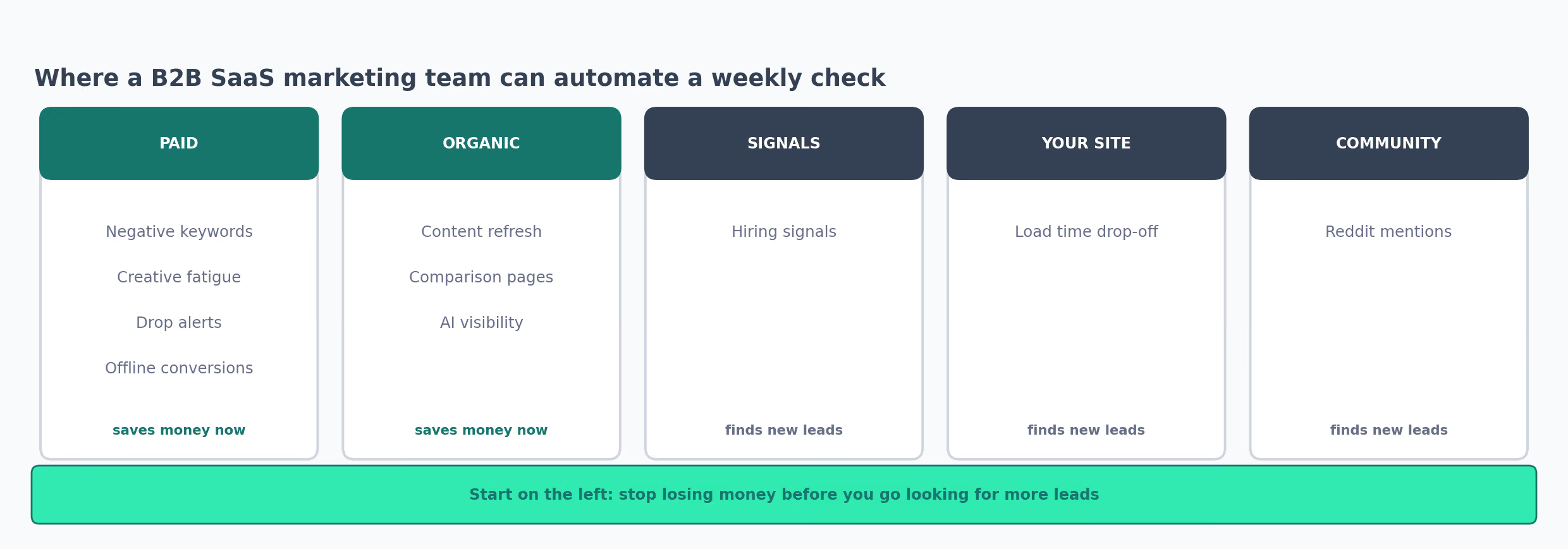
A marketing automation workflow is a small piece of software that does one of those checks for me. It runs on a schedule, compares what it sees against a number I chose, and messages me when something crosses that line. The sales side has its own set, covered in our sales workflow automation guide.
That's the whole job. It doesn't write anything, buy anything or change anything, and it never acts on what it finds.
I found these 10 in the workflow library on The GTM Exchange, and all of them are free to copy. This is how I listed them:
curl -s https://www.thegtmexchange.com/sitemap.xml \
  | grep -oE 'workflows/[a-z0-9-]+' \
  | grep -E 'keyword|ads|creative|conversion|refresh|comparison|visibility|reddit|hiring'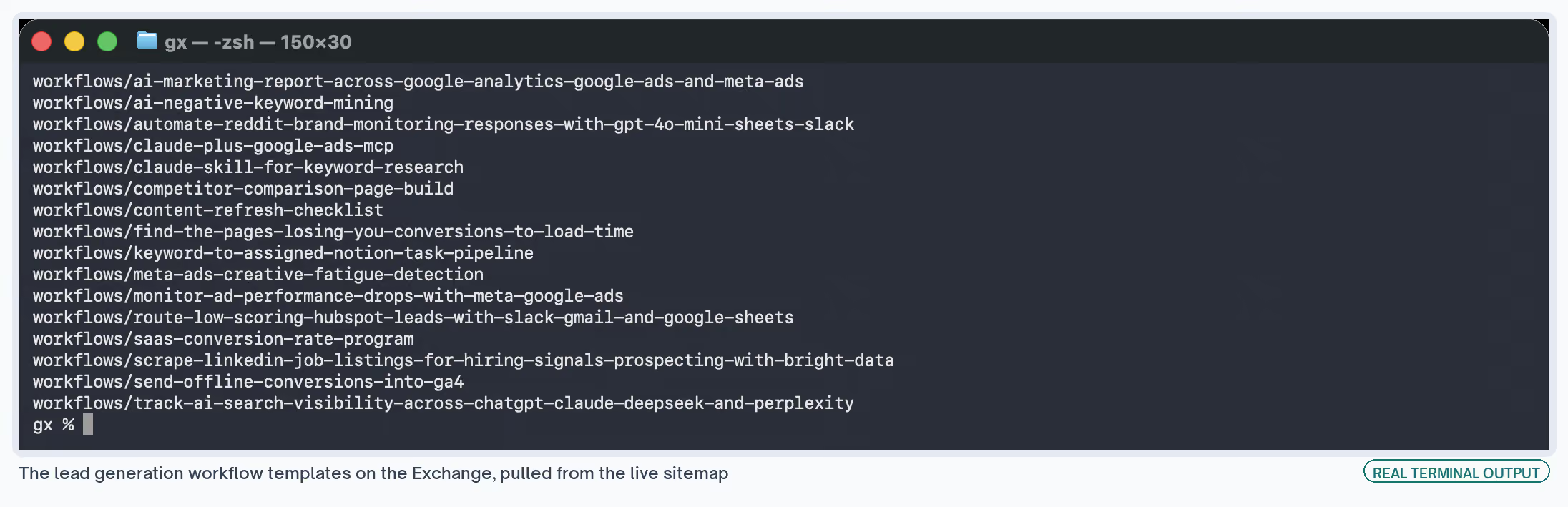
They come in three shapes, and the shape decides how soon you get anything useful:
| Shape | What you do with it | How long before it works |
|---|---|---|
| A set of prompts | Paste them into Claude, which reads your ad account directly | An afternoon, nothing to install |
| An n8n template | n8n is a tool for connecting apps to each other. You import a file, add your logins, and change the numbers | A day, and you need API access |
| A written procedure | Steps you follow yourself. You decide later which parts to automate | You can start today, and it stays manual |
The 10, at a Glance
| # | What it checks | Shape | How often | What you need |
|---|---|---|---|---|
| 1 | Ad money going to irrelevant searches | Prompts | Monthly | Claude, Google Ads |
| 2 | Ads people have seen too many times | Prompts | Weekly | Claude, Meta Ads |
| 3 | A campaign dropping overnight | n8n | Daily | Google and Meta Ads, Slack |
| 4 | Whether Google knows which ads led to sales | Procedure | Once, then ongoing | Google Analytics, a developer |
| 5 | Old pages losing their Google traffic | Procedure | Every few months | Search Console |
| 6 | Searches for "[competitor] alternatives" | Procedure | One page per rival | Search Console, your website |
| 7 | Whether ChatGPT names you when asked | n8n | Weekly | Accounts on four AI tools |
| 8 | Companies hiring for the role you sell to | n8n | Monthly | Bright Data, Google Sheets |
| 9 | Pages so slow that visitors leave | Procedure | Ongoing | PostHog |
| 10 | People asking for tools like yours on Reddit | n8n | Daily | Reddit, an OpenAI key, Slack |
Paid Ads: The Four I Set Up First
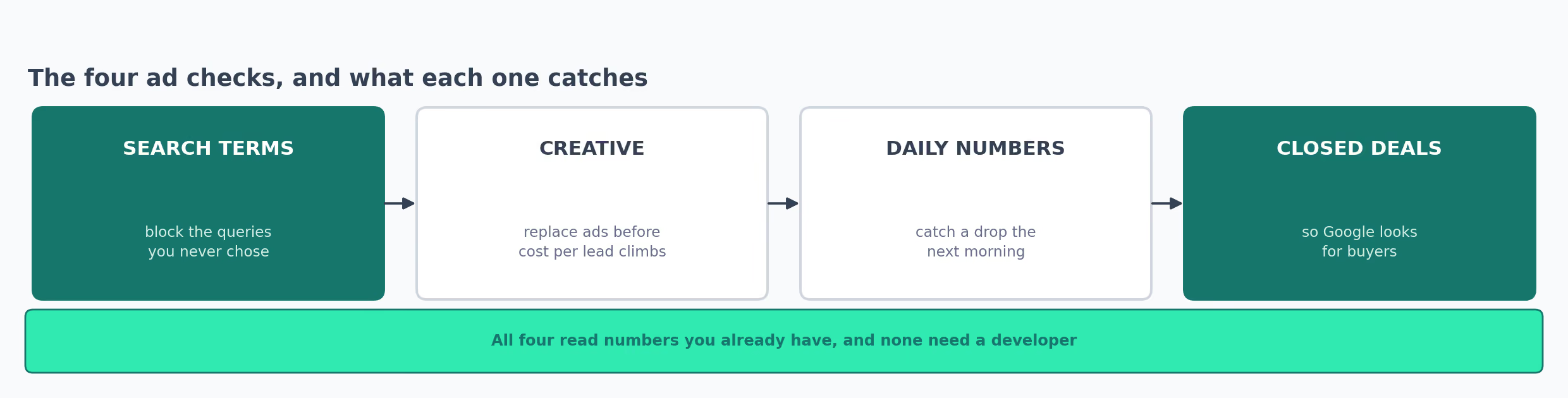
Ad money leaves your account every day. Anything you catch this week, you stop paying for next week. None of these four need a developer, and all of them read numbers you already have.
1. Find the Searches Wasting Your Ad Budget
When you run Google Ads, Google shows your ad for searches you didn't specifically choose, as long as they look related. So a report inside your account lists every actual search that triggered an ad.
Mine fills up every week with searches I'd never have picked:
- Somebody wanting a free version of the product
- Somebody looking for a job at a company like ours
- Somebody who typed a competitor's name
Every one of those was a click I paid for.
You stop that by adding a "negative keyword", which tells Google never to show your ad for that search again.
The problem is that somebody has to read the report and decide what to block. I did that properly once during setup, then not again for months.
What It Does
Reads your search report, suggests searches to block, and gives you a monthly routine so the list keeps up as people's searches change.
What It Needs
Claude, connected to your Google Ads account, plus permission to read the account. AI negative keyword mining is a set of prompts you paste in. There's nothing to install.
How I Run It
- Connect Claude to Google Ads so it can read the search report
- Run the first prompt across the last 45 days
- Read every search it suggests blocking, then block the ones you agree with
- Run the second prompt across 90 days, which groups searches into themes instead of listing them one by one
- Save those themes as a shared list, so every future campaign blocks them automatically
- Do it again next month
Where It Falls Over
You have to read the suggestions. The guide is blunt about the risk: "Applied blind, a mined list can block terms that convert." Block the wrong search and you switch off ads that were making you money.
It also only sees searches that happened often enough to show up in the report. It will always miss some. That's why the monthly repeat matters more than any single run.
If you'd rather start from the account side than from a prompt, the wasted spend finder skill does a similar job.
2. Spot Ads Your Audience Has Stopped Noticing
Run the same Meta ad for a few weeks and the same people keep seeing it. Fewer of them click, so you pay more for each lead. The ad itself hasn't changed at all, and the audience has simply got bored of it.
Nothing tells you this is happening. I used to notice in the monthly report, by which point I'd paid the higher price for two weeks.
What It Does
Looks at each ad week by week, ranks them by how tired they look, and writes a brief for the replacement.
What It Needs
Claude, connected to your Meta Ads account. Creative fatigue detection is seven prompts, so again nothing to install.
How I Run It
- Connect Claude to Meta Ads so it can see individual ads, not just campaigns
- Pull the last 21 days split into three weeks, because a single total for the month hides the direction things are moving
- Look at cold-audience ads separately from ads shown to people who already visited your site, because the second group sees an ad far more often and tires of it faster
- Only call an ad tired if the click rate fell across all three weeks, since one bad week is normal
- Have it write a brief for the replacement ad
- Do it again next week
Where It Falls Over
When it labels an ad "severe", that's the model's guess. The guide puts it well: the label "carries the confidence of a measurement without the basis for one."
So run it on a few ads whose performance you already know, and see whether you agree with its labels before trusting it on the rest.
The replacement briefs also know nothing about your brand rules. Treat them as a starting point for whoever makes the ad.
For ideas on what the replacement should say, the competitor ads analyst skill looks at ads your rivals are running now.
3. Get Told the Next Morning When a Campaign Drops
A campaign's click rate halves on Tuesday. If you look at ad numbers weekly, you find out on Friday, and you've spent three days of budget at the worse rate.
The numbers were sitting there on Wednesday morning. The gap between when they existed and when I looked at them is where the money went.
What It Does
Pulls yesterday's numbers from Google Ads and Meta, puts them into the same format so you can compare them, and messages you when a campaign falls below a line you set.
What It Needs
n8n, API access to both ad platforms, and somewhere to receive the message. Ad performance drop monitoring can send to Slack, WhatsApp or email.
How I Run It
- Add your Google Ads and Meta logins
- Open the settings step and type in your own normal click rate and return on ad spend, because the template arrives with these blank
- Set up a Google Sheet using the column names the template expects
- Delete the message channels you don't want
- Schedule it for after both platforms have finished publishing yesterday's numbers
- Run it against a week you already understand, to see whether its alerts match what you know happened
Where It Falls Over
On a small budget, one bad day usually means the budget ran out early in the day. Testing it on a week you remember is how you learn to tell that apart from a genuine problem.
The number you type in is the whole workflow. It deserves more thought than a guess:
✗  Alert me when the click rate drops below 2%
   (2% of what? that number came from whoever wrote the template)

✓  Alert me when a campaign's click rate falls more than 30% below its own
   average for the past two weeks. Checked against 90 days of our numbers,
   set 1 September 2026.
One practical warning: Google makes you apply for a developer token before anything can read your ads data. Approval takes time. Start that first.
4. Tell Google Analytics Which Ads Led to Actual Sales
Somebody clicks your ad, books a demo, and signs six weeks later. Google Analytics saw the demo booking. It never saw the sale, because that happened inside your CRM.
That matters because Google and Meta both look at what you report as a success and then go looking for more of it. Report demo bookings, and they'll find you more demo bookings, including from people who would never have bought.
Left alone, that quietly points your budget at the wrong audience while every report looks fine. Your cost per lead falls, your pipeline doesn't move, and nothing in the numbers tells you to look.
The template sums it up: "A demo request is measurable in the browser, and the deal it becomes is not, so campaign reporting stops at the form unless the server sends the rest."
What It Does
Sends the closed deal back to Google Analytics from your own servers, tied to the original visit. The ad platforms then learn which clicks turned into money.
What It Needs
Google Analytics and a developer. Offline conversions setup explains it, and the only cost is the developer's time.
How I Run It
- Pick the two or three events that matter, like a closed deal, and keep the list short
- When somebody first visits, save the two ID numbers Google Analytics gives that visit
- When the deal closes, have your server send Google Analytics a message carrying that saved ID
- Send it within 24 hours, or Google can't connect it to the original visit
- Name it the same way you name everything else in Analytics
- Watch it arrive in the Analytics live view before you send any older deals
Where It Falls Over
The 24-hour limit caught me out. You also can't recover those visit IDs later, so the saving step has to be running before any of this starts working.
Names matter more than they sound. Send a badly named event and your Analytics reports split in two, and untangling that afterwards is genuinely unpleasant. This one also isn't something a marketer can do alone, so book the developer time before you start.
What All Four Taught Me
I set the paid ones up expecting the software to be the useful part. Reading them back to back, every single template was telling me the opposite.
Each one carried its own warning about being left alone:
- Negative keywords: read every suggestion before you apply it
- Tired ads: the labels it gives are guesses, not measurements
- Reddit: posting automatically will get your account banned
- Hiring signals: talk to your legal team before you schedule it
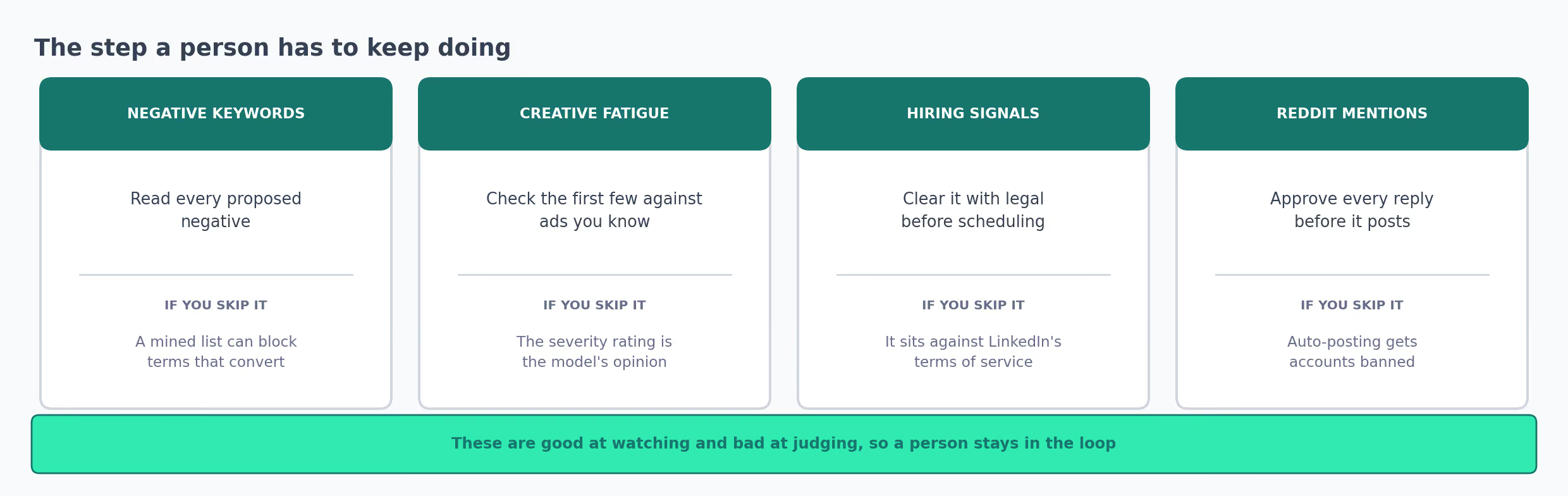
None of these are clever, and that's fine. They're good at watching and bad at judging. Their whole value is putting something in front of you that you'd otherwise never have seen.
That changed how I set the rest up. I stopped asking what each one could do by itself. The duller question turned out to matter more: who reads this, and what happens when that person gets busy?
It also gave me a rule for all 10: nothing sends, posts or changes anything without me looking first, and nothing goes live until I've read a week of its output and disagreed with some of it.
The disagreeing is the part I'd stress. If I read a week and agreed with every line, one of two things is true.
Either the number I set is so loose that it only catches the obvious, or I wasn't reading properly. What I want is two or three alerts I'd have handled differently, because those show me where the line belongs.
Organic Traffic: Three That Don't Involve Writing Anything New
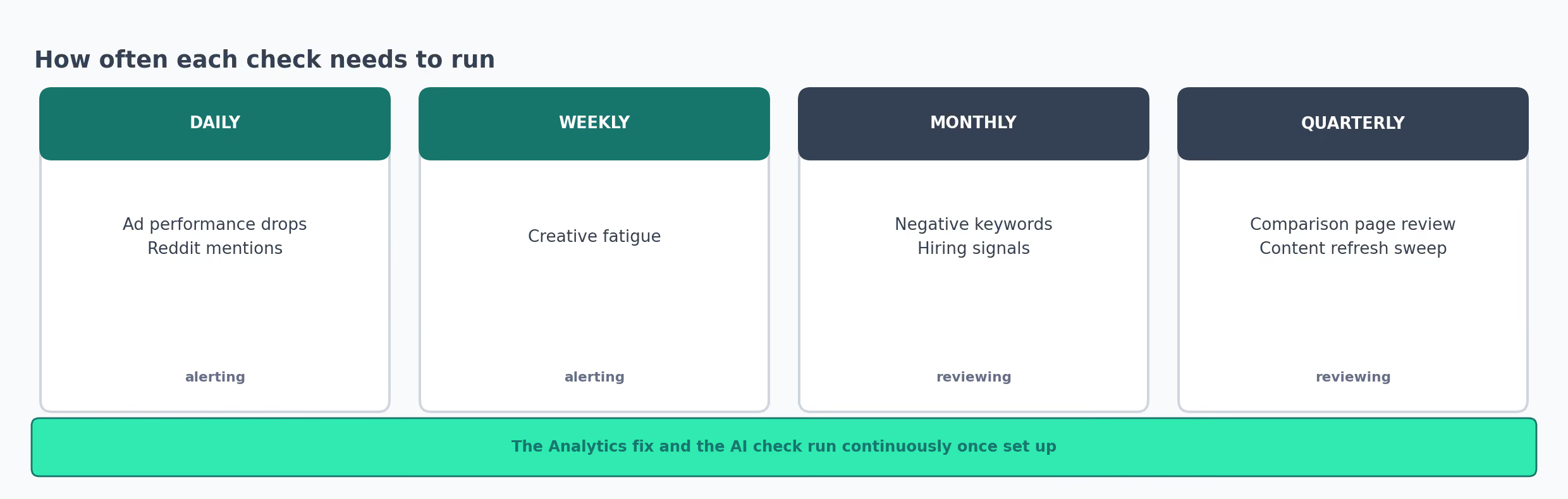
| How often | Which ones | Why that often |
|---|---|---|
| Daily | Campaign drops, Reddit mentions | A day of wasted ad spend is money, and a Reddit thread settles fast |
| Weekly | Tired ads, AI visibility | You need a few weeks before a direction means anything |
| Monthly | Wasted search terms, hiring signals | Search wording and job adverts change slowly |
| Every few months | Competitor pages, old post reviews | Rivals change their pricing, and rankings slip over months |
5. Find Old Pages That Are Losing Their Google Traffic
A blog post ranked well two years ago and has been slipping ever since. It still brings in some visitors. So nobody notices, and reviving it never becomes anyone's job.
Bringing that page back costs less than getting a brand new page to rank. Google already trusts it.
Google Search Console is free, and it shows which searches bring people to your site. It will tell you exactly which pages are sliding.
Choosing is the hard bit. A page can be losing traffic and still bring the business nothing, and updating it feels productive while changing nothing.
What It Does
Finds the pages losing visitors, helps you score which ones deserve the work, then gives you the same set of steps to apply each time.
What It Needs
Search Console and Google Analytics. The content refresh checklist is a written procedure, so there's nothing to install or pay for.
How I Run It
- In Search Console, list the pages that lost clicks over the last 6 to 12 months
- Ignore any page that never had traffic in the first place
- Score each one out of 5 on business value, how much it's fallen, how winnable the ranking is, how much work it needs, and whether AI tools quote it
- Search the query yourself and check whether people now want a different kind of answer than your page gives
- Check you don't have two pages competing for the same search, because updating one of them makes that worse
- Update the title, headings and any old numbers, add a short answer near the top, and republish with the date and what you changed
- Look at the numbers again after 7 days, 30 days and 90 days
Where It Falls Over
It needs a history to work from, so it does nothing for a page you published last month.
You should know that this is Slate's own guide, that Slate sells software for this, and that I work at Slate.
Once you've chosen the pages, the re-optimization skill does the actual rewriting, which keeps the choosing and the writing separate.
6. Build a Page for People Searching "[Competitor] Alternatives"
When somebody is close to buying, they search your competitor's name plus "alternatives" or "vs". Those are the most valuable searches you'll ever see, because the person is already comparing options.
If you have no page for that search, the answer they read was written by your competitor, or by a listings site that puts you fourth.
Your sales team will use these pages too, which makes them useful twice over. Somebody on a call can send the link when a prospect asks how you compare.
What It Does
Gives you the structure for a page that catches those searches and turns them into enquiries, one competitor at a time.
What It Needs
Search Console and your website. The comparison page build is a five-step procedure, and I'd add a legal reviewer to that list.
How I Run It
- Choose which competitors to write about based on how many people already search their name
- Match the exact wording people use, because "alternatives" and "vs" are different questions and want different pages
- Put the comparison table above the explanation, since people came for the answer
- Say plainly what the competitor is better at
- Add a named customer who switched, with a number attached
Where It Falls Over
Writing about a named competitor carries legal risk, so every claim needs a source and somebody to check it. I book that reviewer when I brief the page, not after.
These pages also go stale fast. Your competitor changes their pricing, your table doesn't, and an out-of-date comparison is worse than none. Check it on a phone too, because comparison tables break on small screens more often than you'd expect.
That same guide says these pages convert at around 5% and up. That figure comes from client work it doesn't publish, so read it as one person's experience and not a target.
7. Check Whether ChatGPT Names You When Someone Asks
Buyers now ask ChatGPT or Perplexity which tool they should use. Those answers name a few products, and you're either in the list or you aren't.
Search Console won't show you this. It's the one channel where you can be completely absent and get no signal at all that it's happening.
The answers also name your competitors. Seeing who gets recommended in your place tells you how these tools understand your market.
What It Does
Asks the same buyer questions of four different AI tools, then records whether you appear, how prominently, and who was named instead.
What It Needs
n8n, plus paid accounts with OpenAI, Anthropic, DeepSeek and Perplexity. AI visibility tracking is a template you import.
How I Run It
- Add your keys for all four services
- Replace the example questions with ones your buyers would genuinely type, without your brand name in them
- Tell it your website address so it can spot you in the answers
- Run it once and read how it scores things before you rely on any of it
- Send the results to a Google Sheet so you can compare over time
- Never change the questions after that, and keep to the same schedule
Where It Falls Over
Ask an AI tool the same question twice and you get two slightly different answers. The template says so directly: "assistant answers vary between runs, so treat one reading as a sample."
Keep the questions identical, or you won't know whether the tools changed or your own edits did.
Once you know where you stand, the GEO audit skill looks at the pages that aren't getting quoted.
Buying Signals, Your Own Website, and Reddit
These three bring in leads you don't have yet. Most of the ones above stop you losing what you already had, which is why these waited until last.
Each carries a catch the others don't: one legal, one technical, and one about how a platform treats automated accounts.
8. Find Companies Hiring for the Role You Sell To
If a company advertises a job for the person who would buy your product, somebody there has already argued for the budget. The template says it best: "if a company is hiring for the role you sell to, the budget conversation already happened."
That reaches you months before those people would ever visit your website. It's also the workflow here with the most warnings attached, so read them before you decide to build it.
What It Does
Collects recent LinkedIn job adverts for a given role in a given place, tidies them up, and puts them in a spreadsheet for you to sort through.
What It Needs
n8n, Google Sheets, and Bright Data, which is a paid service for collecting data from websites. Hiring signal scraping is the template. Bright Data needs credit before it returns anything.
How I Run It
- Add your Bright Data key to the request step
- Connect Google Sheets with permission to read and write
- Test it with one role in one city first
- Adjust the waiting step, because Bright Data takes a while to reply
- Decide which job titles count as a signal for your product
- Keep the job title in your spreadsheet, since it's the thing that makes any follow-up make sense
Where It Falls Over
Bright Data "bills per record, so each run has a cost attached even though the template is free." A wide search costs more than a narrow one.
And the legal point, in the template's own words: "It sits against their terms of service, so check what your legal team permits before you schedule it." Ask before you build. Be prepared for the answer to be no.
The signal also goes stale in about a month, once the job gets filled or the hiring stops.
9. Find Pages So Slow That People Give Up and Leave
Your landing page loads fine on your office wifi. On a phone on mobile data it takes long enough that people close the tab. You paid for the ad that brought them there.
Speed testing tools tell you a page is slow. What they never tell you is whether anybody left because of it. That's the difference between work that pays back and work that doesn't.
What It Does
Records how long the page took for each visitor, next to a video of what that visitor did while they waited.
What It Needs
PostHog, which records what visitors do on your site, on its free tier. Finding pages losing conversions explains the setup. You'll want somebody technical for working out the cause.
How I Run It
- Turn on session recording, and check it's also capturing loading times
- Wait until you have visitors on a range of phones and connections, not just your own office
- Sort the recordings by slowest loading time
- Watch what the visitor did during the wait
- Work out whether the cause is heavy code, large images, or a slow server
- Change one thing, then compare a week later
Where It Falls Over
The recorder adds code of its own to the page, so sample your visitors instead of recording every one.
And slow isn't always the reason someone left: "A slow page is not always the reason someone left, so check the replay before you assume." Watching the recording is what stops you spending two weeks on the wrong problem.
For the other reasons people abandon a page, where visitors get stuck and the landing page optimizer cover different halves of it.
10. Catch Reddit Threads Where People Ask for Tools Like Yours
Somebody posts in a subreddit your buyers read, asking which tool to use. That thread will rank on Google, and AI tools will quote it when they answer the same question.
I used to find these weeks later, by which point the thread had settled on whatever answer it got. They matter more than they used to. A Reddit reply from last year can end up in front of a buyer this week.
What It Does
Searches Reddit every day for mentions of your brand or category, scores each one for how negative it is and how much it matters, and writes a suggested reply for you to look at.
What It Needs
n8n, a Reddit account, an OpenAI key, Google Sheets and Slack. Reddit brand monitoring is the template.
How I Run It
- Choose your search words carefully, because a common word will bury you in irrelevant threads
- Leave it in read-only mode for a week before you let it draft anything
- Adjust the score it uses to decide what to show you, which starts at 60 out of 100
- Read every suggested reply yourself before it goes anywhere
- Keep promotional replies switched off to begin with
- Log everything to a spreadsheet, so you learn which subreddits keep coming up
Where It Falls Over
The template's own warning is the one to take seriously: "Auto-posting to Reddit gets accounts banned, so keep a human between the draft and the reply." Reddit communities are hostile to obvious marketing. A banned account is hard to undo.
It also only looks at 50 mentions per run, so a busy day can overflow it. Check its scores against threads you already know about before you act on any of them.
For how to reply once you're in a thread, the Reddit engagement skill covers it.
What My First Month Looked Like
Setting all 10 up at once is how you end up with a pile of half-built things and no idea which of them you trust.
One a week worked better, in the order of what was costing me most. Negative keywords first, because it's prompts against a report I already had. The campaign drop alert second, since it reads the same numbers on a timer.
Scoring old pages came third, and that turned out to be a spreadsheet job before it was a technical one. By the end of the month I had three things running and a sense of which of their built-in numbers had been wrong for us.
That's what I wanted before touching anything that needed a developer. The Analytics one needs engineering time and the AI visibility one needs four paid accounts. Both waited until the cheap ones had earned their place.
Pace mattered less than the habit of looking. Anything I stopped opening quietly stopped working, and I only found out by wondering why a number looked odd.
Where I'd Start
| If your problem is | Set up | Why this one first |
|---|---|---|
| Ad budget disappearing | Negative keyword mining | Prompts and an afternoon, and the waste is happening today |
| Google traffic slipping | Content refresh checklist | Cheaper to revive a page Google trusts than to rank a new one |
| Finding out about ad problems late | Performance drop alerts | Next morning instead of next Friday, on money you already spend |
| Nothing ranking for competitor searches | Comparison page build | Those searchers are already choosing between you and them |
| Ads finding leads that never buy | Offline conversions setup | Everything Google and Meta do next depends on this signal |
| No idea if AI tools mention you | AI visibility tracking | You can't improve it until you can see it |
Negative keywords is top of my list because the money is leaving the account today, and stopping it needs no developer and no extra budget.
The full library of GTM workflows and the Claude skills directory have the rest, including the email and reporting ones I've left out here.
Specifying a workflow
The one-page spec before you build: trigger, data, threshold with a basis, named owner, read-only period and cost per run.
What Goes Wrong With All of Them
- Every template arrives with somebody else's numbers in it, so its alerts mean nothing until you change them
- Anything that charges per record costs more on a busy day than a quiet one
- A daily schedule uses up your API allowance whether or not anything happened
- When one of these labels something, that's a guess dressed up as a measurement
- Two of them have consequences outside marketing: one legal, one a banned Reddit account
- A guide written by a company that sells the software will recommend that software, mine included
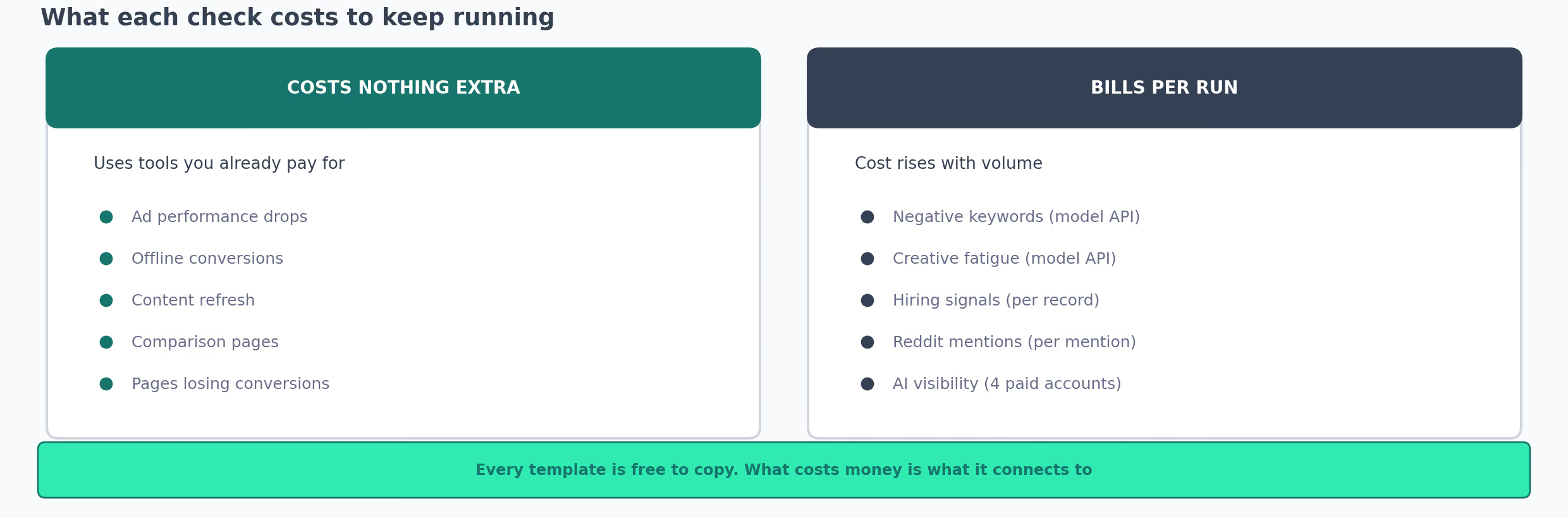
| Workflow | What you pay for | Costs more when busy |
|---|---|---|
| Campaign drop alerts, Analytics setup | Nothing beyond what you have | No |
| Old page reviews, comparison pages | Nothing beyond what you have | No |
| Slow page recordings | PostHog free tier, limited recordings | Above heavy traffic |
| Negative keywords, tired ads | Claude usage per run | With report size |
| Hiring signals | Bright Data, per job advert | Yes |
| Reddit mentions | OpenAI usage per mention | Yes |
| AI visibility | Four paid accounts, per question | With more questions |
The thing that kills these is nobody reading them:
✗  Alert goes to:  #marketing-alerts
   What happens:   somebody has a look

✓  Alert goes to:  Priya
   What happens:   she pauses the campaign, or writes down why she didn't
So give each one a week where it can't send anything, and set them up one at a time.
One you trust and check every week beats six you installed and stopped opening. Mine were heading that way before I wrote down what each was for.
Auditing a workflow
A seven-step read of something already running: does the threshold hold, what does it cost, did the human step survive, who still reads it.
Both files
Both skills plus a README. Free, no email required.
Both are folders you drop into your Claude skills directory:
cp -r specifying-a-workflow ~/.claude/skills/
cp -r auditing-a-workflow ~/.claude/skills/