

Key Takeaways
- Audit your automation by lifecycle stage. A channel view looks complete while the stages between two owners sit empty.
- Write the exit condition before you write the copy. A sequence with no way out keeps emailing people who already replied.
- Enrich a record before you score it. Scoring what somebody typed into a form is a guess with a number attached.
- Trigger trial emails on product events, and read the trial end date from billing.
- Deduplicate onboarding on the company. Five contacts at one account should start one handoff.
- Publish the numbers behind a churn flag instead of a single health score, so somebody can argue with the flag.
- Batch a re-engagement campaign and be ready to stop it mid-run. Mailing a year-dormant list in one go damages a sending domain.
Marketing Automation Workflows for Every Lifecycle Stage
By Abishek Balaji, Content Marketer at Slate. Published and last updated 8 September 2026.
Marketing automation workflows are sequences that run on their own: something happens, and software carries out the next few steps without anyone touching it. A B2B SaaS lifecycle needs them at eight points, from demand through win-back, each with its own trigger and exit.
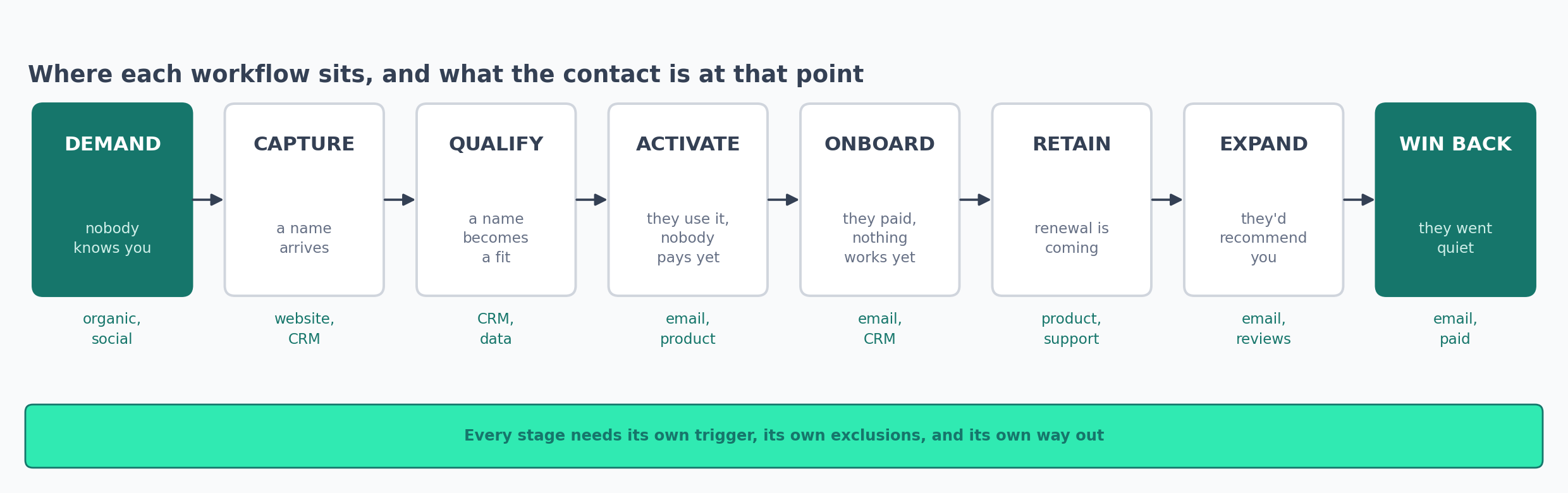
Most marketing leads at B2B SaaS companies inherit their automation in pieces. The paid person set up the alerts. The content person set up a publishing job. Somebody connected the demo form to the CRM two years ago.
Each piece does its job. The problems show up in between, where a contact sits for days because it isn't anybody's job to move them along.
You see the same gaps at most companies. Paid stops caring once the lead reaches the CRM, and lifecycle starts caring when the trial begins. Nobody owns the qualification step in the middle, even though it changes both of their numbers.
Acquisition is usually the strongest part of a stack, because it's the part with a budget line attached. Ten acquisition workflows already cover paid search, organic and buying signals in detail. The stages after the form are where the gaps are.
What Marketing Automation Workflows Are, and What You Need to Run One
A workflow is a set of steps that runs by itself. Something happens, and the software does the next few things without waiting for a person. The Exchange workflow library has a few dozen more built the same way.
Somebody fills in a form and a rep gets a message. A card payment fails and an email goes out. None of this needs an AI model. A couple of these use one to group text, and that's it.
What you're downloading below is a specification. Each folder holds one markdown file. It lists the trigger, the people to keep out, the steps in order, the fields the workflow touches, and the ways it goes wrong.
None of the specs name a platform. One company builds a workflow in HubSpot, the next builds it in Customer.io, and a third uses the n8n connector. You make the same decisions either way, and the building takes an afternoon once they're made.
What You Already Have, and What You'd Add
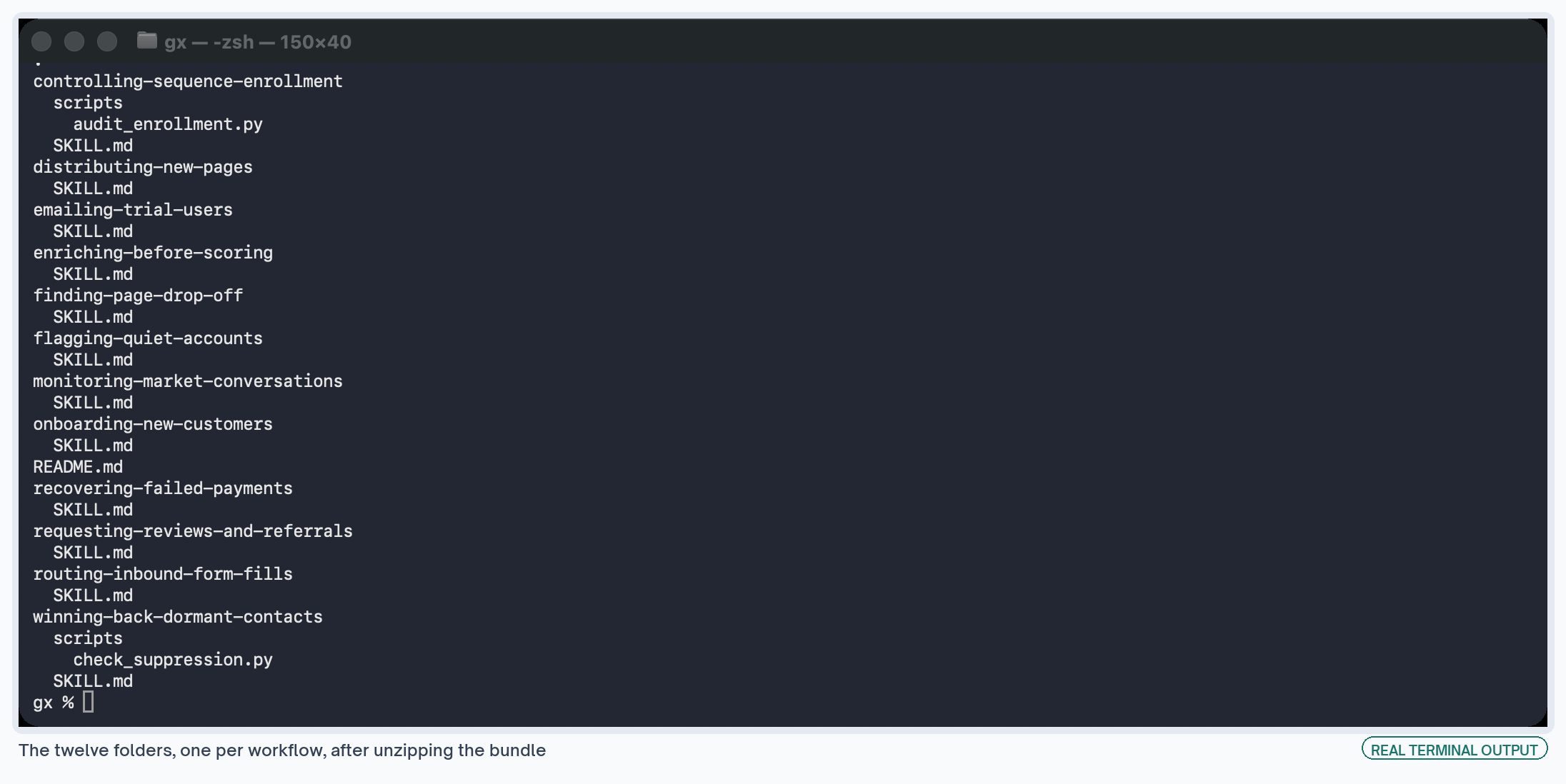
Unzip the bundle and you get one folder per workflow. Two of them also have a Python script. Both scripts use the standard library, so you don't need to install anything:
unzip marketing-automation-workflows.zip
cd controlling-sequence-enrollment
python3 scripts/audit_enrollment.py sequences.json
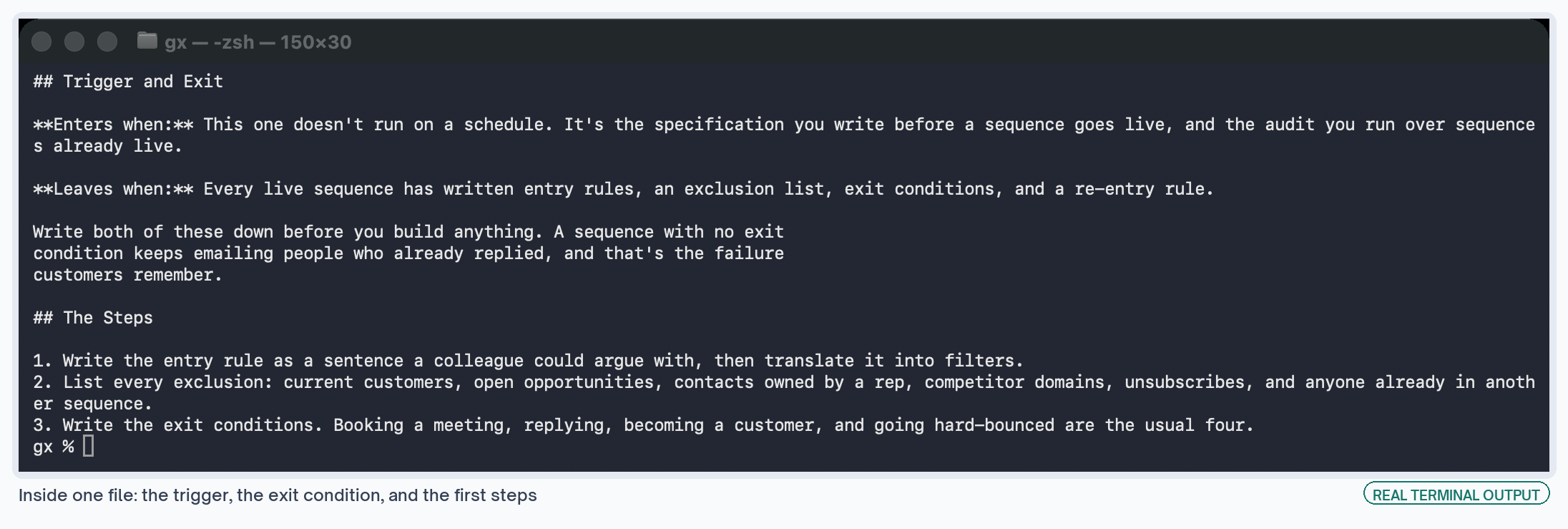
Every file starts the same way, with the two settings that decide whether a workflow embarrasses you. Who gets in, and what takes them out. You can change everything after that once the workflow is live.
The 12 Marketing Automation Workflows, by Lifecycle Stage
All 12 workflows
Every workflow spec plus a readme, one folder each.
Demand: Content and Social Workflows
Nobody has given you their name yet at this stage. The job is showing up where your buyers already spend time. Demand is usually the best-funded stage in a stack, because it has a budget and somebody whose job title matches it.
The automation here doesn't create demand. It makes sure the work you paid for reaches somebody, instead of going nowhere between the publish button and the first reader.
Both workflows below take about a morning to set up. Neither one needs a budget approval, which is usually why they never get built.
Submit New Pages and Queue the Social Posts on Publish
A page goes live and then nothing happens to it. Somebody remembers to share it on Thursday. Nobody submits it for indexing, and the piece you paid for just sits there.
This runs off the publish event in your content management system. It tells the search engines the URL exists, writes the social posts from the page's own title and summary, and puts them in a queue for a person to approve.
What It Needs
- A content management system that fires a webhook on publish. WordPress, Webflow, Sanity and Contentful all do. There's a publish-day submission workflow on the Exchange that covers the search engine half.
- IndexNow, which Bing and several other engines read. Google stopped accepting public URL submissions, so log those URLs and check them in Search Console instead.
- A social scheduler with an application programming interface, or a sheet the scheduler reads.
Where It Fails
- Draft pages published to a visible URL still fire the webhook. Keep an explicit list of allowed domains, and check the page for a
noindextag as well. - Submitting a URL only tells an engine the page exists. It doesn't promise a crawl, and it definitely doesn't promise a ranking.
- A model writing the post from scratch will invent claims the page never made. Build the draft from the page's own title and summary.
Distributing new pages
Announces a new page to search engines and queues its social posts.
Digest What Your Buyers Post, Once a Week
Most content plans start with a keyword tool. Those tools tell you what people typed into a search box. They don't tell you what your buyers are arguing about.
This reads the places your buyers post and groups what it finds into themes. Once a week it sends those themes to one channel, with links back to the original threads.
What It Needs
- A list of sources your buyers post in. Reddit and Hacker News have open public interfaces. LinkedIn doesn't, so either read it by hand or pay a scraping service like Apify or Bright Data.
- A model to group posts by theme, which is the cheapest part of this. The social trend monitor and the Reddit brand monitor are both close to this.
- An engagement floor for each source, because a score of 40 means different things on different platforms.
Where It Fails
- The themes come back too broad to use. A theme called
pricingis just a category. A theme about people comparing seat-based and usage-based pricing for small teams is a brief. - Point it at the communities where marketers post and you get a digest of marketing opinions. Check who is posting before you trust it.
- Scraping services get blocked and their selectors change. Put a row count in the digest so you notice when a source goes silent.
Monitoring market conversations
Groups what your buyers post into weekly themes.
Capture: Form and Website Workflows
Two things go wrong once a name arrives. The lead sits there until somebody notices it, and the page that should have brought in ten more leads brought in one.
The page problem costs more and gets spotted less. A slow reply loses you one deal. A page converting at a third of what it should loses you every deal it never brought in.
You can see both in data you already store, and that's the only reason automating them works. Nothing here needs a new tracking script or a new vendor.
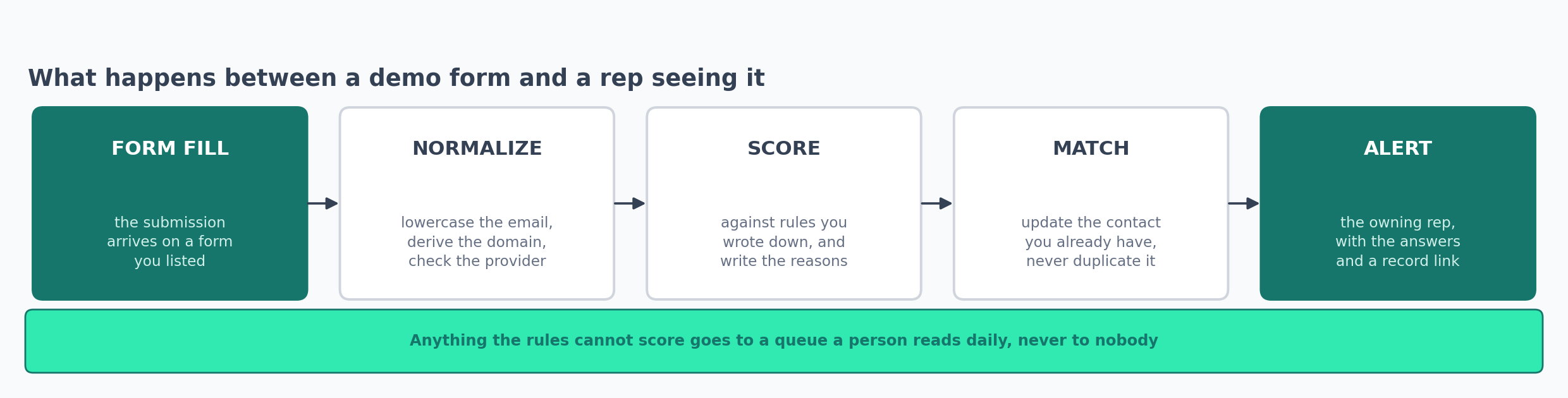
Score a Form Fill and Route It to the Owning Rep
Somebody fills in your demo form at 2pm and hears back on Thursday. Usually nobody even saw the form fill until Thursday morning. The problem is that nobody knew, so nobody could act.
This scores the submission against rules you wrote down. It creates or updates the contact record, then puts the lead in front of a named person with the form answers attached.
The whole thing takes under a minute. Agreeing the rules is the slow part, and that work happens in a meeting.
What It Needs
- An explicit list of the forms it runs on. Route a newsletter signup to a rep and the team learns to ignore the alert channel.
- Your scoring rules written down as a document, not just as filters in a tool.
- A round-robin or territory table, plus somebody who keeps it matching who's working this week. The Typeform to HubSpot route is the version I'd start from.
Where It Fails
- Reps ignore a score that arrives without reasons. Write the reasons next to the number every time.
- Any form that takes an email without matching on it creates a second record for the same person. Match first, then write.
- Send the leads your rules can't score to a queue somebody reads daily. Sending them nowhere is what costs you deals.
Routing inbound form fills
Scores a form fill and alerts the owning rep inside a minute.
Rank the Pages Losing the Most Conversions
Traffic reports tell you which pages get visits. They won't tell you which page had 4,000 people reach the form and 60 finish it. That page is costing you more than most of the keywords you bid on.
This joins three free sources and ranks your pages by how many conversions each one is losing. Every row comes with session recordings attached, so whoever reviews the list can watch what people did instead of guessing from a number.
What It Needs
- Analytics with page and event data, session replay, and field load times. Clarity, Google Analytics and PageSpeed Insights cover all three for nothing.
- A minimum session count, written down. A page with 30 sessions won't tell you anything.
- Page paths written the same way in all three sources before you join them. The session replay side and the load time side exist separately on the Exchange.
Where It Fails
- One source stores
/pricing, another stores/pricing/, and a third adds a query string. Count the rows before and after the join. - A slow page and a badly written page look identical in the report. Watch the recordings to tell them apart.
- Free replay plans only record some sessions. A page with few recordings has missing data, and that says nothing about the page.
Finding page drop-off
Ranks the pages losing the most conversions, with recordings attached.
Qualification: Enrichment and Scoring Workflows
I'd build this stage first, and most teams leave it until last. Every number further down the funnel depends on what gets decided here. A bad record travels all the way to the sales call.
Score a lead on a job title somebody typed by hand and you're scoring a guess. Run a sequence with no exit condition and it keeps emailing whoever that guess let in.
Neither workflow sends anything to a customer. They work out what's true about a record and who's allowed to email it. That's dull work, and it's what makes everything visible behave.
Enrich the Record Before You Score It
A form gives you an email address and whatever the person chose to type. There isn't much to score there. This adds the details the form didn't ask for, checks the email address exists, and only then lets the record move on to scoring.
What It Needs
- An enrichment provider like Apollo or Clearbit. Both charge per credit, so work out the cost before you build.
- An email verification service. Emailable, ZeroBounce and NeverBounce all check whether an address can receive mail for a few cents.
- A written definition of your ideal customer. Without one, enrichment buys you columns nobody reads. The enrichment and routing build shows the order the calls go in.
Where It Fails
- Teams pay for enriched columns and never use them. Decide which scoring rule reads which field before you buy credits.
- Verification returns more than two answers for a reason. Catch-all domains come back as risky, and mailing lots of those damages your sending domain.
- Work out the cost of a full database backfill before you run one. Multiply the row count by the price per credit, or a month of credits disappears in an afternoon.
Enriching before scoring
Adds company data and verifies the address before scoring runs.
Set Entry, Exclusion and Exit Rules Before the Copy
Two settings decide whether a sequence embarrasses you: who gets in, and what takes them out. Most teams set both in a rush at the end of the build, after the copy is done.
Write the specification first instead. The same document works as an audit for the sequences you already have running.
✗  Entry: contacts who downloaded something and look interested.
✓  Entry: submitted a content form in the last 14 days, employee count
   above 50, not a customer, no open opportunity, not already enrolled.
   Exit on reply, meeting booked, becoming a customer, or hard bounce.
   Re-entry after 90 days. Cap 400 enrollments a day.
You can argue with the second version. Somebody can read it and tell you the employee count is wrong. That's the whole reason to write it as a sentence before it becomes a filter.
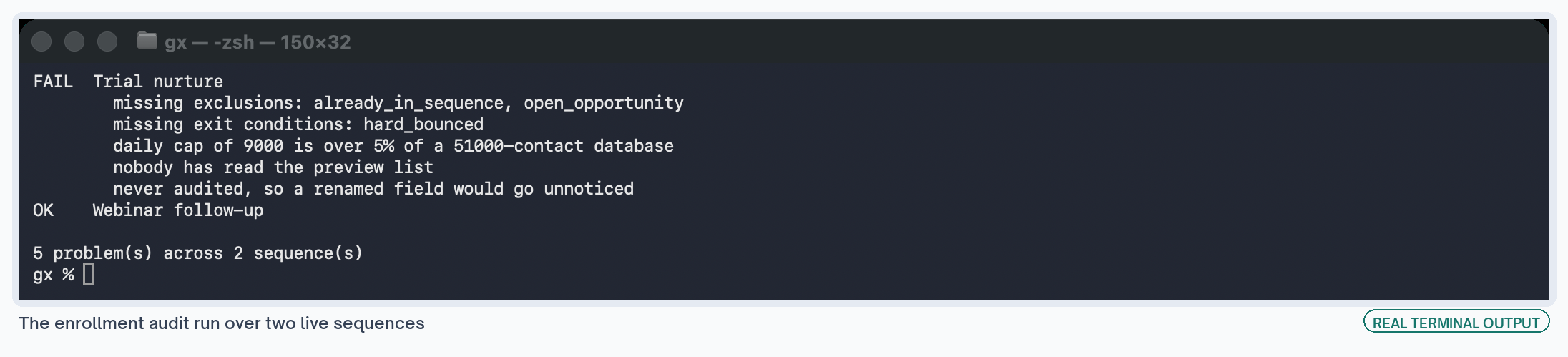
What It Needs
- A suppression list somebody maintains: current customers, open opportunities, competitor domains, and anyone who asked not to be emailed.
- A field that records which sequence a contact is in. Without it you can't stop somebody being in two at once.
- A daily cap on enrollments, set well below the size of your database. There's a HubSpot enrollment walkthrough if that's your platform.
Where It Fails
- A filter reading a property that no longer exists won't throw an error. It matches everyone or nobody, and only a monthly audit will catch it.
- Somebody raises the cap for a launch and never puts it back.
- Some platforms finish the current step before they honor an exit. Trigger an exit mid-sequence and watch what arrives.
Controlling sequence enrollment
Entry rules, exclusions and exit conditions, plus an audit script.
Activation: Trial Email Workflows
Trial email is where most teams get the mechanics right and the timing wrong. Every email sends, every email lands, and none of them match what the user did in the product. Nothing throws an error, so nothing tells you.
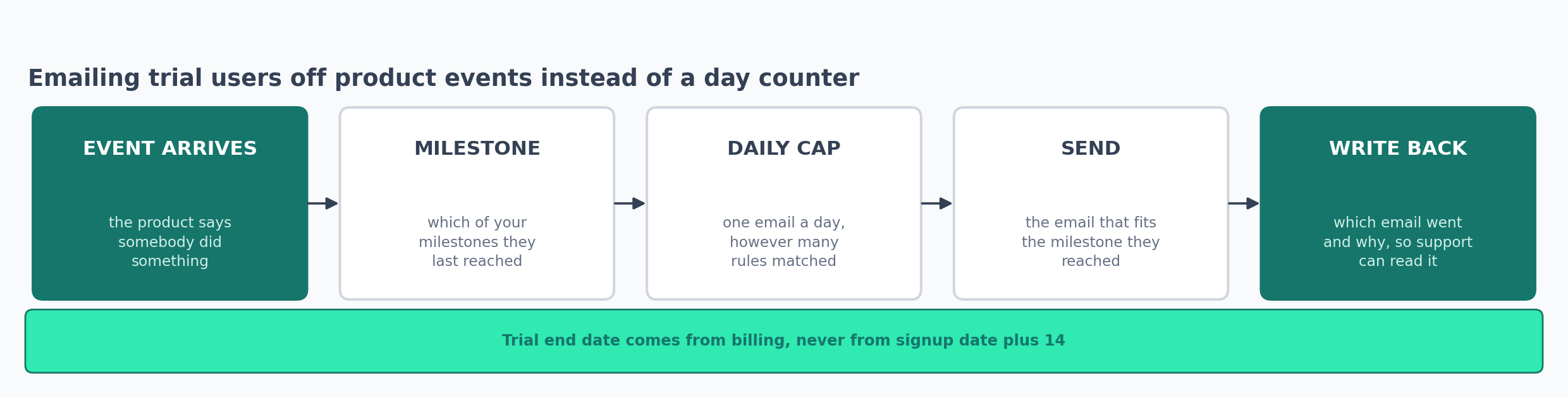
Trigger Trial Email on Product Events
The standard trial sequence sends on days 1, 3, 7 and 13 no matter what the person did.
So the user who set everything up on day one gets an email telling them to set it up on day three. The user who never logged in gets advanced tips.
This reads a handful of product events and picks the email from those. The sequence gets shorter too, because a user who already did the thing never gets the email about doing it.
What It Needs
- A tracking plan, which is a written list of the events your product sends and their exact names. Skipping this costs you an hour now and a debugging session later.
- Two or three milestones that predict conversion for your product. Everything else here depends on picking the right ones.
- The trial end date read from billing. Signup date plus 14 breaks the first time somebody gets an extension. The trial follow-up build and the tracking plan guide cover the two halves.
Where It Fails
- An engineer renames
signup_completedtosignup_complete, the sequence stops sending, and nothing reports it. Count the events you receive daily and alert on zero. - Two rules match on the same morning and the user gets two emails. The one-a-day cap has to apply across all the rules at once.
- Without conversion data, teams pick milestones by opinion. Say that's what you're doing, pick the one support hears about most, and revisit it later.
Emailing trial users
Picks the trial email from product events instead of a day counter.
Onboarding: Customer Handoff Workflows
You already know everything about this handoff in advance. Who bought, what they bought, and who owns them now. The rep wrote down what they promised, assuming somebody made that field required.
So this is the easiest stage to automate, and it's the one most teams leave manual. It happens rarely enough that doing it by hand never quite becomes a crisis.
It's also where a new customer decides whether your company has its act together, and they decide in the first few days.
Run the Closed-Won Handoff off the Deal Stage
A deal closes on Friday and the customer hears nothing until somebody gets round to it. This changes the lifecycle stage, assigns the customer success owner, copies the deal notes across, starts the onboarding emails from that owner's address, and creates the implementation task.
The internal half does more work than the emails. A welcome sequence with nobody assigned behind it gets a reply that nobody answers, and that's worse than the silence it replaced.
What It Needs
- A CRM where the deal stage is accurate. If reps mark deals closed late, this fires late too.
- An onboarding email series somebody wrote, covering what happens next and who to ask.
- The rep's notes as a required field on the deal. Automation can't invent context. The HubSpot onboarding build connects the emails and the team alert.
Where It Fails
- Five contacts at one company will start five onboardings unless you deduplicate on the company. This is the most common way it embarrasses you.
- The customer keeps getting marketing email. That happens when the stage change fires but your sequences don't exclude customers.
- The day-14 check sends another email when it should alert a person. An account that hasn't reached its first milestone needs a call.
Onboarding new customers
Fires the closed-won handoff off the deal stage change.
Retention: Churn and Failed Payment Workflows
A paying customer leaves in one of two ways. Either they decide to go, or nobody decides anything and a card expires.
Marketing usually handles the first conversation and assumes finance handles the second. So the second one gets left to whatever the billing system does by default, and nobody has read those settings.
I'd start with failed payments. You don't have to persuade anybody of anything here. The customer already wanted to keep paying you, and a bank declined a card.
List the Accounts Going Quiet, Once a Week
An account cancels and you find out during the renewal call. The signals were there for months. Logins dropped off, the champion stopped replying, and support tickets went up and then stopped.
This puts those signals in one weekly list, sorted by contract value. Somebody has to read the output as a row, and the two versions of that row look like this:
✗  Account health: 42 out of 100. Flagged for review.
✓  Usage down 61% on this account's own 12-week median.
   Champion last logged in 34 days ago.
   Four tickets in March, none since.
You can argue with the second version. That argument is usually where somebody remembers the champion changed jobs.
What It Needs
- Usage compared against each account's own history. A five-seat account and a 500-seat account in the same table tells you nothing.
- Contract value and renewal date, so the list sorts by what's at stake.
- Somewhere people look every week. A dashboard nobody opens doesn't count. The churn prediction workflow and the Zendesk risk monitor each cover one input.
Where It Fails
- A single score hides how it was calculated, so publish the three inputs next to it.
- Any rolling-median comparison fires in late December and mid-August. Leave those weeks out or expect to explain the spike.
- Champion fields go out of date within months. A quarterly check is the only thing that catches it.
Flagging quiet accounts
A weekly list of accounts going quiet, sorted by contract value.
Retry a Failed Card and Email the Billing Contact
A card expires and a paying customer becomes a former customer without either side deciding anything. You can get that money back, and the customer usually wants to stay.
So this is the highest return per hour in the lifecycle. It's also the one most teams leave to their billing system's defaults.
What It Needs
- A billing system that fires a webhook on a failed charge. Stripe, Chargebee and Paddle all do.
- A transactional sender, so an unsubscribe can't block a billing email.
- A hosted page where somebody can update a card. Stripe's customer portal does this with nothing to build, and the self-serve billing setup walks through it. The payment recovery build covers the retries.
Where It Fails
- Emails go to whoever signed up, and their finance team never sees them. Capture a billing contact at purchase.
- A dunning email that looks like a campaign gets filtered. Plain text from a named address recovers more than a designed template.
- Some banks block a card after several attempts. Follow the retry schedule your payment processor recommends.
Recovering failed payments
Chases a failed card before it becomes a cancellation.
Expansion: Review and Referral Workflows
Somebody scores you a nine, gets a thank-you, and never hears from you again.
The ask that would have worked has to happen while they still feel that way. A quarterly review of survey responses is three months too late. Timing matters here far more than what the email says.
This is also the cheapest source of reviews you have. A customer who just told you they're happy will write a G2 review if you ask them that week, and will ignore the same email in November.
Route a Positive Response to a Review or Referral
This reads the score and the comment together, then sends anything negative to a named person within the hour. The ask depends on the account. A self-serve customer gets a review request, and a well-known name gets a case study invitation.
The routing is what pays for this one. Send every response to the same report and you get a slide for the quarterly review.
Send the unhappy ones to a named person within the hour and you get a conversation while it's still possible to have one.
What It Needs
- A satisfaction survey on a repeating schedule. Quarterly is enough for most B2B SaaS products.
- One shared cap across every type of ask, so no account gets asked twice in 90 days.
- One named person who owns negative responses. The survey collection workflow handles the survey side.
Where It Fails
- Two triggers with two separate caps means two asks. Share one cap between them.
- Score thresholds on their own will send a review request to somebody who wrote an angry comment and misread the scale.
- Nobody replies to a no-reply address, and the people who wanted to reply can't.
Requesting reviews and referrals
Routes a positive response into the ask that fits the account.
Win-Back: Re-Engagement Workflows
Most B2B databases hold a big group nobody has emailed successfully in a year. The usual instinct is to mail all of them at once and see who replies.
That instinct has probably damaged more sending domains than any other habit in email.
So this is the workflow I'd hand over most carefully. Everything else here fails in a small way. A broken enrichment call leaves you an empty column, a broken onboarding trigger costs you an awkward week, and you can sort both out by Friday.
Work a Dormant List in Stoppable Batches
This defines dormancy precisely and verifies every address the same week you send. It works through the segment in batches from a separate subdomain. Everyone who stays quiet moves to a paid audience, where an ad can reach them without touching your sending reputation.
The paid step makes deleting the rest bearable. You keep a way to reach those contacts, so the email list can shrink down to the people who open it.
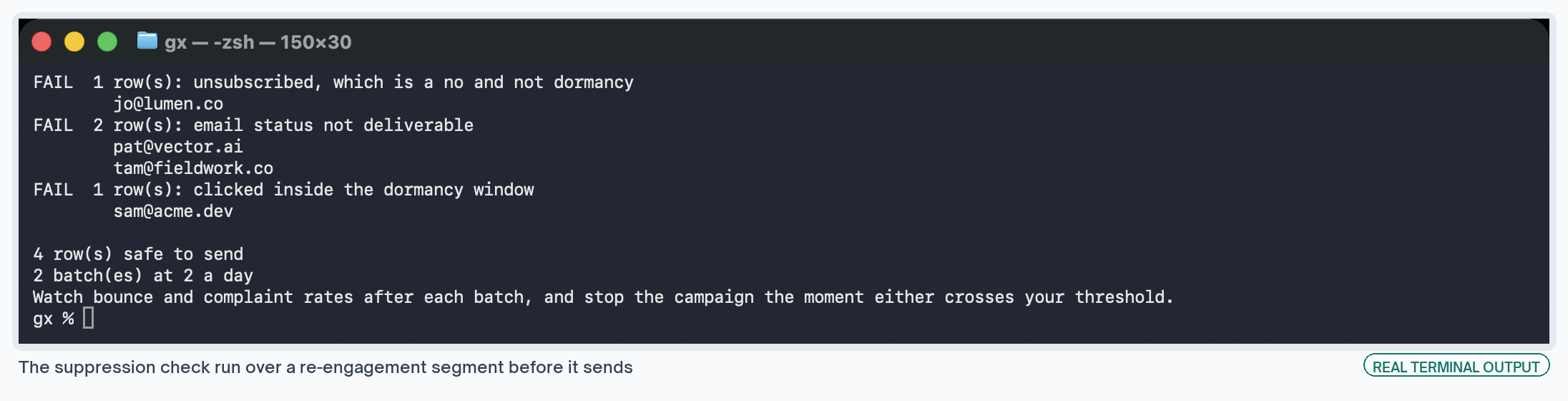
Run the check over the segment export before the first batch goes out:
cd winning-back-dormant-contacts
python3 scripts/check_suppression.py segment.csv --daily-volume 800
What It Needs
- Twelve months of click history. Opens stopped being reliable once mail privacy features started loading images in advance, so use clicks.
- A separate sending subdomain, so a bad run can't damage the domain your billing and product emails use.
- Batch sizes matched to your normal daily volume, plus bounce and complaint limits agreed before the first send.
Where It Fails
- A year of silence followed by a big send looks exactly like what it is. Batching is the only protection you have.
- Suppress a contact here and next month's product launch will pick them up again, unless suppression excludes them from every sequence.
- Judge the campaign on opens and it will look like it worked while the clicks say otherwise.
Winning back dormant contacts
Works a dormant list in stoppable batches, plus a suppression check.
What to Decide Before You Build One
A workflow specification answers four questions in order. Answer them out of order and you end up with a nurture track that has good copy and no idea who it's for.
Who enters. Write it as a sentence somebody can disagree with, then turn that into filters. Nobody can argue with a filter on its own, and that's a problem. A colleague reading the sentence will tell you the employee count is too low.
What takes them out. Replying, booking a meeting, becoming a customer, and a hard bounce cover most cases. Teams answer this question last, and customers notice when nobody answers it at all.
What it writes back. Every step that makes a judgement should record why. Nobody trusts a lead score with no reasons next to it, and the same goes for a churn flag. Support needs those reasons when a customer asks.
Who owns it once it's live. Whoever gets the alert when the row count comes back as zero. That's rarely the person who built it.
The rest of the build is clicking. It goes quickly once you've answered those four questions, and slowly if you haven't. Getting them wrong costs you the month twice over, because you rebuild after you find out.
Keeping a Marketing Automation Workflow Working
Everybody plans the build. Nobody plans for the workflow breaking a few months later without saying so.
Somebody tidies the CRM and renames a field. An engineer sends an event under a new name. A scraping service changes its markup, or a token expires without warning.
The workflow keeps running through all of that and produces nothing. On a dashboard, that looks the same as a quiet week.
So log a row count somewhere for every workflow, and set the alert to fire on zero. A workflow that handled 40 records last Tuesday and none this Tuesday is either a holiday or a breakage.
One alert on one number catches most of these. You don't need a monitoring system for it, and a weekly Slack message is enough.
Ownership is the other half. Give each workflow to a person by name, and ideally to whoever reads the output. A team owns nothing, which is how an alert sits unread in a shared channel for a month.
If nobody reads the output, turn the workflow off. A list nobody reads can sit there broken for months, and it looks like it's working the whole time.
I can't tell you what any of this saves. Nobody measured a before, and a total across every stage would just be a guess with a decimal point on it.
Anyone quoting you a clean percentage across a whole lifecycle is guessing too, with more confidence.
What These B2B Marketing Automation Workflows Cost to Run
Enrichment and ad spend account for most of the cost. Everything else reads data you already store and sends email you already send.
Enrichment is the one line that grows with volume. A per-record price looks small next to one form fill and stops looking small across a database backfill. Log the credit spend per run and you'll see the monthly number before the invoice arrives.
Settings to Change Before Switching a Marketing Workflow On
The one I'd never skip is reading the preview list. Whatever the filter says it matches, read the first 50 names yourself before anything sends.
A filter that matches your whole database looks identical to a correct one until you see who's in it.
Which Marketing Workflow to Build First
Enrollment control, which is the dullest answer available. It costs nothing and needs no new tools. Every other workflow here writes into a sequence that either has exit conditions or doesn't, and you'd rather find that out now.
After that, go by what's leaking. Start with failed payments if you charge cards, because that money is already yours. Do form routing next if inbound leads sit overnight, and quiet accounts if a renewal has surprised you recently.
Leave the dormant list until last, whatever the size of your database. Get it wrong and you damage a sending domain that works fine today.