

Key Takeaways
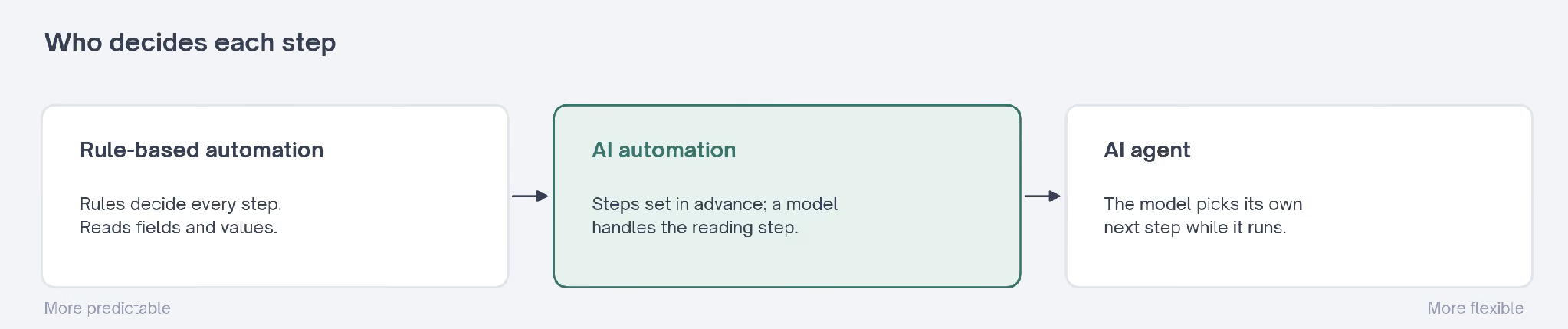
- AI automation sits between rule-based automation and AI agents: you set the steps in advance, and a model handles the ones that require judgment.
- The AI step usually does one of a handful of jobs: sorting, pulling out details, summarizing, drafting or scoring.
- Many GTM automations need only one AI step inside an otherwise ordinary workflow.
- The biggest design decision is where a person checks the output before anything reaches a customer.
- The best first job repeats every week, has a clear input, and fails cheaply when the model gets it wrong.
- Every AI step costs money per run and can fail without telling you, so log it and alert on errors.
AI automation is a workflow that runs on its own, with an AI model handling the steps preset rules can't, such as reading a message, sorting it or drafting a reply. Rules still move the data between apps. For GTM teams, it suits repetitive work with clear inputs and results someone can check.
Most GTM teams already run automation. A form fill creates a CRM record, a new trial user gets a welcome email, and a closed deal posts a note in Slack. None of it involves AI, and it works fine.
The trouble starts with the jobs rules can't handle. Reading a reply to decide whether it's an objection or a referral, summarizing a sales call, or sorting a hundred brand mentions by urgency all require someone to read first.
AI automation is putting a model into that reading step.
Until recently, people did those jobs or skipped them.
A rep skimmed the replies when they had time, and call notes went into the CRM when someone remembered. Brand mentions got a look once a week. The work was repetitive, and only a reader could do it.
For the workflows themselves, the Exchange has a separate guide to AI workflows.
This guide covers what changes when you bring in AI automation, the patterns most workflows follow, two public templates that put the human in opposite places, and how to choose the first job to hand over.
What Is AI Automation? Rules, a Model, and Where They Meet
Classic automation follows preset rules. When a field equals a value, the software takes an action. That works for structured data, such as a dropdown choice or a date, but fails on free-text entries.
AI automation adds a model for the parts rules can't read. Oracle's AI automation explainer places it between robotic process automation, the older software that repeats clicks and keystrokes, and AI agents that plan and act on their own.
The three sit on a range, and the difference is who decides each step:
| Who decides each step | A rule someone wrote | A rule, with a model handling one or two steps | The model, while it runs |
|---|---|---|---|
| What it reads | Fields and values | Free text, documents and messages | Whatever its tools return |
| How predictable it is | Fully | Mostly, since the path is set in advance | Less, since the path changes |
| GTM example | Send the welcome email at signup | Sort replies by intent, then route each one | Research an account and decide what to send |
Anthropic draws the same line in its guide to building effective agents. It calls systems with steps laid down in advance workflows, and systems where the model directs its own process agents.
Most of what a GTM team needs is the workflow kind, and the Exchange's AI agent guide covers the other end of the range.
Anthropic's own advice is to look for the simplest setup that works and add complexity only when it improves results.
That advice runs counter to how AI tools are usually sold. A demo of an agent researching accounts and writing emails is more exciting than a workflow that tags replies.
The second one is usually what a team can run every day without someone watching it.
Oracle's explainer adds a practical note for teams buying software. Some business applications now come with built-in AI automations, so the first step is to check what your existing tools already do before building anything new.
Many definitions of AI automation, Oracle's included, say it learns on the job. In the GTM workflows covered here, nothing learns between runs. Each run sends the model the same instructions, and results improve only when someone edits those instructions.
That matters for planning. Improvement is a task with an owner, and a workflow left alone for six months is running on six-month-old instructions.
Marketing Automation, Before and After the AI Step
Marketing automation has long relied on rules. A contact joins a list, waits two days, gets an email, and moves to the next list when they click.
A public n8n template for customer onboarding shows the shape. It sends a welcome email at signup, documents after 2 hours, a check-in after 1 day and a first-week guide on day 3, with team alerts and no AI.
That's still the right build for timed emails. The timing never needs judgment, so a model would only add cost. Plenty of good automation will never need a model.
The AI step belongs where something in the flow has to be read. A follow-up template on n8n, the 4-stage email follow-up system, uses a model for one small job: inserting each recipient's name into templates that stay otherwise unchanged.
Its creator puts the cost at about $0.001 per personalization with Groq, an AI provider with a free tier.
That's the model doing almost nothing, and the template is useful precisely because the model's job is so narrow. Most of the value comes from the rules around it.
The rest of that workflow is plain rules: it sends follow-ups on days 3, 7, 12 and 16 after the first email, which a separate workflow or person sends, and a database tracks each contact's stage.
That split between rules and a model is the pattern to copy. Timing, tracking and sending stay with rules and the model only touches the part where wording changes from person to person.
What the AI Does in AI Automation
Laying out the workflow itself, step by step, is the AI workflow guide's job. The question here is narrower: once a model is in the automation, what is it there to do?
In most GTM automations, the model does one of five jobs. Oracle's explainer describes the same building blocks under other names, such as classifying documents and extracting information:
| Job | What the model does | A GTM example |
|---|---|---|
| Sort | Puts each input into one of a few categories | Tags inbound replies as interested, objection, referral or unsubscribe |
| Extract | Pulls named details out of free text | Lifts company size and use case from a demo request form |
| Summarize | Shortens something long | Turns a sales call transcript into five lines for the CRM |
| Draft | Writes a first version for a person to edit | Writes a reply to a brand mention for the social team to approve |
| Score | Gives each input a number against a standard | Rates how closely a lead matches your ideal customer profile |
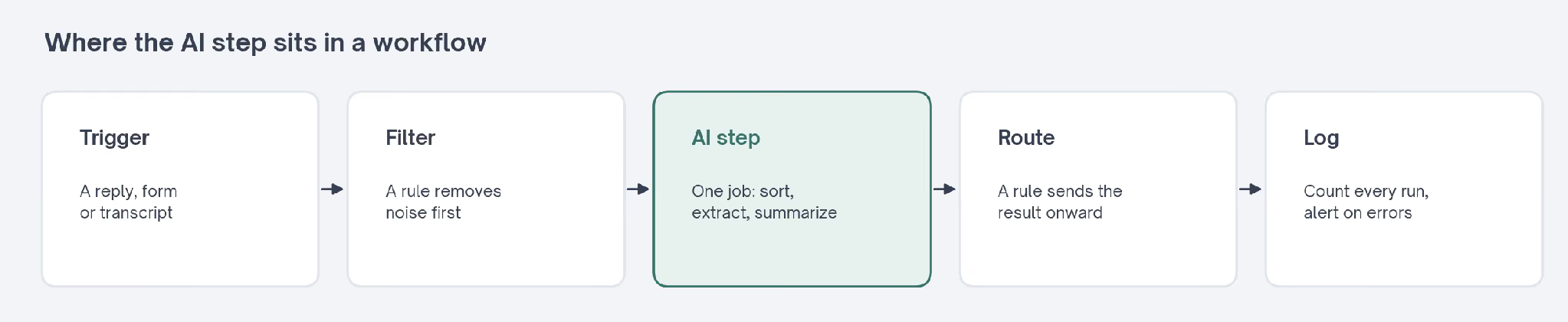
Everything around that step stays rule-based. A trigger starts the workflow, a connector fetches the data, the model does its one job, and a rule decides what happens with the result. The model never touches the trigger or the routing.
Keeping the model to one job makes the workflow easier to check. If the sorting is wrong, you know which step to look at, and you can test that step alone with a sample of inputs.
Sorting
I'd start with sorting, since it's usually the safest first job. The model reads each input and picks one label from a short list you wrote. A wrong label is easy to spot and easy to correct.
It goes wrong when labels overlap, since "interested" and "wants pricing" can get mixed up unless the instructions say which one wins, so a short definition for each label works better than a longer prompt.
Extracting
Extraction turns free text into fields. A demo request that says "we're a 40-person team moving off spreadsheets" becomes a company size and a current tool, ready for the CRM. Routing rules can then read those fields like any other.
It goes wrong when the detail isn't there. A model asked for a company size may guess one, so the instructions should say to leave the field empty when the text doesn't state it.
Summarizing
Summaries save the most time on long inputs, such as call transcripts and support threads. A five-line summary in the CRM gets read, while a transcript attached to the record usually doesn't. That alone changes what a manager can see in the pipeline.
It goes wrong when it leaves out the one line that mattered. Asking for specific sections, such as next steps and objections raised, keeps the summary from turning into a general recap.
Drafting
Drafting is where most teams want to start, and where a person matters most. A draft reply, a post or a follow-up email reads well enough to send, which is exactly the risk. Fluent text hides mistakes well.
I'd keep drafts as suggestions until the team has read enough of them to trust the pattern. Sending a draft to a person first costs a few seconds of review and catches cases the prompt didn't anticipate.
Scoring
Scoring gives each input a number, such as how closely a lead fits your ideal customer. It works when you set a standard, and the model can compare each input against it. Without a written standard, the number means nothing.
It goes wrong when the score hides its reasons. A number with no explanation can't be argued with, so asking the model to explain its score keeps it checkable.
AI Automation Patterns: The Shapes Most Builds Take
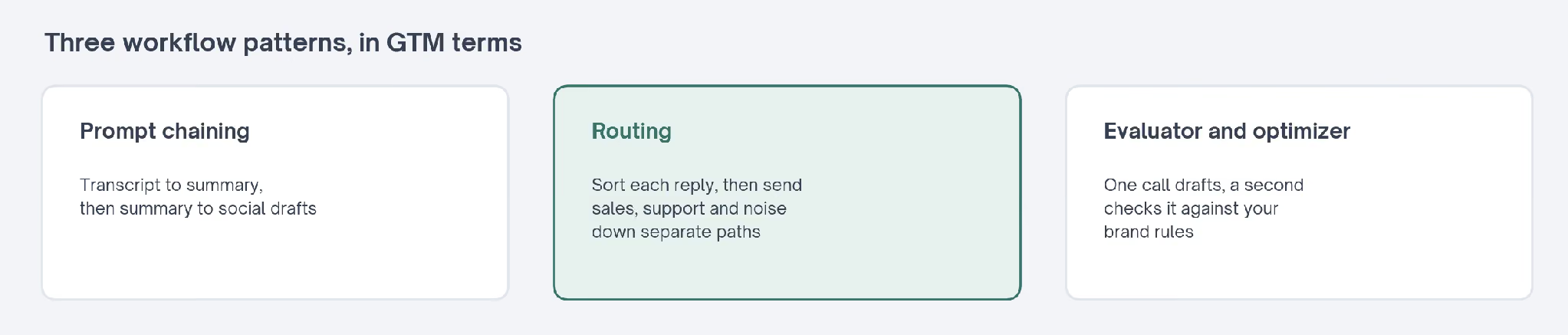
Anthropic's guide names a handful of common patterns it has seen in language-model workflows. Translated into GTM jobs, three of them do most of the work:
- Prompt chaining: Each step works on the output of the last. Anthropic's own example is writing marketing copy, then translating it into another language.
- Routing: The model sorts an input, and each category goes down its own path. Anthropic's example sends general questions, refund requests and technical support to different processes.
- Evaluator and optimizer: One model call writes, a second one checks against clear criteria, and the draft goes back if it fails.
The guide also allows for checks between steps, which it calls gates. A gate can be a plain rule you write, such as rejecting any draft over 150 words, so a bad output stops before it reaches the next step.
Gates cost almost nothing to add. For a GTM team, chaining fits content repurposing, where a webinar transcript becomes a summary and then a set of social drafts.
Routing fits inbound handling. Each reply or form fill goes to the right person, and the categories can be as simple as sales, support and noise.
The evaluator pattern fits anything with a written standard. A brand voice guide or a list of banned claims gives the checking step something concrete to test against. Without one, the checking step has nothing to check against.
Anthropic's guide also describes running checks side by side, which it calls parallelization. One model call handles the task while a second screens the same input for problems, and Anthropic notes this tends to work better than asking one call to do both.
For a GTM team, that might mean one step drafting a reply while another checks the draft for claims your legal team hasn't approved. Each step stays simple, and you can test either one on its own.
Two Brand-Monitoring Workflows, One Big Difference
Two public n8n templates watch for brand mentions and use a model to judge them. They look alike on paper, and they make opposite choices about where a person sits. The difference comes down to a single step.
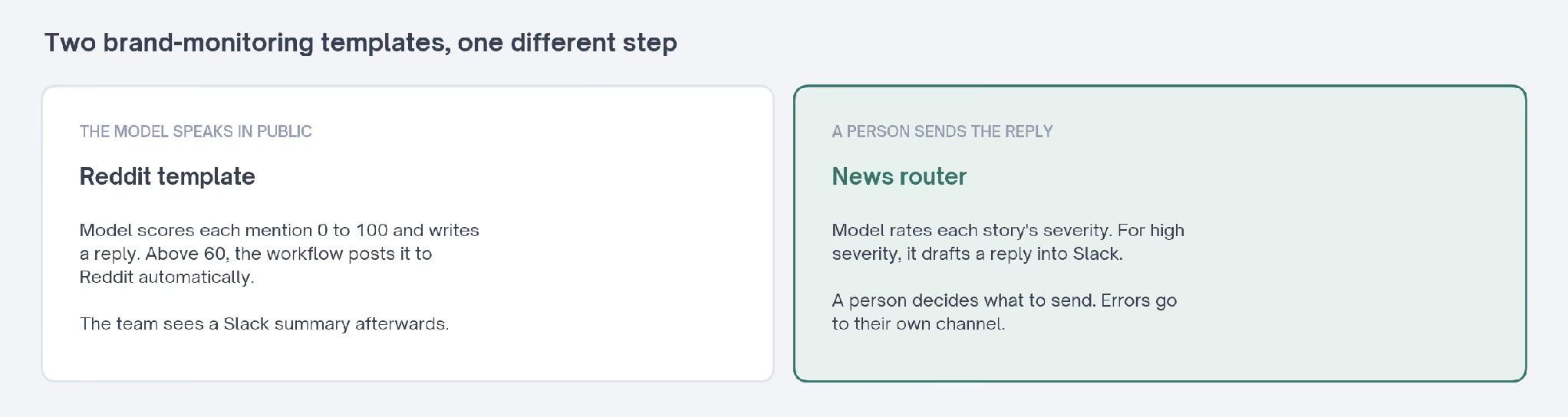
The first, Daniel Shashko's Reddit brand monitoring template, runs every 24 hours. It sends each new mention to GPT-4o-mini, which rates sentiment, scores engagement from 0 to 100 and writes a reply.
Posts scoring above 60 that the model judges relevant get the AI-written comment posted to Reddit automatically. The team sees a summary in Slack after the comments are already live.
The second, Chijioke Ogbonna's brand mention router, checks Google News every 15 minutes. A model classifies each story by sentiment, intent and severity. It runs far more often. It never posts anything itself.
For high-severity stories, it drafts a short public reply and posts it to Slack as a suggestion. A person reads it and decides what to send. Errors go to a separate Slack channel, so a broken run doesn't pass for a quiet day.
| How often it runs | Every 24 hours | Every 15 minutes |
|---|---|---|
| What the model decides | Whether to engage, and what to say | How severe each story is |
| Who sends the reply | The workflow, automatically | A person, from a Slack draft |
| How errors surface | Nowhere: a failed run sends no summary | In their own Slack channel |
Both keep a record in Google Sheets: the news router logs every mention, and the Reddit template logs each post it replies to. That gives each team something to check the model against later. That log is what makes either design safe to adjust.
Neither design is wrong. The first suits a team comfortable with a model speaking for the brand in public, after tuning its prompt and threshold. The second suits a team that wants the speed of sorting without handing over its public voice.
That choice comes up in almost every GTM automation. I'd make it before choosing a tool, because it decides whether the model's mistakes reach a customer or a colleague first.
If I were running the Reddit template, I'd start it in the second style. Sending each draft to Slack for a few weeks shows how often the model's judgment matches the team's, and you can raise or lower the threshold with that evidence.
AI Automation Examples Across the GTM Funnel
The same handful of AI jobs shows up at every stage of the funnel. What changes is the input and who acts on the result.
At the top, the input is public conversation. The brand-monitoring templates above sort and score mentions, and the output goes to whoever handles social or PR. Speed matters most here, since a reply posted while the thread is still active gets read.
At capture, the input is a form. Extraction turns a free-text answer about team size or current tools into fields a routing rule can read, so a demo request reaches the right rep without someone copying details across.
In qualification, scoring compares each lead with a written profile of your best customers. The model's reasons travel with the score, so a rep can see why a lead ranked high before calling. A score without reasons is easy to ignore.
After a sales call, summarizing does most of the work. A transcript becomes next steps and objections in the CRM, and the rep checks it while the call is still fresh.
In retention, the input is support tickets and usage data. The Exchange's churn prediction template combines deal age, ticket sentiment and usage trend into one health score, so a quiet account surfaces before renewal. Those three signals rarely sit in the same report.
Across all five, the model rules look almost the same. A trigger starts the run, a filter removes noise, the model does its job, and a rule sends the result to a named person.
How GTM Teams Can Automate Repetitive Work
Start by automating something boring. A dull, frequent task with a clear right answer teaches a team more than an ambitious one that's hard to check. Boring jobs also have the clearest definition of done.
I'd look for three things in a candidate:
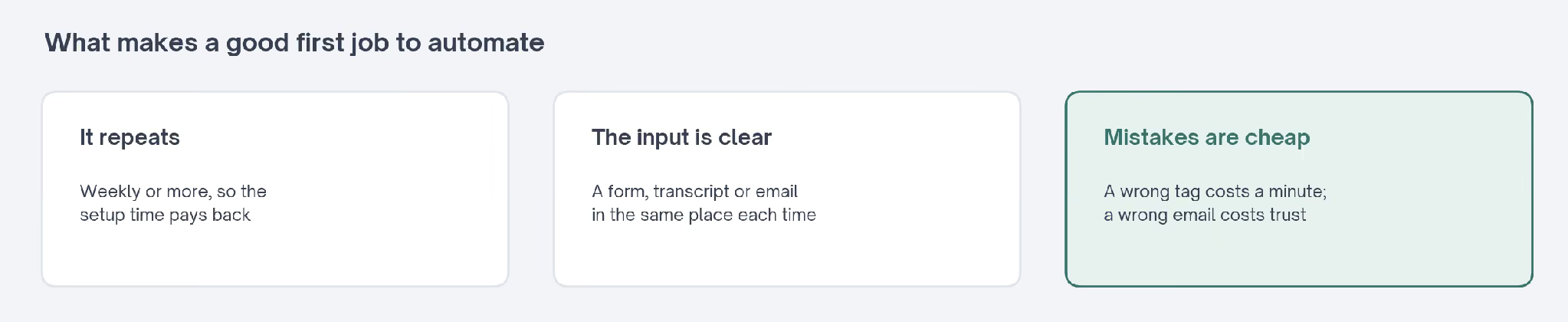
- It repeats. It comes up weekly or more, so the setup time pays back.
- The input is clear. A form, a transcript or an email, arriving in the same place every time.
- Mistakes are cheap. A wrong tag on a reply costs a minute to correct, while a wrong email to a customer costs trust.
| GTM job | Rule-based or AI? | Why |
|---|---|---|
| Send the welcome email at signup | Rule-based | The timing and content never need judgment |
| Route demo requests to the right rep | Rule-based, with AI if forms are free text | Territory tables handle structured fields; a model reads the rest |
| Tag inbound replies by intent | AI | Someone has to read each reply |
| Summarize sales calls into the CRM | AI | The transcript is long, free text |
| Draft replies to brand mentions | AI, with a person approving | The wording reaches the public |
| Score leads against your ideal customer | AI or rules | Rules work for firmographics; a model helps with written signals |
Starting with sorting or summarizing usually works better than starting with drafting. The output stays internal, so a mistake shows up in a colleague's view before it reaches a customer's inbox.
Once the first workflow runs cleanly for a few weeks, the next one goes faster. The connectors, the logging and the habit of checking a sample all carry over. The second build reuses most of the first.
A Worked Example: Tagging Inbound Replies
Replies to outbound email are a good first build for most teams. They arrive in one inbox, they need reading, and a wrong tag only delays a follow-up. They also arrive in volume. The time saved shows up quickly.
- Trigger on each new reply. The workflow starts when a reply lands in the shared inbox or the sequencing tool.
- Filter with rules first. Out-of-office messages and bounces have recognizable patterns, so rules remove them before the model sees anything.
- Ask the model for one tag. Give it four labels, a one-line definition for each, and two example replies per label.
- Route by tag with rules. Interested replies go to the rep, objections go to a shared queue, and opt-outs go to suppression.
- Log every run. Record each reply, its tag and the time, so the team can check what happened later.
Steps 2 and 4 carry most of the workflow, and neither one needs a model. The AI step is a single call in the middle, which keeps the cost low and makes the tag easy to audit.
After the first week, read twenty tagged replies. Any label the model keeps getting wrong usually needs a sharper definition or a better example, and that edit takes minutes. Once the tags settle down, repeat the check monthly.
What AI Automation Costs, and Where It Breaks
Every AI step has a running cost. Each input sent to a model is a paid call. A workflow that handles a thousand items a day costs a thousand calls, even when the per-call price is small.
Volume drives the bill more than price does. Rules don't have that cost, so keep the model to the steps that need it. A filter in front of the model, such as skipping duplicates or out-of-scope messages, cuts the bill without touching the results.
The model choice matters too. Anthropic's guide gives the example of sending easy questions to a smaller, cheaper model and saving the larger one for hard cases, which suits a sorting step that mostly sees routine inputs.
The failures matter more than the cost:
- Wrong answers that look right: A model can confidently tag a reply incorrectly, and nothing in the workflow flags it.
- Silent breakage: An expired login or a renamed field stops the workflow, and an empty Slack channel looks the same as a quiet week.
- Drift: Inputs change over time, such as a new product name or a new kind of request, and a prompt written months ago stops fitting.
- Messy data: Oracle's explainer lists data quality as a main challenge, since a model working from bad records produces bad results faster.
- Mistakes that stack up: In a chain, an error in the first step carries into every step after.
Two habits handle most of these. Log every run with a count of what it processed, and send errors somewhere a person reads, the way the news router uses its own Slack channel. Both are small additions next to the rest of the build.
The third habit is reading a sample: a dozen outputs a week, checked by someone who knows what good looks like, catches drift before it turns into a pattern.
How Many Teams Use AI Automation Today
Adoption is wide and still shallow. McKinsey's State of AI survey found that 88% of respondents said their organization used AI in at least one business function in 2025, from a survey of 1,993 people. That's a large share of companies using AI somewhere.
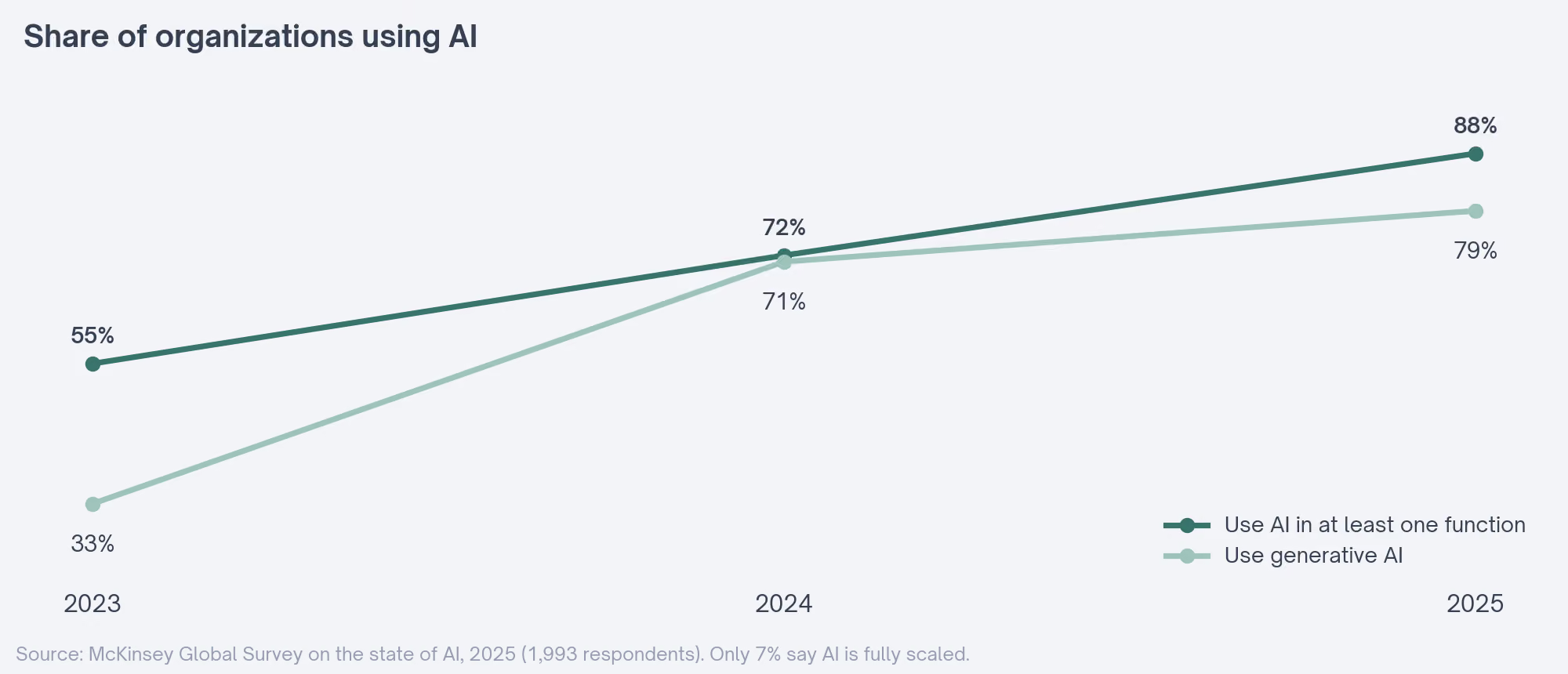
| Year | Use AI in at least one function | Use generative AI |
|---|---|---|
| 2023 | 55% | 33% |
| 2024 | 72% | 71% |
| 2025 | 88% | 79% |
The same survey found that only 7% of respondents said AI had been fully scaled across their organization. McKinsey's reading is that broader use may need workflows redesigned around what AI can do. Using AI and building around it are different stages.
For a GTM team, that gap is the opportunity and the warning. Trying AI is common, while building it into how the work runs every day is the step most organizations haven't taken yet.
Who Owns an AI Automation Once It's Live
Every automation needs a named owner. An AI step makes that more pressing. The owner is the person who gets the error alert, reads the weekly sample and edits the instructions when the inputs change. A team name in that field doesn't count.
The model's instructions deserve the same care as any other piece of the build. A one-line change can alter every output.
Keep them in one place, note when they change and why, and test a change on a handful of past inputs before it goes live.
Ownership also settles who answers for a mistake. A tagged reply that went to the wrong rep is a small problem with a clear owner, and an unowned workflow turns the same mistake into a mystery nobody investigates.
Where to Go Next on the Exchange
The Exchange already covers the tools and ready-made builds, so this guide stops at the concepts. These pages pick up from here:
- AI workflow automation tools, sorted by the layer each one handles, with where each gives up.
- Marketing automation workflows for B2B SaaS, starting with the ones to build first.
- The lifecycle workflows guide, with specs from demand through win-back.
- Sales workflow automation, covering prospecting and follow-up.
- Free n8n templates for GTM teams, sorted by where each lands in the funnel.
- The Exchange workflow library, with every listed automation and its limits named.
- The free tools directory, covering the apps these workflows connect, with what each free plan includes.
- Content and SEO automation, for building automated content systems that keep quality checks in place.
- The trial follow-up template, a rule-based build that sends each user the email for their day.