

Key Takeaways
- The AI model gets the steps that need judgment: reading free text, judging tone, summarizing, and drafting.
- Counting, adding up, random picks, and anything that must repeat exactly stay with rules. A model asked to choose at random tends to keep choosing the same option.
- The person goes after the model and before the first step that can't be undone.
- A review step needs the output and one question for the reviewer. Without both, the workflow stops at that step.
- If the steps are set in advance, it's a workflow. If the model chooses its own next step, it's an agent, and I'd start with a workflow.
- A separate step that reads the source catches a model's mistakes. The same model rereading its own output misses them.
- Copied templates arrive with their author's thresholds, so I'd replace each one with a number I can explain.
- I'd write the job down as steps, each marked rule, model, or person, before choosing a tool.
An artificial intelligence (AI) workflow is a set of steps that runs on its own once something starts it, with an AI model handling the steps that need judgment, like reading a customer message or drafting a reply. Rules handle anything that must come out the same every time, and a person approves anything risky before it goes out.
A lot of marketing work repeats in the same order. Something arrives, someone reads it and decides what it is, and then someone replies to it or routes it on.
An AI workflow hands the reading and deciding to a language model. Software moves the data in and out, and a person checks anything that's about to reach a customer.
Most of the work in building one, as far as I can tell, is deciding which steps the model gets and which stay with a rule or a person.
What Is an AI Workflow?
It's a trigger plus a chain of steps that ends in a result, with an AI model doing at least one of the steps. The trigger can be almost anything that happens in your tools.
Common triggers in go-to-market work:
- A schedule, like every morning at eight
- A new form fill on your site
- A record changing in your CRM, like a deal moving to closed won
- A message arriving in a shared inbox or in Slack, your team chat
- A person pasting something into a box and pressing run
The result is usually one of these:
- A message to a person or a channel
- A row added to a sheet
- A draft waiting for review
- A changed record in the CRM
The model is usually a large language model like the ones behind ChatGPT and Claude, built to read and write text. Some workflows add an image model that draws a picture from a description.
Every model step runs on a prompt that says what to do and what to hand back, in a format the next step can use.
When you chat with ChatGPT, you choose every next step yourself. Write those steps down and have software carry them out in order, and you have an AI workflow.
Every step in the chain is one of three kinds:
| Kind of step | What it's good at | In the Reddit monitor |
|---|---|---|
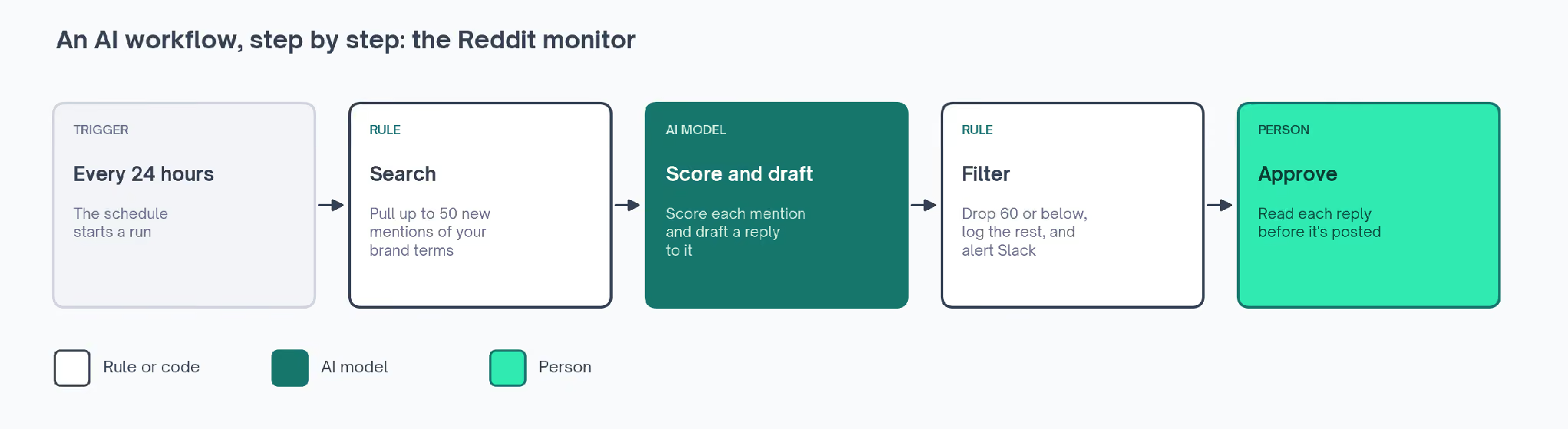
| Rule | Anything that must give the same answer every time: pulling records, counting, comparing a number with a threshold, and sending a message | Search Reddit for your brand terms every 24 hours, then drop any mention scoring 60 or below |
| AI model | Reading messy text, judging tone or relevance, summarizing, and writing a first draft | Score each mention's sentiment, judge its relevance, rate its engagement out of 100, and draft a reply |
| Person | Checking output before a customer sees it, and catching what the model gets wrong | Read every drafted reply before anything is posted |
That's the Reddit monitor listed on The GTM Exchange, a go-to-market (GTM) directory of tools, workflows, skills, and newsletters. It watches Reddit, the discussion site, for your brand name.
The rule deciding what reaches a person comes straight from its listing: "Only posts that are relevant, score above 60 on engagement quality, and warrant something other than a pass make it through to a human."
The model step is the one I'd test first in any workflow, since it's the only step that can give a different answer to the same input.
The churn prediction workflow on the Exchange, which flags customers likely to cancel, makes the same point. Its notes tell you to check the sentiment step against tickets you've already read, "because sentiment scoring is the piece most likely to be wrong."
What Does an AI Workflow Look Like, Step by Step?
A banner workflow we built in Slate, an AI platform for marketing teams, takes a blog post title and returns a finished banner, the cover image at the top of the post.
A model handles the art director and draw steps, and code or platform settings handle the rest:
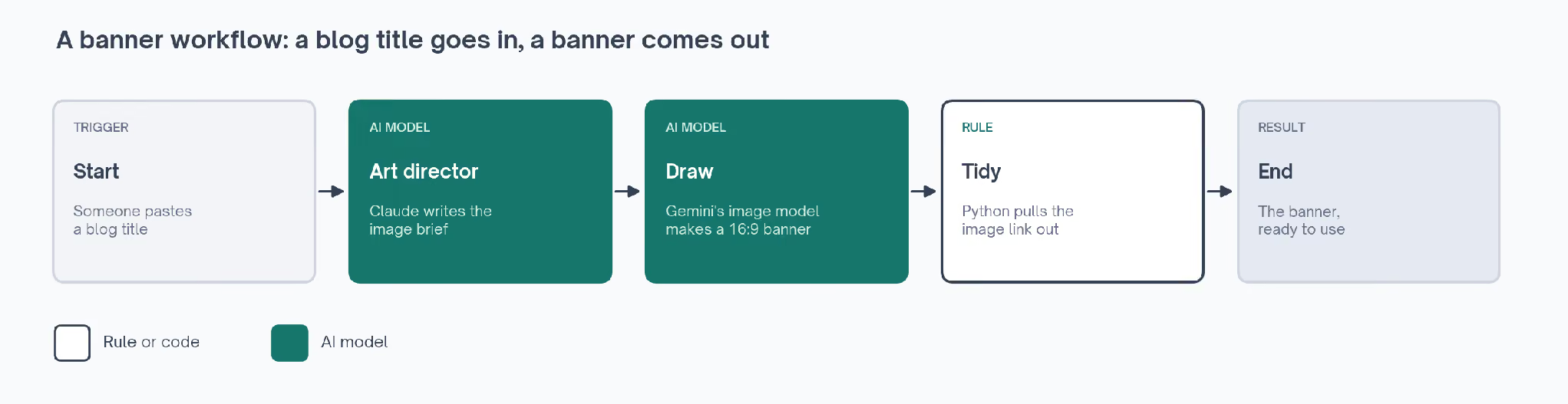
| Step | Done by | What goes in | What comes out |
|---|---|---|---|
| Start | A form | A blog post title, typed or pasted | The title |
| Art director | Claude, a language model | The title and the design rules | A written brief for the image covering layout, background, illustration, and logo position |
| Draw | Google's Gemini image model | The brief | A 16:9 (widescreen) banner image |
| Tidy | A few lines of Python, a programming language | Everything the draw step sends back | One link to the image file |
| End | The platform | The link | The banner, ready to download |
The art director step decides what the banner should look like and writes that down in words the image model can follow.
The draw step uses Gemini because the other image model we looked at, from ChatGPT's maker OpenAI, only makes square pictures or 3:2 ones, and a banner needs 16:9. So the model for each step gets picked by what that step has to produce.
The tidy step exists only to pull a plain link out of the bundle of data the draw step sends back. Code steps in an AI workflow are often that short.
In the first versions, the art director step also chose the layout. Its instructions told it to add up the letters of the title, divide by the number of layouts, and use the remainder to pick one.
The idea was to land different titles on different layouts and stop a run of banners from looking alike.
Which Steps Should the AI Model Handle?
A model should handle the steps that need judgment about words or pictures. Code should handle anything that needs arithmetic, an even spread across options, text kept word for word, or the same answer every time.
The banner workflow's layout step, where Claude picked a layout by adding up the title's letters, taught us that. Four runs in a row came back as the same design whatever the title, with the headline in a see-through card on dark navy.
A language model writes the most likely next words. It doesn't reliably work out a sum over the letters of a title, so it kept returning the layout it rated most likely.
No step in the workflow compared one banner with the last, so the repeat only showed once we looked at several together.
So we took that choice away from the model. A code step called Pick Design now runs before the art director and decides every part of the design that should vary evenly:
- Layout
- Background and colors
- Illustration
- Eyebrow label, the small tag above the headline
- Logo position
- Alignment
- Headline size
Pick Design has to come first, because in Slate a step can only use what earlier steps produced. The art director then gets those choices as a locked block it may not change, and spends its effort describing the scene.
To choose, Pick Design scrambles the title and a random number into one long number, called a hash. Cut down to the layout choice, the idea looks like this in Python:
import hashlib, os
LAYOUTS = ["glass_card_center", "white_card_confetti", "title_left_motif_right",
           "title_top_bare", "motif_hero"]
seed = os.urandom(4).hex()   # new every run
print("SEED", seed)          # paste it back in to rebuild this design
number = int(hashlib.md5((title + seed).encode()).hexdigest(), 16)
layout = LAYOUTS[number % len(LAYOUTS)]
The first version hashed the title alone. Re-running one title then gave back the identical banner when we wanted options for one post. With a random number added per run, four runs of the same title returned four different designs.
Each run prints its random number, called a seed, and pasting that seed into an optional field on the form rebuilds the same design later.
✗  The model picks the layout from a sum over the title's letters.
   Four runs, whatever the title, one layout.
✓  Code picks the layout from a hash of the title and a random number.
   The model is told the choice is locked.
   One title, four runs, four designs.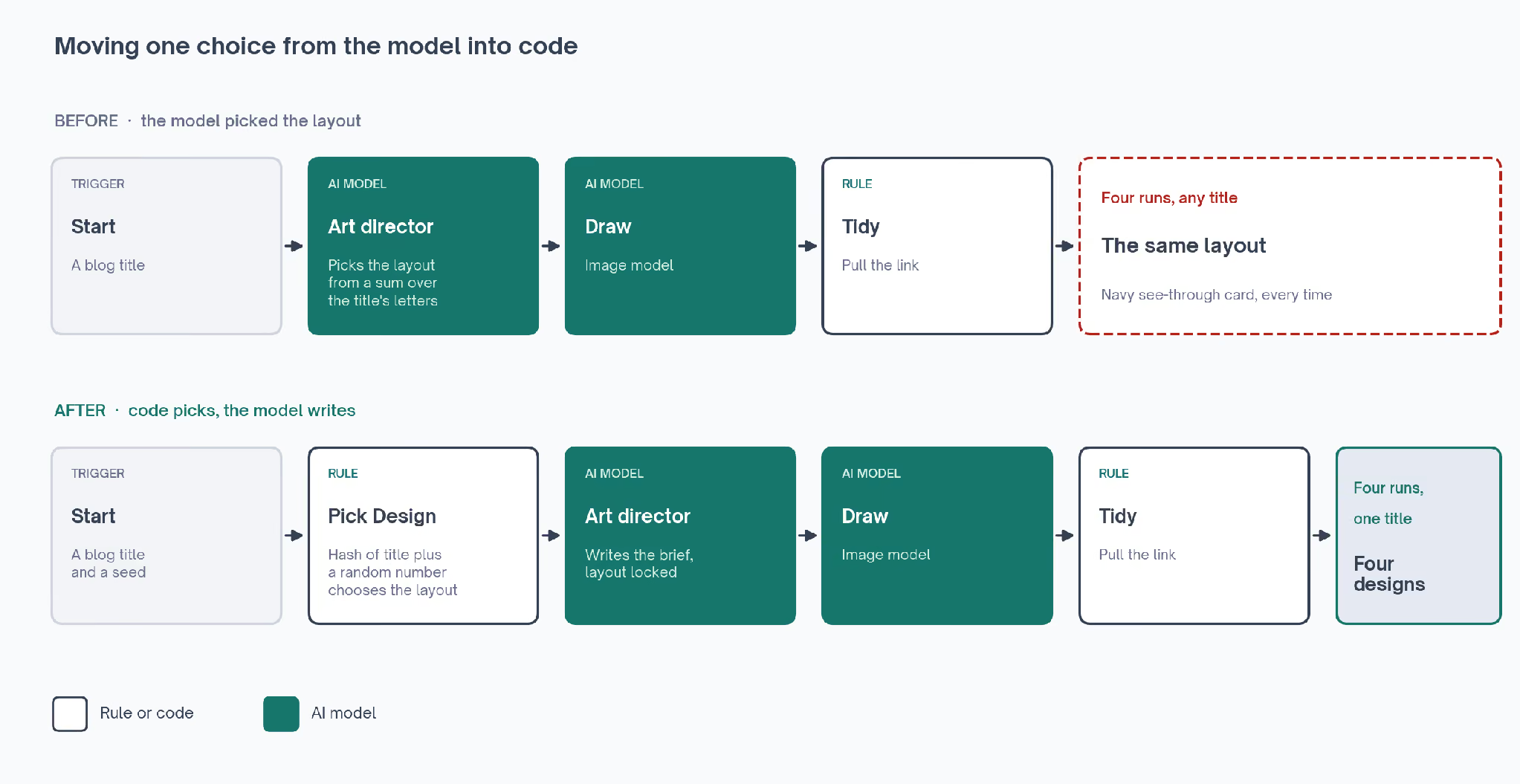
Here's how I'd sort any step:
| If the step has to | Give it to | Because |
|---|---|---|
| Give the same output for the same input | A rule | A model can word things differently on every run |
| Pick at random or spread choices evenly | A rule | A model drifts back to the option it rates most likely |
| Count, add up, average, or compare numbers | A rule | Code doesn't make arithmetic slips |
| Read free text and judge what it means | The model | A rule can't tell that a lukewarm reply comes from an unhappy customer |
| Write a first draft or a summary | The model | Language models are built to write |
| Send, post, publish, or spend | A person, after the model | A mistake here reaches a customer |
Some steps need both halves, and the banner workflow now splits its old layout step that way: Pick Design chooses the layout and the art director writes the brief. When a model keeps getting one detail wrong, I'd try that split first.
Where Does a Person Fit in an AI Workflow?
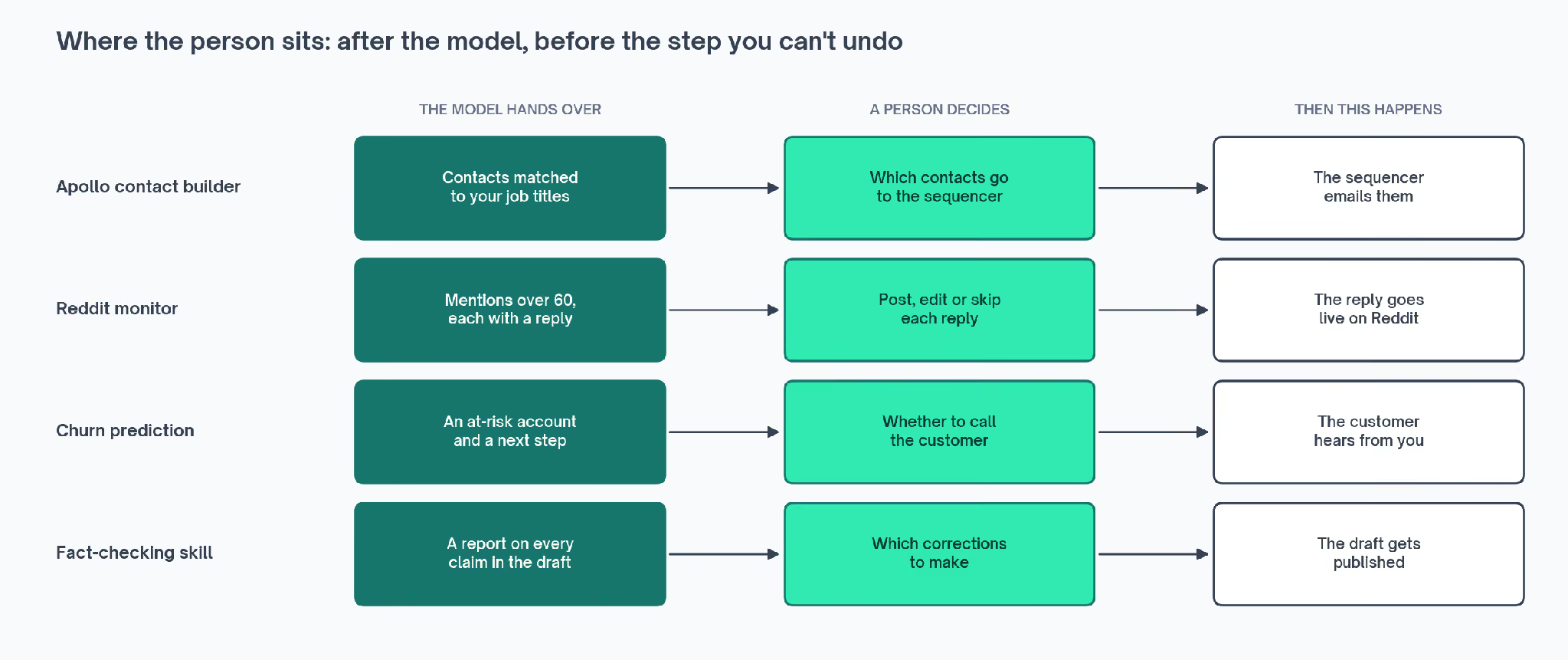
A person belongs after the model and before the first step that can't be undone, like sending an email, posting a reply, publishing a page, or spending money. In that spot, they judge the finished output while nothing has gone out yet.
The Apollo contact builder finds people at target companies through Apollo, a database of business contacts. Its listing says: "Nothing reaches your sequencer until a rep approves it." A sequencer sends outbound email, so a bad match becomes an email to the wrong person.
The Reddit monitor's notes add a trial period, with the workflow running read-only for a week before any drafting gets switched on.
These Exchange workflows all put the person in the same spot:
| Workflow | What the model hands over | What the person decides |
|---|---|---|
| Apollo contact builder | Contacts matched to the job titles you asked for | Which contacts go to the sequencer |
| Reddit monitor | Mentions scoring over 60, each with a drafted reply | Whether each reply gets posted, and what to change first |
| Churn prediction | An at-risk account, its data, and a suggested next step | Whether to call the customer |
| Fact-checking skill | A report of claims that held up, failed, or had no source | Which corrections to make |
We learned what a review step needs from one that never worked. One of our content workflows researched and drafted pages, with a review step before anything got published, and 11 runs in a row stopped at that step and never finished.
We blamed the platform's review screen at first, but the step had a title and nothing else, so the reviewer had nothing to look at and nothing to click.
The rebuilt step carries the missing pieces: a line saying what the reviewer is deciding, and the drafts from the step before it. When we ran it, the review screen showed the title, the instructions, the drafts in an editable box, and an Accept button.
✗  Review step
     title:   a heading
   The run stops here and never moves on.
✓  Review step
     title:   a heading
     prompt:  what the reviewer is deciding
     review:  the drafts from the step before
   The reviewer reads the drafts, edits them, and presses Accept.
Whatever tool you build in, a review step works when the reviewer gets the output in front of them and one decision to make about it.
How Is an AI Workflow Different From Automation and From an AI Agent?
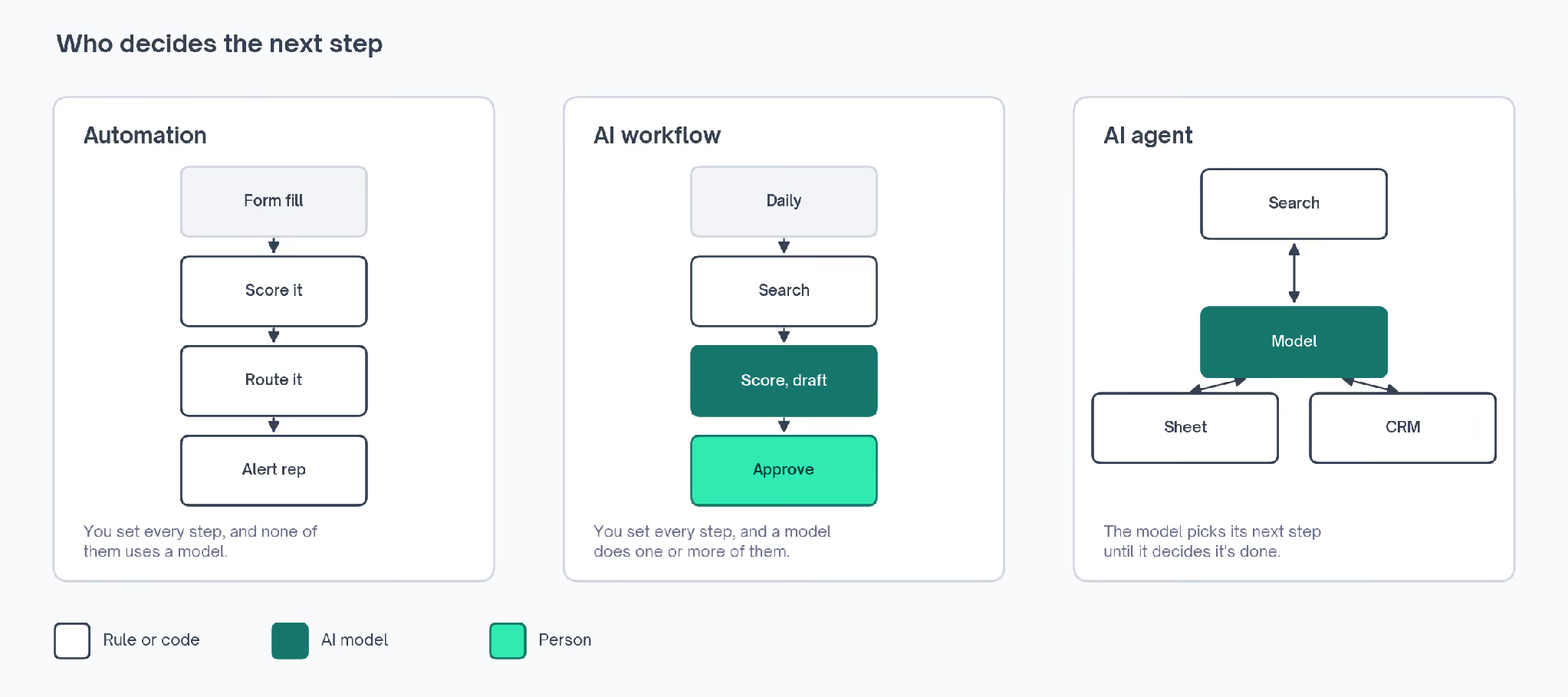
Regular automation has no AI step. An AI workflow has at least one, and in an AI agent the model decides the steps as it goes.
Anthropic's engineering team draws the line by who chooses the path. In its guide to building agents, workflows are "systems where LLMs and tools are orchestrated through predefined code paths."
In an agent, the model directs its own process and picks its own tools, in Anthropic's words "maintaining control over how they accomplish tasks."
LLM stands for large language model. Tools means the apps and actions a model may use, like a web search, a spreadsheet, a CRM, or an email inbox. LangChain's developer docs, written for people building with language models, draw the same line.
| What differs | Automation | AI workflow | AI agent |
|---|---|---|---|
| Who sets the steps | You, in advance | You, in advance | The model, while it works |
| Has an AI model step | No | Yes, one or more | Yes, at the center |
| Same input, same output | Yes | Except in the model steps | No |
| Example | A form lead scored by rules you wrote and routed to HubSpot, a CRM | Reddit mentions scored by a model, filtered by a rule, and read by a person | An assistant told to research a company, which decides what to open next and when it's done |
| When I'd pick it | The job fits if-then rules | Messy text has to become a decision or a draft | The steps can't be listed in advance |
I'd reach for an agent last, and Anthropic's guide recommends the same order: "finding the simplest solution possible, and only increasing complexity when needed."
On when an agent fits, the guide says "workflows offer predictability and consistency for well-defined tasks, whereas agents are the better option when flexibility and model-driven decision-making are needed at scale."
An agent also decides how many steps to take. Since each step is a model call you pay for, the cost of one job can change from run to run.
Most marketing jobs I'd automate can be written out step by step in advance, so a workflow covers them. When a tool calls itself an agent, I'd check who chooses the next step: the model, or the person who built it.
AI Workflow Examples for Marketing and Sales Teams
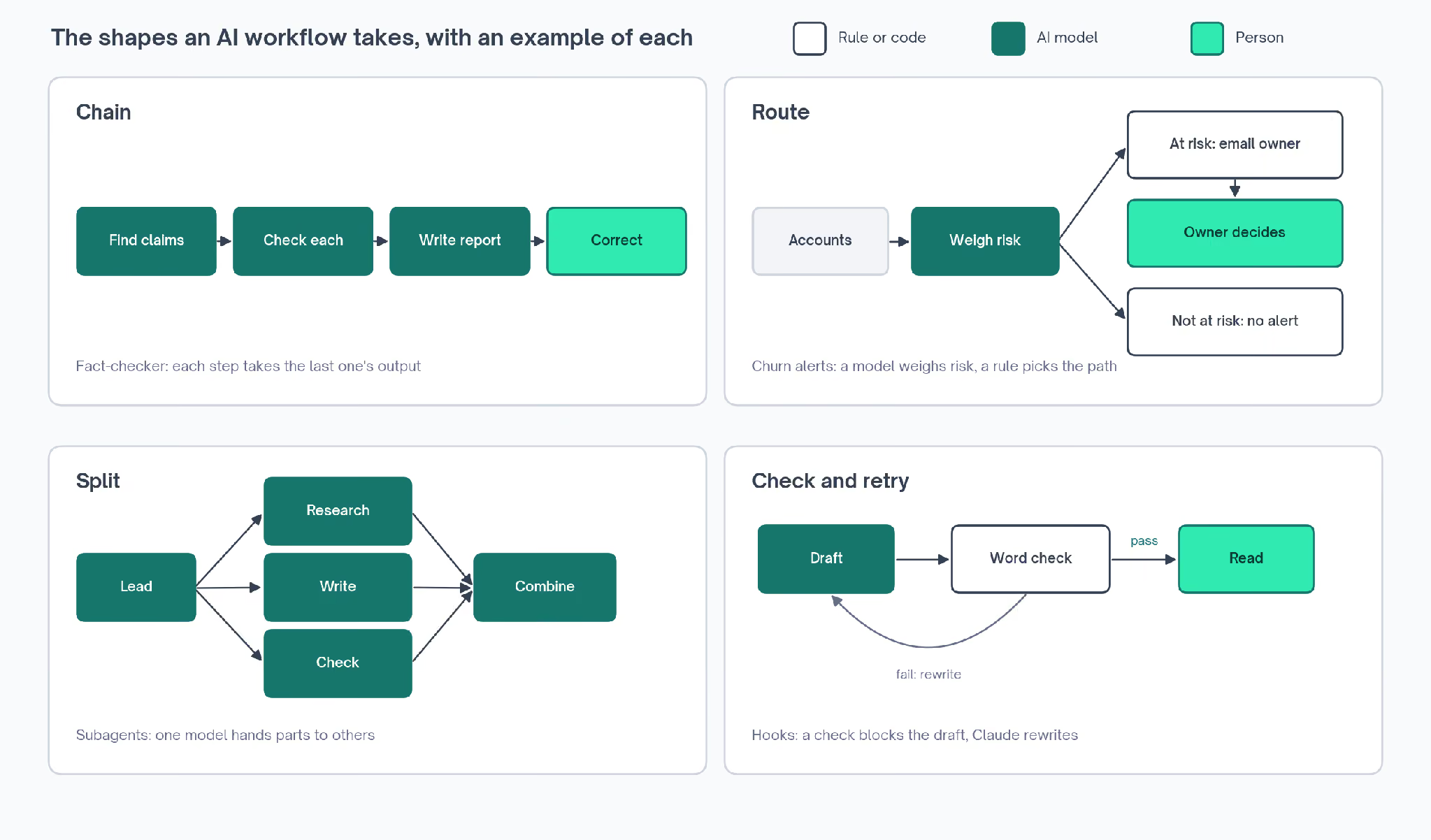
Anthropic's guide names the common shapes AI workflows take, and the Exchange's workflow library has a marketing or sales example of each, with the setup steps published.
Chained Steps: A Fact-Checker for Drafts
In a chain, each model call takes the previous one's output. Anthropic's guide defines it this way: "Prompt chaining decomposes a task into a sequence of steps, where each LLM call processes the output of the previous one."
The fact-checking skill on the Exchange works that way. It pulls every checkable claim out of a draft and checks each one against live pages. Then it writes a report of what held up.
- Take a finished draft (trigger)
- Pull out every statistic and attributed statement (model)
- Pass the claims on one at a time (rule)
- Check each claim against live pages with a web search model (model)
- Write a report of what held up, what failed, and what had no source (model)
- Make the corrections from the report (person)
Its notes say to run the first stage alone and read the claims it found, "because a missed claim never gets checked."
Routing: Churn Alerts That Go to the Account Owner
A router reads each input and sends it down a different path. Anthropic's guide puts it like this: "Routing classifies an input and directs it to a specialized followup task."
The churn prediction workflow is a router. It pulls deals from HubSpot, along with support tickets and product usage from a Google Sheet.
A model weighs each account, and only the accounts that cross your risk line go on to their owner by email, with the data and a suggested next step attached.
- Pull open deals from HubSpot (rule)
- Collect linked support tickets and product usage from a Google Sheet (rule)
- Score how unhappy each ticket sounds (model)
- Weigh sentiment, deal age, and usage against the thresholds you set (model)
- Email the account owner when risk crosses the line (rule)
- Decide whether to call the customer (person)
Its notes suggest running it against last quarter's churned accounts first, to see whether it would have caught them.
Splitting the Work: Subagents for Research, Writing, and Checking
Here one model hands parts of a job to other models. In Anthropic's description, a central model breaks a job into tasks, then "delegates them to worker LLMs, and synthesizes their results."
The subagents workflow sets this up in Claude Code, Anthropic's assistant for working with files. A subagent is a separate Claude worker with its own instructions and tools, and each job in the split gets one, limited to the tools that job needs.
- Split a large task into parts (model)
- Limit each subagent to the tools its part needs, so the writer can't edit files (rule)
- Work on each part in its own subagent (model)
- Combine the results (model)
- Review the combined result (person)
The listing's advice is to test each subagent alone before chaining them, "because a bad handoff is hard to debug in a chain."
Check and Retry: A Banned-Word Check on Every Draft
A check-and-retry workflow loops until the output passes a check. The guide describes it with a second model as the checker: "one LLM call generates a response while another provides evaluation and feedback in a loop."
The hooks workflow builds this loop into Claude Code with a script as the checker. A hook runs your script at set points while Claude works. A banned-word check can run that way on every draft and block the ones that fail.
- Write or edit a draft (model)
- Run the banned-word check on it (rule)
- Block a failing draft and send the failure back (rule)
- Rewrite the draft against the failure (model)
- Read the passing draft for whether the argument holds (person)
For content kept in GitHub, the site many teams use to store and track changes to files, the content checks workflow runs link and spelling checks on every change. Its listing leaves the argument and the accuracy to human review.
The full workflow library holds more AI workflow examples of each shape, each with its setup steps and the tools it needs.
Which AI Workflow Tools Can Run One?
Four kinds of tool can run one, and the choice depends mostly on whether the workflow has to keep going while you're away from your desk:
- A chat assistant runs one when you ask. A Claude skill carries out a saved procedure on request, with nothing to connect beyond what Claude already reaches.
- Connector platforms run one on a schedule or an event. Zapier, Make, and n8n link apps to each other and let you drop a model step into the chain, and our n8n template guide shows what those chains look like.
- Platforms built around model steps run one with the model at the center. Slate is one, with steps for language models, image models, code, and human review, and it's where the banner workflow runs.
- Your GTM tool's own builder runs one on the records it already holds. HubSpot and Clay, a tool for building and enriching lead lists, both have one.
If a workflow has to start on a schedule, I'd look at the connector platforms first. Prices and limits for each group are compared in our AI workflow automation tools guide.
How Do You Map Your First AI Workflow?
I'd map one on paper before opening any tool. A list of steps, each marked rule, model, or person, shows the expensive mistakes while they're still cheap to change.
- Pick a job you've done by hand the same way several times, and write each step on its own line.
- Mark each line rule, model, or person.
- Find any model line that asks for a count, a sum, a random pick, or the same answer every time, and move it to a rule line.
- For each model step, write down what goes in and what has to come out, in the format the next step needs.
- Put a person in front of anything that can't be undone, and give them the output plus a single question to answer.
- Try it on cases you've already handled by hand and compare the results.
- Choose a tool once you know which kinds of step you need.
Moving counts and random picks out of model lines catches the mistake the banner workflow made with its layout. Testing on cases where I already know the right answer shows a wrong model step straight away.
For each kind of step, I'd write down:
| Kind of step | What to write down |
|---|---|
| Rule | The exact logic, and every input it reads |
| AI model | What goes in, what has to come out, its format, and what happens if it's wrong |
| Person | Who they are, what they see, the one question they answer, and what happens if they say no |
The model rows take the most writing, because a loose output format breaks the step after it or passes along something half right. A written format also gives the person step something specific to check against.
The banner workflow, mapped that way:
Job:          Banner for a new blog post
Starts when:  someone pastes the post title into the form
Ends with:    a link to a 16:9 banner, used by whoever publishes the post
1. rule    Pick layout, background, and logo position from a hash of the title and a random
seed
2. model   Write the image brief, keeping every locked choice
   in:  the title and the locked choices
   out: one image prompt naming only the headline, the label, and the brand name as text
3. model   Draw a 16:9 banner from the brief
   in:  the image prompt
   out: an image
4. rule    Pull the image link out of the response
5. rule    Return the link
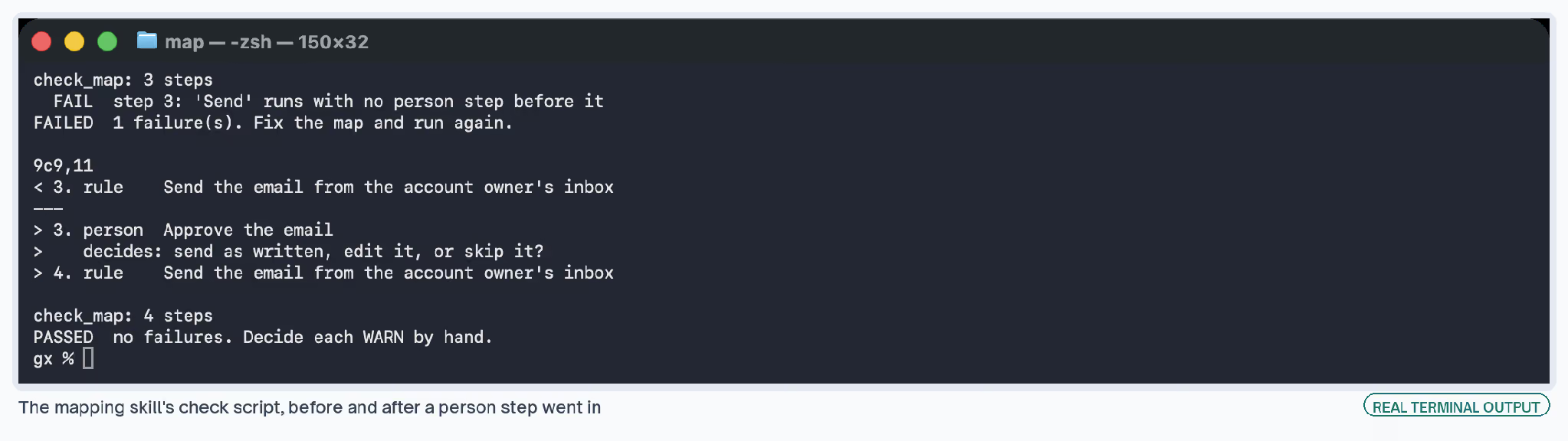
A free Claude skill, Mapping an AI workflow, carries out that procedure. Describe a job in plain words and it returns the step list with each step marked, plus a warning on any model step doing a rule's job.
Its check script fails any map where something gets sent with no person in front of it. Here it is on a thank-you email workflow, before and after a person step went in:
If you'd prefer to write your own, the skill packaging workflow covers saving a procedure as a skill.
Mapping an AI workflow
Describe a job in plain words and get back a step map with every step labeled rule, model, or person, plus a check that fails any model step doing a rule's job. Free. No email required.
Where Do AI Workflows Break?
Mostly at the model steps, and mostly without an error message. Each of these comes from a workflow we built or one listed on the Exchange.
A Model Misses Its Own Mistakes
When we had Claude review drafts it had written, it passed eight quotes that weren't on their source pages. Four were invented outright, and the other four had been changed inside the quotation marks.
A script that fetches each source page and looks for the exact words now catches them, and the fact-checking workflow uses the same idea, pointing its checks at a web search model "so it reads live pages."
Image Models Take Every Word of the Prompt Literally
The banner workflow's art director, the step where Claude writes the image brief, once described the eyebrow label's styling. The image model drew those words into the banner, so the label came out reading GEO, semibold, letter-spaced.
✗  Brief:   eyebrow label GEO, semibold, letter-spaced
   Banner:  the label reads "GEO, semibold, letter-spaced"
✓  Brief:   the only text in the image is the headline, the label, and the brand name,
            with no styling words, spec labels, color codes, or added punctuation
Logos go wrong the same way: we gave the image model a logo file, and it drew its own version, with the dots below the center line and the corners too soft.
Some of it did yield to a clearer prompt. The model printed the brand name without the logo mark until the brief said the logo is mark plus name. It tinted part of the name lavender until the brief said one color.
Since an image model generates every pixel, an exact logo needs a separate step that places the file on top. Slate's code step has no image library for that, so when the logo has to be exact, we build the banner with a different tool.
Models Rewrite Text You Need Word for Word
An earlier version of the banner workflow asked the model to shorten each title to a few words before drawing it. The banners then showed a short phrase in place of the post's title. A blog banner needs the title exactly as written.
The workflow now passes the title through untouched. I'd keep the model away from any text that has to survive word for word, like titles, names, prices, and legal lines, or lock that text in the prompt.
An Edit Can Sit in a Draft
Slate keeps a draft of every workflow beside the live version. We edited a prompt and kept seeing the old text, because the edit sat in the draft until someone published a new version.
After any edit, I'd check which version the next run will use before judging the change, since a test against the old version says nothing about the new one.
Copied Templates Come With Someone Else's Numbers
Every workflow you copy arrives with another person's thresholds in it. The Reddit monitor's notes say so directly: "60 is the author's line and yours may be higher."
The churn workflow says the same about its limits for deal age, sentiment, and usage. I'd watch any copied workflow for a week before trusting a number in it. Then I'd change each threshold to one I can explain.