

Key Takeaways
- Build a workflow when something other than you starts the job: a form, a schedule or another app. Every new lead needs the same steps in the same order.
- Build a skill when the job needs a back-and-forth with you or a judgment on each result, like setting up a scoring model you'll tune later.
- Keep arithmetic away from the model in both. Scores, counts and rotations belong in code or in your CRM's own scoring tool.
- An AI workflow is a workflow where one or more steps ask a model a question. The path around that step stays the same.
- A skill is something an agent loads. The agent reads the instructions and picks its next step, where a workflow's steps were drawn in advance.
- Use both when a job has a design phase and a repeat phase: the skill to decide the rules with you, the workflow to apply them to every lead.
- Put a person before any step that posts in public, whichever one you build.
An AI workflow is a chain of steps drawn in advance, in a tool like n8n or Zapier, where a model handles one or more of the steps and the order never changes. An AI agent skill is a folder of instructions that an agent such as Claude loads and follows, choosing each next step itself. Use a workflow when an event starts the job, and a skill when the job needs judgment or a conversation.
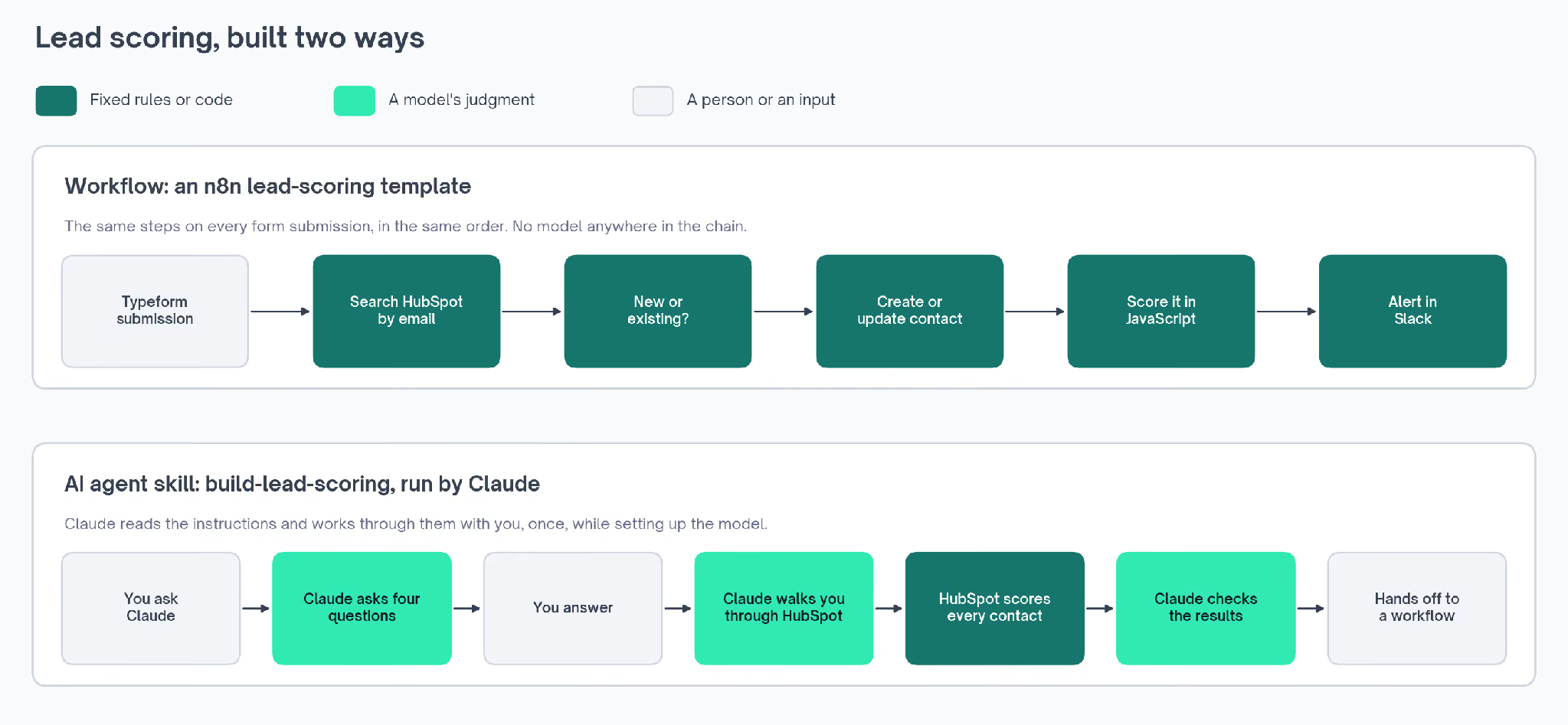
Ranking new leads is a job you can hand to an AI workflow or to an AI agent skill, and the two versions work in opposite ways.
A workflow version scores every form submission the moment it arrives, using steps somebody drew in advance. A skill version works through the setup with you in a Claude chat, asks how you sell and builds a scoring model in your CRM.
The same split runs through most go-to-market (GTM) work, where some jobs need the same steps every time and others need judgment from the person who owns them.
The two terms are easy to mix up, because the word workflow means different things depending on whose documentation you're reading:
| Where you see the word | What it means there |
|---|---|
| Anthropic's skill documentation | The procedure written inside a skill, which it lists alongside "workflows, context, and best practices" |
| n8n, Zapier and similar tools | A chain of steps that runs in a set order once something triggers it |
| HubSpot | An automation rule inside the CRM, such as moving a contact from lead to customer |
In the phrase AI workflow vs AI agent skill, workflow means the middle row: a chain of steps somebody drew in advance, set against instructions an agent reads and follows as it goes.
How an AI Workflow Scores a Lead: An n8n Example
n8n is a tool for connecting apps. You build a workflow in it by placing steps on a canvas and drawing arrows between them, and n8n calls each step a node.
The first node is the trigger, the event that starts a run. Nothing happens until the trigger fires. After that, n8n follows the arrows from node to node until it reaches the end.
n8n's template library has a lead scoring workflow you can import and run. Its trigger is a new submission in Typeform, a form builder. Every submission then takes the same path through HubSpot, the CRM, and on to Slack:
| Node | What it does |
|---|---|
| Typeform Trigger | Picks up the new form submission |
| Search HubSpot Contact | Looks the email address up in HubSpot |
| If | Branches on whether that person already exists |
| Create a contact, or Update a contact | Adds a new contact, or refreshes the one that's there |
| Lead Scoring | Runs a short JavaScript function that adds up points |
| Slack Notification | Posts the lead and its tier to a sales channel |
The HubSpot search comes before anything gets created. Without it, a person who submits the form twice would become two contacts, and duplicates would pile up in the CRM.
The If node then sends the lead down one of two branches: create a new contact, or update the one that's there. Both branches end at the scoring node. So a new lead and a returning one get scored by the same rules.
The Slack message carries the lead's name, email, company, score and tier. A rep can see how hot a lead is without opening HubSpot.
The scoring node holds a short function written in JavaScript, a common programming language. Here's how it starts:
// Rule 1: Conversion events
if (parseInt(props.num_unique_conversion_events?.value || "0") > 0) {
  score += 30;
}
// Rule 2: Page views
if (parseInt(props.hs_analytics_num_page_views?.value || "0") > 5) {
  score += 20;
}
Each rule checks one field on the HubSpot record and adds points when it matches. The full set covers:
- A conversion event, such as a form fill: 30 points
- More than five page views: 20 points
- More than two visits: 20 points
- An email address outside Gmail, Yahoo, Outlook and Hotmail: 20 points
- A phone number on the record: 10 points
- A company record HubSpot has filled in automatically: 20 points
- A lifecycle stage of lead, the HubSpot field that marks how far along a contact is: 10 points
Two thresholds turn the total into a tier. A lead with 70 points or more is hot, one with 40 or more is warm, and anything lower is cold.
Because the rules are written out, anyone on the team can see why a lead came back hot. And because nothing in them changes between runs, the same lead always gets the same score:
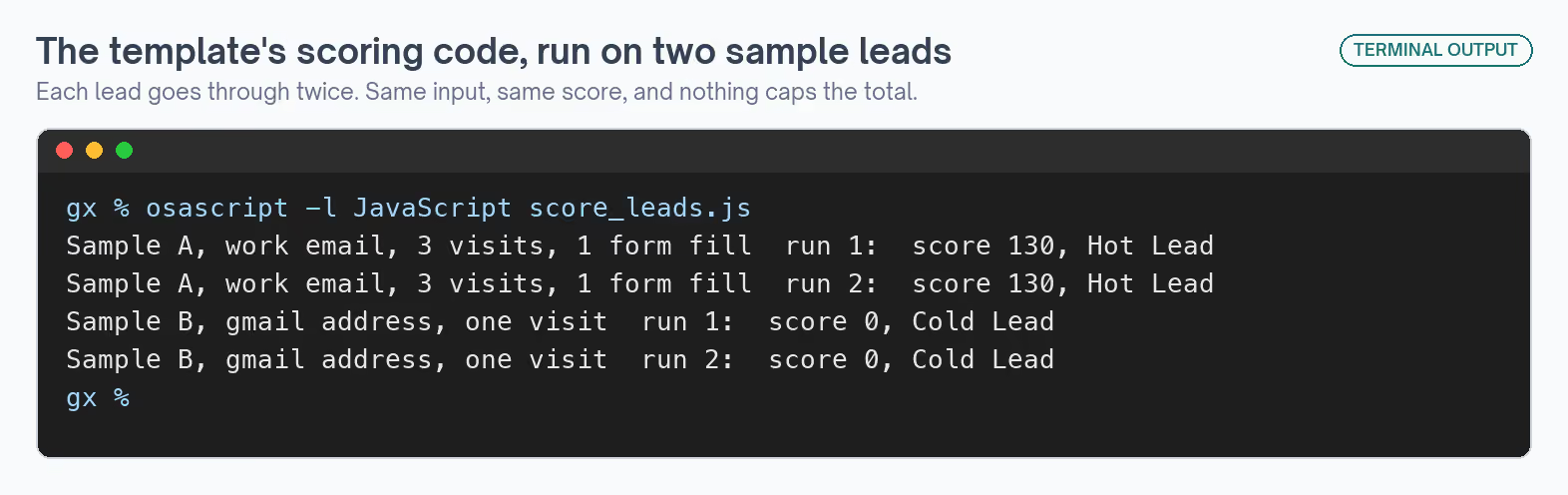
Before switching it on, send one test submission. That run shows the field names your form sends. The scoring rules have to point at the same fields, or they never match.
Nothing caps the total, though. A strong lead reaches 130 on a scale that looks as if it stops at 100, so a cap is the first edit I'd make for a team that reads scores as percentages.
Every node here is a lookup, a branch, a set of rules or a message. A model has nothing to do, which makes this a plain workflow with no AI in it at all.
What Makes a Workflow an AI Workflow
An AI workflow keeps the same shape and hands one or more nodes to a language model. A Reddit monitoring template for n8n shows where the model goes. It checks for mentions of your brand once a day.
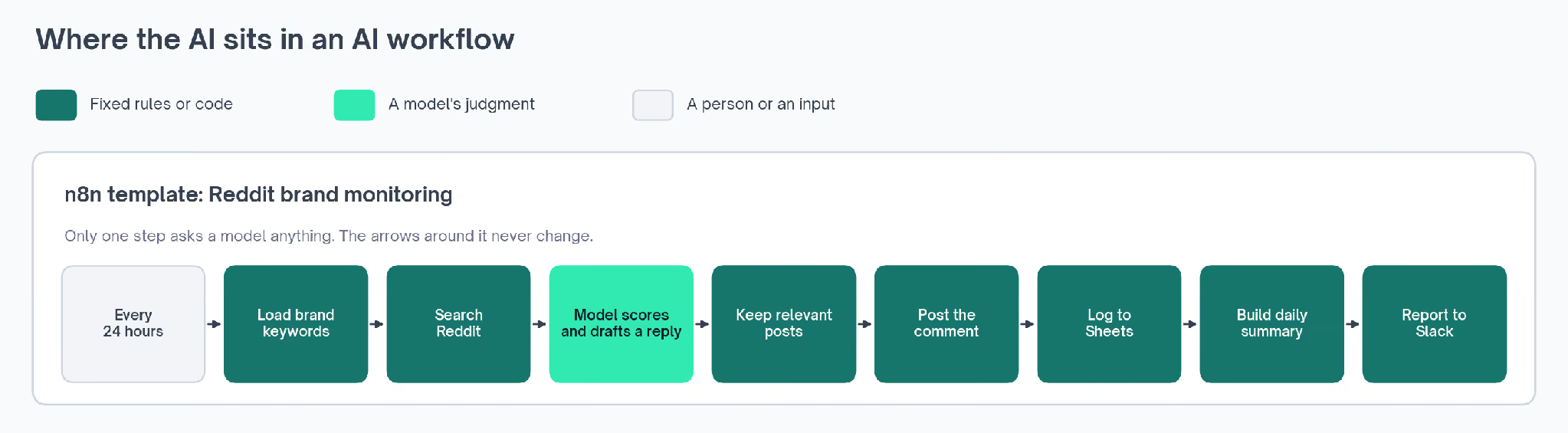
Its first nodes load your brand keywords and search Reddit for the newest posts that use them. Each post then goes to an OpenAI model, which judges how relevant it is, scores the sentiment and drafts a reply.
After that, the path is set again. A filter reads the model's answer and keeps a post only if it's marked relevant, scores above 60 for engagement and has a response type other than pass.
That filter turns the model's judgment into a yes or no the workflow can act on. A Reddit node then posts the drafted replies as comments, and the run ends with a log in Google Sheets and a summary in Slack.
So the model answers one question per post and never chooses what happens next, which means that with keyword rules in its place, the template would be a plain workflow again.
The template leaves the model choice and its instructions blank. You pick the model and write what it should look for when you import it. Those instructions decide what counts as relevant, so they're the part I'd spend the most time on.
The model node is also the one step whose output can change from day to day. The template sets its temperature, a setting that controls how much a model's wording varies between runs, to 0.7.
At that level, the same post can get a differently worded reply each time, which suits a drafted reply.
It's also why I'd put a person before the posting node. As built, the template posts every reply under your Reddit account as soon as a post passes the filter.
AI workflow automation means this kind of workflow running with nobody pressing go, on a schedule, a form submission or a publish event.
The GTM Exchange, a directory of GTM tools, skills and workflows, has a guide to AI workflow automation tools. It also collects n8n templates for GTM to import.
How an AI Agent Skill Works: The Same Job as a Claude Skill
A skill handles lead scoring from the other end, starting with a conversation. A Claude skill is a folder with a file called SKILL.md in it.
The file holds plain-English instructions for one kind of task. The folder can also hold any scripts or reference files the task needs.
Anthropic describes skills as "organized folders of instructions, scripts, and resources that agents can discover and load dynamically" (Agent Skills announcement).
Claude reads a short description of every skill it has. When your request matches one, it opens the full instructions and follows them. Until then, a long procedure takes up no room in the conversation.
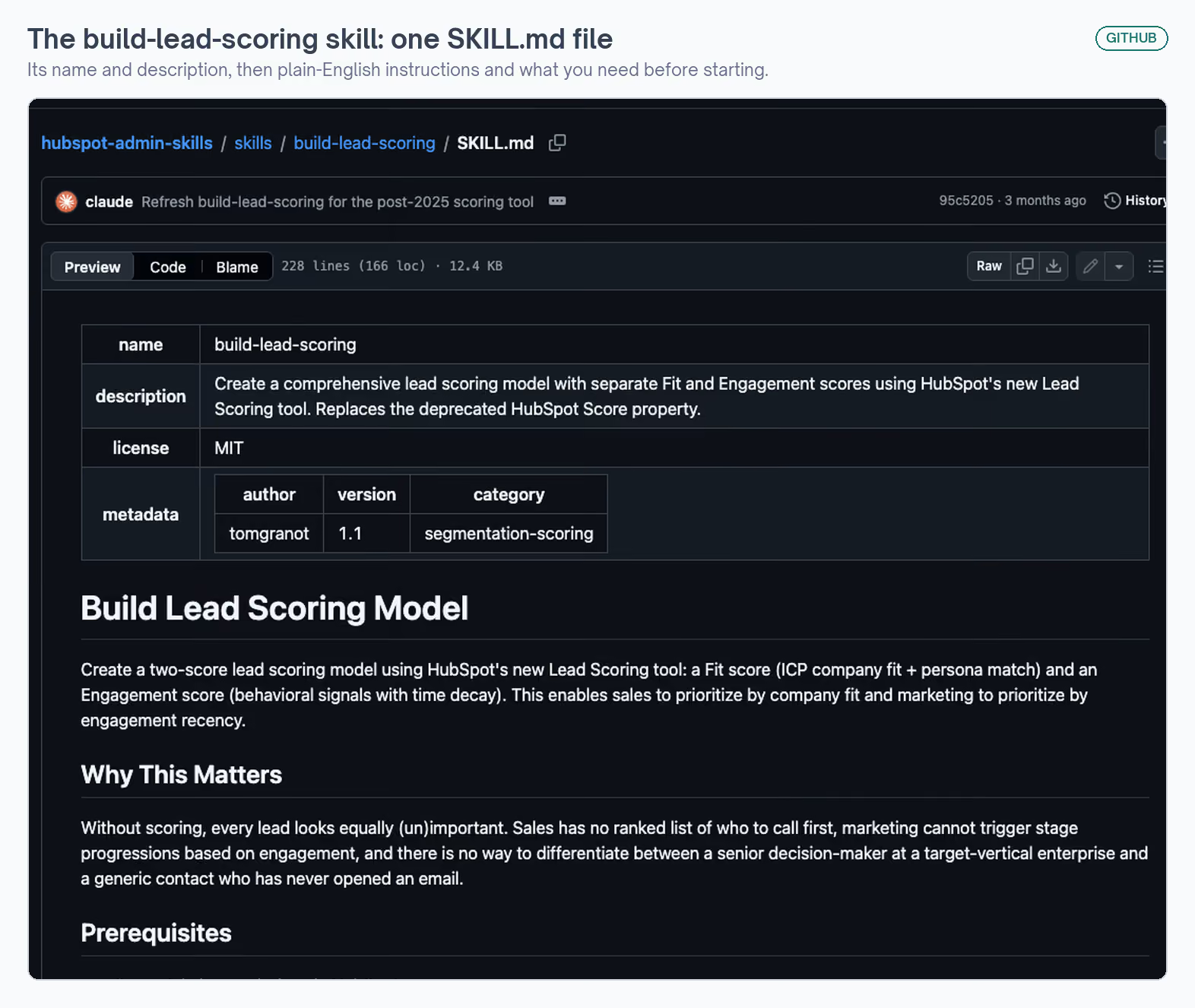
The build-lead-scoring skill is one of these, published on GitHub under an MIT license that lets anyone use and change it. Its description, the part Claude matches your request against, reads:
name: build-lead-scoring
description: "Create a comprehensive lead scoring model with separate Fit and
  Engagement scores using HubSpot's new Lead Scoring tool. Replaces the
  deprecated HubSpot Score property."
license: MIT
A request about setting up lead scoring in HubSpot should match it. A request about anything else shouldn't, so the skill stays out of the way until you need it.
When you ask Claude to set up lead scoring, the skill has it start with questions before changing anything:
- Which job titles and personas are most valuable to you
- Which engagement actions count the most
- Which negative signals should lower a score
- What score should turn a contact into a marketing qualified lead (MQL), the point where marketing hands a lead to sales
Each question comes with a default, so a vague answer still produces a model that works. The defaults include 30 points for a form submission and minus 100 for a contact who has unsubscribed from all email.
HubSpot only lets you create scoring rules in its own screens. It has no API for it, the interface other software uses to talk to a tool. So Claude walks you through each screen, one score at a time, and tells you what to enter.
The model it builds has two scores. A Fit score measures how well a contact matches your ideal customer profile (ICP) and target personas. An Engagement score measures recent activity, such as email clicks and form fills, and lets old activity fade over time.
The skill's own worked example shows how the two combine. A chief executive at a top-tier company who clicked an email this week lands around 60 for Fit and 55 for Engagement, the highest priority.
A contact with no title, at a company outside the ICP and with no activity in six months, lands below zero on both. Sales can sort by Fit to decide who to call, and marketing can trigger on Engagement to decide when.
After setup, the work is checking, and that's where Claude's judgment does the most:
- Wait four to six hours, because HubSpot recalculates every contact in the background
- Sort contacts by the Fit score and read the top 20, whose job titles should match your target personas
- Sort the other way, where the bottom should be unsubscribed, bounced, or outside your ICP
- Pick three contacts at random, work out their scores by hand, and compare
A workflow template can't do those checks for you. Deciding whether the job titles at the top look right takes someone who knows your buyers. Claude does the sorting and comparing, while you make the call.
If the results look wrong, the skill also covers undoing the setup. Scores can be switched off or deleted, once you've checked that no workflow or list still depends on them.
A few HubSpot limits shape the setup as well:
- Each HubSpot account allows five scores, so the skill suggests keeping slots free for later
- New scores read zero until HubSpot finishes recalculating
- The model needs tuning once 30 days of results are in
- An ICP tier property has to exist first, and another skill in the same repository builds it
Moving contacts through lifecycle stages based on their scores happens elsewhere. The skill hands that job to a separate HubSpot workflow, built by a companion skill in the same repository, because it has to happen to every contact whenever a score changes.
So the skill sets up the model once, with you in the conversation, and a workflow takes over the part that repeats.
Who Decides the Next Step in an AI Workflow vs an AI Agent
One difference explains most of the others: who decides what happens next. Anthropic draws the line in its guide to building effective agents.
Workflows, in that guide, are "systems where LLMs and tools are orchestrated through predefined code paths." LLM stands for large language model, the kind behind Claude and ChatGPT. Agents are systems where the model directs its own process and its own use of tools.
The n8n template is the first kind, with its path drawn before any lead arrives. Claude working through the skill is the second kind. It reads the instructions, asks you questions and decides when the job is done.
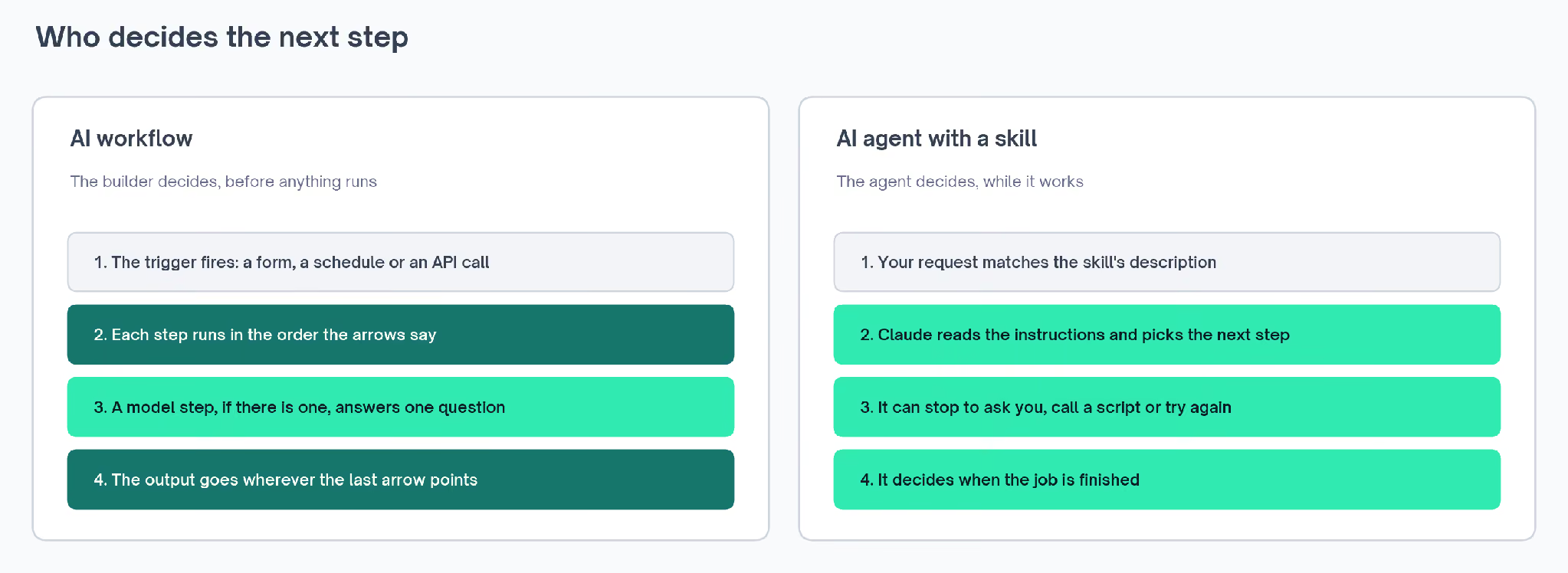
So a skill is something an agent loads. Anthropic compares writing one to "putting together an onboarding guide for a new hire", and the lead scoring skill reads that way, with context first, then questions, then steps and checks.
A workflow can contain AI without being an agent, as the Reddit template shows: its model answers a question inside one node, and the next node is already decided.
The same guide gives advice that applies before building either: "we recommend finding the simplest solution possible, and only increasing complexity when needed."
For GTM work, that usually means a workflow whenever you know the steps in advance. A skill makes sense when the steps depend on answers you haven't given yet.
The practical difference shows up in your calendar. A workflow needs you when you build it or change it, and a skill needs you every time it runs, because the conversation is part of the job.
HubSpot workflows, the CRM's own automation rules, are the kind the lead scoring skill hands lifecycle stages to. They follow the same idea as n8n ones: a trigger, then steps in a set order.
There's a guide to HubSpot workflow enrollment on the Exchange for setting one up.
AI Workflows vs AI Agent Skills, Side by Side
Here's how the two lead scoring builds compare on the questions a GTM team asks before choosing one:
| Question | The n8n workflow | The Claude skill |
|---|---|---|
| What starts it | A new Typeform submission | You, asking Claude in a chat |
| How often it happens | Every time a form comes in | Once, plus a review after 30 days |
| Who decides the next step | The arrows drawn in n8n | Claude, following the instructions |
| Where the score comes from | A JavaScript function inside the workflow | HubSpot's Lead Scoring tool |
| Where AI comes in | Nowhere in this template | Asking the questions, guiding the setup and checking the results |
| How you change it | Edit the function or the thresholds | Edit the text of SKILL.md, or give different answers |
| What it hands back | A scored lead in Slack | A two-score model in HubSpot, ready for a workflow |
Who decides the next step settles most of the other differences. A workflow can run unattended on every lead because its path never changes. A skill can stop to ask you things because Claude chooses what to do next.
The frequency row follows from that. A job you do once, with care, suits a skill. A job that has to happen the same way hundreds of times suits a workflow.
Changes land differently as well. Edit the scoring function and every lead from then on gets the new rules. Edit the skill and the next conversation follows the new instructions, while the model already in HubSpot stays as it was.
Finding a problem works differently too. n8n records every run, and its execution history lets you copy a past run's data back into the workflow to debug it.
With a skill, the record is the conversation. If the scores look wrong, you can scroll back to the answer that set a weight, then change that answer or the file.
Trying either one takes a few accounts:
| What you need | The n8n workflow | The Claude skill |
|---|---|---|
| Where you get it | n8n's template library, free to import | GitHub, free under an MIT license |
| What runs it | n8n, in the cloud or on your own server | Claude Code, Anthropic's app for running Claude on your own computer |
| Accounts it connects to | Typeform, HubSpot and Slack | Marketing Hub, HubSpot's marketing product, on the Professional or Enterprise plan |
| Access you need | Logins for each of those accounts | Super Admin, HubSpot's top admin role |
| How you install it | Import the template, then add your logins | Add the plugin in Claude Code with the commands below |
The skill comes as part of a plugin, a bundle of related skills. These two commands add it to Claude Code:
/plugin marketplace add tomgranot/hubspot-admin-skills
/plugin install hubspot-admin@hubspot-admin-skills
Why Neither One Lets the Model Do the Math
In both builds, code produces the score. The workflow adds points in JavaScript. In the skill, HubSpot's own scoring tool does the arithmetic, while Claude decides the rules with you and checks the results.
That's deliberate. Anthropic's skills announcement says "many applications require the deterministic reliability that only code can provide". Deterministic means the same input always gives the same output, and a lead score has to work that way or sales stops trusting it.
Asking a model to do arithmetic anyway fails in a predictable way.
One banner workflow's prompt told the model to pick a color scheme by working out a checksum, a sum of the title's characters. Its first four attempts all came back the same dark navy:
✗  In the prompt: "choose exactly one treatment from the title using a stable
   deterministic rule (for example, a simple title-character checksum modulo 3)"
✓  In a Python step before the model: hash the title with a random token,
   divide, and use the remainder to pick from each list of options
A language model predicts likely words, so the sum never happened. With the choice moved into a Python step ahead of the model, three different titles came back as three different designs.
The same test applies to any prompt in your own workflows. If it asks the model to count, rotate, alternate or remember what it did last time, that step belongs in code.
Both lead scoring builds still contain judgment, made at different times. In the workflow, the template's author made every call in advance, down to 30 points for a conversion. In the skill, Claude makes those calls with you, for your own pipeline.
They also disagree on how big the number should get:
✗  n8n template: points add up with no ceiling
     score += 30 ... score += 20 ...   a strong lead reaches 130
✓  build-lead-scoring: "Set the overall score maximum (recommended: 100)"
     plus two separate scores: Fit for who to call, Engagement for when
The skill puts its reason plainly: "Two separate scores are better than one." Fit says who to talk to and Engagement says when, and folding them into one number hides both.
The workflow's single score still does its job in a Slack alert, where a rep wants one number and a tier. If you want a cap, the function is short enough to change in a few lines.
When to Use an AI Workflow, an AI Agent Skill, or Both
Most jobs lean clearly toward one or the other. These are the questions I'd ask about any job, in this order:
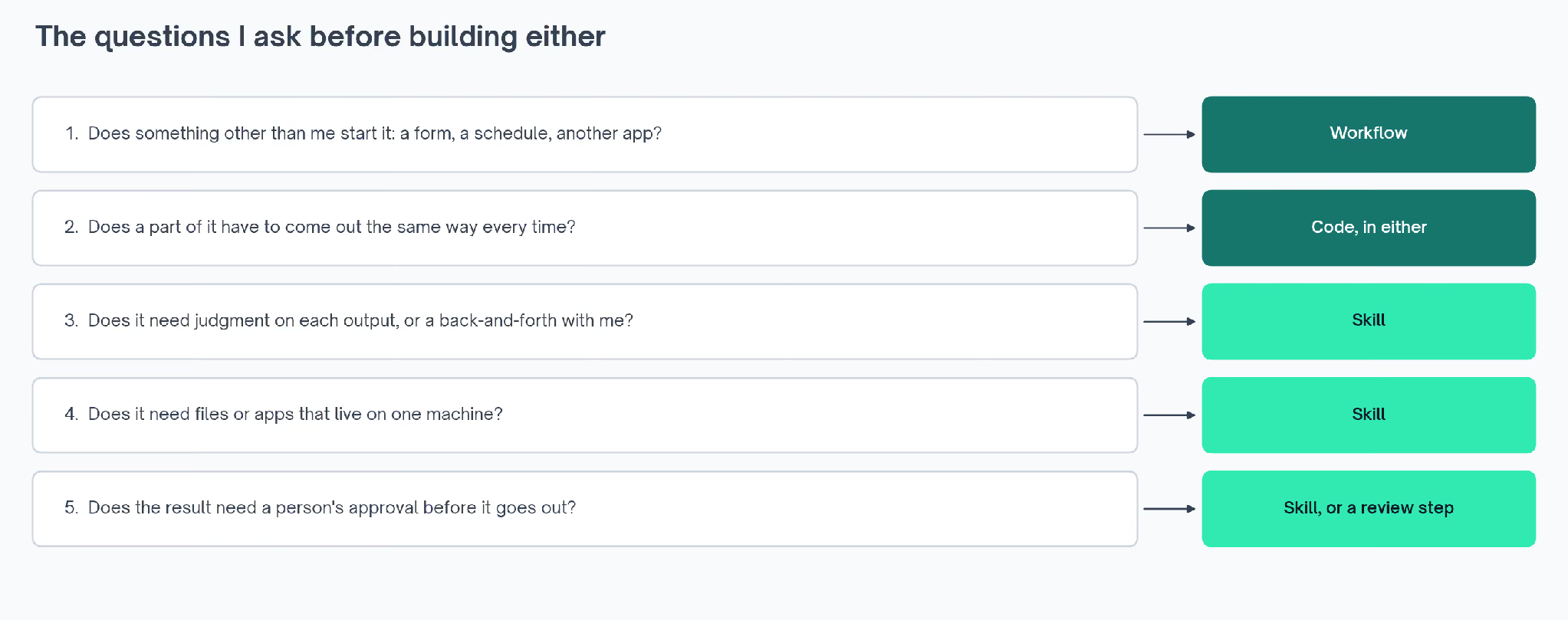
- Does something other than me start it? A form, a schedule or another app means a workflow, because it has to run when nobody's watching.
- Does a part of it have to come out the same way every time? That part goes into code, inside whichever one I build.
- Does it need a conversation with me, or a judgment on each result? That's a skill, because Claude can stop and ask.
- Does it need files or apps that live on one computer? That's a skill too, since Claude Code can reach them and a hosted workflow usually can't.
- Does the result need a person's approval before it goes out? A skill can show you the draft first. A workflow needs a review step added before the step that publishes.
Lead scoring splits across them. Routing a new lead starts with a form, so that part is a workflow job. Designing the model needs your answers, so that part is a skill job. And the score itself lives in code on both sides.
Here's how the same questions sort other common GTM jobs:
| GTM job | What I'd build | Why |
|---|---|---|
| Sending new form leads to the CRM | Workflow | It fires on every submission, and the steps never change. This enrichment version fills in company data before scoring |
| Following up low-scoring leads | Workflow | It runs on a schedule. This hourly follow-up template checks a sheet so nobody gets alerted twice |
| Setting up a scoring model | Skill | It needs your answers and a check on the results |
| Writing an ideal customer profile | Skill | It's a conversation about who buys. The ICP builder skill asks how you sell and fills in the profile |
| Brand voice rules | Skill | Claude loads them whenever it writes, so there's nothing to trigger. See brand voice guidelines |
| Fact-checking an article | Skill | Each claim needs a call on which source to trust. See this fact-checking skill |
| Telling search engines a page is live | Workflow | It fires on every publish. See push new URLs |
| Monitoring brand mentions | Workflow with an AI step | The search runs daily, and only reading each post needs a model |
An event or a schedule points to a workflow. A conversation or a judgment points to a skill. Jobs that need both usually split the way lead scoring does, with a skill to design the rules and a workflow to apply them.
How AI Skills and Workflows Work Together
The lead scoring skill already passes work in one direction: it builds the model with you, then leaves lifecycle stages to a HubSpot workflow. The connection can run the other way too, with Claude starting a workflow.
n8n has an MCP Server Trigger node for this. Its documentation describes the node as "making n8n tools and workflows available to MCP clients" (n8n docs).
Claude is one of those clients. So a skill doesn't need to know how the workflow is built, only what to send it and what comes back.
That means a skill can hold a step that starts your lead routing workflow and then checks the Slack message it posts. The workflow keeps the part that has to be identical every time. The skill keeps the judgment about whether the result looks right.
If I were building lead scoring from nothing, I'd do it in that order. I'd use the skill first, to design the model with whoever owns the handoff to sales, then build the workflow that applies it to every form.
That order also keeps each piece small. The skill only has to hold the setup and the checks, and the workflow only has to hold the steps that repeat.
Two other Claude Code features sit close to this line. Custom subagents split a job across separate workers with their own instructions. Claude Code hooks run your own script at set points in a session.