

Key Takeaways
- Pick workflows by the job you're behind on. The boring ones have saved me the most time.
- Write the spec before you build: what starts it, what data it reads, the steps, what lands, and how you'll know a run went well.
- Start with something you can finish in one sitting. Anything bigger tends to sit half-built.
- Most of what I run touches one or two tools. A five-tool chain needs five sets of credentials and breaks in five places.
- Keep a person in the loop wherever a wrong output costs money. Ads and outbound need this more than content does.
- Add a step that checks whether the work landed. Most content workflows stop at publish and never look back.
- Check what the tool you already pay for does before buying anything. Google Ads scripts, Cloudflare and Search Console cover a lot of this.
A marketing workflow is a set of steps you run the same way every time, with one clear trigger and one clear output.
This guide lists the ones I keep going back to, grouped by the job they do: content, SEO, AI search, paid, lifecycle, leads and reporting. All of them are free to copy.
Introduction
A few years into doing marketing, I noticed I was redoing the same work every week. Briefing the same way, checking the same things, pulling the same numbers into the same sheet.
So I started keeping a list of the bits I could hand over to something else. Anything that survived a month of use stayed on it. Plenty of things didn't.
This is that list. Some of them I run myself, and the rest our team runs. All of them live in our library of GTM workflows.
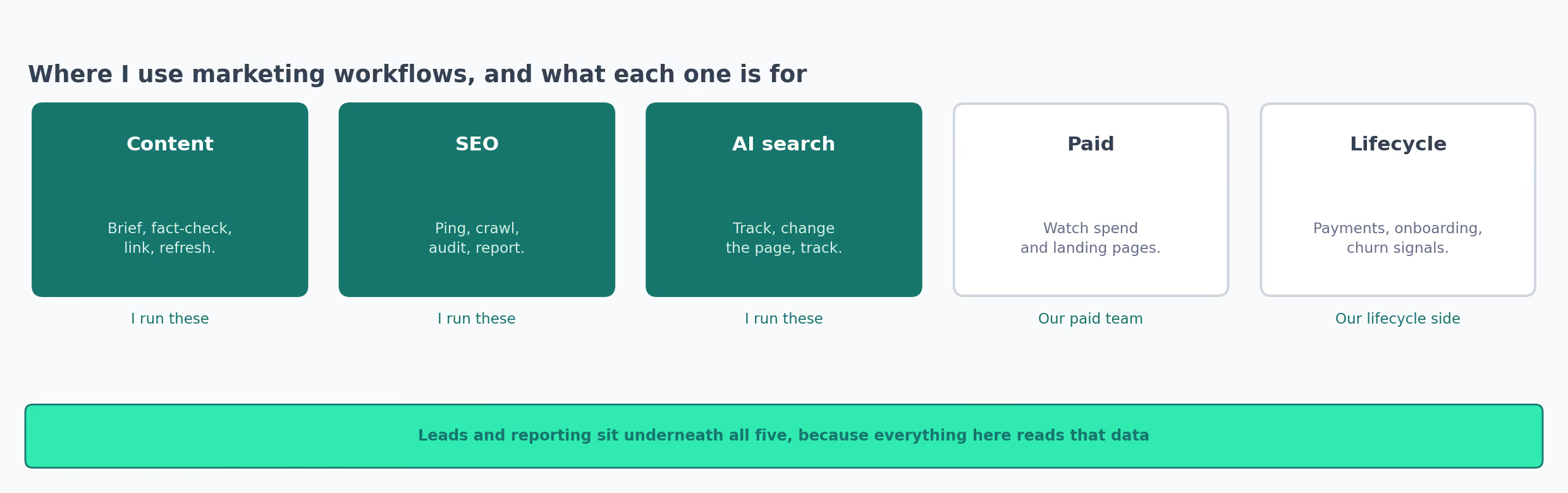
None of it needs a platform decision up front, so start with whatever you can abandon cheaply.
Content Marketing Workflows I Run Every Week
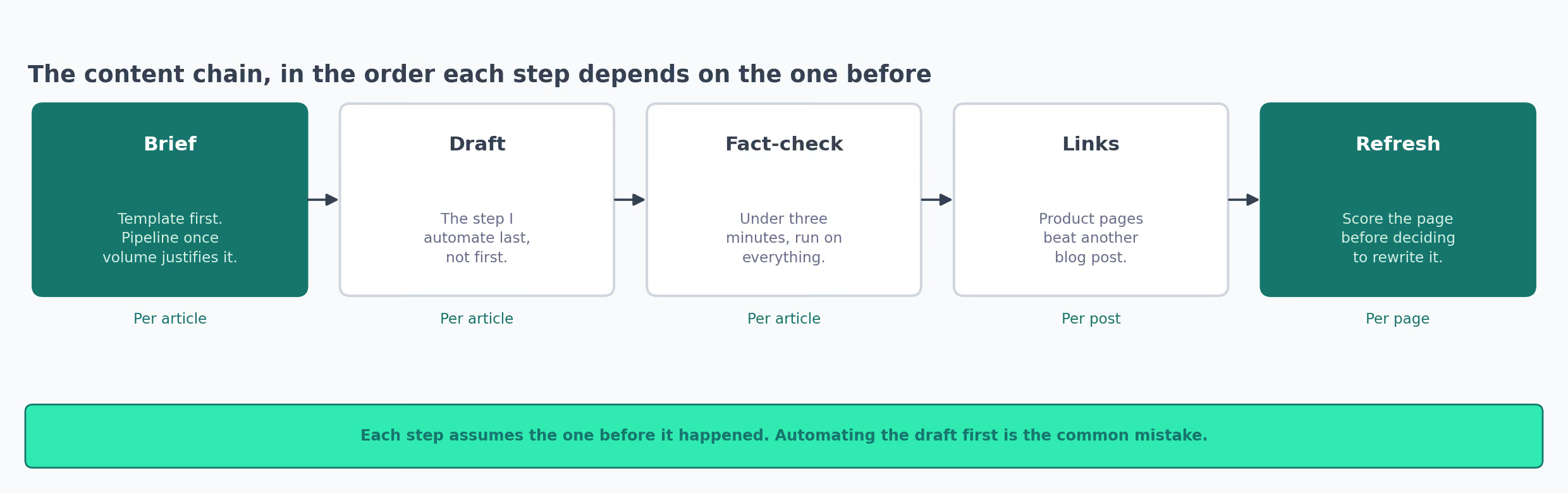
The chain runs in order, and each step assumes the one before it happened.
Briefs
Start with the content brief template. It's a plain document with the fields spelled out, and nothing about it is automated.
Use it even if you plan to automate later. It forces the argument about angle and audience early, while changing your mind is still free. Skip that argument and you find out three drafts in that everyone had a different article in mind.
Once you're briefing more than a few articles a month, the brief pipeline does the same job faster. A single brief comes back in under 10 minutes, against 45 to 60 minutes by hand.
Brief before drafter, always. A weak brief only gets you a weak draft faster.
The fields I'd never leave blank:
- The one question the page answers, written as a reader would type it
- Who it's for, and what they already know
- The short answer, in about 50 words, before any of the detail
- What the page should link to, both inward and outward
- What it deliberately leaves out
Fact-Checking
The fact-checking pass reads a finished draft and flags claims that don't hold up. It takes under three minutes an article.
I run this on everything now, including pieces I wrote myself. What it catches most often is a number that was right two years ago. Prices and headcounts age badly, and nobody rereads an old paragraph looking for them.
The second thing it catches is a claim with no source behind it. Those survive an edit. They read like something everybody knows, until somebody asks where it came from.
Internal Links
New articles have nothing pointing at them, and I never go back to add links later.
The internal linking pass handles a post at a time, plus batches across the archive. Clearing the archive once and then keeping up per post is far less work than a yearly audit.
The linking engine does the same job with a rule I like: product and feature pages win over another blog post when both fit. It caps the target list at 500 URLs, so a big site needs splitting into sections first.
Whichever you use, read the links it adds for the first few runs. The one that caught me out was a tool dropping the links already in the draft while adding its own.
Check the old ones survived before you judge the new ones.
Something I'd skip: automating the draft before the rest of this chain works. A drafting step is the most tempting thing to build and the one that needs everything around it in place first.
Refreshing Old Pages
The content refresh checklist scores a published page and tells you whether to update it or leave it alone.
Refreshing is slower than it looks, so batch it by template. Ten comparison pages share most of their research. Doing them together turns a week of small separate jobs into one afternoon.
Where It Breaks
- The refresh score needs traffic history, so a page from last month has nothing to work with
- The linking tools cap how many target URLs they read, so a big site needs splitting into sections
- A drafting step built before the brief, fact-check and link pass just produces weak drafts faster
SEO Workflows That Run Without Me
These are the checks I'd otherwise forget. None need a person present once they're running.
| Workflow | When it runs | What it costs |
|---|---|---|
| Ping search engines on publish | Every time a page goes live | Free |
| Crawl for broken links | Quarterly | Free up to 500 URLs |
| SEO audit template | Per site, when something looks off | Free |
| Monthly SEO reporting | Monthly | Free guide, API costs |
The publish ping tells Bing and the other IndexNow engines the moment a page goes live.
Wire it to a genuine publish event and nothing else. Submitting the same URLs over and over can get you rate limited.
Google isn't part of IndexNow, so this does nothing for Google discovery. Submitting a URL asks for a crawl and promises nothing about ranking. I'd still wire it. It costs nothing and takes an hour.
The quarterly crawl is dull and I've never regretted running it. Broken internal links pile up quietly, especially after somebody reorganizes a section.
Run it before a migration and again after. The second pass is the one that catches what the move broke.
What the audit template covers, and what I check by hand each time:
- Pages returning errors, or redirecting more than once
- Titles and descriptions that are missing or duplicated
- Schema that fails validation
- Pages that load slowly on a phone
- Anything indexed that shouldn't be, which is usually a staging path
Monthly reporting is the one I'd automate last. Hand over the pulling of numbers, keep the reading. A machine-written summary says what moved and never says why anyone should care.
Where It Breaks
- Google isn't part of IndexNow, so the publish ping does nothing for Google discovery
- Submitting the same URLs repeatedly can get you rate limited, so wire it to a genuine publish event
- The free crawl tier stops at 500 URLs, which a mid-sized site passes quickly
AI Search Workflows: Finding Out If Anything Got Cited
You publish a page and it looks fine. Nothing in the process asks whether an assistant picked it up.
The loop I run:
- Track what the assistants say today
- Change the pages
- Track again a few weeks later, asking the same questions
Check what the assistants say. The AI visibility tracker asks the same questions across several assistants and records who gets named. It calls four paid model APIs, so a run costs a little on four accounts. Answers vary, so one reading is a sample.
Change the pages. The GEO techniques guide covers changes you make to your own pages, with nothing to buy.
See which crawlers arrive. AI Crawl Control sits in the Cloudflare dashboard and shows which AI crawlers are hitting your site. It's on every Cloudflare plan, the free one included.
Leave a few weeks between the two readings. Assistants don't recrawl on your schedule, so checking the day after publishing tells you nothing at all.
What the Citation Data Shows
We track AI citations for clients at Slate. Looking at one B2B SaaS workspace over the last three months, the overwhelming majority of pages an assistant cited never mentioned the brand at all.
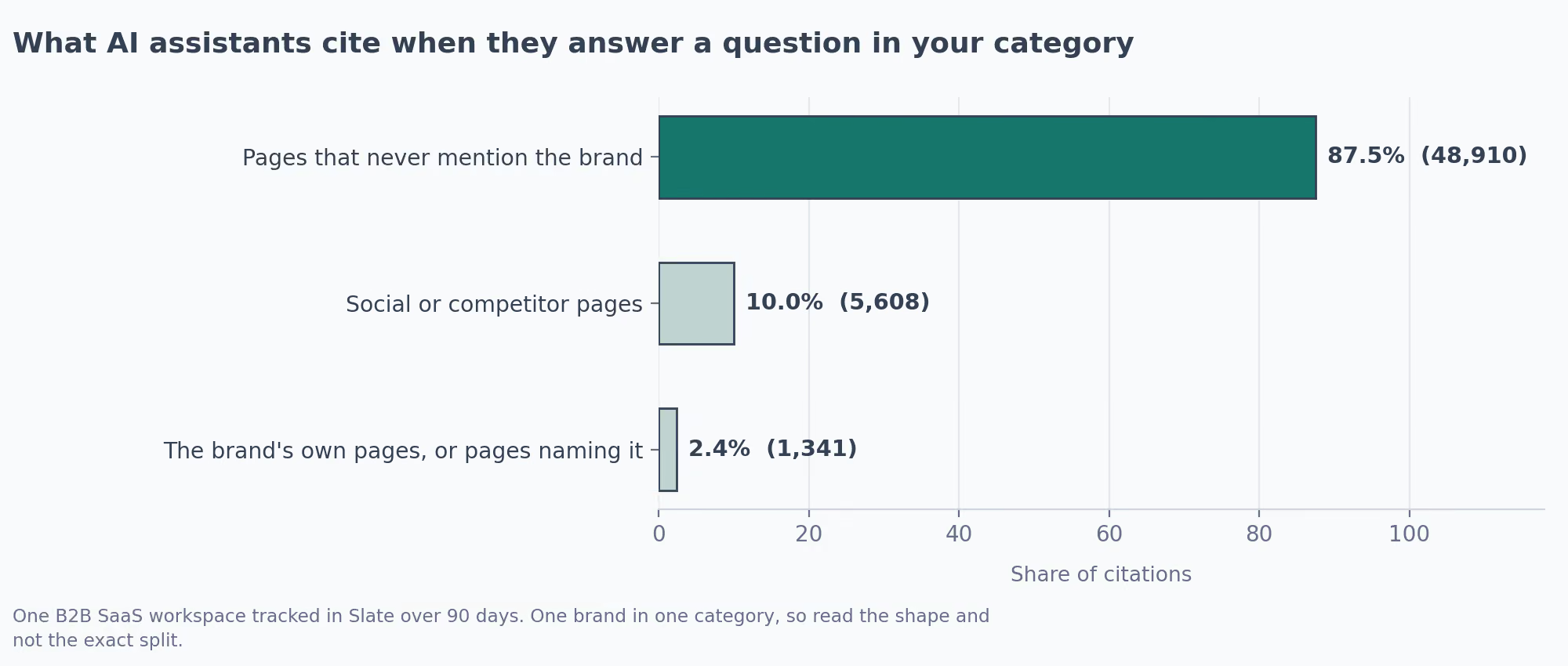
That's one brand in one category, so I wouldn't treat the exact split as a benchmark. Being absent is the normal state. Publishing more tells you nothing about whether you've left it.
If most of what gets cited is somebody else's page, getting mentioned there matters as much as publishing your own. That's a different job, usually with a different owner.
I work at Slate, so weigh that accordingly. Slate does the measuring end and it's a paid platform. The tracker above does a rougher version for the price of some API credits. The GEO guide costs nothing.
Where It Breaks
- The tracker calls four paid model APIs, so every run costs a little on four accounts
- Answers vary between runs, so a single reading is a sample and not a number
- Nothing here recrawls on your schedule, so a reading taken too soon shows you nothing
Paid Media Workflows That Stop Money Leaking
Our paid team runs these, and all four watch for money leaving without anybody noticing.

The Broken Landing Page Check
The link checker walks your ads, keywords and sitelinks and confirms each URL still loads. Results go to a Google Sheet and an email arrives after each pass.
This is the one I'd argue hardest for at any company running paid. A dead landing page keeps taking budget for as long as nobody notices. The ads carry on serving perfectly well.
Copy the failure string idea. A page can return a healthy status code and still show an error. So you define text that counts as broken, whatever the code says.
Pick that string carefully. I ran a quick version of this check over a few live pages and the first row came back a false positive.
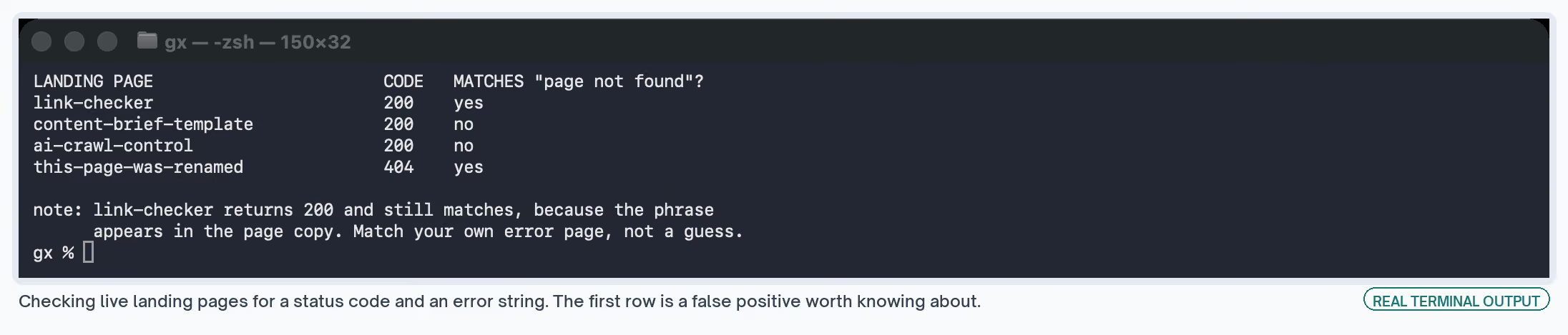
That page is fine. It just happens to contain the phrase in its own copy.
Use the exact text your own error page prints. Then run it over pages you know are good, and trust the alerts once those come back clean.
Where It Breaks
- Google Ads scripts stop after 30 minutes, so a big account needs the sweep spread over several days
- It reports and pauses nothing, so somebody still has to act on the email
- It has to be scheduled hourly to work as designed, which I got wrong the first time
The Performance Drop Alert
The drop monitor reads Google Ads and Meta daily and posts to Slack when something falls off.
Where It Breaks
- The benchmarks arrive hard-coded in the template and mean nothing until you swap in your own averages
- Google Ads API access needs a developer token you apply for, so plan around the wait
Negative Keywords and Tired Creative
Negative keyword mining reads the search terms report monthly and proposes exclusions. Creative fatigue detection reads ad-level trends weekly and flags a creative on the way down.
Both propose and neither acts. I'd keep it that way for anything touching spend. The value is the list turning up on a schedule. Waste creeps back, and I don't go looking for it on a normal week.
Where It Breaks
- Applying negatives straight from a prompt without reading them can block terms that convert, so a person stays in the loop
- The search terms report already hides low-volume queries, so the mined list is never complete
Social Workflows I'd Approach Carefully
Social is the area where I trust automation least, because the output goes out under your name in public.
| Workflow | What it does | Cost |
|---|---|---|
| Reddit brand monitoring | Finds mentions daily, scores them, drafts a reply | Free template, API costs |
| Trend monitoring | Sweeps several platforms daily for content angles | Free template, scraping credits |
| Scheduled posting | Turns sheet rows into per-platform drafts and queues them | Free template, API costs |
Monitoring, Which I'd Run
Monitoring reads and drafts, and a person decides what goes out. Auto-posting replies to Reddit gets accounts banned, so the human stays between the draft and the send.
Trend monitoring needs a filter on the way out. Trending and relevant are different things. Without somebody checking, the calendar fills with topics nobody in your market cares about.
Posting, Which I'd Leave Alone Longest
The posting workflow queues automatically, so a bad row in the sheet becomes a published post. Generated copy also reads as generated unless the prompts carry your own voice.
Where It Breaks
- Auto-replying in public gets accounts banned, so keep the person in the loop
- The Reddit sweep takes a capped number of mentions per run, so a spike overflows the day's window
- The trend sweep uses community nodes that only work on self-hosted n8n
Lifecycle Workflows That Catch People Before They Leave
Retention suits automation better than almost anything else, because the signals already sit in systems you own and watching them by hand is nobody's full-time job.
It's also the group where marketing, support and finance all touch the same customer. Agree who acts on an alert before you turn any of these on.
| Workflow | What it watches | Cost |
|---|---|---|
| Recover failed payments | Cards that fail on renewal | Included with Stripe Billing |
| Onboarding sequence | New signups, and whether anyone follows up | Free template |
| Churn prediction | Deal age, ticket tone and usage together | Free template, API costs |
| Zendesk risk signals | Support tickets that read badly | Free template |
Failed payments is the one I'd wire first. The window to catch a failed card is short and the work is entirely mechanical. The money is already yours, which makes it the cheapest revenue on this page.
Most billing tools have this built in and switched off. Check what yours already does before building anything, because the version inside the product is usually good enough.
Switch these on at the same time:
- The retry schedule, so a card gets tried again on a sensible cadence
- The dunning emails, read once in full before they go anywhere
- A customer-facing billing page, so people can update a card without emailing support
Churn prediction is the heaviest of the four. It needs enough churn history to learn from, so a young product has nothing to feed it. Leave it until the others are running.
We assumed our onboarding sequence covered everything. Then I traced what happens when somebody signs up and nobody replies, and found the path just stopped there.
Read every message these can send before you turn them on. They act on people, and a well-timed email in the wrong voice does more damage than no email at all.
Where It Breaks
- Churn prediction needs enough churn history to learn from, so a young product has nothing to feed it
- Marketing, support and finance all touch the same customer here, so an alert with no named owner gets ignored
- The billing versions are often already in the product and switched off, so building first wastes the work
Lead and Data Workflows That Keep the CRM Clean
Scoring, routing, reporting and every lifecycle email assume the contact record is clean and that there's only one of it. Get this right before the rest.
The form to CRM router searches your CRM by email before deciding whether to create a contact or update one.
That single branch is what stops a form filling the database with duplicates.
Scoring then happens in a plain function you can read, so you can see why a lead came back hot and change the rule the same afternoon.
Settle the rules before you automate them. Sales and marketing rarely agree on what a good lead is. A workflow makes that disagreement run hourly instead of weekly. Test with a work address and a personal one before trusting any tier.
I'd add these:
- Routing low-scoring leads gives the ones below the bar somewhere to go, instead of nowhere
- Enriching decision makers adds detail to a list, with a human verification step before anything sends
Enrichment only pays if somebody uses the extra fields. I once paid for a dozen enriched columns and then wrote a sequence that used the first name.
On outbound, keep the human step. A content workflow producing something wrong wastes an afternoon. An outbound workflow producing something wrong emails a thousand people.
Where I'd put the person:
- After enrichment, before anything is written
- After drafting, before the first send of a new sequence
- Never in the middle of a running campaign, because that's a bottleneck nobody staffs
Start any outbound workflow on a batch small enough to read in full. Twenty records tells you whether the enrichment and the copy are any good. A bad twenty costs you nothing.
Where It Breaks
- The tiers mean whatever your scoring rules say, so the output is worthless until the rules are agreed
- Enrichment costs money per record whether or not anyone reads the extra fields
- An outbound step running without a human check emails a thousand people before anybody notices
Reporting Workflows: One Place Instead of Three Tabs
Reporting is the easiest of these to get wrong by automating too early. Build the dashboard before the robot. A Looker Studio dashboard reading GA4 or a sheet is free and covers most of what a weekly review needs.
Watch which numbers get discussed in the meeting for a month. Automate those and drop the rest.
Before automating any report, I want three answers:
- Who reads this, by name
- What decision changes based on it
- What happens if it arrives a day late, which sets the cadence
When I can't answer those three, I drop the report instead of automating it.
Once that exists and people use it, the cross-channel report pulls analytics, Google Ads and Meta into one weekly summary.
Underneath both, do these properly:
- A tracking plan so events arrive named the same way every time
- The GA4 to BigQuery export so you keep raw data past the sampling limits
Both stop you building three reports on numbers that quietly disagree with each other.
Where It Breaks
- The report that runs perfectly and goes unread is the one I've built most often, which is why the three questions come first
- A tracking plan added late means redoing every report built before it
- A cross-channel pull inherits every naming problem sitting underneath it
Where to Start in Each Area
If you build a single thing per area, build these. The order across areas is the one in the intro: leads first, because the rest reads that data.
| Area | Start with | Why this one | Cost |
|---|---|---|---|
| Leads and data | Form to CRM with dedupe | Everything downstream reads that record | Free template |
| Paid | Landing page checker | A dead page spends budget silently | Free |
| Content | Brief template | Settles the angle before anyone drafts | Free |
| SEO | Ping on publish | An hour to wire, then never touched again | Free |
| Lifecycle | Failed payment recovery | Short window, mechanical work, money already yours | Included with billing |
| AI search | Visibility tracking | You can't change what you haven't measured | API costs |
| Reporting | One dashboard | Tells you which numbers people care about | Free |
Filled in for the lead router, the spec looks like this.
TRIGGER   a Typeform submission
INPUT     the form fields, plus the CRM as system of record
STEPS     search CRM by email, create or update, score, post to Slack
OUTPUT    one Slack message with a tier, in the sales channel
CHECK     submit a work address and a personal one, read both records
COST      free template, no paid APIs
SKIP IF   your CRM already dedupes on the form it hosts
How I Set One Up
Repetition on its own is a weak reason to build something. I ask these first.
Does it come round often enough? Something you do once a quarter, in 20 minutes, is a checklist. It costs an afternoon less to write, never breaks, and needs no credentials.
Can you explain the steps to someone else? Where the work changes every time on a judgment call you can't put into words, you don't have a workflow yet. Write the judgment down as a list of questions. Then look at whether the answers repeat.
Sometimes there's no pattern at all, and learning that now beats learning it a week in.
Past that, the job usually falls into one of the shapes below.
| The work | Why it suits a workflow | Example from above |
|---|---|---|
| Same steps, high volume | The tenth one costs the same as the first | Content briefs |
| Watching for a change | A person forgets, a clock doesn't | Ad performance drops |
| Dull but expensive to skip | Nobody wants to do it, and missing it costs money | Broken landing pages |
| Pulling numbers from three places | The joining is mechanical, the reading is not | Weekly reporting |
| Moving data between tools | No judgment involved at all | Form to CRM |
Moving data between tools is where I'd start at a new company. Everything else reads the data that step produces. A mess there spreads everywhere.
What I Write Down First
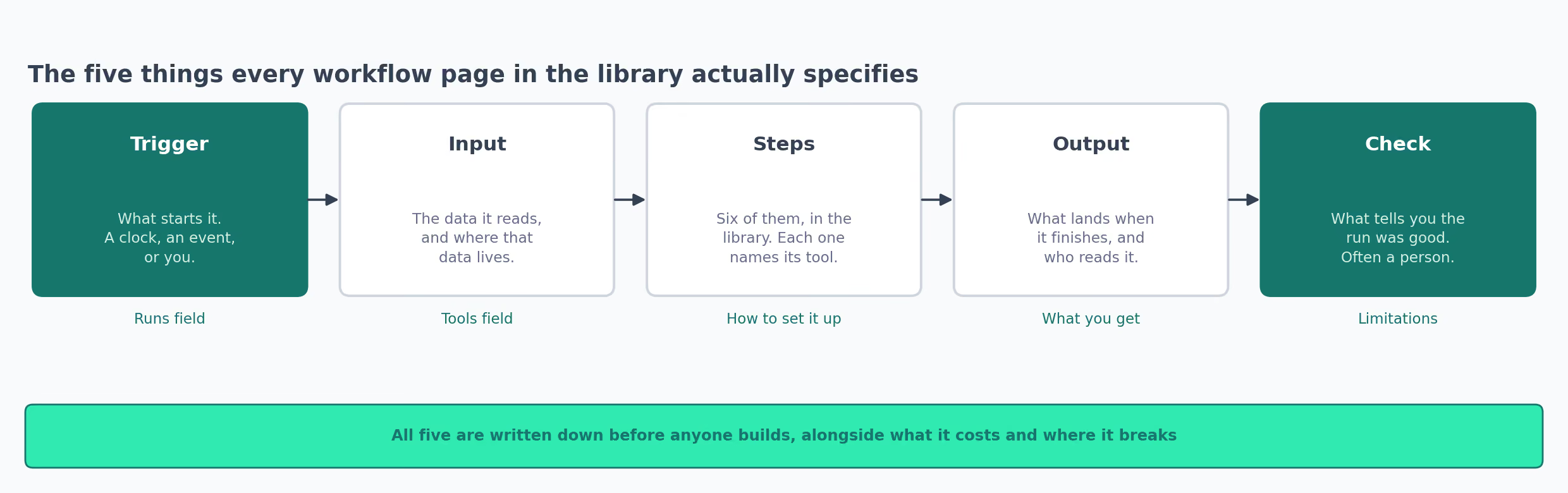
Before any tool is open, I write the spec out. It takes five minutes and stops me building things nobody asked for.
TRIGGER   what starts it, and how often
INPUT     what data it reads, and where that data lives
STEPS     what happens, in order, and which tool does each bit
OUTPUT    what lands at the end, and who reads it
CHECK     how I'll know a run went well
The check is the line I skipped for a long time, and it isn't the same as approving the output.
Approving asks whether the thing looks good. A check asks whether the workflow did what it claims. A brief generator can produce a lovely brief off the wrong competitor set. Anyone reading only the brief will pass it.
My early checks were too vague to fail, which is the same as having none.
✗  CHECK   the output looks good
✓  CHECK   the sheet gained a row for every URL in the account, and the
           three I broke on purpose all came back flagged
When the build is bigger than an afternoon, I add:
- What it costs per run, including model and API spend
- When to skip it, meaning the case where this is the wrong build
The skip line has killed two of my own ideas, both of them workflows to summarize things nobody had asked to have summarized.
The First Week After Switching It On
The week after something goes live is when you learn whether the spec was honest. What I check:
- Did every run finish, or did one fail quietly
- Did the output land where I said it would, and did the named person open it
- What did the week cost in model and API spend against my guess
- Did anybody do anything differently because of it
That last one decides whether it stays. A perfect output nobody acts on is a workflow to switch off. Killing it in week one is far easier than in month six.
Who Owns It Afterwards
Every workflow needs a name against it, or a broken run becomes everybody's problem and therefore nobody's.
The owner gets the failure alert. They answer questions about what the output means, and they decide when to switch it off. That last one is the job I forget to assign.
I'd also write down where the thing lives and what credentials it uses. When somebody leaves and their API key dies with them, that note is the difference between a ten-minute repair and an afternoon of guessing.
The Tools I'd Pick First
Most of the list above runs on a handful of tools, and adding a new one is usually a slower decision than it looks.
| Tool | What I use it for | Cost |
|---|---|---|
| n8n | Anything crossing two or more systems | Free templates, self-hostable |
| Claude | The step in the middle that needs judgment | API costs |
| Google Sheets | Where output lands so a person can read it | Free |
| Slack | Where an alert goes when somebody must act | Included |
| Search Console | Free input for anything SEO-shaped | Free |
| Google Ads scripts | Checks that stay inside the ad account | Free |
| Slate | Measuring whether pages get cited by assistants | Paid |
n8n is where I'd start for anything joining two systems. The self-hosting option matters more than the node count. A workflow reading your CRM is a workflow holding customer data.
Google Ads scripts are underrated. They live in the account you already have and cost nothing. They also skip vendor review, usually the slowest part of adopting anything.
Claude sits in the middle of a lot of these, doing the step that needs a judgment call: reading a search terms report, scoring a draft, grouping feedback. When a step like that repeats, it can be packaged as one of the Claude skills in our library so it runs the same way every time.
Keep that step narrow. The more you ask a model to decide in one go, the harder it gets to work out which part went wrong when the output looks off.
On Slate, my own employer: it handles the AI search measurement end well and it is a paid product. For routing a lead or watching ad spend it's the wrong tool. The free options above beat it.
Picking per step usually lands me on two tools instead of five. The time I went best-in-class at every step, I ended up with five bills, five logins, and no clear idea who to ask when it broke on a Friday.
✗  One platform to handle your entire marketing workflow, seamlessly.
✓  A trigger, one tool that does the work, and somewhere the answer
   lands. Add a fourth tool only when something breaks without it.
What Goes Wrong Across All of Them
Every one of these has gone wrong on me at least once. None of them are reasons to skip the workflow. They're the things I'd want somebody to tell me before I started.
- The manual ones stop getting run. Mine waited forever until I attached them to something already in my calendar.
- The scheduled ones outlive their audience. I now put a review date on anything running to a clock, and switch off whatever nobody defends.
- A failed run is silent unless you wire the alert. Most tools can post a failure to Slack. I'd do that on day one, because a few good runs make it easy to stop checking.
- Credentials die quietly. A token expires or somebody leaves, and the workflow keeps reporting nothing at all. Note down what each one uses and who owns the account.
- The input changes shape and nothing complains. A renamed column or a new form field will run through most workflows without an error. I've collected a week of empty rows this way.
- Half-built is worse than nothing. Somebody assumes it's running and stops doing the manual version. I've done that to myself.
- None of this judges the work. These make the mechanical part faster. Choosing the topic, the offer and the audience is still the job, and that's what decides whether any of it mattered.
If you take one thing from this, take the job you're most behind on and build the smallest version that helps this week. Leave the next one until that first has run without you for two weeks.
Specifying a workflow
Turns an automation idea into a written spec, and argues against the build before any tool is opened.
Auditing a workflow library
Reports field gaps, trigger split and tool counts across a set of workflows you already have.
Both files
Both skills plus a README with the install command. Free, no email required.