

Key Takeaways
- The difference comes down to who decides the next step: a rule you wrote, or the model while it runs.
- Vendors define "agent" in different ways, so judge a product by how it behaves.
- Most GTM jobs, such as routing, enrichment, scheduling, and refreshes at volume, run better as scripted workflows.
- Agents fit research, drafting, and any job where the path changes with the input, as long as a person reviews the output.
- Agentic automation puts agent steps inside a scripted loop, with people at the decision points.
- Anything that touches money, contracts, or a customer's inbox needs an approval step, whichever you build.
Use automation when you can write the steps down in advance and the job has a right answer. Use an AI agent when the next step depends on what it finds, and someone can check the result. Most GTM work is automation, often with one AI step, and agents pay off on open-ended research and drafting.
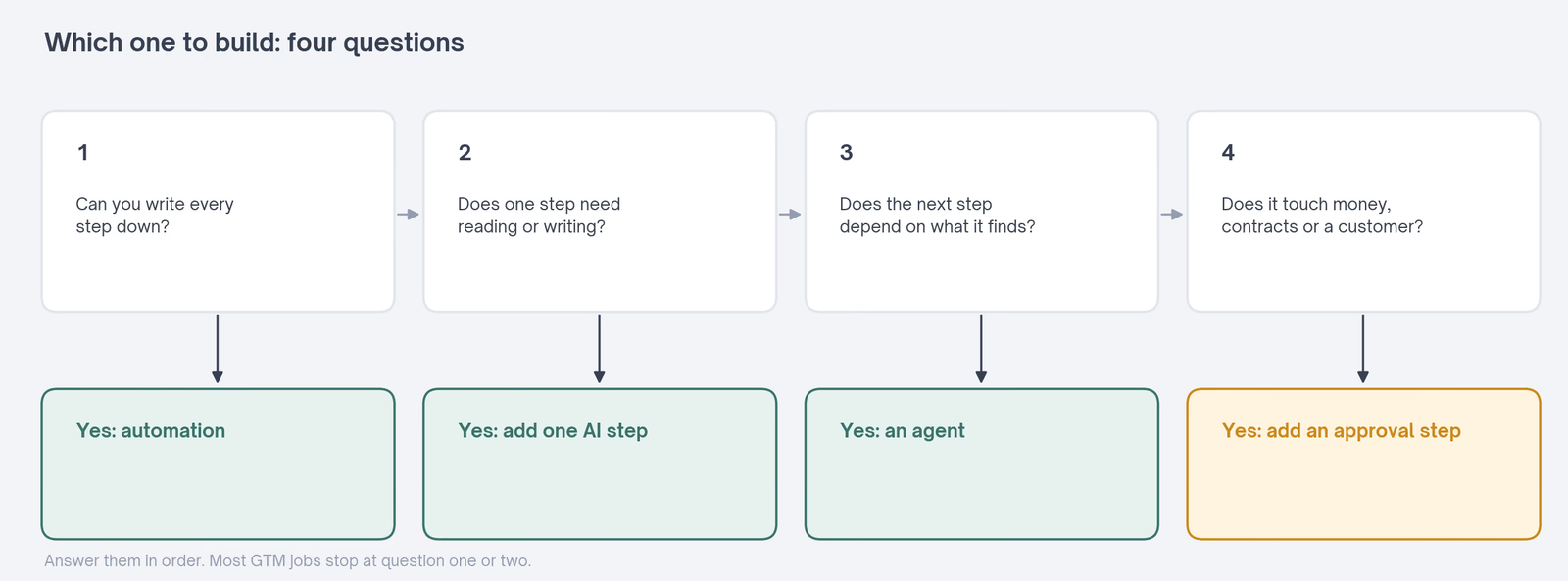
Most GTM teams now face the same question about every repetitive job: should an AI agent run it, or plain automation? The question usually arrives as a tool choice. Start with the job instead.
A lead routing rule, a weekly report, and a refresh of five hundred pages don't need an AI agent that decides for itself.
A first pass at account research does. Nobody knows in advance which pages it'll need to read, or when it has read enough.
The cost of guessing wrong runs both ways. Build an agent for a routine job and you pay more per run for answers that vary when they shouldn't. Build a rigid workflow for open-ended work and the exceptions pile up in someone's inbox.
Slate builds both kinds, sometimes for the same job. So this guide uses Slate's own setup alongside guidance from Anthropic, Gartner, UiPath, and McKinsey.
AI Agents vs Automation: The Difference in One Question
Ask who decides the next step. In automation, a rule someone wrote decides, so the path is set before the run starts.
In an AI agent, the model decides while it runs. It chooses which tool to call next, reads the result, and judges when the job is done.
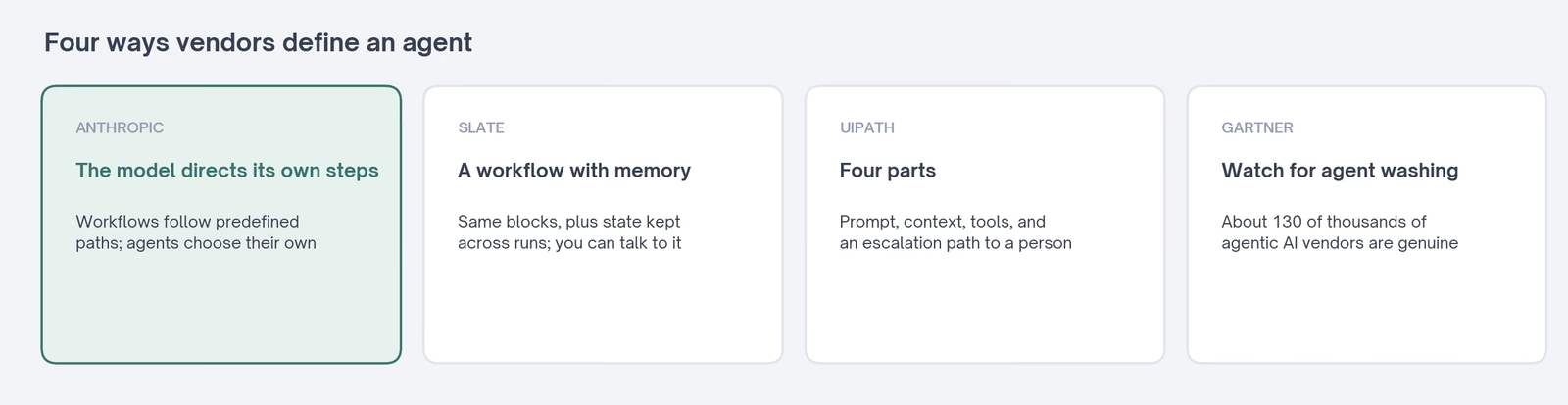
Anthropic's guide to building effective agents draws the same line. It calls systems with predefined paths workflows, and systems where the model directs its own process agents.
Between the two sits automation with one AI step. A scripted workflow calls a model to read or write one thing, and rules handle the rest.
The Exchange's guide to AI workflows covers how to lay those out, and its AI agent guide explains how agents work inside.
| Automation | AI agent | |
|---|---|---|
| What you hand it | A list of steps | A goal and a set of tools |
| What it decides | Nothing; the rules decide | Which step comes next, and when to stop |
| How predictable it is | The same path every run | The path changes with the input |
| How it fails | At a step you can see | Anywhere, and errors can carry forward |
| What it costs per run | Low and steady | Higher and variable |
| Who checks the result | Whoever owns the rule | A person, before anything risky happens |
Why the Label on the Product Can Mislead You
The word "agent" means different things to different vendors, and that's the first trap.
Anthropic notes that some of its customers use "agent" for fully autonomous systems. Others use it for prescriptive implementations that follow predefined workflows. Anthropic groups both under "agentic systems" and keeps the workflow-versus-agent split underneath.
Slate draws its line somewhere else. In his article on Slate's content engine, Slate co-founder Shiyam Sunder defines agents as workflows with memory.
The blocks are the same. The agent layer keeps state across runs, so you can talk to it, and it holds a direction for the next batch of drafts.
UiPath, a software company best known for robotic process automation, now sells AI agents to large enterprises, and its agent documentation defines an agent by four parts: a prompt, context, tools, and escalation paths to a person. The last part matters most for GTM work, since it decides when a person sees the output.
Then there's a warning from Gartner, the technology research and advisory firm, about "agent washing", meaning existing assistants, chatbots, and robotic process automation relabeled as agents. Its June 2025 prediction estimates that only about 130 of the thousands of agentic AI vendors offer genuine agents.
So I'd look past the label and ask how the thing behaves. The Exchange's AI agent guide has a checklist for exactly that. The short version is one question: does it decide its own next step?
Agentic Automation: What Most Teams End Up Building
Agentic automation is a scripted workflow with agent steps inside it. The loop and the schedule stay as rules, and agents handle the parts that need judgment.
UiPath builds it the same way from the other direction. In its documentation, an agent's tools include invoking automations. The agent decides what to do, and a deterministic robot carries it out.
Slate's content engine is a working example. Every Monday at 8 AM IST, a scheduled trigger starts the whole loop, from topic mining to distribution. Nobody presses a button to begin it.
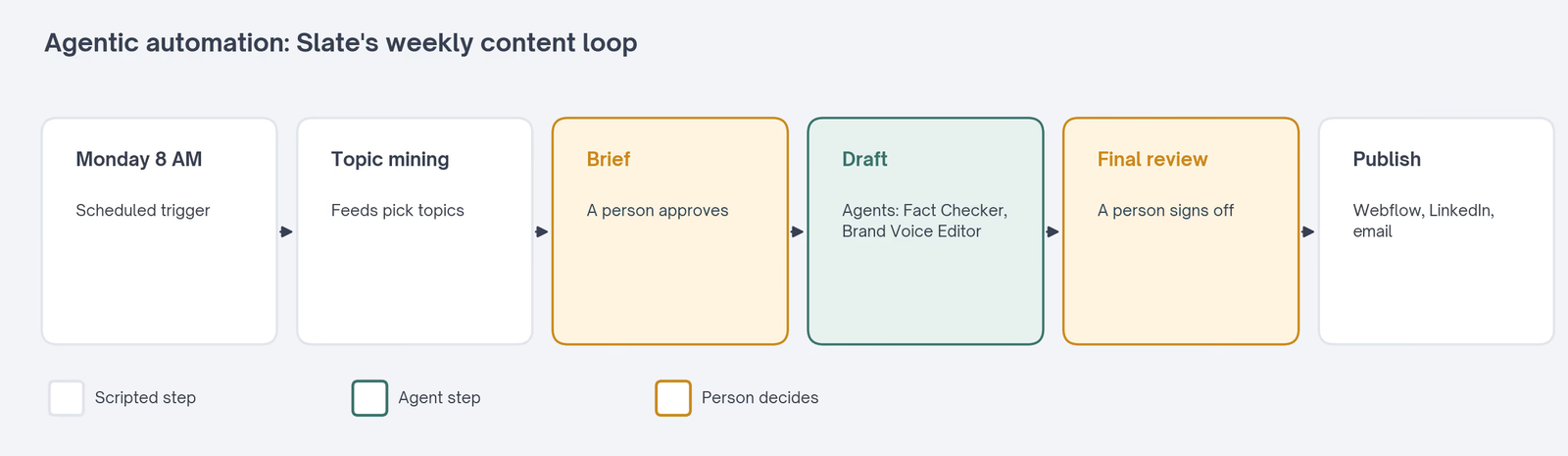
People sit in exactly two places: approving the briefs and doing the final review. An editor sets aside about forty-five minutes a week for three published articles. Before, the same output took roughly fifteen hours of team time.
Slate's guide to content workflow tools states the principle as a rule: automate the handoffs and keep people at the decisions. The agents make drafting faster, and the scripted loop makes the whole thing repeatable.
What the Agents Inside That Loop Do
Inside that weekly loop, four agents do the judgment work, and each has one narrow job. None of them runs the show.
The Fact Checker reads every draft and pulls out every statistic. It then checks each one against the original source. When it can't find the source, it flags the figure for a person to check.
The Brand Voice Editor works from about twenty-five of Shiyam's LinkedIn posts and Slate's best-performing articles. It rewrites drafts to sound like him.
Because it keeps memory, he can ask for a punchier tone this week, and it holds that direction for the next ten drafts.
The Outreach Drafter writes the email to a publisher when Slate's citation feed spots a listicle Slate should appear on. The External Linking Engine tracks which sources Slate trusts and which it has linked to recently.
Each of those jobs needs a decision that changes from draft to draft. That's the test. Everything around them, from the schedule to the publishing step, stays scripted.
AI Automation vs AI Agents, Job by Job
Gartner gives the simplest version of the split in its agentic AI forecast. Use agents when decisions are needed, automation for routine workflows, and assistants for simple retrieval.
Its analyst adds a warning that many use cases positioned as agentic today don't require agentic implementations. Applied to common GTM jobs, that gives a table like this:
| GTM job | Build it as | Why |
|---|---|---|
| Route inbound leads to the right rep | Automation | Territory and size rules have a right answer |
| Enrich contacts with firmographic data | Automation | The same fields, from the same sources, every time |
| Send a timed onboarding sequence | Automation | The schedule never needs judgment |
| Tag replies by intent | Automation with one AI step | Rules move the reply; a model reads it |
| Refresh hundreds of decaying pages | Automation with AI steps | The refresh has a known shape, repeated at volume |
| Research an account before outreach | Agent | The pages to read depend on what it finds |
| Draft outreach for a gap in a listicle | Agent, with a person approving | Each email depends on the publisher and the page |
| Fact-check every statistic in a draft | Agent | It chooses which sources to open for each claim |
| Change billing, discounts, or contract terms | Automation, with a person approving | Errors cost money and trust |
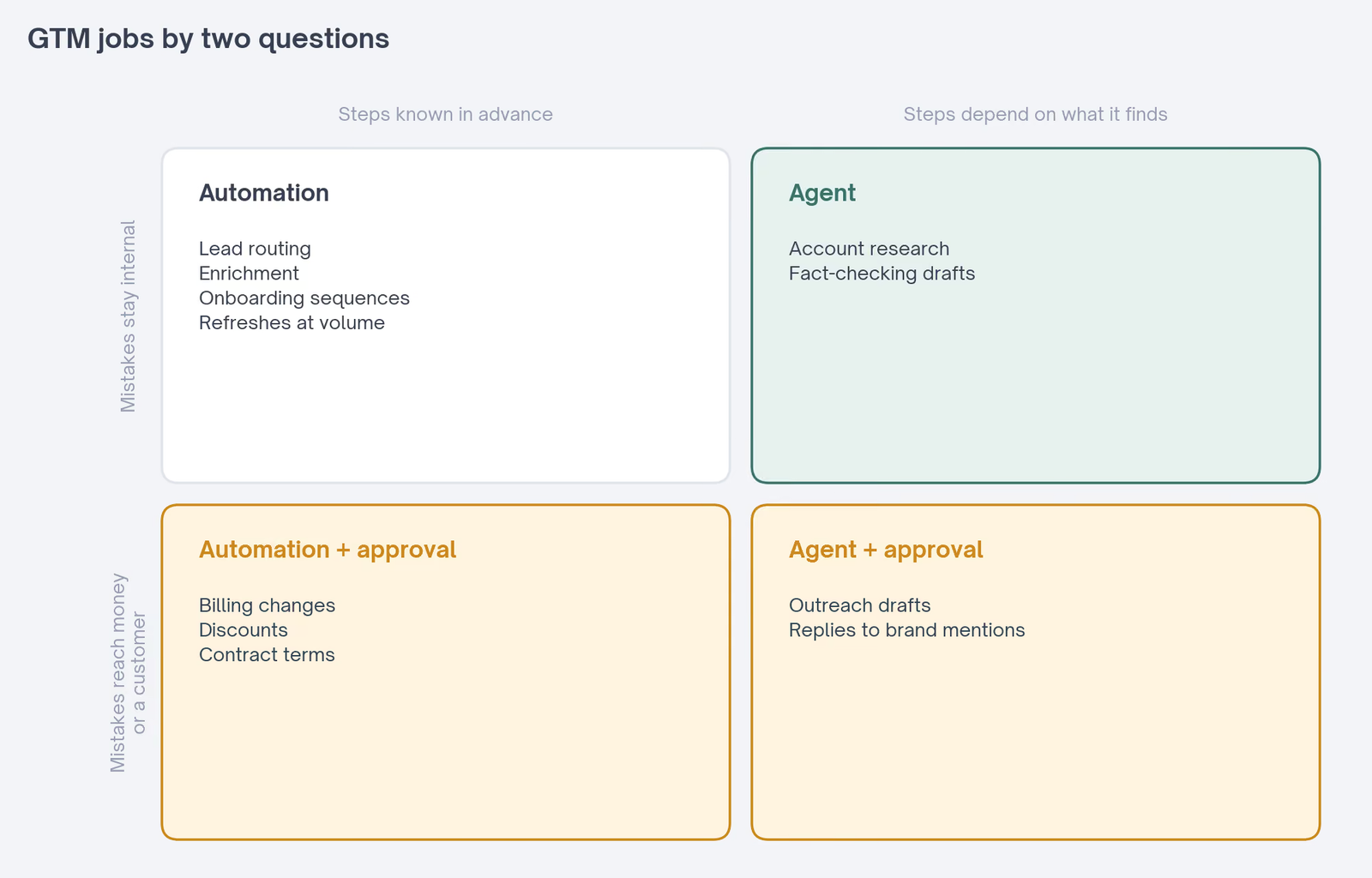
UiPath's documentation lands in the same place from the vendor side. It lists drafting, multi-system research, and first-pass triage as good uses for agents. High-risk financial transactions and regulatory work with zero error tolerance stay on deterministic automation.
The table follows one rule. If you can write the steps down, write them down and automate the job. If the steps depend on what the work turns up, hand the job to an agent.
Refreshes are the case people most often get wrong. A refresh feels like judgment, since each page needs different edits. But the procedure stays the same for every page: read it, compare it with what ranks, update the stale parts, and send it for review.
That's why Slate runs refreshes as workflows, with a person reviewing each refreshed page before it publishes.
Its Content Refresh workflow updated nineteen articles in sixty days, with traffic on the refreshed pieces up forty-two percent on average. And TripleDart refreshed more than 1,000 pages in four weeks with Slate Workflows and Sheets, Slate's bulk-run spreadsheets.
The Same GTM Job, Built Both Ways
Slate's Listicle Builder exists as a workflow and as an agent, which makes it a clean comparison.
The workflow version runs eleven blocks in order and takes ten to twelve minutes. It takes a target keyword and leaves a finished listicle in Webflow as a draft, with screenshots, internal links, and citations.
Slate reports twelve listicles from it in sixty days, ranking around position eight on average within four weeks.
The agent version runs the same blocks and adds memory. It remembers which listicles Slate has already produced and which angles it has covered. So the next one doesn't repeat them.
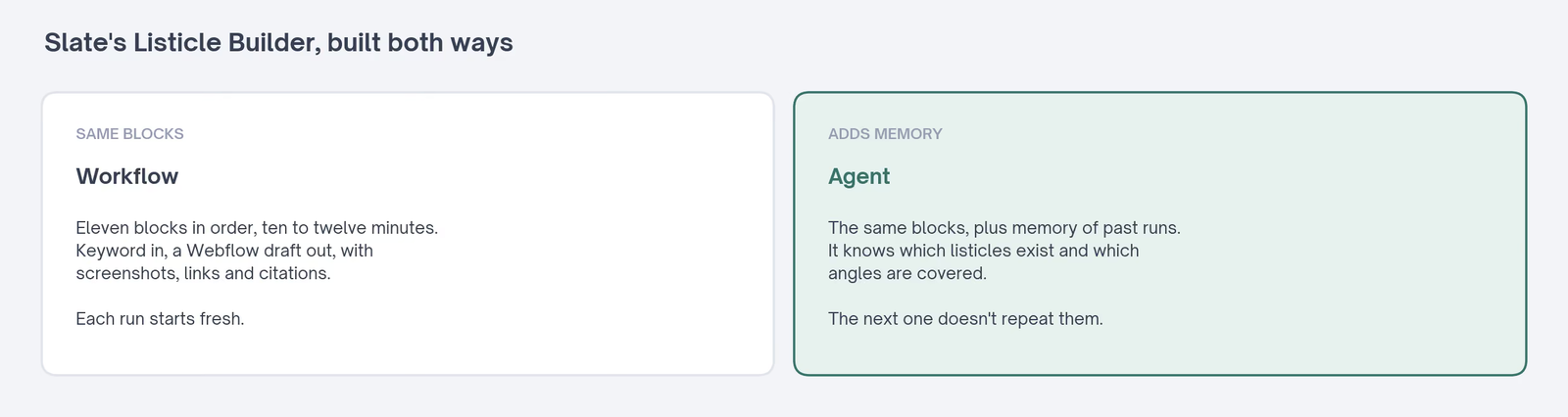
That's a narrow difference. The agent didn't replace the workflow. It added the one thing a single run can't have, which is knowledge of the runs before it.
Slate's Internal Linking Engine shows the same difference in a different job. It crawls the site weekly and remembers each page's link equity. It won't keep pointing new articles at a page that's already a hub.
Memory pays off when repeated runs over the same library start stepping on each other. When each run stands alone, the workflow is enough.
A Worked Example: Account Research Before Outreach
Account research is the GTM job where the choice matters most, so I'll build it both ways on paper.
As automation, it's an enrichment run. A new target account lands in the CRM, a rule calls a data provider, and set fields come back: headcount, industry, funding stage, and tech stack. Every account gets the same fields, in the same order.
That covers the facts a routing rule needs. It doesn't tell a rep why this account might care this month.
As an agent, the job starts from a goal: find the reason to reach out.
The agent might read the company's careers page, its last three blog posts, a recent funding announcement, and the founder's LinkedIn activity. Which of those it opens depends on what the first one turns up.
It stops when it has a specific signal, or when it hits a turn limit. Then it writes a short brief with its sources linked.
The version that works in practice uses both. A rule triggers the agent when an account moves to "target". The agent writes the brief, a rep reads it before writing a word, and a rule logs the brief to the CRM.
The Exchange's AI-powered BDR engine shows the scripted half of that loop. It sources and checks a list before loading a written sequence, and the research brief would slot in before that sequence gets written.
What It Takes to Run an Agent Well
An agent is mostly its tools. Anthropic describes agents as typically just models using tools based on feedback from their environment, in a loop. So the quality of the tools and their descriptions decides most of the outcome.
Anthropic says its own team spent more time optimizing the tools than the overall prompt when building a coding agent. For a GTM agent, that means clear tool names, plain descriptions, and examples of correct use.
It also means stopping conditions. An agent without a turn limit or a clear definition of done will keep searching. That costs money and rarely improves the result.
And it means a test set. Before an agent touches live accounts, run it on twenty past cases where you know the right answer, and read every output.
Signs a Job Has Outgrown Its Workflow
Most workflows never need to become agents, though a few show clear signs that they do.
The first sign is a branch for every exception. When the workflow has grown a condition for each unusual input and new ones keep arriving, the rules are trying to do judgment.
The second is a step that can't be listed in advance. Research is the usual example. You can't write down which five pages to read about an account you haven't looked at yet.
The third is a manual queue that keeps growing. If people spend their week clearing the items the workflow couldn't handle, those items are the agent's job. The routine ones can stay with the workflow.
The fourth is repetition across runs. When each run produces something sensible on its own but the batch keeps covering the same ground, the job needs memory.
Signs an Agent Should Have Been a Workflow
The opposite mistake is just as common, and Gartner's agent washing estimate suggests it's the more expensive one.
If the agent takes the same path on almost every run, it's a workflow with extra cost. Write the path down, and keep the model for the one step that reads or writes.
If the output has to be identical every time, such as a field mapping or a report format, an agent's variation is a defect. Rules give the same answer twice, and agents may not.
If the agent's cost per run swings widely from one input to the next, check what it's doing with the extra calls. Often it's searching for something a rule could have told it, such as which CRM field to read.
If nobody can say why a run went wrong, that's a sign too. A workflow's failure has an address, and an agent's often doesn't. Teams that can't trace failures usually end up rebuilding the job as a workflow anyway.
What Agents Cost That Automation Doesn't
Agents cost more to run, and the cost moves with the work. Anthropic says plainly that agentic systems often trade latency and cost for better task performance.
It also warns that autonomy brings higher costs and the potential for errors that build on each other. McKinsey's State of AI 2026 puts numbers on the cost side.
About one in five respondents say AI operating costs, including tokens, have constrained their use of AI. For agents specifically, about one in ten report that constraint.
The failures cost more too. A workflow breaks at a step you can see, and you can swap that one block without touching the rest.
Shiyam's example is the Listicle Builder: when a better drafting model comes out, he replaces block seven and leaves the other ten alone.
An agent's error can sit three steps back from where it shows up. Anthropic recommends extensive testing in sandboxed environments, along with guardrails, before trusting one with live work.
A workflow's cost is also easier to predict before you run it. You can count the steps and the model calls, and multiply by the number of items.
An agent's cost depends on how many turns each item takes, which you only learn by running it.
Gartner's cancellation forecast is the end of that road. It expects over 40% of agentic AI projects to be canceled by the end of 2027, because of escalating costs, unclear business value, or inadequate risk controls.
Where a Person Has to Stay, Whichever You Build
Approval matters more than the build type. Before choosing between an agent and a workflow, decide which actions need a person's sign-off before they happen.
Slate builds that line into its agent playbooks, which it calls Recipes. In its tool catalog, every tool an agent can call is marked as a read or a write.
Reading Ahrefs data runs freely. A write, such as creating a new tracking topic, needs approval first.
Slate's content workflow guide routes work by risk in the same spirit. A glossary entry gets automated checks and a spot check. A pricing, legal, or medical claim gets specialist review plus senior approval.
Anthropic's description of agents includes the same idea. Agents can pause for human feedback at checkpoints, and they often run with stopping conditions, such as a maximum number of turns.
In practice, that approval step can be light. A draft that waits in a queue for a person to click approve costs a few seconds per item, and it catches the cases nobody planned for.
For a GTM team, I'd draw the line at three things. Money, contracts, and anything that lands in a customer's inbox get a person's approval, whether a rule or an agent prepared them.
How Many GTM Teams Use Agents Today
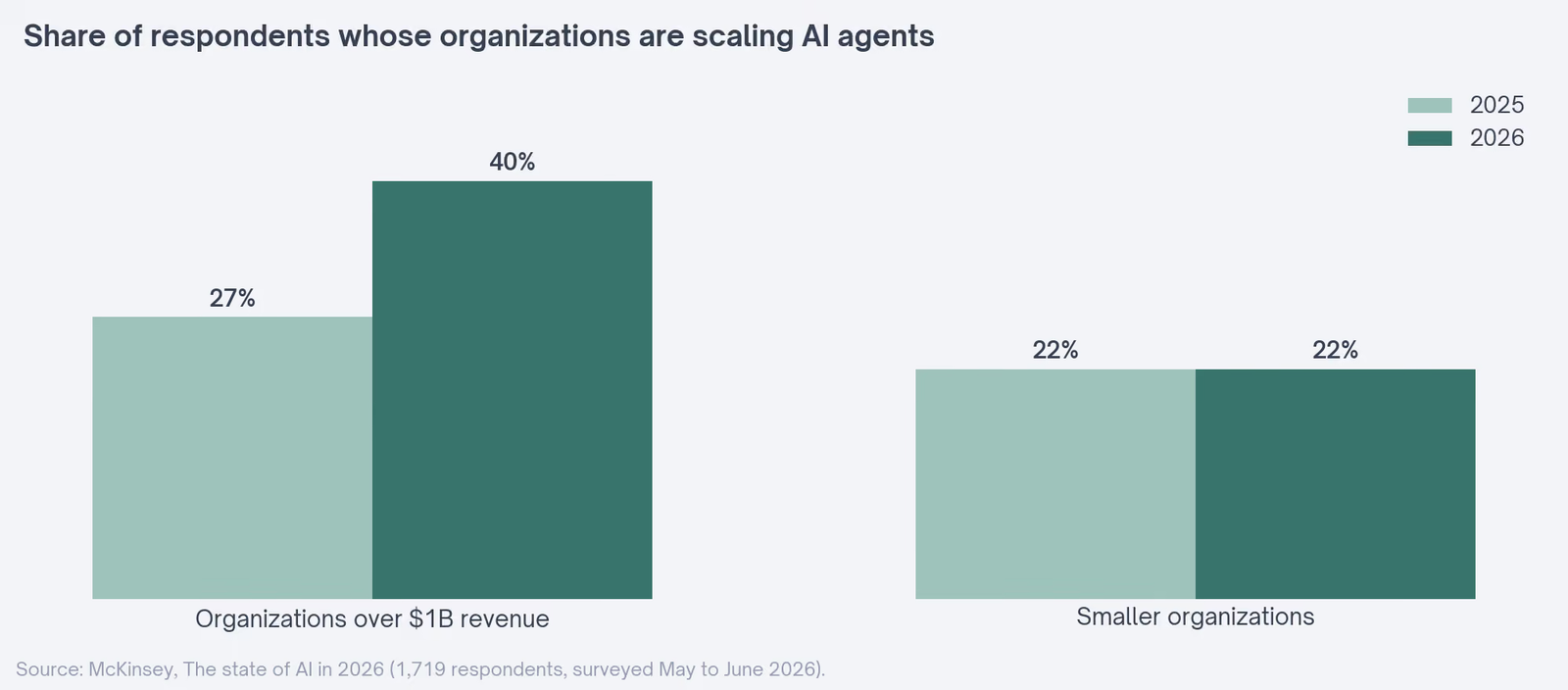
Agents are spreading, mostly in big companies. McKinsey's 2026 survey of 1,719 respondents found that 40% of those at organizations with more than $1 billion in revenue report scaling AI agents. A year earlier, the share was 27%.
| Who | Scaling AI agents in 2025 | Scaling AI agents in 2026 |
|---|---|---|
| Organizations over $1 billion in revenue | 27% | 40% |
| Smaller organizations | 22% | 22% |
Among smaller organizations, the share stayed flat at 22%. Chatbots are still far more widely scaled: about 47% of respondents say their organizations are scaling chatbots across the enterprise, against about two in ten for AI agents.
McKinsey finds agents scaled most often in IT, knowledge management, and software engineering. Respondents in consumer goods and retail most often report agents in marketing and sales.
McKinsey also finds that high performers, the roughly 6% of respondents who attribute 5% or more of EBIT to AI, are more than three times as likely as others to be scaling agents in most functions.
They're also far more likely to have redesigned workflows around AI, nearly three-quarters against about a quarter of everyone else.
For a mid-sized GTM team, that's useful context. Most of the companies you compete with aren't running agents at scale either. Starting with automation and adding agents where a job needs one carries no penalty.
How to Decide for Your Next Build
When a new job lands on your list, these questions sort it quickly:
- Can you write every step down before the run starts? Then build automation. Most routing, enrichment, scheduling, and reporting jobs stop here.
- Does one step need reading or writing? Add a single AI step to the workflow, and keep the rest as rules.
- Does the next step depend on what the work turns up? That's the case for an agent, such as research across sources you can't list in advance.
- Will it run again and again on the same material? Give it memory, the way Slate's agents remember past runs, so it doesn't repeat itself.
- Does it touch money, contracts, or a customer's inbox? Put a person's approval in front of that action, whichever you built.
Write the answers down before anyone opens a builder. The answers decide the build, and they're far easier to argue about on a page than in a half-finished workflow.
Start with the cheapest build that passes those questions. You can add an agent step to a working automation later. Making an unpredictable agent behave like a workflow after the fact is much harder.
Where to Go Next on the Exchange
These pages pick up from here:
- The AI agent guide, with the checklist for telling an agent from a relabeled chatbot.
- The AI workflow guide, covering which steps the model should handle and where a person checks.
- Workflows versus skills, the same lead scoring job built as an n8n workflow and as a Claude skill.
- AI workflow automation tools, sorted by the layer each one handles.
- Content and SEO automation, with architecture blueprints for automated content work.
- Free n8n templates for GTM teams, sorted by where each lands in the funnel.
- Sales workflow automation, with twelve finished automations to download.
- The AI-powered BDR engine, which sources and checks a list before loading a written sequence.
- The lead enrichment workflow, a scripted build with a skill holding the rules.
- The Exchange workflow library, with every listed automation and its limits named.