

Key Takeaways
- AI workflow automation is a workflow with set steps where one step uses a model, such as writing an email or labeling a ticket.
- The GTM processes to automate first repeat every week, run on data you can already reach, and end in something a person can check.
- Anything that sends, publishes, or spends money waits for a person, while the steps before it run on their own.
- Most AI workflows fail without warning when a login expires or a field gets renamed. Every one needs an alert that fires when a run fails.
AI workflow automation runs a set sequence of steps, like a regular automation. A model handles the one step that needs judgment. In GTM, that covers enrichment, outbound emails, churn alerts, product monitoring, reporting, and more.
What AI Workflow Automation Means for a GTM Team
A regular automation moves data between tools on a trigger, such as a form fill or a new deal. An AI workflow adds one step a rule can't handle, such as writing a first-touch email or reading the mood of a support ticket.
The rest works like any other automation. The steps run in the same order every time, and code checks the model's output before anything goes further.
Which platform runs the workflow is a separate choice. Zapier, Make, n8n, and the agent builders differ by price and by how much a model gets to decide. The Exchange compares them in detail in Best AI Workflow Automation Tools.
Before automating any GTM process, I'd check it against four questions:
- Does it repeat every week? A weekly process pays back the build. A quarterly one rarely does.
- Can the workflow reach the data? Each input has to sit in a tool with a connector, such as your CRM, ad account, or help desk.
- Have the steps settled? The Exchange's workflows directory advises waiting on a process that's still changing, because automating it locks in whichever version you had that week.
- Can someone check the output? A draft email or a score is easy to review before it goes out, while a sent email can't be taken back.
10 GTM Processes You Can Automate With AI
These ten run across sales, marketing, and customer success, and each one has a published workflow on the Exchange you can copy. The table shows what starts each one, what the model does, and who checks the output before it goes anywhere.
| Process | Starts when | What the AI does | Who checks the output |
|---|---|---|---|
| Lead enrichment | You ask Claude to enrich new contacts | Runs the enrichment pass, while a script holds back weak matches | A person, who confirms every write and reviews the matches held back |
| Outbound email sequences | Every weekday, from a contact sheet | Writes each email from the contact's details | A person, before each send for the first two weeks |
| LinkedIn outreach | Every workday, from a prospect CSV | Writes the connection note and follow-ups from company research | You, sending each one from a capped daily list |
| Customer onboarding | A new account signs up | None. Timed emails and team alerts cover it | No one, since every new account gets the same emails |
| Churn risk alerts | On a schedule you set | Reads ticket sentiment and weighs it with deal age and usage | The account owner, who gets the alert with a suggested next step |
| Product health monitoring | Every day | Attaches a root-cause suggestion to each anomaly | The product team, who treat the suggestion as a guess |
| Customer feedback analysis | Every day | Groups survey responses by sentiment, then finds themes in batches | No one, since the report posts straight to Slack |
| Marketing reporting | Once a week | Writes the year-over-year comparison and a summary | No one, since the summary goes straight to email |
| Content fact-checking | Before an article publishes | Lists every claim and checks each one against a web source | The editor, who decides on any claim it can't verify |
| Social post scheduling | Every day at 9 AM | Writes a version of each planned topic for each platform | No one in the template, since posts queue straight to Buffer |
Onboarding is the one row with no AI step. That's on purpose: a plain automation does the job when the steps and the copy are the same for every new account.
The other nine use the model for one of three jobs. Each job needs its own check:
| What the AI does | Processes | What to check |
|---|---|---|
| Writes something a person will send | Outbound emails, LinkedIn notes, social posts | Read the first batch of drafts in full, since a draft can follow every rule and still miss the reader |
| Reads and labels | Lead enrichment matches, churn sentiment, feedback themes, root-cause notes | Compare the labels with cases you already know, before anyone acts on them |
| Summarizes or checks | Marketing reports, fact-checking | Read the data underneath, since a summary can soften a bad week |
Read the last column before you copy a workflow. Several of these send their output with no person in between, which suits an internal alert or a weekly report.
A social post is different, because it goes out under your brand. The social workflow's own page advises keeping an approval step for the first month, between the sheet and Buffer.
Lifecycle email has more stages than these. Slate's set of twelve in Marketing Automation Workflows for Every Lifecycle Stage covers demand through win-back. Each one comes with its trigger, its exclusions, and its exit conditions.
Two other lists on the Exchange cover different ground. Slate's ten marketing checks watch paid ads, organic traffic, and Reddit, and each one reports to a person without deciding anything, in Marketing Automation Workflows for B2B SaaS: The 10 I'd Build First.
Form capture and lead routing, which run on scoring rules with no AI step, sit in the Exchange's sales workflow automation guide.
The time savings can be large. TripleDart's SEO reporting workflow took six hours a report and now takes about 30 minutes of drafting plus review.
How One AI Workflow Runs
Every process in the table follows the same shape, whatever platform runs it. The model gets one step. The steps around it pull the data, check the output, and stop anything risky.
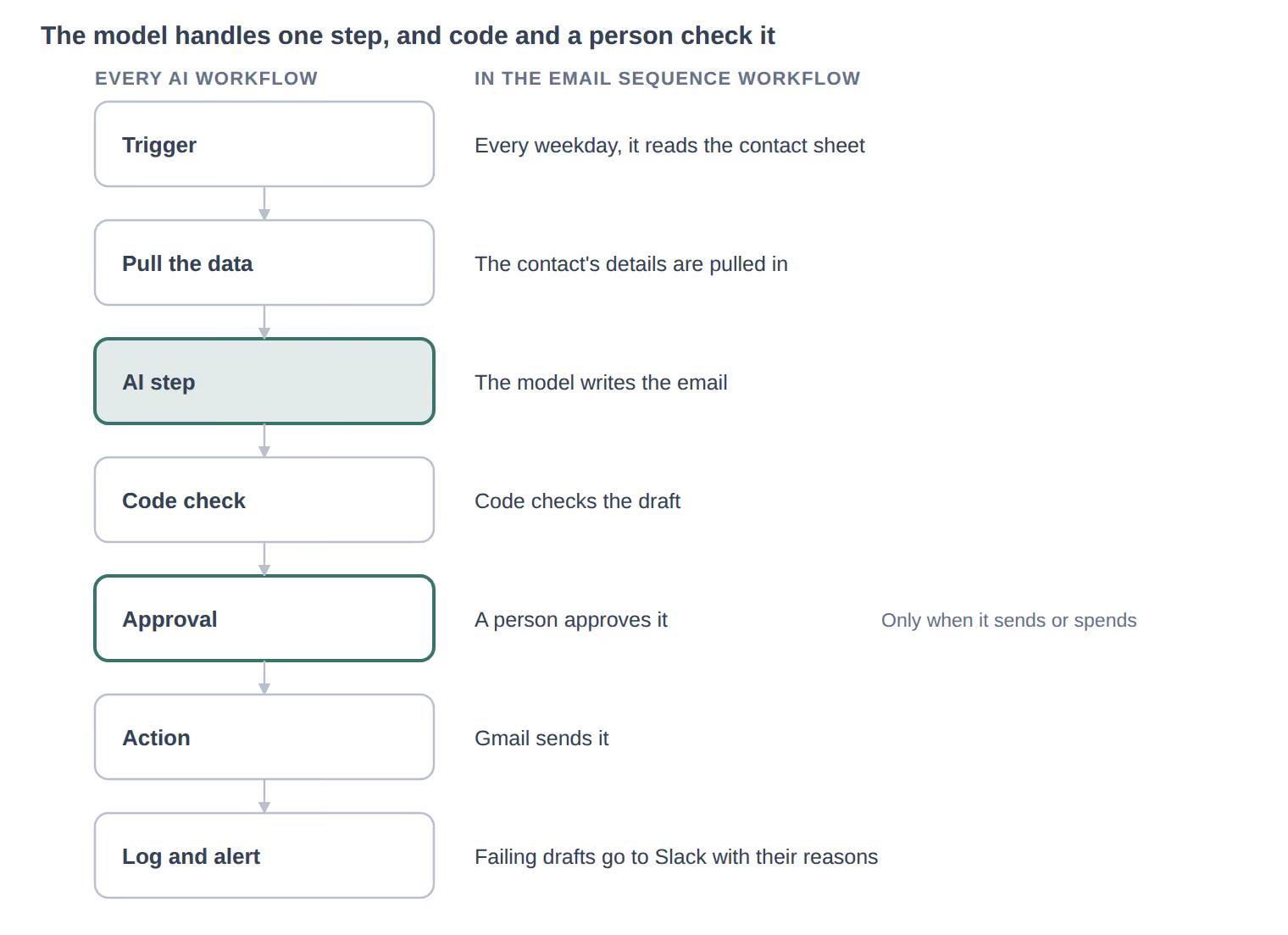
Keep the approval step when you trim a workflow. Reporting can skip it. Anything that emails a customer or changes a budget can't.
One Workflow, Start to Finish
Take TripleDart's email sequence workflow. Every weekday it reads a contact sheet, where each row holds a name, a company, and a signal, meaning the reason you're writing, such as a job posting.
The AI step drafts one email at a time under a set list of rules. A code step then checks the draft against thirteen of them, blocking it if a placeholder is left in or the opt-out line is missing.
Failing drafts go to Slack with the reason.
For the first two weeks, every passing draft waits in Gmail until a person sends it. A cold sequence then runs on days 1, 4, 8, and 14, and before each follow-up the workflow checks the thread and stops on a reply or a bounce.
The workflow's own page names the limit: a vague signal gives a vague email, and no rule in the gate can catch it.
How to Pick Your First Process and Measure It
The best first process is the one that costs the most hours and does the least harm when a run goes wrong. Here's the order I'd follow:
- List the processes your team repeats each week, with the hours each one takes by hand.
- Run each through the four questions above, and set aside any that fail one.
- Pick the one with the most hours among those whose output a person can check.
- Time two runs by hand, so you have a number to beat.
- Run the workflow next to the person for two weeks, then compare hours, errors, and how often the output needed a rewrite.
Rebuilding the process matters more than bolting a model onto it. In McKinsey's 2026 State of AI survey, nearly three-quarters of AI high performers said they had rebuilt workflows around AI, against one-quarter of other respondents.
What Breaks in AI Workflows
Most AI workflows break in the plumbing, well before the model gets a say. The Exchange's workflows directory puts it in order: the credential fails first, then the schema. Either way, the run fails without a sound unless someone added an alert.
| Failure | What you see | What prevents it |
|---|---|---|
| An expired login or API key | Runs stop, with no error anyone reads | An alert to a person on every failed run |
| A field renamed in another tool | Empty or wrong data flows into the AI step | A check that required fields are filled before the model runs |
| Model output in the wrong shape | A half-written email or a score outside the range | Code that checks the output before it moves on |
| The same trigger firing twice | A contact gets two copies of one email | A dedupe step before any action |
| A process that changed after the build | The workflow keeps running last quarter's version | One owner per workflow, and a review whenever the process changes |
| Customer data sent where it shouldn't go | Contact details or ticket text reach a model provider your policy doesn't cover | A list of what each step sends, and to which provider, before you connect live data |
The last row needs the same check as any vendor review. Self-hosting n8n keeps the workflow on your own servers, but the AI step still sends its input to whichever model provider it calls.
The third row is where AI workflows differ from plain automations. In TripleDart's email sequence workflow, the model writes each email, code checks the draft, and a person approves it before Gmail sends.