

Key Takeaways
- Write the description for the requests people type. Claude picks a skill by matching your words against it, so it's the only part of the file that decides whether the skill runs at all.
- Put trigger phrases in the first few hundred characters. Claude Code cuts the listing at 1,536 characters, and claude.ai refuses anything over 1,024.
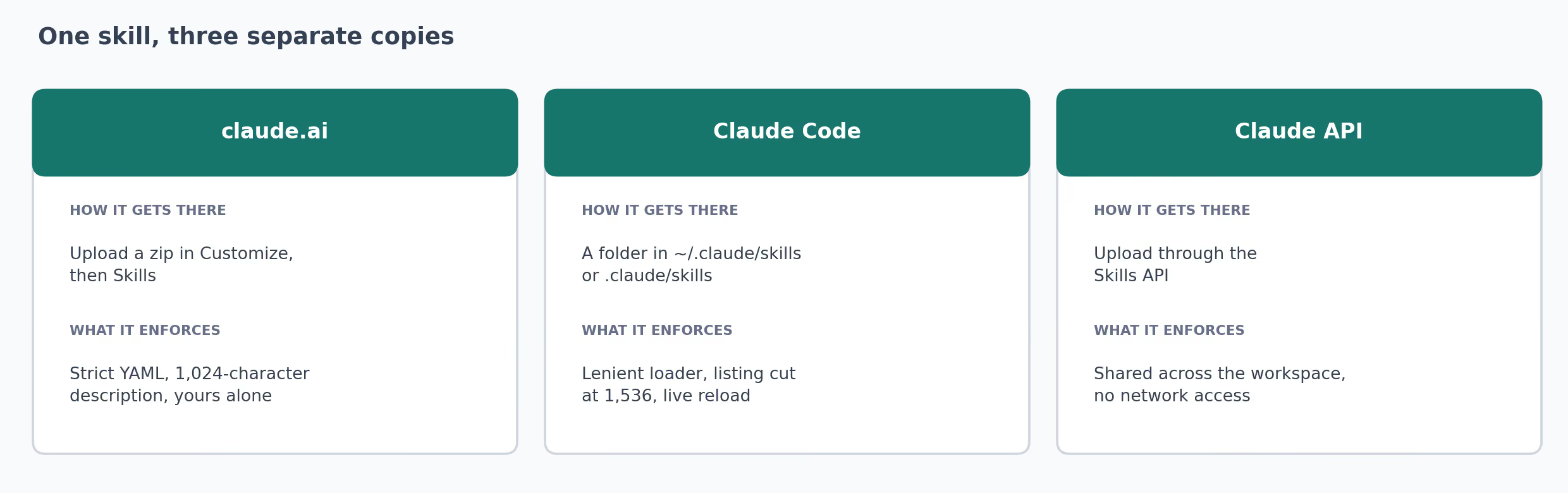
- Treat claude.ai and Claude Code as separate installs. A skill uploaded to one doesn't appear in the other.
- Run a strict YAML check before you upload. An unquoted
#in a description drops everything after it, and the upload still reports success. - Give each skill a tell: one instruction with a visible effect, so you can see from the reply whether it loaded.
- Type
/skill-namefor anything that sends or publishes. Automatic loading suits reference skills like voice rules and pricing checks. - Edit the file when a skill misbehaves, and keep the old version beside it until the new one has run a few times.
How Claude Skills Work Once They're Installed
A Claude Skill is a folder with a file called SKILL.md in it. The file holds instructions Claude follows for one kind of task, like writing a brief or fact-checking a listicle. For the anatomy of that file, see what's inside the folder.
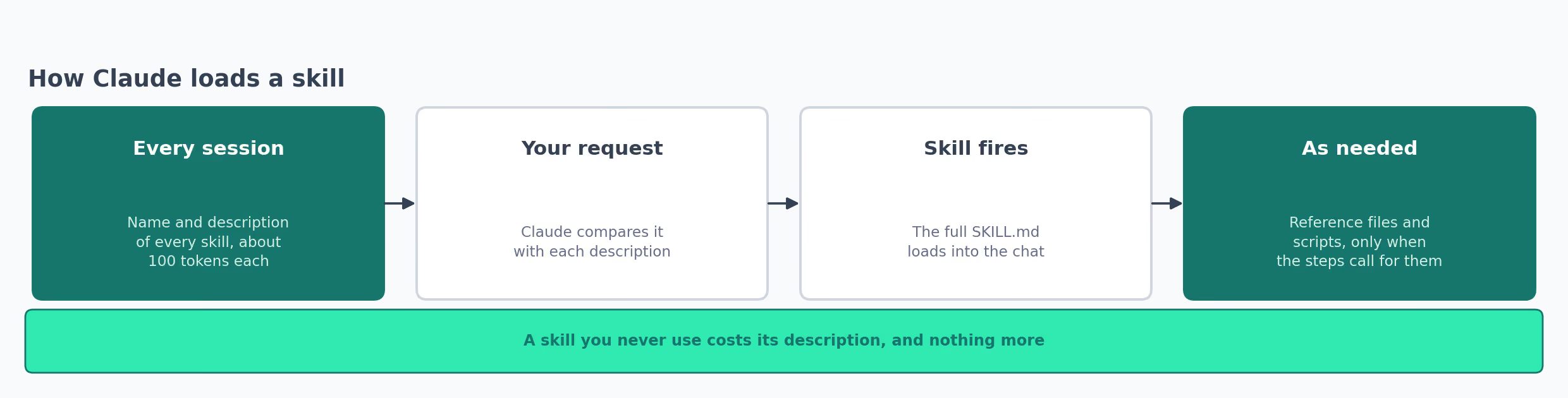
Using one comes down to the few lines at the top of the file, called the frontmatter, which are written in a simple format named YAML. Every session, Claude reads the name and description of each installed skill and nothing else.
Anthropic's overview says "until a Skill is triggered, only its name and description occupy context" (Agent Skills overview).
When a request matches a description, Claude opens the whole file and follows it. Reference files and scripts in the folder load later still, at the point a step in the instructions asks for one of them.
| What loads | When | Rough cost |
|---|---|---|
| Name and description | At the start of every session | About 100 tokens per skill |
The body of SKILL.md | When your request matches the description | Under 5,000 tokens, per Anthropic's guidance |
| Reference files and scripts | When a step in the body calls for them | Nothing until they're read or run |
A token is the unit Claude measures text in, and one works out to roughly four characters of English.
Claude can pick a skill by itself: the help center says "Claude determines when each skill is needed based on your request" (Use skills in Claude). Or you name the skill yourself, which in Claude Code means typing a slash and its name.
This article came out of the automatic route. I asked for an article for The GTM Exchange, TripleDart's go-to-market (GTM) directory where this piece lives.
My keywords went in the same message, pasted underneath. Claude matched the request to our article-writing skill without being told its name.
They then arrived at the foot of the skill as a line starting ARGUMENTS:. The skill has no placeholder for inputs, and in that case Claude Code appends whatever you typed to the end of the file.
Skills can also hand work to each other. Our blog refresh skill names two others in its own description. It calls our first-party data skill for the research stage and defers to our blog writing skill for voice and formatting.
Each file stays shorter that way, and a voice rule changed in the blog writing skill reaches every skill that defers to it.
How to Use Claude Skills in Claude.ai
The claude.ai side needs one setting and an upload. Anthropic lists skills on the Free, Pro, Max, Team and Enterprise plans.
- Open Settings, then Capabilities, and turn on Code execution and file creation. On Team and Enterprise, an organization owner turns skills on.
- Go to Customize, then Skills.
- Click +, choose Create skill, then Upload a skill.
- Pick a zip of the skill folder. The zip holds the folder, and the folder holds
SKILL.md. - Start a new chat and ask for the task in your own words.
Anthropic's own skills need no upload. Ask for a deck and Claude uses the PowerPoint skill. A spreadsheet request goes to the Excel skill, and a contract redline goes to the Word skill.
Custom skills on claude.ai belong to the person who uploaded them. Everyone on a team uploads their own copy, unless an organization owner publishes the skill for the whole organization.
The Exchange's content brief skill is one I'd share that way, because a brief in the same section order for everybody is the point of it.
To change a skill later, open the menu on it and choose Replace. That uploads a new version under the same skill, and we've never had to delete one to correct it.
The Overview panel shows roughly the first 500 characters of a description and stops there. That's a display limit. It tells you nothing about whether the upload kept the rest of the text.
How to Use Claude Skills in Claude Code
Claude Code reads skills straight from folders on your machine, with no upload step. Where you save the folder decides where the skill works:
~/.claude/skills/<skill-name>/SKILL.md     every project on this machine
.claude/skills/<skill-name>/SKILL.md       this repository only, commit it for the team
Claude Code notices a new or edited skill inside a running session. You only restart when the skills folder itself didn't exist as the session began. From there, the choices look like this:
| You want | Do this | What happens |
|---|---|---|
| Claude to decide | Ask for the task in plain words | Claude matches your request to a description and loads the skill |
| A specific skill now | Type /skill-name | The skill loads whether or not your wording matches |
| To pass it an input | Type /skill-name then the input | The input fills $ARGUMENTS in the file, or lands at the end as ARGUMENTS: |
| Only you to start it | Add disable-model-invocation: true to the frontmatter | Claude never loads it by itself |
I'd use the slash for anything with a side effect, since a skill that uploads a banner or publishes a page to your website shouldn't pick its own moment. For reference skills like voice rules and pricing checks, automatic loading is the whole appeal.
An input can be as short as a title. Typing /tripledart-blog-banner followed by a post title hands the banner skill everything it needs. Claude Code passes the title in with the skill's instructions.
Claude Code doesn't sync with claude.ai either. Anthropic's overview says "Custom Skills do not sync across surfaces", and the Claude API, which developers use to build Claude into their own software, keeps a third separate copy.
I'd keep one folder as the master and zip from it whenever claude.ai needs an update.
Why Our Skills Worked in Claude Code and Broke on Claude.ai
Our team keeps 38 skills in ~/.claude/skills. They cover blog briefs, case studies, LinkedIn posts, banner images and fact-checking. Claude Code loads every one of them without a warning.
The first upload to claude.ai went wrong without an error message. Our LinkedIn post skill uploaded and lost every phrase telling Claude when to use it. Its description ran to 2,099 characters, and a strict YAML parser kept 531 of them.
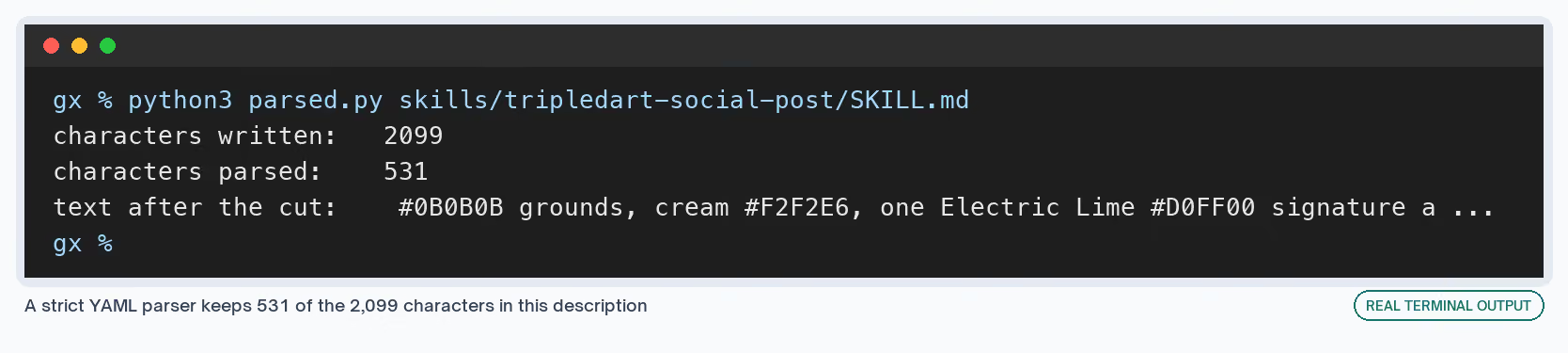
The cause was a brand color. YAML, the format the frontmatter is written in, treats a space followed by # as the start of a comment. Claude Code's loader tolerates it, and claude.ai's parser doesn't.
Everything after the first #0B0B0B disappeared, including every "use this when" phrase. The cut also let it pass the length check. At 2,099 characters it was over the 1,024 limit, and at 531 it fit comfortably.
The repair is a folded block, which YAML reads as plain text:
# Before: one line, unquoted. Strict YAML stops at " #".
description: Builds LinkedIn visuals on #0B0B0B grounds with a lime accent. Use when...

# After: a folded block. Colons, quotes and # need no escaping.
description: >-
  Builds LinkedIn visuals on #0B0B0B grounds with a lime accent. Use when
  asked for a LinkedIn post, a carousel, or a post visual.
A colon causes the second failure. A colon followed by a space inside an unquoted description makes strict YAML refuse the whole block, and the upload preview then reports that it found no description at all.
Twelve of our 38 skills had a colon like that, our birthday-message skill among them. Its description says every message "is meant to pass the swap test: if you could swap in any other coworker's name and it still works, it's too generic."
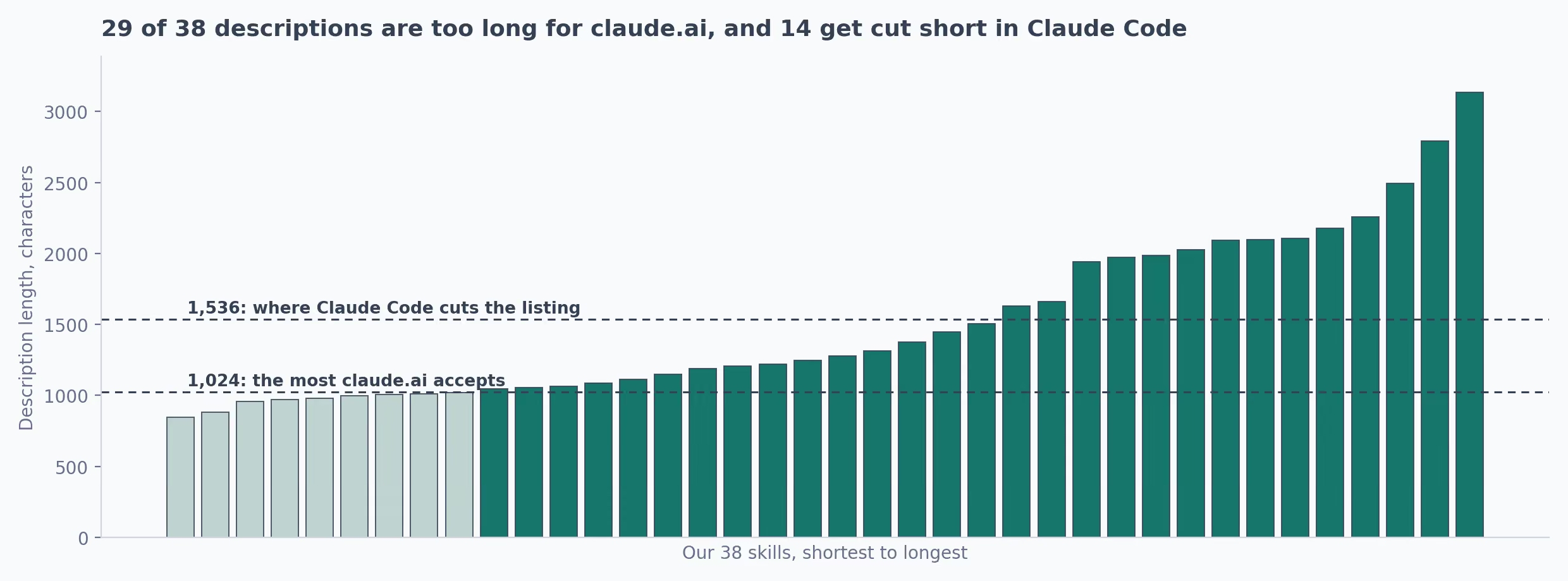
Then I measured every description against both published limits:
| Limit | Where it applies | Our skills over it |
|---|---|---|
| 1,024 characters | The published maximum for a description, enforced on upload | 29 of 38 |
| 1,536 characters | Where Claude Code cuts the listing Claude reads | 14 of 38 |
An XML-like tag such as <brand> | Upload refuses the description | 2 of 38 |
When we moved the team's set to claude.ai, we rewrote each description as a folded block under 1,024 characters. We kept the trigger phrases and the line naming the neighboring skill to use instead.
The explanation of how each skill works inside came out. Claude reads that from the body once the skill loads.
The length has a cost inside Claude Code too. Anthropic's overview estimates about 100 tokens per skill for the listing.
Capped at 1,536 characters each, our 38 descriptions come to about 48,000 characters. By the usual estimate of four characters per token, that's roughly 12,000 tokens loaded into every session before anyone types a word.
Where the Trigger Phrases Sit in a Description
The 1,536 row matters even if you never touch claude.ai. Past that point, Claude Code trims the description before Claude sees it. The docs say to "Put the key use case first."
So I measured where each of our descriptions first says when to use the skill, meaning the first "use when", "use whenever" or "trigger" phrase. Half of them get there by character 690, and the rest take longer:
| Where the first trigger phrase starts | Our skills | What Claude sees |
|---|---|---|
| Inside the first 1,024 characters | 27 of 38 | The trigger phrases, in both products |
| Between 1,024 and 1,536 | 7 of 38 | The phrases in Claude Code, nothing after a claude.ai trim |
| Past 1,536 | 4 of 38 | A description of the output and no trigger phrases at all |
Our case study writer is the extreme one, with its first "use whenever" at character 2,452. In the skill listing Claude Code gave me while I wrote this, its description stops mid-sentence at a list of brand colors.
Claude sees no word about when to use it.
All four open with a long account of what the skill produces, section by section, and only then say when to reach for it. In Claude Code, that order costs each of them its triggers.
The order I'd use now, for any skill:
- What it produces, in one sentence, in third person
- The requests that should load it, phrased the way people type them, lazy versions included
- The do-not line, naming the neighboring skill and when to use that one
- Anything else, only if there's room under 1,024 characters
Anthropic's authoring guidance says to "Always write in third person" for the description. Writes case studies from client materials reads cleanly in a list of 38, and I can help you write case studies blurs into every other skill written the same way.
Here's the case study writer's opening as it stands, next to the order above:
As written: End-to-end case study writer for TripleDart (tripledart.com). Takes any
            combination of raw client materials (discovery decks, performance sheets,
            call transcripts, email threads, internal notes, Notion pages ...

Reordered:  Writes a finished TripleDart case study from raw client materials. Use when
            asked to write, draft or turn notes into a case study or customer story.
            Do not use for blog posts (use tripledart-blog-writer).
The do-not line earns its space when two skills sit close together. Our article-writing skill ends its description by sending hub directory pages to the hub builder and tripledart.com posts to the blog writer.
Without that line, all three could match a request that mentions an article.
How to Tell Whether a Claude Skill Fired
A skill that doesn't load fails without telling you, because Claude answers anyway. The reply looks plausible and misses the rules the skill carries. These checks catch it, cheapest first:
- Watch the transcript in Claude Code. It names the skill as it launches, before any other work. Typing
/also lists every skill Claude Code found, which confirms the folder is in the right place. - Give the skill a tell. Add one instruction with a visible effect that Claude wouldn't produce unprompted. Our fact-checking skill always opens its reply with the article's URL, then a table whose columns come in the same order every time.
- Force it once with the slash. If
/skill-nameproduces the right output and plain wording doesn't, the instructions are fine and the description needs work. - Run
/skill-doctorin Claude Code. Per the docs, "It flags skills in the listing that have never been invoked", along with what each one costs in context. - Test in a fresh chat. A conversation where the skill already loaded keeps using it, which says nothing about whether it triggers.
The tell is the check I'd keep if I dropped the rest. It works on claude.ai, where I have less to look at. It also turns a feeling about output quality into a yes or no.
When a skill never fires, the test I'd run uses eight requests. Five are phrased the way the team types them, including a lazy one with no context. Three come from a neighboring skill's territory and shouldn't fire it.
Every miss changes the description. A request that should have fired adds its exact phrase. One that fired by mistake adds a "do not use for" line pointing at the other skill.
When a Skill Stops Doing What It Says
Skills drift. The work around them changes and the file doesn't. The editing loop I'd follow is small:
- Find the rule the output broke, or notice there's no rule for it.
- Write the rule into
SKILL.mdwith the reason it exists. - Keep the old piece beside the new one until the new one has run a few times.
- On claude.ai, use Replace on the existing skill. In Claude Code, saving the file is enough.
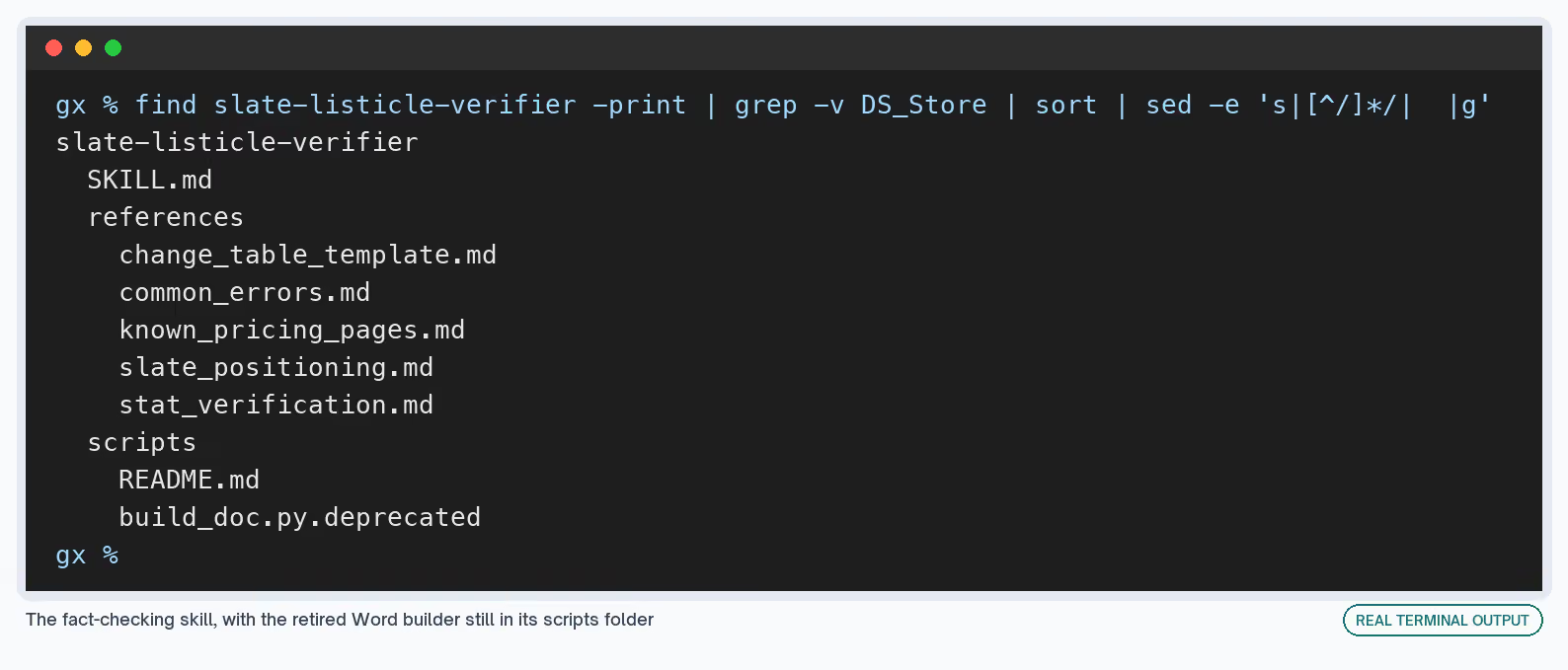
Our fact-checking skill shows the whole loop on disk. It used to produce a Word document of corrections. Its rule now reads "a markdown table in the chat reply. Never a .docx", and the old builder stayed in the folder, renamed:
One Claude Code behavior affects how a rule should be worded. Once a skill loads, its text stays in the conversation, and "Claude Code does not re-read the skill file on later turns" (Claude Code docs).
An instruction written as a one-time step gets followed once. I'd write anything that should hold for the whole task as a standing rule.
Long sessions have a second catch. When Claude Code summarizes a conversation to free up space, it re-attaches each skill's first 5,000 tokens, within 25,000 tokens across all of them (skill content lifecycle).
A long skill loses its tail after a summary. I'd put the rules that matter most near the top for that reason. Calling the skill again after a summary brings the whole file back.
Using a Skill With the Data It Needs
A skill holds a procedure. It doesn't hold access to anything. When a skill needs data from a platform, it uses an MCP connector that Claude already has, and the skill decides what to ask for and what to do with the answer.
Our first-party insights skill works this way. It reads an existing article on tripledart.com, our agency's site, pulls citation and visibility data through the Slate MCP connector, and returns a list of data points to add.
Slate is our AI search visibility platform, and the connector is how Claude reads it. The skill's job is everything the connector doesn't know:
- Which metrics matter for the article's topic
- How to write a finding without naming a client, since "Never name a client" is one of its rules
- What to return, which is a markdown list in chat and never a rewritten article
It also shows how two skills share a boundary. Its description says to route any request for a rewrite or a finished article to our blog refresh skill. It adds a tie-breaker: "If in doubt between this skill and tripledart-blog-refresher, use tripledart-blog-refresher."
That line exists because both skills answer requests about an existing article. Without a tie-breaker, the same request could load either one depending on its wording, and the person asking would get a list when they wanted a finished article.
Claude Skills Examples From Our Folder
Each of these is a skill our team runs, described through the rule that makes it work and the place it still breaks. The Exchange's skills directory lists many more you can install.
Celebration Messages: Birthday and Anniversary Posts for Slack
Writes a few short Slack messages for a teammate's birthday or work anniversary, from notes colleagues collected about them.
The Rule Doing the Work
A small file, rotation_state.json, lists the openers and shapes used in recent runs, and the skill won't reuse them. Birthday posts in the channel don't all start the same way as a result.
The file also forbids inventing a detail: "Never invent an accomplishment, a quirk, or a number to make a message feel specific."
What Makes It Fire
Its description lists the phrases people type, such as "happy birthday post for the channel" and "anniversary shoutout".
Where It Falls Over
- The colon in its description fails strict YAML, so the local copy wouldn't upload to claude.ai as written.
- It only knows what the notes say. Thin notes produce a plain message by design.
Slate Listicle Verifier: Fact-Checking Tool Roundups
Checks every price, plan name, statistic and link in a Slate blog listicle against the vendor's own pages, and returns a table of corrections. The Exchange's fact-checker skill applies a similar check to any article.
The Rule Doing the Work
Every correction needs a source link. Pricing has to come from the tool's official pricing page, and review sites are allowed for orientation only.
What Makes It Fire
A slatehq.com blog URL plus "fact-check", "verify", "audit" or "QC". The output format doubles as its tell: the URL first, then the table.
Where It Falls Over
- Prices change after the check. The skill records the date it last verified Slate's own pricing and re-fetches the pricing page each run, and it's only as current as that fetch.
- A claim with no source anywhere gets marked for removal. A person still decides whether to cut it.
TripleDart Blog Banner: Cover Images That Don't Repeat
Designs a 16:9 blog cover image from a post title, in the TripleDart brand.
The Rule Doing the Work
A script checks each design against a log of recent ones, recent_designs.json. It fails any banner that repeats the last run's layout or ground color, and nothing renders until it passes.
The title is used word for word. The file calls paraphrasing it the fastest way to lose the requester's trust.
What Makes It Fire
"Blog banner", "cover image", "featured image", or a pasted title with a request for a banner. Its description was already a folded block, so it survived strict YAML.
Where It Falls Over
- At 1,215 characters, the description is still over the claude.ai limit on the local copy.
- A varied banner isn't always a good one. The script blocks repeats and can't judge taste.
Skill Creator: Anthropic's Skill for Writing Skills
Anthropic's own skill for building a new skill, editing an existing one, and testing how well its description triggers. It's in the Exchange directory as Skill Creator. The agent skill workflow walks through packaging a task you keep repeating.
The Rule Doing the Work
It treats triggering as something you measure. Its description covers running evaluations on a skill and tuning the description for triggering accuracy.
What Makes It Fire
Its description names requests to create a skill, improve an existing one, run evaluations on it, or tune its description.
Where It Falls Over
- The measurement depends on the test requests. Requests written from the description will pass against the description.
- It tunes the words. Whether the skill's output is any good is still a judgment somebody on the team makes.
Download the Checks I Run Before Uploading a Skill
Every upload problem above happened without an error message, so I turned the checks into a script. It parses the frontmatter the way claude.ai does and reports what would break. Here it is on four of our skills:
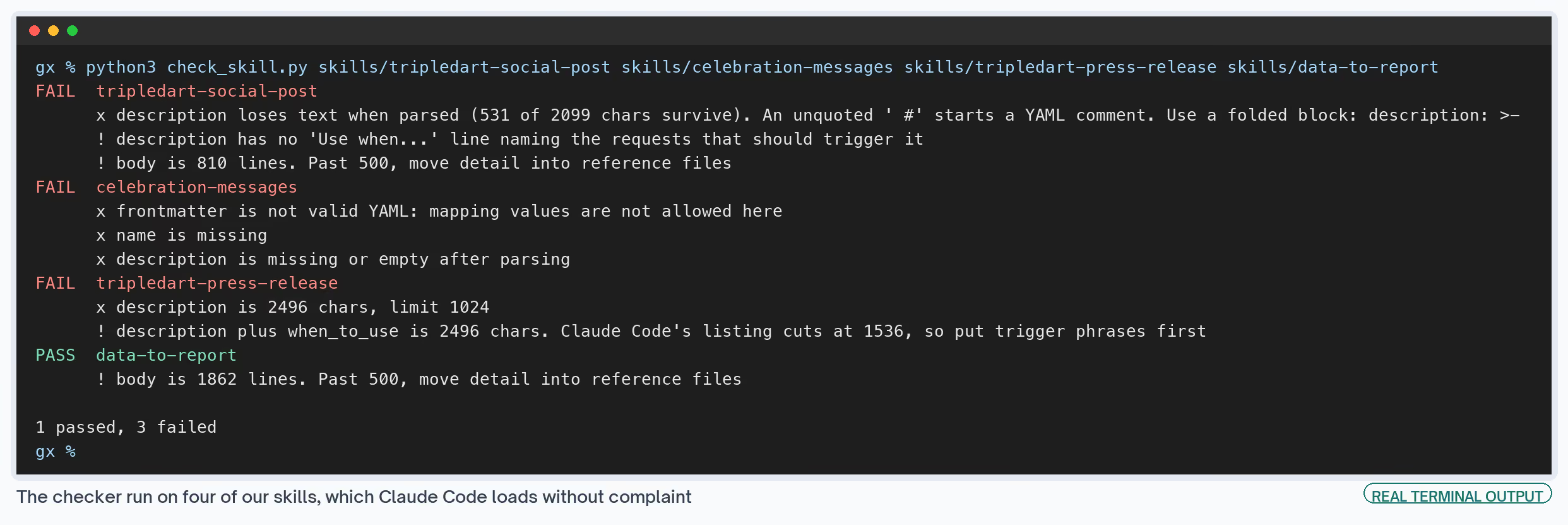
It exits with an error when any folder fails, so it can sit in front of a zip step. Run it on your whole folder at once:
python3 scripts/check_skill.py ~/.claude/skills/*The second download covers what a script can't: whether the requests your team types trigger the skill. It holds the eight-request test from above and a log to fill in. Both follow Anthropic's authoring guidance, down to the third-person descriptions.
Checking a skill before upload
Parses a skill's frontmatter the way claude.ai does and flags lost text, invalid YAML, over-length descriptions, tags and folder-name mismatches.
Testing skill triggers
Eight test requests, a visible tell and a log, for tuning a description until the skill fires when it should.
Both skills
Both folders plus a README with install steps for Claude Code and claude.ai.
Neither one knows how your team phrases requests. The trigger test needs requests taken from your own chat history, and picking them is a job for a person.
What I'd Do Differently With a New Skill
- Write the description last. Once the body works, the description is a list of the requests it answers and the neighbor it shouldn't be confused with.
- Keep it under 1,000 characters from the start. Cutting 2,000 down later takes longer.
- Use a folded block every time. It costs one line and removes both YAML failures.
- Add the tell before the first test. Without it I'm judging output quality, which is slower and less certain.
- Keep one master folder. Our uploaded copies carry the rewritten descriptions, and the local ones still carry the long originals.
- Start from somebody else's skill. The Claude skills for marketing roundup, the content brief workflow and the brand voice skill are where I'd begin. Editing a working file teaches the format faster than a blank one.