

Key Takeaways
- An AI agent is a language model running in a loop: it reads the task and every result so far, picks the next step, and software around it carries that step out.
- The model never runs a tool itself. It asks for one by name. Your application or the vendor runs it and sends the result back into the conversation.
- Memory lives in two places: the current conversation and the notes an agent keeps in files between sessions.
- Approval is a setting in the software around the model. Anything you can't undo, like sending email or changing CRM records, should wait for a person.
AI agents work by running a language model in a loop. Each turn, the model reads the task and everything that's happened so far. Then it either answers or asks to use a tool.
One Task, Traced Through the Agent Loop
Say you ask an agent to find companies in your ideal customer profile (ICP) that posted a revenue operations (RevOps) job this month, then draft a first note to each. A few minutes later you get a list and a set of drafts.
In between, a language model made a run of small decisions. The software around it carried each one out. The Exchange has covered the definition, and how an agent differs from a chatbot, in detail in What Is an AI Agent?
In the words of Anthropic's engineering team, agents are "typically just LLMs using tools based on environmental feedback in a loop." LLM means large language model, the part that reads and writes text. Here's the RevOps task as that loop.
| Turn | What the model has read | What it asks for | Who runs it |
|---|---|---|---|
| 1 | The task, its instructions, and the list of tools | Open the saved ICP notes | The harness, against your storage |
| 2 | The ICP notes | Search job boards for RevOps roles posted in the last 30 days | The job board's application programming interface (API) |
| 3 | The postings | Look up each company in the CRM | Your CRM |
| 4 | Which companies are already customers or open deals | Save a draft note for each company left | Your email tool |
| 5 | Confirmation that the drafts exist | Nothing more, so it answers with the list | No one, so the loop ends |
Every row is the same move. The model reads everything so far and asks for a single step. Code outside the model does it and reports back.
AI Agent Reasoning: How the Model Picks the Next Step
On every turn, the model rereads the whole conversation, from the task down to the latest result. Then it writes the next step, either an answer or a request to use a tool.
That's why the plan in the trace bends as results come in. Once the CRM lookup shows some companies are already customers, the next request leaves them out.
The pattern has a research name. A 2022 paper from Princeton and Google, ReAct, had models alternate between a reasoning step and an action. Writing the reasoning out helped the model keep track of its plan, while each action pulled in facts it didn't have.
Because the model reasons only from what's in front of it, a rule you never wrote down gets guessed. You do get a readable trail in return: when an agent goes wrong, the transcript usually shows the turn where it happened.
AI Agent Tools: How an Agent Reaches Your Systems
Each tool has a name and a short description. It also has a schema, which lists the inputs it takes. The model sees those and the result that comes back, and none of the code behind them.
Claude's tool documentation says it directly: "The model never runs anything on its own." The model writes a request, and your code or the vendor's servers carry it out. Here's what the job search tool from turn two could look like.
{
  "name": "search_jobs",
  "description": "Search job boards for open roles. Use it for hiring signals. Contact details come from crm_lookup.",
  "input_schema": {
    "type": "object",
    "properties": {
      "title": {"type": "string", "description": "Job title to match, such as RevOps Manager"},
      "posted_within_days": {"type": "integer"}
    },
    "required": ["title"]
  }
}
When the model wants the tool, its response carries a request like this one. The harness then runs the search.
{"type": "tool_use", "name": "search_jobs", "input": {"title": "RevOps Manager", "posted_within_days": 30}}The output goes back as a tool result on the next request. Claude's docs describe the loop the same way. Keep running tools while the model asks for them, and stop when it answers or hits a limit.
Where a tool runs decides who's responsible for it.
| Where it runs | Who writes it | Examples |
|---|---|---|
| Your application | You write the schema and the code | CRM lookup, internal APIs |
| Your application, using a schema Anthropic publishes | Anthropic writes the schema, and you run it | Memory, bash, text editor |
| Anthropic's servers | Anthropic | Web search, web fetch, code execution |
You rarely write each tool by hand. The Model Context Protocol (MCP) packages a product's tools so any compatible agent can call them. The Exchange walks through a full setup for an ad account in Claude plus Google Ads MCP.
Tool descriptions do more work than they look like. When Anthropic's team built a coding agent for SWE-bench, a benchmark of software tasks, it spent more time on the tools than on the main prompt. Requiring absolute file paths stopped a whole class of mistakes.
People searching for AI agent tools often mean the platforms that host agents, such as Lindy or Gumloop. The Exchange compares them in detail, by layer and price, in Best AI Workflow Automation Tools.
Memory: What an Agent Keeps Between Steps and Sessions
Inside a run, memory is the conversation itself, since the model rereads every message and tool result each turn. That lasts until the context window fills up, the context window being the most text a model can read at once.
Between runs, memory has to live outside the model. With Claude's memory tool, Claude checks a memory folder before a task. As it works, it writes what it learns to files there and reads them back in later conversations.
That tool runs on your side, like the CRM lookup. Claude asks to view or edit a file, and your application does it in storage you control. So you decide where the ICP notes from turn one live and who can change them.
| Memory | Where it lives | How long it lasts | In the RevOps example |
|---|---|---|---|
| The conversation | The model's context window | One run | The postings and CRM results from earlier turns |
| Saved notes | Files or a database the agent reads and writes through a tool | Until someone deletes them | The ICP rules opened on turn one |
| Saved procedures | Skill files the agent loads when a task matches | Until someone edits them | A house style for first-touch notes |
Saved procedures are what Claude skills are: folders of instructions and scripts Claude loads when a task calls for them. The Exchange lists ones built for GTM work in its Claude skills directory.
Long runs outgrow the context window anyway. The memory tool docs pair it with compaction, a feature that summarizes older parts of the conversation. The active context stays small, and the notes that matter survive in files.
Actions: Where a Person Signs Off
Reading a job board changes nothing, while sending an email or updating a deal stage does. Both happen only through a tool the harness runs.
That puts approval in the harness. Anthropic's guidance has agents pause for human feedback at checkpoints or when they hit a blocker. It also recommends stopping conditions, such as a cap on the number of turns.
In the RevOps example, the last tool saves drafts. A person reads them and presses send, so a wrong guess about a company never reaches a buyer's inbox.
| Action | Who does it |
|---|---|
| Searching and looking up records | The agent |
| Writing drafts and reports | The agent, with a person reviewing |
| Sending email or posting from your accounts | A person, after reading the draft |
| Changing CRM records or ad spend | A person, or the agent behind an approval step |
The Exchange covers an outbound version of this loop in detail, from sourcing a list to a written sequence, in AI-Powered BDR Engine: Apollo to Instantly.ai.
AI Agent Architecture, End to End
Put the parts together and the model sits in the middle of a loop it doesn't run.
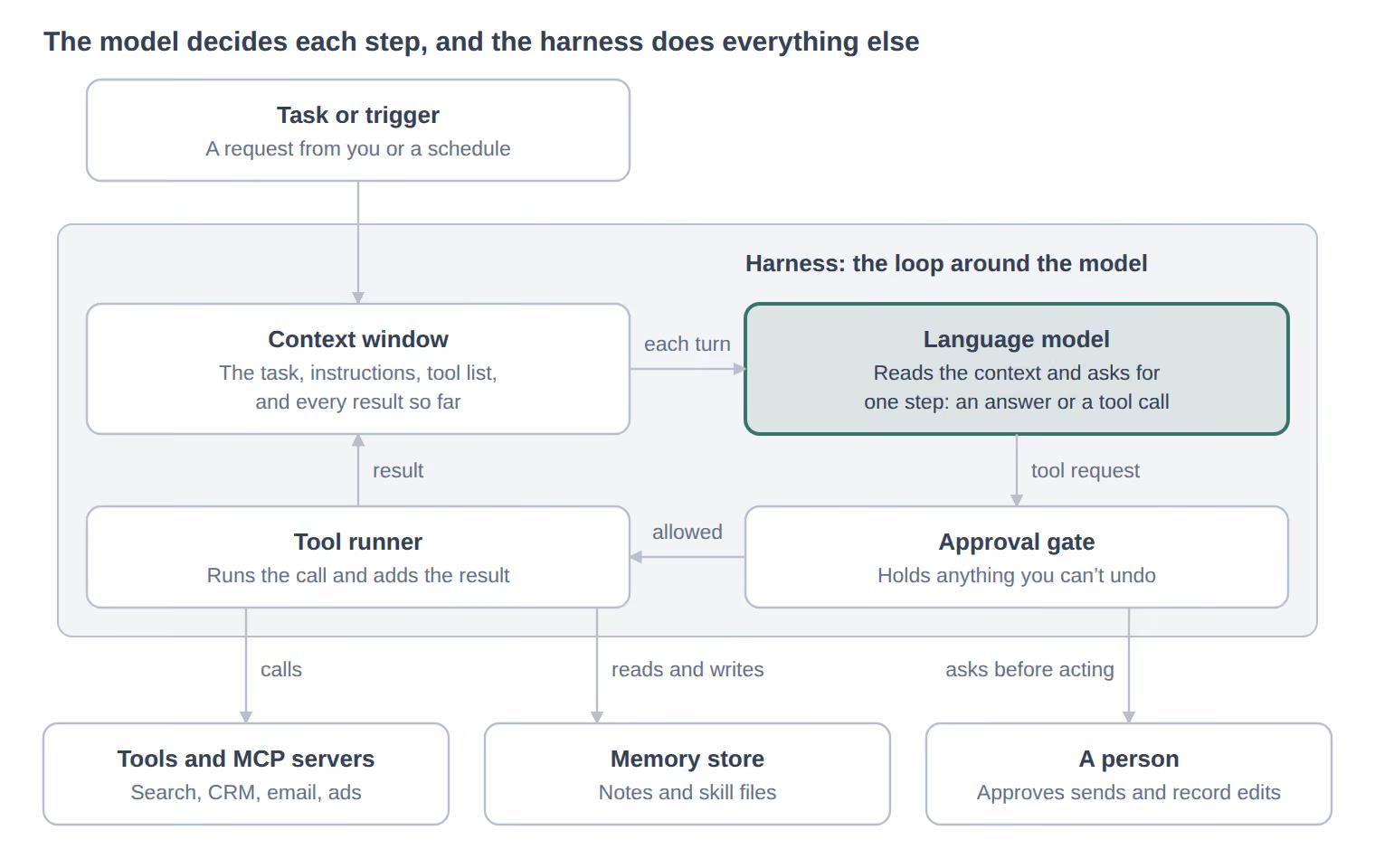
Every request the model makes goes through the harness. Reads run straight away, and their results go back into the context. Anything you can't undo waits at the gate for a person.
Where AI Agents Break
Most agent failures start in a single part of the loop. Look there first.
| Failure | What you see | Where to look |
|---|---|---|
| A vague tool description | The agent calls the wrong tool, or the right one with bad inputs | The tool's name, description, and examples |
| A rule no one wrote down | The agent guesses a filter you assumed it knew | The instructions and the memory notes |
| An early mistake carried forward | One bad result shapes every turn after it | The transcript, at the first wrong turn |
| No stopping rule | Runs that keep looping and keep billing | A turn cap in the harness |
| Instructions hidden in fetched text | A web page or an email tells the agent to do something you never asked | Treat fetched text as data, and hold actions for approval |
Anthropic's guidance names the trade-off: more autonomy brings higher costs and errors that build on each other, so test in a sandbox first.
The Exchange has a full workflow for checking what an agent writes before it goes out: Claude Skill for fact-checking.
Sources
- Anthropic, Building effective agents
- Claude Platform Docs, How tool use works
- Claude Platform Docs, Memory tool
- Yao and others, ReAct: Synergizing Reasoning and Acting in Language Models
- Anthropic, Skills repository README