

Key Takeaways
- An AI tool does one task when you ask, an AI workflow runs set steps on its own, and an AI agent decides its own steps toward a goal.
- The difference that matters is who decides what happens next: you, the steps you wrote in advance, or the model.
- Start with the simplest one that does the job, and move up only when the simpler one stops working.
- Most GTM teams end up using all three, often on the same job at different stages.
Use an AI tool, like a chat assistant, for one-off work you do yourself. Use an AI workflow when a job repeats with the same steps every time, such as a weekly report.
An AI agent fits when the job repeats but the steps change with each case, such as researching a different account each day. Agents cost more to run and need closer review. Try them last.
What AI Tools, AI Workflows, and AI Agents Are
All three use the same kind of AI model underneath. What separates them is who decides each step: you, a set of steps written in advance, or the model itself.
An AI tool is something you use directly, one task at a time. You open a chat assistant such as Claude or ChatGPT, paste in a call transcript, and ask for a summary, and nothing happens until you ask.
An AI workflow runs a set order of steps on its own, with the model handling one or two of them. A new form fill triggers it, a model scores the lead, and the result lands in your CRM, the same way every time.
An AI agent gets a goal and works out the steps itself: asked to research an account, it decides which pages to read, what to look up next, and when it has enough.
Anthropic draws the same line in its guide to building effective agents. Workflows run models and tools through predefined code paths. Agents direct their own process and tool use.
If your choice is only between an agent and a plain automation, the Exchange goes through it job by job.
That article covers when a scripted workflow is enough and when an agent earns its cost, in AI Agents vs Automation.
The Exchange has in-depth articles on what agents can do for each team.
Marketing jobs are in AI Agent Use Cases for Marketing Teams, and sales jobs are in AI Agents for Sales.
AI Tools vs AI Agents vs AI Workflows, Side by Side
The table compares the three on the questions that decide which one a job needs. The last row puts a GTM example on each.
| Who starts it | You | A trigger, such as a form fill or a schedule | You or a trigger, with a goal |
|---|---|---|---|
| Who decides the next step | You | The steps written in advance | The model |
| Does the same input give the same result? | Depends on how you ask | Yes, step for step | Not always, since the path can change |
| Setup | None | Building and testing the steps | Building, plus testing on many past cases |
| Running cost | A free tier or a paid plan per account | Platform runs plus a model call or two | More model calls per task |
| How you check it | You read every answer | Code checks each run, and an alert flags failures | Spot checks, and approval on anything it sends |
| Best for | One-off tasks and first drafts | Jobs that repeat the same way | Jobs that repeat but differ each time |
| GTM example | Rewriting a landing page headline | Building the weekly marketing report | Researching each new account before outreach |
Anthropic's guide puts the cost row plainly: agents trade speed and cost for better results on hard tasks. Its advice is to find the simplest setup that works and add complexity only when it's needed.
One GTM Job, Done Three Ways
The clearest way to see the difference is to give all three the same job: turning a sales call into a recap and a CRM update.
| AI tool | The rep pastes the transcript into a chat assistant and asks for a recap | Copies the recap into the CRM, then writes the follow-up | A few calls a week |
|---|---|---|---|
| AI workflow | The call recording triggers it, a model writes the recap in your template, code checks it, and the CRM updates | Approves the recap before it saves | Every call, in the same format |
| AI agent | It reads the transcript and the deal's history, spots a new stakeholder, looks them up, and drafts the follow-up | Approves the CRM changes and the follow-up | Deals where each call changes the plan |
A tool needs no setup. The rep does every step. On routine calls, the workflow saves the most time, since every recap follows the same shape.
An agent earns its cost only when calls differ in ways that matter, such as a new decision-maker joining. On a routine check-in, it does the workflow's job at a higher price.
The Exchange lists Fathom for recording and summarizing calls, which covers the first step of the workflow version. The steps to build the rest are in How to Build an AI Workflow Step by Step.
How to Choose Between an AI Tool, a Workflow, and an Agent
Two questions settle most cases, asked in order until one answer fits.
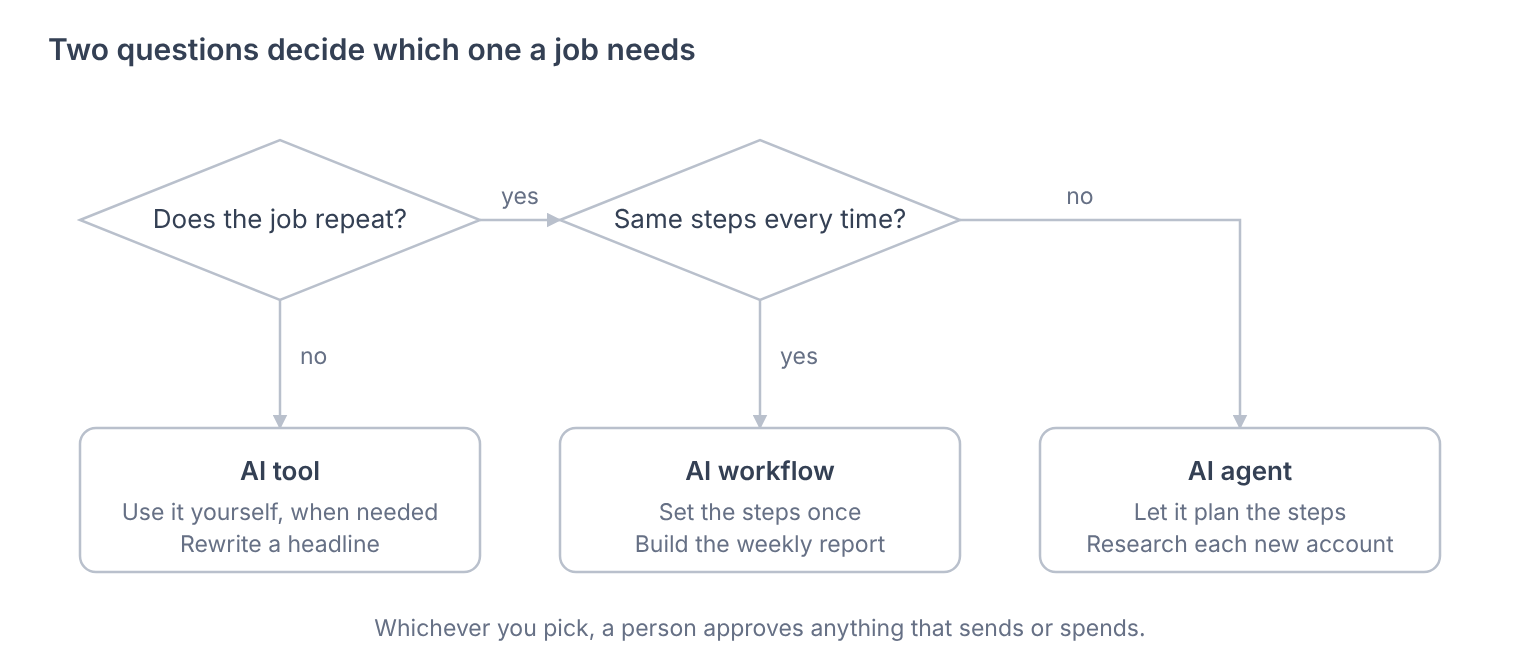
If a job doesn't repeat, building anything around it costs more than it saves, so a tool is enough. If it repeats the same way each time, a workflow is cheaper to run and easier to check than an agent.
An agent is the answer only when the job repeats and each case needs different steps, and even then a person stays on anything it sends or spends.
Using All Three, and the Mistakes to Avoid
Most GTM teams don't pick one. A marketer drafts a headline in a chat assistant, a workflow builds the Monday report, and an agent researches the accounts sales will call that week.
A job often moves up the ladder as it settles: it starts as something one person does in a chat, becomes a skill or a workflow once the steps stop changing, and only becomes an agent if every case still needs different steps.
Claude skills sit in the middle of that ladder. A skill is a written set of steps Claude follows each time, so a task you'd normally do in chat comes out the same way for everyone on the team.
The Exchange's Claude skills directory lists ones you can install.
These are the mistakes that show up most when teams pick the wrong one:
| Mistake | What happens | Better choice |
|---|---|---|
| An agent for a job with set steps | It costs more per run and is harder to check | A workflow |
| A workflow for a one-off job | The build takes longer than doing the job by hand | A tool |
| A chat tool for a weekly job | Results change with whoever asks, and nothing is logged | A skill or a workflow |
| An agent that sends without approval | A wrong message reaches a customer | An approval step before anything goes out |
| Trusting the label on the product | Some products called agents follow set steps | Asking who decides the next step |