


Preview
What it is.
Check what a prospect already runs and the email half writes itself. Wappalyzer identifies the technologies behind a website: CMS, analytics, payment processing, marketing automation, chat widget.
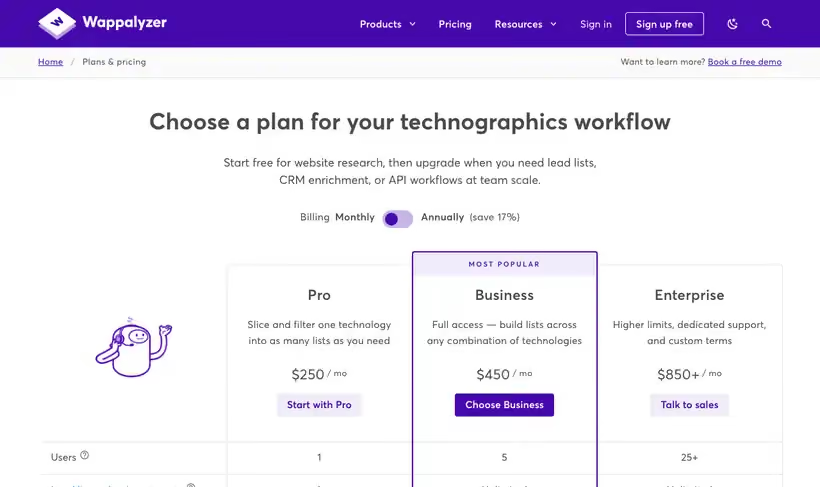
A free account gets 50 technology lookups every month, plus 50 email verifications, 5 website alerts and sample lead lists. Paid plans start at $250 a month and add list building across technologies, CRM enrichment and API credits.
What you get.
- 50 technology lookups a month, plus 50 email verifications.
- The technology your best customers share, which is usually your cleanest ICP filter.
- 5 website alerts, so a target account changing tools reaches you.
- A browser extension that reads a stack during research without spending a lookup.
How to set it up.
Create the free account, then run a lookup on your best five customers and note what they share.
Turn that shared technology into your qualification filter, since it is the pattern your product already fits.
Set website alerts on your most important accounts, using the 5 the free account allows.
Install the extension so a stack check happens while you research, without spending a lookup.
Track lookups through the month, because 50 goes quickly once a team is using it.
Pricing Plans
Free
$0
50 technology lookups and 50 email verifications a month, 5 website alerts
Pro
$250
a month, one technology target for list building, 5,000 API credits
Use cases
Qualify before writing
Look up the account and open with the tool they already run.
Find your cleanest ICP filter
Check what your best customers share in their stack and score new accounts on it.
Watch for a stack change
Set an alert on a target account so a swap becomes a reason to call.
Best for
Qualifying an inbound lead
One lookup tells you whether the account runs the stack your product fits, before a call is booked.
Finding your integration pattern
Check your best customers and the shared technology is usually the cleanest ICP filter you have.
Watching a competitor displacement
Website alerts flag when a target account changes a tool, which is the window when switching gets discussed.
Open the tool
Opens on Google in a new tab.