


Preview
What it is.
Mail-tester began as an internal tool its makers built to test their own newsletters. They call themselves geeky email software engineers, and they share the tester for free on the web. There's no signup for a basic test.
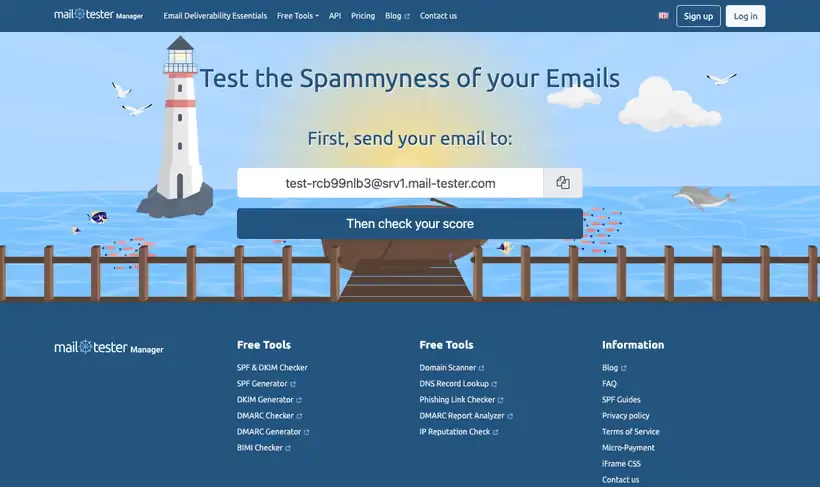
The site generates a random email address each time you load it. You send your campaign there and click Check your score. The report covers the message itself along with your mail server and sending IP.
Scoring runs on a vanilla SpamAssassin install, reversed so a positive score is good. Free tests cap at 3 per 24 hours, and each result stays live for 7 days.
What you get.
- A spam score out of 10 for any message you send in
- A detailed report of what's configured properly and what's not
- SpamAssassin scoring from a vanilla, out-of-the-box install
- Checks on your mail server and your sending IP
- 7 days of access to each result, or 30 days with an account and your own prefix
How to set it up.
Open mail-tester.com and copy the generated test address shown on the page.
Send your draft campaign to that address from the platform you use for live sends.
Click the Check your score button once the message has gone out.
Read the score out of 10, then open each flagged section of the report.
Correct the flagged items, SPF or DKIM gaps for instance, in your sending domain's DNS.
Send a fresh test, remembering that reusing the same address deletes the previous result.
Pricing Plans
Free
$0
3 tests per rolling 24 hours; results readable for 7 days
Extra tests and API
Paid
Packs of extra tests, plus iframe and JSON API access on paid plans
Use cases
Score a template before a send
Mail the generated address and read the score back.
Find the configuration gap
Work through the report and correct what it says is missing.
Second opinion on a rebuild
Re-test after the edit while the free result is still readable.
Best for
Pre-send deliverability checks
Run every new template through it before a big campaign goes out, and you'll catch setup rot early.
DNS auth debugging
The report separates what's configured properly from what's not, so you know which record to edit.
Open the tool
Opens on Google in a new tab.