


Preview
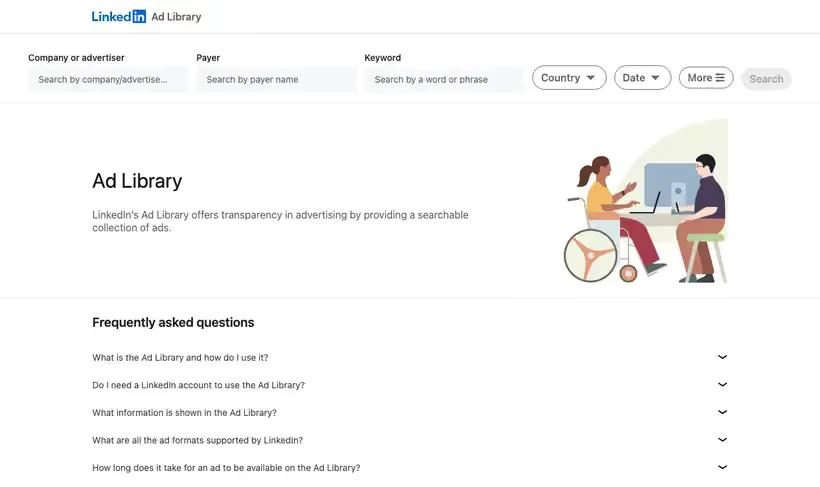
What it is.
Search any company and you see the claims a competitor pays to make, plus how long they kept making them. No LinkedIn account is needed to look.
It holds ads that ran after June 1, 2023, and each one stays for one year after its last impression. Watch which creative survives past a first flight, because an ad still running in month eight has been through a performance review.
What you get.
- Competitor creative and copy, searchable by company, payer name, keyword, plus country.
- A year of history after an ad's last impression, so you see what survived and what got pulled.
- Impression ranges on European Union ads, which hint at the scale of the spend.
- Tested language you can lift into page titles, since paid copy has been through the numbers.
How to set it up.
Open the Ad Library and search the competitor's company name, not their product name.
Filter by country to separate a global brand campaign from a local demand campaign.
Sort what you find by date to see which creative survived past a first flight.
Use the More filters on European Union ads to read impression ranges, which hint at spend.
Save the ads that keep reappearing month after month, because nobody keeps paying for a loser.
Pricing Plans
Ad Library
$0
public, no account, one year archive
Use cases
What survived
Search a competitor and note which ads have kept running for months.
Message inventory before a launch
Read the claims rivals pay to make, then decide which ones you can contest.
Check who is paying
Look up the payer when the brand on the creative is not the advertiser.
Best for
Competitive message research
Read the exact words a competitor pays to put in front of your buyers, in their own creative.
Briefing new ad creative
Ten competitor ads in a deck is a faster brief than any positioning document, and it costs nothing.
Checking a claim about spend
Impression ranges on European Union ads give a rough sense of scale when someone says a competitor is everywhere.
Open the tool
Opens on Google in a new tab.