


Preview
What it is.
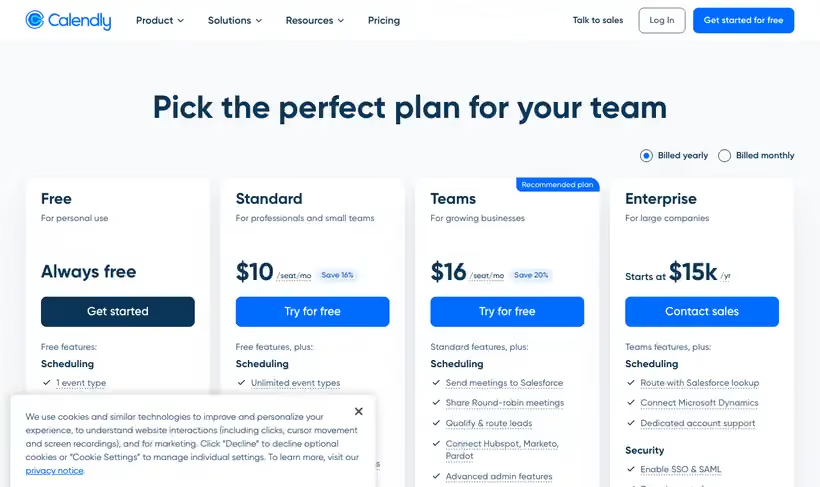
Put a link in the signature and the scheduling emails stop. Calendly's free plan is always free and covers 1 event type on 1 connected calendar.
One event type is the constraint that decides whether you upgrade. A single demo link is fine; a demo, a discovery call and a support slot means three, and three means paying.
What you get.
- A booking link that reads your calendar, on a plan that stays free.
- Automatic time zone handling, which removes the most common scheduling mistake.
- Buffers and daily caps, so the calendar stays workable.
- Calendar invites created for both sides without anyone sending one.
How to set it up.
Connect the calendar that holds your actual bookings, since free covers one.
Set buffer time before and after, or you'll end up with meetings back to back all afternoon.
Cap the daily meeting count, which is the setting most people find out about too late.
Put the link in your email signature and the CTA of your outbound sequence.
Set the minimum notice period, so nobody books you in twenty minutes.
Pricing Plans
Free
$0
1 event type, 1 connected calendar, always free
Standard
$10
per seat per month, unlimited event types and multiple calendars
Use cases
Demo request to booked meeting
Send the link and let the prospect pick a slot your calendar already allows.
Stop the time zone mistake
Let it handle zones so nobody joins an hour late.
Protect the calendar
Set buffers and a daily cap so a busy week stays workable.
Best for
A founder taking demo calls
One link, one meeting type, no scheduling emails. The free plan covers this exactly.
Outbound sequences
A booking link in the last line of an email removes the step where interest goes cold.
Testing whether scheduling helps
Run the free tier for a month and count how many meetings booked themselves.
Open the tool
Opens on Google in a new tab.