


Preview
What it is.
When one booking link stops being enough, free scheduling still works here. Cal.com lets an individual schedule for free with no usage limits, and it's open source.
It's also open source, so a team with hosting can run it themselves. Most people never need that, and it does mean the roadmap and the data handling are inspectable.
What you get.
- Free scheduling for 1 user with no usage limits.
- As many event types as you need, since they are not metered.
- Calendar connections and time zone handling on the free tier.
- An open source codebase, with self-hosting available if a review asks for it.
How to set it up.
Connect your calendar and set availability before creating any event types.
Create one event type per meeting shape, since the free tier doesn't cap them.
Add buffers and a minimum notice period, so the calendar stays workable.
Use a separate link per campaign when you want to see where bookings come from.
Look at self-hosting only if data residency is a genuine requirement, since the hosted version is free anyway.
Pricing Plans
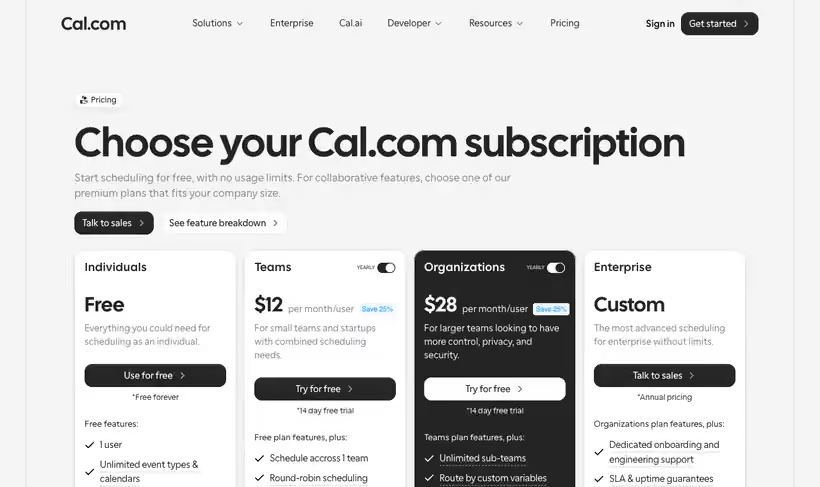
Individuals
$0
1 user, free forever, no usage limits
Use cases
Several meeting shapes at once
Publish a demo link and a discovery call link without paying per event type.
Booking for a team of one
Run scheduling with no usage limits while the company is still small.
Move off a metered tool
Recreate the links you already use when the event-type limit starts to bite.
Best for
Someone who needs several meeting types
Demo, discovery, plus support each get their own link, without the upgrade prompt other free tiers show.
Privacy-sensitive teams
Open source and self-hostable, which answers the questions a security review tends to ask.
Replacing a paid scheduling seat
For an individual, the free tier covers what most people pay for elsewhere.
Open the tool
Opens on Google in a new tab.