


Preview
What it is.
Remotion turns a React component into a video, so the same input gives the same output every time. That is what makes a batch possible: one composition, a row of copy per variant, and forty files out.
Remotion maintains its own agent skills for the framework, and they are better at React than this one. This sits above them. It pulls your colors and fonts off your live site into a typed module every component imports, holds every row of copy to a character budget, and reads the frame size off a per-placement spec file.
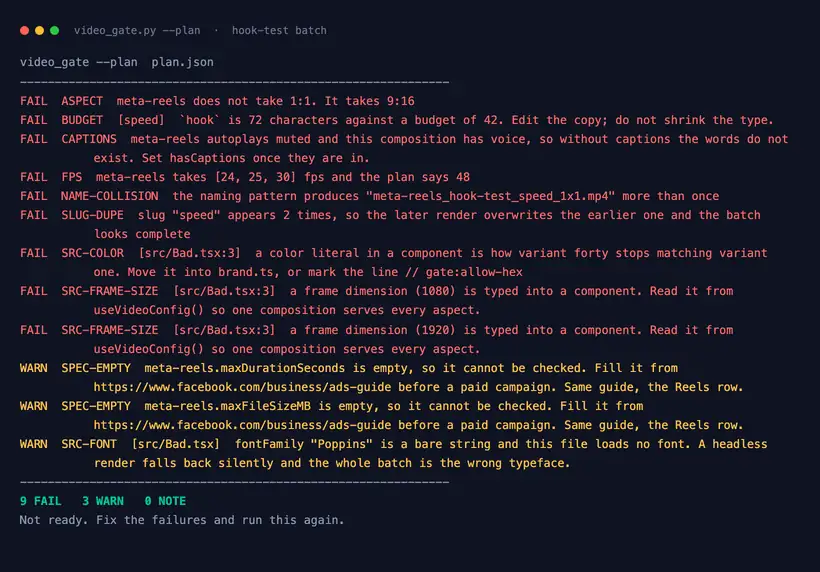
Then it checks twice. Before the batch: a frame size the placement would crop, copy over its budget, a hex typed into a component, two rows carrying the same slug. After the batch: dimensions, duration, file size and the audio track, read from the rendered bytes with the ffprobe Remotion already bundles.
What you get.
- A typed brand module every component imports, so variant forty matches variant one
- Eight go-to-market video anatomies, from a proof clip to a personalized outbound cut
- A character budget per text field, held against every row before anything renders
- A per-placement spec file carrying the frame size, and caps that each name their source
- A named batch plus a manifest linking every file to the row that made it
How to set it up.
Unzip it so the folder sits at ~/.claude/skills/remotion-gtm-video with SKILL.md at its root. On a paid Claude plan you can upload the zip under Settings, Capabilities, Skills.
Install Remotion's own skills alongside it with npx skills add remotion-dev/skills. This one points at those for anything about the framework.
Read Remotion's license before the first render. It is free for individuals and non-profits, and for a for-profit organization with up to 3 employees. A company license is required past that.
Hand it the URL of a page whose look you want carried over. extract_brand.py writes tokens.json and a brand.ts your components import.
Name the placement first. The frame size and the frame rate both come from the spec file, and a wrong frame gets cropped through the headline.
React to the beat sheet before any component exists. Every text field gets a character budget there, and the check holds every row to it.
Pricing Plans
Free. MIT licensed.
Downloads as a zip from this page. Remotion itself has a separate license, linked inside the skill.
Use cases
Six hooks, one body
A hook test needs the copy to vary in one place and nowhere else. Put one hook per row in variants.csv, run the batch, and six files come back named so the ad account sorts them by hook.
Every case study off one composition
You have fourteen customer results and no room for fourteen edits. A proof-clip composition reads a row per customer, so the number, the logo and the quote all come from the CSV.
The same cut in two aspects
The video runs in feed and in Reels. Add a row with the other aspect, and the composition reads the frame size from the spec file, so nothing gets cropped through the headline.
A batch somebody else rendered
A freelancer sent thirty files and nobody opens thirty files. Point the check at the folder and it reports the dimensions, duration, size and audio track of each one against the plan.
Best for
A team that needs video variants, not one video
The whole return is that variant forty-one costs one more row.
Anything going into a paid ad account
A strict flag promotes every warning to a failure, and the second pass reads the rendered bytes.
Marketers working next to a React codebase
What gets handed over is a project a developer can take on, and the manifest says which row made which file.
Reviewing a batch you did not build
Pointing the check at a folder gives a per-file report against the plan.