


Preview
What it is.
Paste a draft or point it at a file, and Claude rewrites it a paragraph at a time. It states each paragraph's point plainly, then puts the supporting figures and links back. Give it a sample of your own writing and the rewrite follows its rhythm.
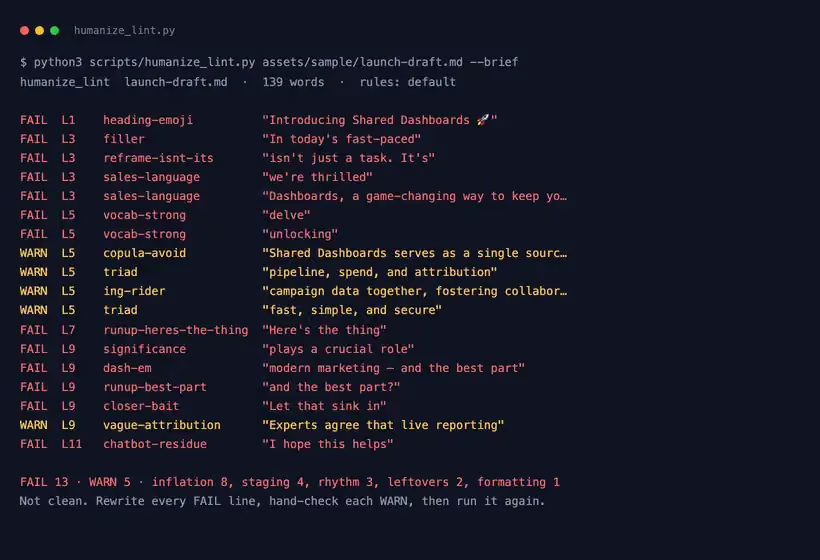
A script decides when the wording is done. It flags stock AI words and sentences that say what something isn't before saying what it is. It returns an error until none are left.
A second script compares the two versions and fails when a figure, link, quote or code span changed. When a reviewer cuts a sentence, one command turns it into a rule that every later run enforces.
What you get.
- A lint that prints each AI tell with its line number, plus what to do about it
- A check that fails when a figure, link, quote or code span differs between draft and rewrite
- A team rules file that grows from rejected sentences, with the reason on every rule
- A voice file template, and a sample launch post with its rewrite to try the checks on
- Support for Markdown, plain text, HTML and Word files, with nothing to install beyond Python
How to set it up.
Unzip it so the folder sits at ~/.claude/skills/ai-humanizer with SKILL.md at its root. On claude.ai, turn on code execution under Settings, Capabilities, then upload the zip under Customize, Skills.
From the skill folder, run python3 scripts/humanize_lint.py assets/sample/launch-draft.md to see each tell in a sample launch post, with its line number.
Copy assets/voice.example.md to voice.md and fill it in: who reads you, how you sound, the words you never use, and a paragraph you liked.
Ask Claude to humanize a draft, or give it a file path. The rewrite lands beside the original as a .humanized file, so nothing gets overwritten.
Read the block under the rewrite. It gives the before and after counts, and any flagged sentence kept on purpose with the reason.
When a reviewer cuts a sentence, run add_rule.py with the phrase and why it went. Use strict mode for anything published under your brand.
Pricing Plans
Free. MIT licensed.
Downloads as a zip from this page. Skills run on every Claude plan, Free included, once code execution is on.
Use cases
A launch post drafted with AI
The draft reads like a chatbot wrote it, but its plan names and limits are right. Hand it over and the run-ups and closers go, while every plan name and limit stays.
Checking someone else's rewrite
A freelancer sent back an edited version and you need to know no fact moved. Point the check at both files, and it lists any figure, link, quote or code span that changed.
A case study the customer signed off
The customer approved every figure in it, so none of them can move in the edit. The preservation check fails if a figure changes or a new one appears.
A check before anything publishes
Your posts live in a repository. The script returns an error on any FAIL, so it can block a merge the same way a broken-link check does.
Best for
Teams publishing AI-assisted drafts under a brand name
Strict mode turns every flagged sentence into a decision before it goes out.
Editors reviewing other people's rewrites
The preservation check reads both versions and lists what moved.
Agencies writing in several client voices
A rules file in each client's folder sits on top of the team list.
Anyone who has cut the same sentence twice
A rejected sentence becomes a rule in one command, and the rule records why.